Incident escalation means passing a security problem to people with more skill or authority when it gets serious.
This guide is for people new to IT, help desk or security work, and for managers who may get that call. You do not need to be an expert to escalate well: you need to know the signs, the next person on the list and what to tell them.
In short
- Escalating means handing a problem up to someone who can do more about it, not giving up on it.
- How serious a problem is (its severity) decides how fast it moves up and who gets called.
- When you are unsure, escalate early. Closing a false alarm is cheaper than starting late.
- A good escalation gives the facts in a few lines: what you saw, when, what it affects and what you have done.
What you will learn
- Explain what incident escalation is in one sentence.
- Spot the signs that a problem needs to go up a level.
- Write a short, clear escalation message.
- Check that your team has a contact list that works out of hours.
- How bad it is (severity)
- a rating, often from low to critical, of how much harm a problem causes or could cause.
- First sort (triage)
- a quick check of what has happened and how serious it is, so it goes to the right people.
- Who to call next (escalation path)
- the agreed list of people or teams to contact, in order, as a problem gets worse.
What is incident escalation?
Think of a hospital emergency department. A triage nurse sees each patient first and decides how urgent they are. A sprained ankle waits. Chest pain goes straight to a senior doctor, and the nurse does not wait to be sure it is a heart attack.
Incident escalation works the same way for security problems. An incident is something that harms, or may harm, your systems or data. It could be a strange login, a virus warning or a laptop that has gone missing. The first person to see it does a quick check, called triage. They then decide whether they can handle it or whether it must go to someone with more skill or authority.
Escalation is that hand-over. It is also how a problem moves from the technical team to managers, and in serious cases to the board, lawyers or outside experts.
Where the comparison stops working: a patient walks in and is clearly there. A cyber attack can be quiet, so a small odd sign may be the only clue to something much bigger.
Why does it matter?
Serious problems need people who can make big decisions, such as taking a key system offline. If a problem stays with the wrong person for too long, it can spread while they work alone.[1]
If you are new to IT or help desk work
What could happen: you spend hours on a "password problem" that is really someone breaking in.
Check this: do you know your team's rule for when to pass a problem up?
If you manage a team
What could happen: you hear about a serious problem the next morning, because nobody had your number.
Check this: make sure the contact list has two ways to reach you and a named deputy.
If you run a small business
What could happen: your IT supplier spots a problem but waits for your go-ahead to switch a system off.
Check this: agree in advance what your supplier may do without asking you first.
What does it look like?
Here is a made-up escalation message from a help desk worker to the security lead. It is short, factual and easy to act on.
Example only. All values are made up.
To: security lead (on call)
Subject: ESCALATION - suspected account break-in - HIGH       (1)
What I saw: 40 failed logins, then a success, on user
            [email protected] at 02:14                     (2)
Affects:   finance mailbox; may include customer bank details  (3)
Done so far: account locked at 02:31, password reset sent
Need from you: decide whether to check other finance accounts  (4)
- The subject says it is an escalation and gives a severity rating, so it stands out.
- Facts, with times. In a real message, this line would contain the actual account name.
- What the problem could affect, which helps decide how serious it is.
- A clear ask, so the next person knows what decision is theirs.
Why this is risky: a vague message such as "something weird with a login, can you look when free?" can sit unread for hours.
The safer way: use a short, fixed format, and follow up by phone for anything rated high or critical.
How does it work?
Good preparation is the main thing that helps when an incident happens.[4] US government guidance also treats incident response as part of everyday risk management.[5] So most teams follow a written plan. The UK's National Cyber Security Centre (NCSC) says a basic plan should include key contacts and the rules for when to escalate.[1]
- Spot. Someone notices a problem, or a tool raises an alert.
- Triage. They check what kind of problem it is and how serious it is. The NCSC suggests three questions. Can people still work? Has private data been seen or taken? Can the data and systems still be trusted?[1]
- Rate it. They give it a severity, often on a scale from low to critical. Each organisation sets its own examples for each level.[1]
- Pass it up. The rating decides who is called and how fast. Low problems may stay with the IT team. High or critical ones often go to senior leaders or the board.[1]
- Hand over clearly. The next person confirms they have it. One person leads, and everyone knows who that is.[2]
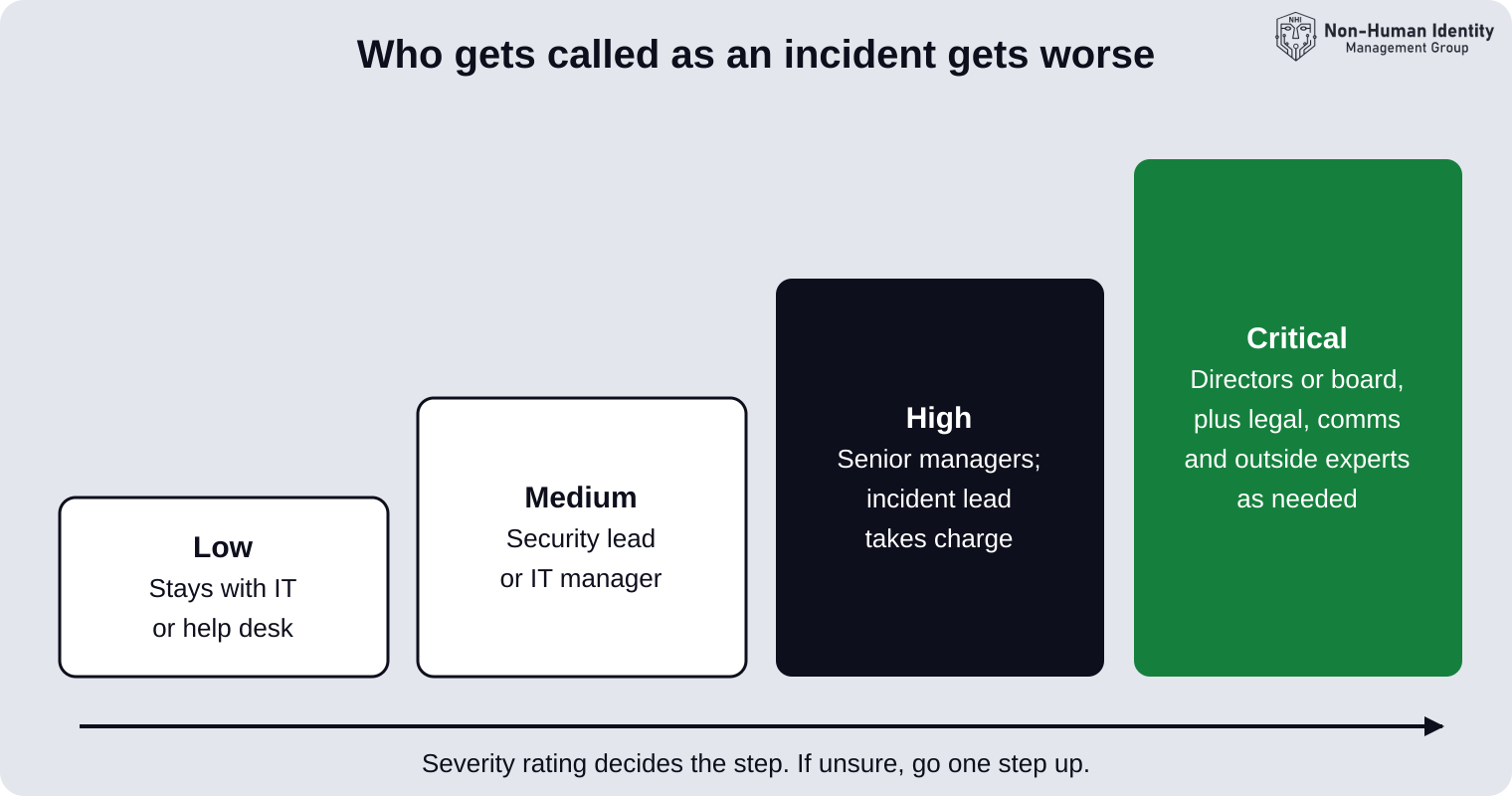
Many teams use tools that page people automatically. In one widely used tool, an alert goes to the first person on call. If nobody responds within a set time, it moves to the next person on the list, and so on.[3] This is called an escalation policy. It means one missed phone call does not leave a problem stuck.
Escalating early is a good habit. Google's guide for its engineers makes the same point. It is better to declare an incident early and close it quickly than to start hours into a growing problem.[2] The NCSC also suggests naming deputies and keeping at least two ways to reach each contact, in case someone is unavailable.[1]
A worked example
Soren Delmar has worked on the help desk at Meadow Brewery, a fictional drinks company, for three weeks. On a Friday evening a sales manager calls. She cannot log in, and she has had an email saying her password was changed. She did not change it.
Soren's first thought is to reset the password and move on. Then he remembers the triage nurse. A password problem is the sprained ankle. A password changed by someone else might be the chest pain.
He checks the login records. Someone logged in from another country an hour ago, and the account can reach customer orders.
Soren opens the team's plan. Any sign of a break-in to an account with customer data is rated high. High means call the on-call IT manager straight away, not email.
He calls Otto Jovanovic, who is on call, and reads out his notes. He says what he saw, when, what the account can reach and that he has locked it. Otto confirms he is taking the lead.
Otto finds two more accounts with the same odd logins. That changes the rating to critical. Following the plan, he phones the operations director, Hal Gallardo, who brings in the company's outside security firm.
On Monday, the team reviews what happened. Hal thanks Soren. The quick call meant the break-in was found within hours. They add one line to the plan: any "I did not change my password" call is escalated at once.
Myths and mistakes
| What people think | What is true |
|---|---|
| Escalating means I failed. | Escalating is part of the job. Passing a serious problem up at the right time is doing it well. |
| I should be sure before I bother anyone. | Waiting for proof can waste time. Escalate early and let the next person help decide.[2] |
| An email is enough. | For serious problems, phone as well. Emails can sit unread, especially at night. |
| Once I pass it on, my part is over. | Stay available. The next person may need your notes and what you saw. |
| Everyone knows who to call. | Contact lists go out of date. Check names, deputies and out-of-hours numbers regularly.[1] |
What can I do this week?
- Find your team's incident plan and read the part on when to escalate.
- Save the on-call or security contact in your phone, plus one deputy.
- Learn your team's severity levels and one example of each.
- Write a short escalation template you can copy: what, when, affects, done so far, need.
- If you are a manager, agree what staff or suppliers may do without waiting for you.
Checklist
- We have a written incident plan with clear escalation rules.
- We use simple severity levels, with examples that fit our business.
- Each severity level names who is called and how fast.
- Each contact has a deputy and at least two ways to reach them.
- Out-of-hours contacts are listed and tested.
- Staff know it is fine to escalate when unsure.
- Every hand-over is confirmed, and one person leads.
- We review escalations afterwards and update the plan.
Common questions
When should I escalate an incident?
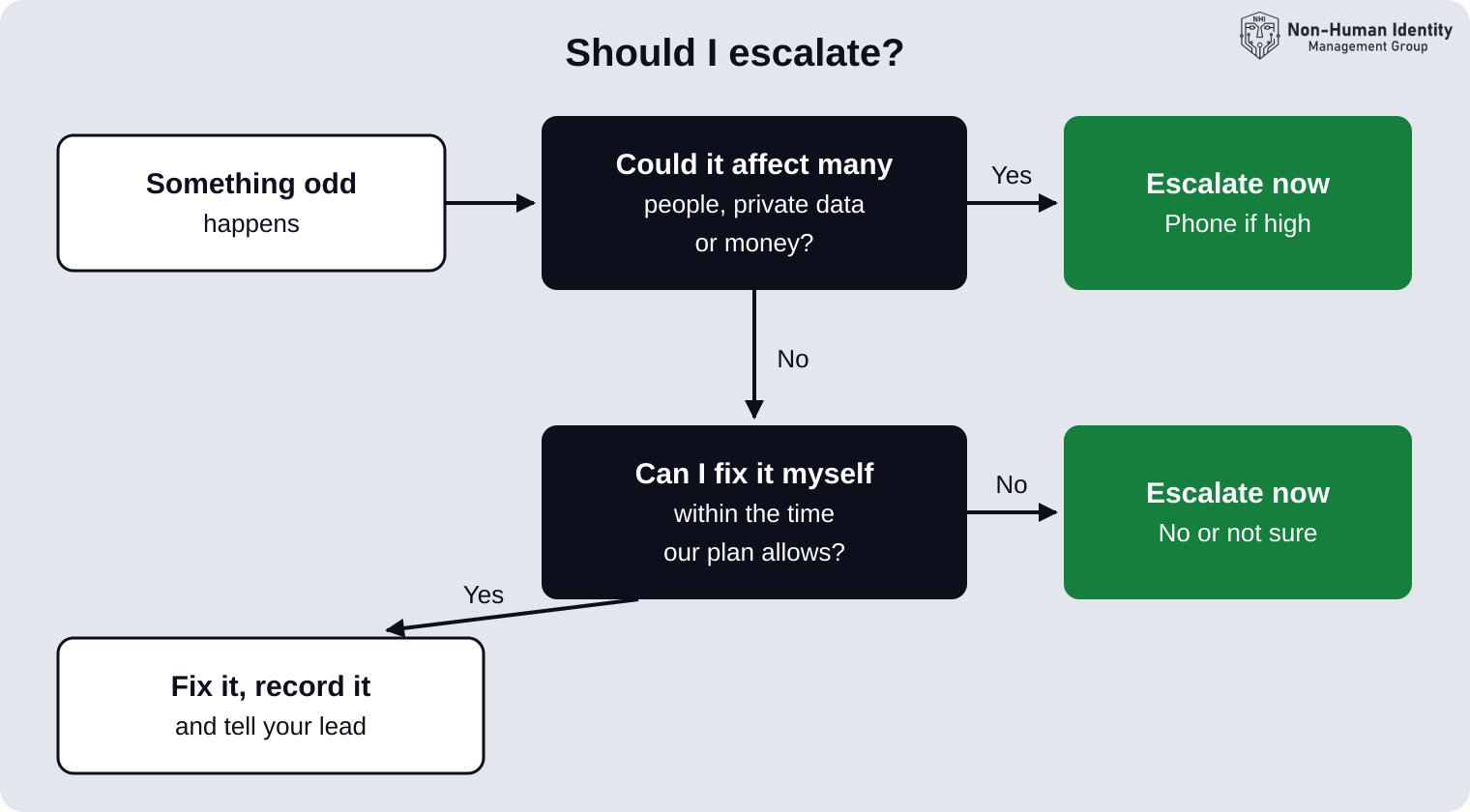
Escalate when the problem is beyond your skill or authority. Also escalate when it could affect many people, private data or money, or when you are not sure. Your team's plan should list the triggers. If in doubt, pass it up: a false alarm costs little.
What is the difference between reporting and escalating?
Reporting is telling someone a problem exists, and anyone can do it. Escalating moves a problem that is already being handled to people with more skill or authority. This usually happens because it is more serious than first thought.
What should an escalation message include?
Keep it short and factual. Say what you saw and when, what it could affect, what you have done so far and what you need from the other person. Give it a severity rating, and phone as well if it is high or critical.
Who decides how serious an incident is?
The person doing the first check gives a starting rating, using the levels in the team's plan. The rating can go up or down as more is learned. The person leading the response has the final say.
Can escalation go too far?
Yes, if every small problem goes to the top, leaders get swamped and stop paying attention. That is why clear severity levels with examples matter. They let small problems stay with the team and send serious ones up fast.
Where next?
Ready for the detail? Read the practitioner template: Incident Severity Classification Matrix Template. It goes further into impact criteria, a full severity matrix, response times for each level and when legal reporting rules apply.
Also useful:
- Incident Response for Beginners
- Reporting Security Incidents at Work for Beginners
- Incident Response Contact and Call Tree Template
- Incident Commander Role Guide
- Cyber Incident Reporting for Beginners
Related NHI Mgmt Group resources: Incident Communication Plan Template · Alert Fatigue Reduction Guide · Incident Responder for Beginners
Key terms
- Incident escalation
- Passing a security problem to people with more skill or authority as it gets more serious.
- Security incident
- Something that harms, or may harm, an organisation's systems or data.
- Triage
- A quick first check of a problem to decide how serious it is and who should handle it.
- Severity rating
- A level, often from low to critical, showing how much harm a problem causes or could cause.
- Escalation policy
- The agreed order of people to contact, and how long to wait for each, before moving on.
- Incident commander
- The one person leading the response to a serious incident.
- Incident response plan
- A written guide to what to do, and who to call, when an incident happens.
Sources and further reading
- Plan: Your cyber incident response processes. National Cyber Security Centre (UK), 2019. https://www.ncsc.gov.uk/collection/incident-management/cyber-incident-response-processes, accessed 28 Nov 2026.
- Managing Incidents, in Site Reliability Engineering. Google. https://sre.google/sre-book/managing-incidents/, accessed 28 Nov 2026.
- Escalation Policy Basics. PagerDuty Docs, PagerDuty. https://docs.pagerduty.com/incident-management/schedules/escalation-policies, accessed 28 Nov 2026.
- Incident management. National Cyber Security Centre (UK), 2019. https://www.ncsc.gov.uk/collection/incident-management, accessed 28 Nov 2026.
- NIST SP 800-61 Rev. 3, Incident Response Recommendations and Considerations for Cybersecurity Risk Management: A CSF 2.0 Community Profile. National Institute of Standards and Technology, April 2025. https://csrc.nist.gov/pubs/sp/800/61/r3/final, accessed 28 Nov 2026.