Security misconfiguration means a website or app is set up in an unsafe way.
This guide is for new developers, people starting in IT and anyone who owns a website. You do not need to write code to be affected: if someone builds or hosts a site for you, the settings they choose decide how much a stranger can see.
In short
- Misconfiguration is a settings problem, not a coding bug: the software works, but it is set up unsafely.
- Common examples are default admin passwords, test pages left switched on and error pages that show internal details.
- It is very common. The web security group OWASP found some form of it in every app it tested for its 2025 list.
- Start from safe settings, remove what you do not use, and check the live site again after every change.
What you will learn
- Explain what security misconfiguration is in one sentence.
- Spot four common signs of it on a website.
- Check your own site for the easy ones.
- Ask your developer or host the right questions.
- Unsafe setting (misconfiguration)
- a choice in a program's settings that leaves a way in or shows too much.
- Factory login (default credentials)
- the username and password a product ships with, often the same everywhere.
- Developer mode (debug mode)
- a setting that shows extra detail to help builders fix problems.
What is security misconfiguration?
Think of a theatre. The audience should see only the stage. But tonight the backstage door is propped open, and the crew's notes are pinned where anyone can read them.
A website works the same way. Visitors should see only the pages meant for them. Security misconfiguration is when the settings leave the backstage on show. The code itself may be fine. The problem is how it has been set up.[1]
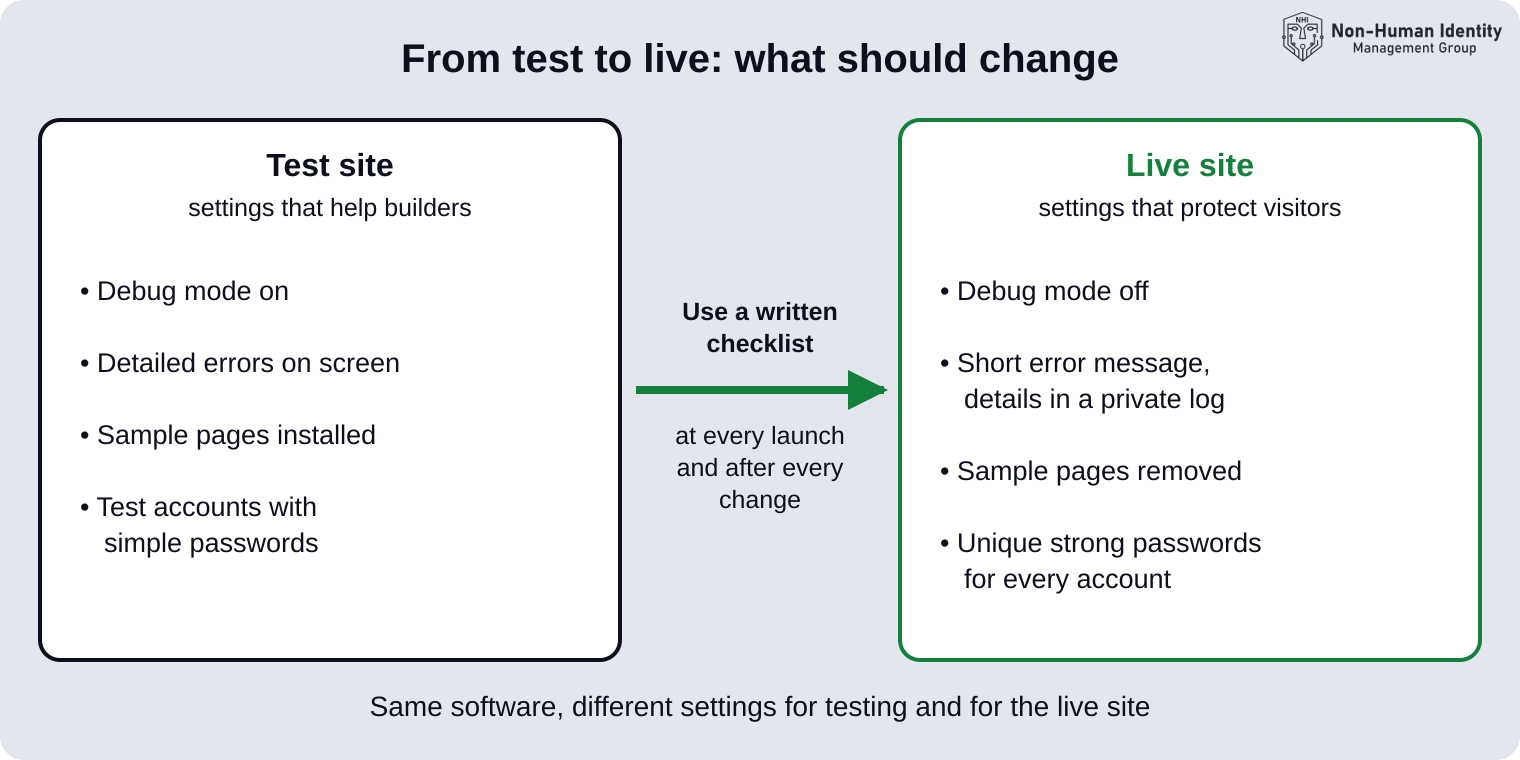
Most web software comes with many settings. Some help developers while they build, like a debug mode (a setting that shows detailed error reports). Some exist for a first login, like an admin account with a known password. If nobody changes them before the site goes live, they stay on.
Where the comparison stops working: a theatre has one backstage door. A website has many layers, such as the web server, the app, the database and the hosting account. Each layer has its own settings, and each one can be left open.
Why does it matter?
Unsafe settings are easy for attackers to find, because they look the same on thousands of sites. A global group of web security volunteers publishes a list of top web risks. For its 2025 list, it found some form of misconfiguration in every app it tested.[1]
If you own a website
What could happen: the admin page still uses the password it came with, and a stranger logs in.
Check this: ask your developer to confirm every default password was changed before launch.
If you are a new developer
What could happen: you leave debug mode on, and an error page shows your server's file paths and settings to the world.
Check this: keep separate settings for testing and for the live site.
If you are new to IT support
What could happen: a test page or sample app from setup day is still on the live server.
Check this: list what is installed on each server and remove what nobody uses.
What does it look like?
Here is a made-up error page from a catering firm's booking site. Debug mode was left on, so a broken link shows far more than it should.
Example only. All values are made up.
Error 500 at /bookings/0000
DEBUG = True                                  (1)
Server path: /srv/EXAMPLE/booking-app/        (2)
Framework version: Example 0.0.0              (3)
Database host: db.example.invalid
Admin page: /admin  (login: admin / admin)    (4)
- Debug mode is switched on for the public site, so full error details are shown to anyone.
- In a real file, this line would contain the folder layout on the server, which helps an attacker plan.
- Software names and versions tell an attacker which known flaws to try.
- In a real file, this line would contain the admin address. If the factory login still works, anyone can sign in.
Why this is risky: every line is a clue. Detailed error output and default accounts are both on OWASP's list of common misconfigurations.[1] One popular web framework's own guide warns never to go live with debug mode on. It says file paths and settings give attackers extra information.[2]
The safer way: visitors see a short, friendly error message. The full details go to a private log that only the team can read. The admin page has its own strong password and sign-in check.
Example only. All values are made up.
Sorry, something went wrong.
Please try again, or call us to book.
Reference: EXAMPLE-0000
How does it work?
Misconfiguration usually creeps in over the life of a site, in steps like these.
- Setup. The software is installed with its factory settings, which are built to be easy to start with, not to be safe on the open internet.
- Building. Developers switch on helpful extras, such as debug mode, sample pages and test accounts.
- Launch. The site goes live in a rush, and some of those extras are never switched off.
- Drift. Over months, people add features, open folders and change settings, often without writing it down.
- Discovery. Automated tools scan the internet for known signs, such as default admin pages, open folder listings and detailed error pages.[1]
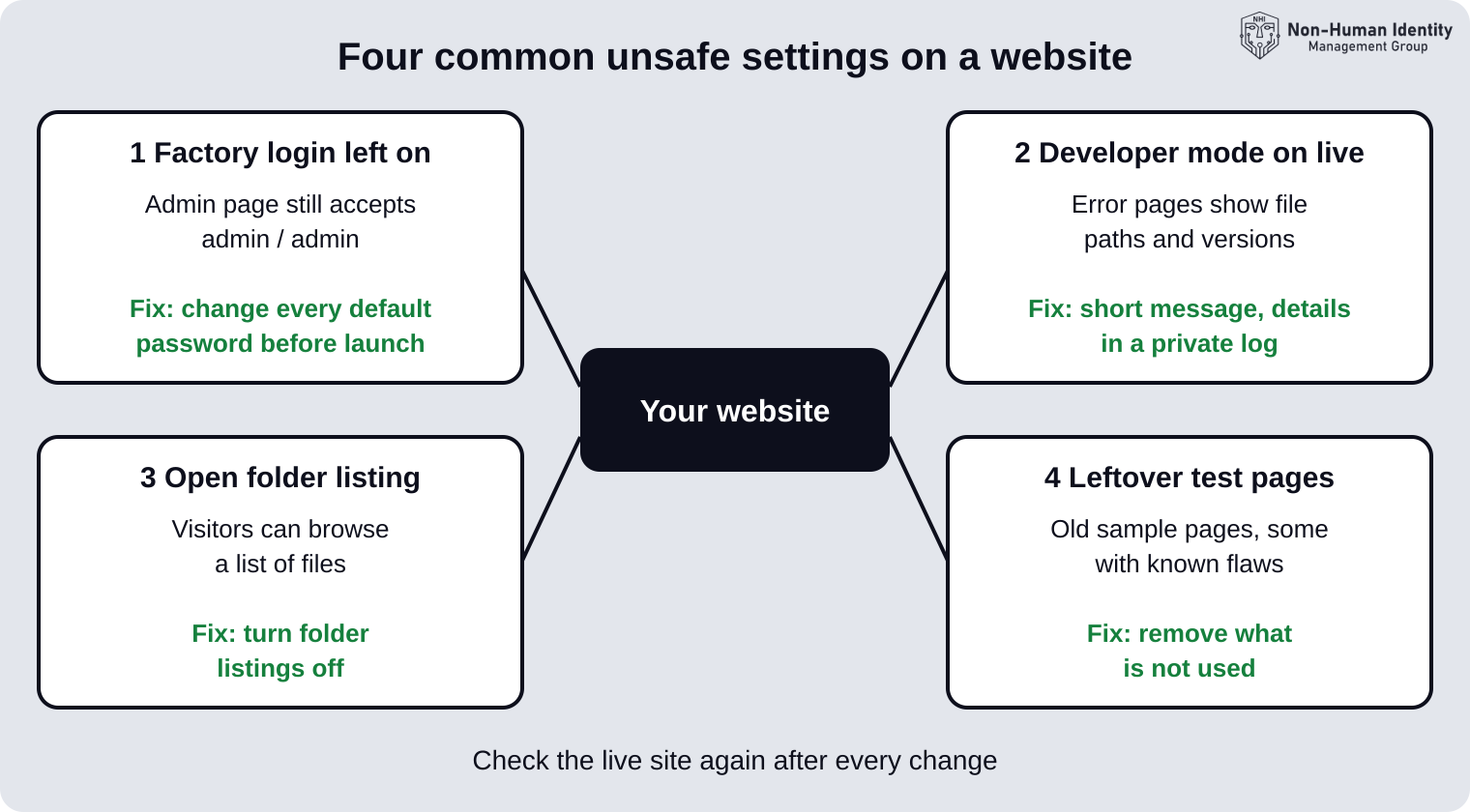
An open folder listing happens when a folder has no home page and the web server is set to show its contents instead. On one common web server, the Apache HTTP Server, this listing appears only when a setting allows it.[3] Missing security headers are another quiet gap. These are short instructions a site sends to browsers, for example to always use a secure connection.[4]
A worked example
Noor Vance runs Meadow Kitchens, a fictional catering firm. Its website takes online bookings. Mira Falk, a junior developer, has just joined the small team that looks after it.
On her first week, Mira mistypes a booking link on the live site. Instead of a friendly message, she sees a long error page. It lists the server's folder names, the software version and part of the settings.
She tells Noor straight away. Noor remembers the theatre picture from a training session. "So we've left the backstage door open?"
Mira agrees, and they check four things together. First, debug mode is on for the live site. Mira turns it off, so visitors now see a short message and the details go to a private log.
Second, the admin page is at the usual address. They try the login that came with the software, and it still works. Mira changes it at once and sets a strong, unique password with a second sign-in step.
Third, a folder of old menus shows a full file list in the browser. Mira asks the host to turn folder listings off.
Fourth, a sample page from setup day is still there. She removes it.
Because the admin login was open, Noor asks the team to review recent admin activity and bookings. They find no changes they cannot explain in the records available to them.
Noor asks Mira to write a short launch checklist. From now on, every change to the site ends with a check of the live settings.
Myths and mistakes
| What people think | What is true |
|---|---|
| New software is safe out of the box. | Factory settings are often built for easy setup. US security agencies list default settings and default logins as a top misconfiguration.[5] |
| Nobody will find our admin page. | Common admin addresses and default logins are widely known and can be found by automated scans. |
| Detailed errors help users. | They mostly help attackers. Show a short message and keep details in a private log.[1] |
| We checked the settings at launch, so we are done. | Settings drift as the site changes. Check again after changes, and on a regular schedule.[1] |
| Misconfiguration is only a cloud problem. | Cloud storage is one example, but web servers, apps and admin pages can all be set up unsafely.[1] |
What can I do this week?
- Ask your developer or host to confirm that every default password has been changed.
- Visit a made-up page on your site and check that the error message is short and plain.
- Ask whether debug mode is turned off on the live site.
- Ask for a list of anything installed on the site that nobody uses, then remove it.
- Agree a short checklist to run after every change to the live site.
Checklist
- No account on the site, server or hosting panel uses a factory password.
- Debug mode is off on the live site.
- Error pages show a short message, and details go to a private log.
- Folder listings are turned off.
- Sample pages, test accounts and unused features have been removed.
- Test and live sites use separate settings and separate passwords.
- Security headers have been reviewed with your developer.
- Settings are checked after every change and on a regular schedule.
Common questions
Is misconfiguration the same as a bug?
No. A bug is a mistake in the code itself. Misconfiguration is when working software is set up unsafely, such as a factory password left on. Both can let attackers in. The fixes differ: bugs need code changes, while misconfiguration is fixed by changing settings.
How do attackers find unsafe settings?
Often with automated tools. These tools visit many sites and look for well-known signs, such as default admin pages, open folder listings or detailed error pages. Because the signs look the same everywhere, small sites can be found as easily as big ones.
How is this different from system hardening?
They overlap. Hardening is the wider job of setting up any computer or device safely. Security misconfiguration is the name for what goes wrong when that job is missed. This guide looks at the website and app layer, such as error pages and admin pages.
Do I need a tool to check for it?
Not to start. You can check the easy signs yourself: a made-up page address, the admin login page and the list of installed add-ons. Scanning tools and the checklists in the practitioner guide help a team check more layers, more often.
Are cloud storage leaks the same thing?
Yes, they are one kind of misconfiguration. A storage area set to "public" by mistake is an unsafe setting. This guide covers websites and apps. Cloud storage has its own beginner guide, linked below.
Where next?
Ready for the detail? Read the practitioner guide: OWASP Top 10 A02 Guide. It goes further into the full list of weakness types, automated configuration checks across environments, and how this risk maps to security frameworks.
Also useful:
- The OWASP Top 10 for Beginners
- System Hardening for Beginners
- Cloud Storage Buckets for Beginners
- Attack Surface for Beginners
- Security Headers Guide
Related NHI Mgmt Group resources: Misconfiguration exposures · Cloud Misconfiguration Guide · Secure Configuration Policy Template
Key terms
- Security misconfiguration
- Software that works but is set up in a way that leaves a gap or shows too much.
- Default credential
- A login a product ships with, often the same on every copy, that should be changed before use.
- Debug mode
- A setting that shows detailed error reports to help developers, meant for testing only.
- Directory listing
- A web server showing a list of files in a folder that has no home page.
- Security headers
- Short instructions a website sends to browsers to switch on extra protections.
- Configuration drift
- Settings slowly changing away from the safe starting point as people make changes.
Sources and further reading
- A02:2025 Security Misconfiguration. OWASP Top 10:2025, OWASP Foundation. https://top10.owasp.org/2025/A02_2025-Security_Misconfiguration/, accessed 28 Nov 2026.
- Settings: DEBUG. Django documentation (version 5.2), Django Software Foundation. https://docs.djangoproject.com/en/5.2/ref/settings/, accessed 28 Nov 2026.
- Apache Module mod_autoindex. Apache HTTP Server Version 2.4 documentation, Apache Software Foundation. https://httpd.apache.org/docs/2.4/mod/mod_autoindex.html, accessed 28 Nov 2026.
- Strict-Transport-Security header. MDN Web Docs, Mozilla. https://developer.mozilla.org/en-US/docs/Web/HTTP/Reference/Headers/Strict-Transport-Security, accessed 28 Nov 2026.
- NSA and CISA Red and Blue Teams Share Top Ten Cybersecurity Misconfigurations (advisory AA23-278A). CISA and NSA. https://www.cisa.gov/news-events/cybersecurity-advisories/aa23-278a, accessed 28 Nov 2026.