Choosing between MDR and an in-house SOC means deciding who watches for attacks: a provider or your own team.
This guide is for owners, managers and newcomers who have been asked "should we buy MDR or build our own team?" You do not need a security background: the choice is mostly about people, money, time and who makes decisions.
In short
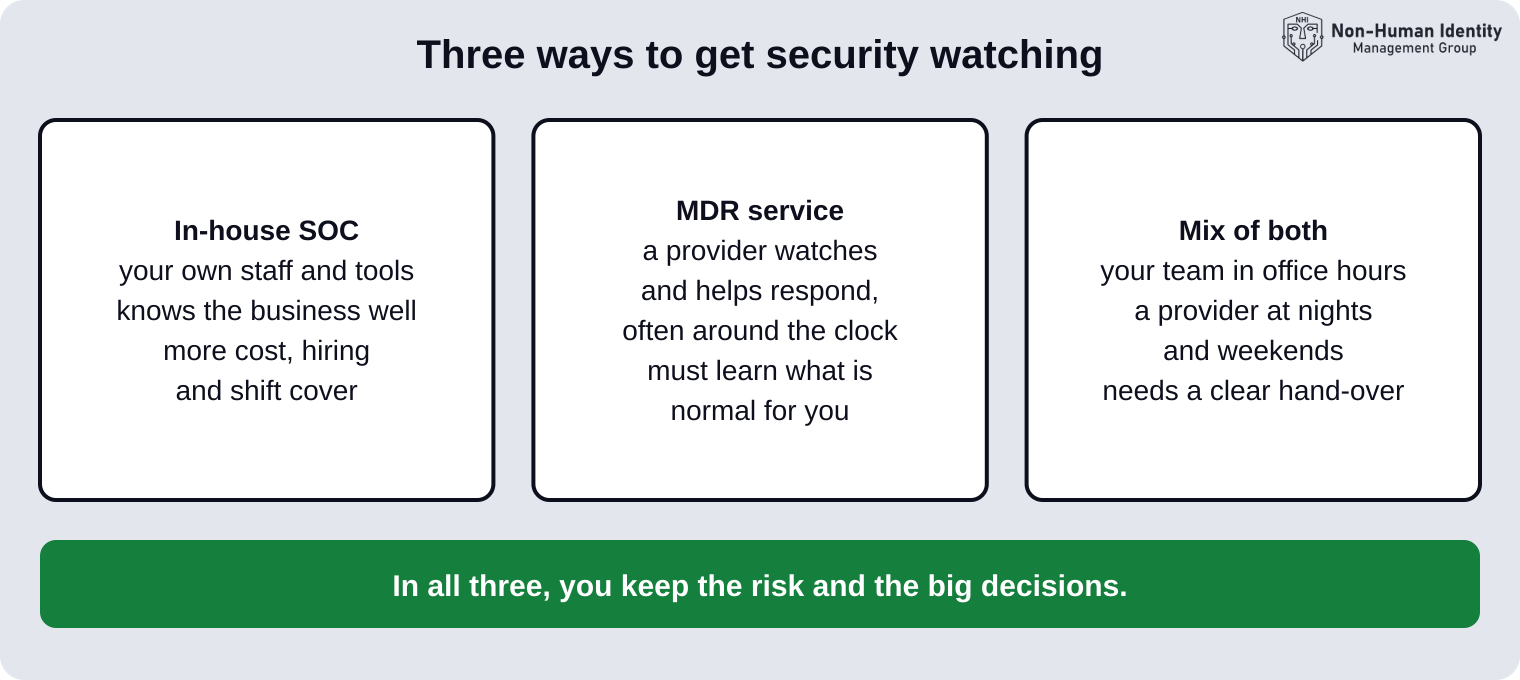
- MDR is a bought service: a provider's analysts watch your alerts and help you respond, often around the clock.
- An in-house SOC is your own team doing that work, with more control and knowledge of the business, but more cost and hiring.
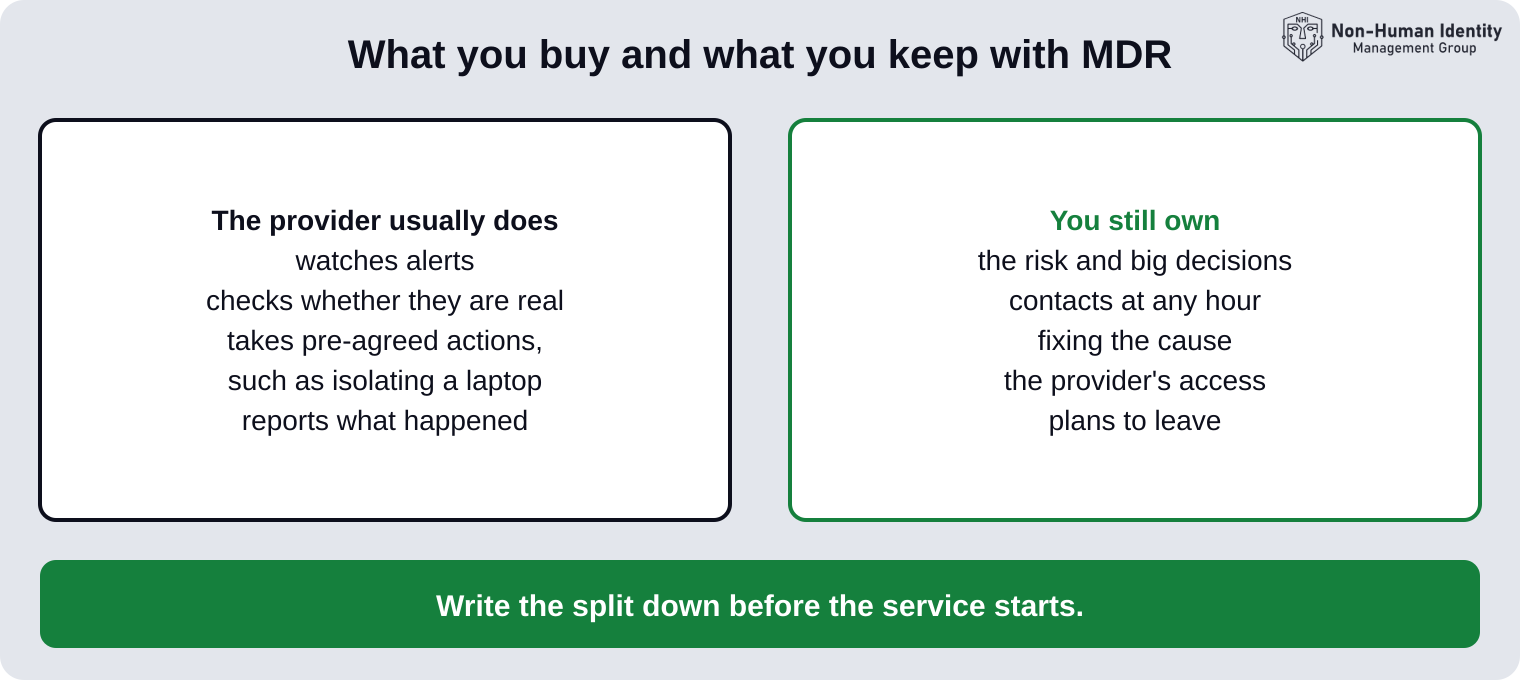
- Whichever you pick, you keep the risk, the big decisions and the job of giving the watchers what they need.
- Many organisations mix the two, for example their own team in office hours and a provider at night.
What you will learn
- Explain the difference between MDR and an in-house SOC in plain words.
- Spot what you still own when you buy a service.
- Check the trade-offs that matter for your size of organisation.
- Ask a provider the questions that reveal how they will really work with you.
- Security watch team (SOC)
- the people, tools and steps that watch for attacks and act on them.
- Bought-in watch service (MDR)
- short for managed detection and response: a provider's team that watches your alerts and helps you act.
- Warning (alert)
- a message from a security tool saying something may be wrong.
What is the choice between MDR and an in-house SOC?
Think of how a business handles its accounts. It can hire its own finance team, or pay an accounting firm. Either way, the directors still sign the accounts and answer for them.
Watching for attacks works the same way. A security operations centre (SOC) is the team that watches for attacks and acts on them. You can build that team in-house, with your own staff and tools.
Or you can buy managed detection and response (MDR). With MDR, a provider's analysts watch alerts from your systems and help you respond. Many providers work around the clock.
Where the comparison stops working: an accounting firm mostly looks back at last year. A watch service may have to act within hours, often at night. So it needs clear rules on what it may do without asking you first.
Why does it matter?
The choice shapes how fast an attack is spotted, who acts on it and how much it costs. UK government guidance on building a SOC notes that most SOCs outsource some of their work.[1] So the real question is often how much to buy, not whether to buy.
If you run a small business
What could happen: you buy a service, but nobody tells the provider who to call at night.
Check this: name two people the provider can reach at any hour, and keep the list current.
If you are asked to compare options
What could happen: you compare only prices, and miss what each option leaves for your own team to do.
Check this: write down who does each step, from spotting an alert to fixing the cause.
Next: MDR Buyer's Guide
If you are new to security work
What could happen: you join a team that uses a provider and are unsure what is yours to handle.
Check this: ask to see the agreed list of actions the provider may take without asking.
What does it look like?
A simple way to see the choice is a "who does what" card. Here is a made-up one for a company that buys MDR.
Example only. All values are made up.
Who does what: Example Ltd and ExampleMDR
Watch alerts 24 hours a day ........ provider   (1)
Isolate a laptop at night ........... provider, pre-agreed (2)
Disable a staff account ............. provider asks us first (3)
Decide whether to tell customers .... us        (4)
Fix the cause (patch, settings) ..... us        (5)
Give the provider access ............ us, reviewed each quarter (6)
Night contact ....................... [email protected]
- The provider's main job: watching and checking alerts.
- An action agreed in advance, so the provider can act fast without waking anyone.
- A bigger action, where the provider must ask first.
- Decisions with legal or business impact stay with you.
- The provider often points out the problem. Your team or IT supplier usually fixes it.
- The provider's tools reach your systems through non-human identities (NHIs): digital identities that represent machines, applications, services or AI agents. Someone must own and review their access. In a real file, this line would contain the named owner.
Why this is risky: without a card like this, each side may assume the other is handling something. Gaps tend to show up during an attack, when there is least time to sort them out.
The safer way: agree the card before the service starts, test it with a practice incident and review it every year.
How does it work?
Here is a simple way to work through the choice.
- List what you need watched. This might be laptops, email, cloud services and the website. A provider can only watch what it can see.
- Decide the hours. Do you need office hours only, or nights and weekends too? Round-the-clock cover needs several people working in shifts.
- Be honest about people. Can you hire and keep skilled staff, and cover their holidays and sickness?
- Weigh knowledge of the business. The NCSC says in-house teams have better awareness of the business, which helps investigations.[1] A provider must be told what is normal for you.
- Agree what stays with you. This usually includes the risk, big decisions, fixing causes and the provider's access to your systems.
- Plan the exit. Make sure you could change provider later and still keep your records.
A worked example
Sorrel Removals is a fictional moving company with 80 staff and one IT manager, Hana Lindahl. After a phishing scare, the owner, Gita Kowal, asks Hana whether they need a security team.
Hana starts with the hours. Most staff work days, but the booking system runs all night. Watching around the clock would mean several people on shifts. That is more than Sorrel can hire for.
She then looks at MDR. A provider could watch alerts from the laptops and email at all hours. But Hana knows the business best. She knows the drivers sign in from the road at odd times, which a provider might flag as strange.
Hana proposes a mix. The provider watches and handles the first steps. She stays the main contact and fixes causes, with an outside IT supplier helping when needed.
Before signing, she writes a "who does what" card with the provider. The provider may isolate a laptop at night without asking. It must phone her before it locks a staff account. Gita, as owner, decides anything about telling customers.
Hana also lists the accounts the provider will use to reach Sorrel's systems. She gives each one an owner and a review date, and asks how Sorrel would get its records back if it ever changed provider.
Three months later, the provider isolates a driver's laptop at 02:00 after a suspicious download. By the time Hana is at work, the laptop is cut off and she has a clear report to act on.
Myths and mistakes
| What people think | What is true |
|---|---|
| Buying MDR hands over the security problem. | It hands over the watching. You keep the risk, the decisions and the fixing. |
| An in-house team is always better. | It knows the business better, but round-the-clock cover and hiring are hard for many organisations. |
| MDR is only for big companies. | Many providers serve smaller organisations. Check what is in scope and what costs extra. |
| The provider will fix whatever it finds. | Many providers report and contain. Fixing the cause is often left to you. Check the contract. |
| Once signed, the service runs itself. | Contacts, systems and staff change. Review the set-up and the provider's access regularly. |
What can I do this week?
- List the systems that most need watching, such as email, laptops and cloud services.
- Write down who would see an alert at 02:00 on a Sunday today.
- Draft a simple "who does what" card, even before choosing an option.
- If you already use a provider, ask for the list of actions it may take without asking.
- Check which accounts any provider uses to reach your systems, and who owns them.
Checklist
- We know which systems need watching and at which hours.
- We have compared in-house, MDR and a mix, not just prices.
- A "who does what" card is written down and agreed.
- Pre-agreed actions are listed, and bigger actions need our approval.
- Night and weekend contacts are named and current.
- The provider's access accounts each have an owner and a review date.
- We know how to get our records back if we change provider.
- We test the set-up with a practice incident at least once a year.
Common questions
What is the difference between MDR and an MSSP?
MDR focuses on spotting and responding to attacks. A managed security service provider (MSSP) often runs a wider set of security tools for you, such as firewalls, and may do less hands-on response. Names vary between providers, so check what each one really does. See MDR vs MSSP.
Can a small business build its own SOC?
It can, but it is hard to staff around the clock. A small team in office hours may be realistic, with a provider covering nights and weekends. The NCSC says it is fine to start with a smaller capability and improve over time.[2]
Will an MDR provider see our data?
Usually yes, some of it. To check alerts, analysts often need to see logs, file names and account details. Ask where your data is stored and who can see it. Also ask how long it is kept, and how it is returned or deleted at the end.
Is a mix of in-house and MDR common?
Yes, it is a common choice. A typical mix has your own team in office hours, with a provider covering nights and weekends. It works best when the hand-over between the two is written down, so nothing is dropped at shift change.
Who is to blame if the provider misses an attack?
Your organisation still owns the risk and answers to customers and regulators. The contract may set out what the provider must do and any service levels. That is why checking scope, response times and reporting before you sign matters so much.
Where next?
Ready for the detail? Read the practitioner guide: MDR Guide. It goes further into shared responsibility, pre-approved response actions, service levels, data access, provider identities and exit planning.
Also useful:
- MDR Buyer's Guide
- Co-Managed SOC and SOC-as-a-Service Guide
- Building a SOC from Scratch Guide
- Security Operations Centres for Beginners
- EDR, XDR and MDR for Beginners
Related NHI Mgmt Group resources: MDR Service RFP Template · Small SOC Operations · Non-Human Identities for Beginners
Key terms
- Security operations centre (SOC)
- The people, tools and steps that watch for attacks and act on them.
- Managed detection and response (MDR)
- A service where a provider's analysts watch your alerts and help you respond.
- MSSP
- A managed security service provider that runs security tools or services for other organisations.
- Service level agreement
- The part of a contract that sets how fast and how well a provider must respond.
- Runbook
- A written set of steps to follow for a known type of problem.
- False positive
- A warning about something that turns out to be harmless.
Sources and further reading
- Building a Security Operations Centre (SOC): Designing an operating model. National Cyber Security Centre (NCSC). https://www.ncsc.gov.uk/collection/building-a-security-operations-centre/operating-model/designing-an-operating-model, accessed 28 Nov 2026.
- Building a Security Operations Centre (SOC): Things to consider. National Cyber Security Centre (NCSC). https://www.ncsc.gov.uk/collection/building-a-security-operations-centre/operating-model/things-to-consider, accessed 28 Nov 2026.