A security operations centre (SOC) is the team, and the processes and tools it uses, that watches an organisation's systems for signs of attack and responds when something suspicious happens.
This guide is for newcomers, students, career changers and managers who want to understand what a SOC does all day. It explains how alerts are raised, checked and handled, walks through a fictional example, clears up common myths and suggests first steps for a small team. It is the starting point for a group of related beginner pages on SIEM, logging, threat hunting and security automation, which go deeper into each part.
By the end of this guide you will be able to:
- Explain what a SOC is and why organisations have one.
- Describe how an alert moves from detection to response.
- Understand the main roles and tools in a SOC.
- Identify practical first steps if you do not have a SOC yet.
Key takeaways
- A SOC catches what gets past prevention. The UK National Cyber Security Centre (NCSC) says a SOC's main purpose is to limit the damage to an organisation by detecting and responding to attacks.[1]
- It runs on logs. Without the right records from accounts, devices and networks, there is nothing to detect.[3]
- Not every alert is an incident. Triage, the quick first check, decides what needs a closer look.[4]
- A SOC is people and process as much as tools. There is no one-size-fits-all SOC; the right design depends on your threats, assets and resources.[1]
- You do not need your own building. Many organisations buy SOC services from a provider or run a small hybrid team.
What it is, in plain English
Every computer, server, cloud service and sign-in page keeps records of what happens, called logs. A SOC collects these logs, uses tools to spot patterns that look like an attack, and has people who check those warnings and act on them. The NCSC describes a SOC as a team responsible for detecting and responding to cyber attacks, and notes that some SOCs also handle vulnerability assessment, compliance or system configuration.[1]
An everyday comparison is the control room of a shopping centre. Cameras and door sensors feed into one room. Staff watch the screens, most of the time see nothing wrong, and occasionally spot someone acting oddly. They check, call security guards if needed, and write up what happened. Where the analogy breaks down: a SOC watches millions of events that no person could read, so much of the first sorting is done by software, and attackers often look exactly like normal users.
A SOC can be a dedicated in-house team, a service bought from an outside provider, or a mix of both. Providers include managed detection and response (MDR) services; see EDR, XDR and MDR for Beginners.
Why it matters to you
- If you run a small business: you may not need a full SOC, but someone needs to notice when an account is broken into or a laptop is infected. A managed service is often a realistic option.
- If you are new to a security job: SOC analyst roles are a common way into the field. Knowing how triage and escalation work helps you in interviews and on day one.
- If you are a manager: the SOC is how you find out about an attack early rather than from a customer or a ransom note. You decide what it covers and how quickly it must respond.
Prevention controls such as firewalls and multi-factor sign-in reduce attacks, but some attacks still get through. The speed at which they are spotted and contained often decides whether an incident stays small. NIST's incident response guidance, SP 800-61 Rev. 3, links detection, response and recovery directly to how organisations manage cyber risk.[6]
How it works, step by step
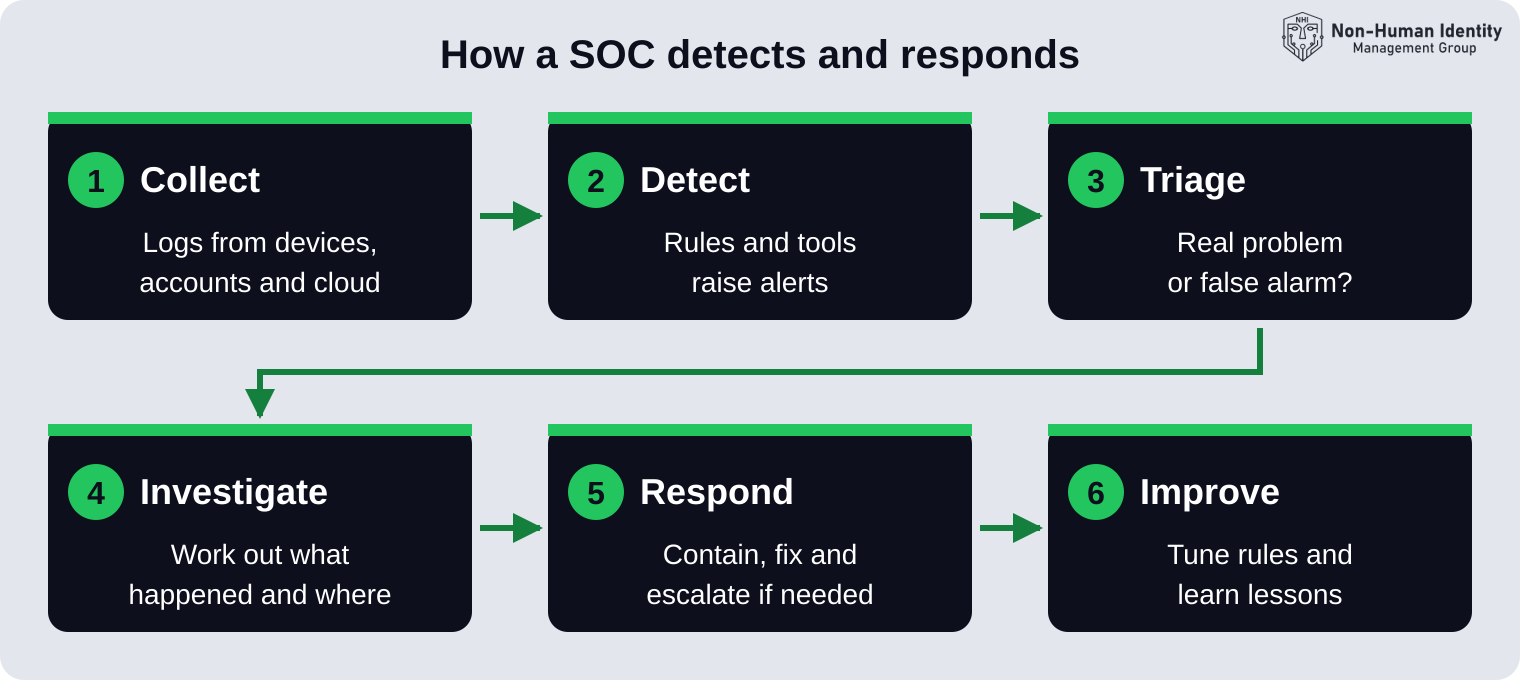
- Collect logs. The SOC gathers records from applications, computers, network devices and cloud services. The NCSC suggests starting with three "must-have" sources: sign-in attempts (successful and failed), security controls such as anti-malware and firewalls, and DNS lookups, which can show a device contacting a known bad website.[3]
- Store and search them in one place. Most SOCs use a SIEM (security information and event management) platform, which brings logs together and runs detection rules. See SIEM for Beginners.
- Detect. Alerts come from security products, from rules the SOC writes itself (for example "large file transfer outside working hours"), from looking for unusual patterns across lots of data, and from people actively searching, called threat hunting.[2]
- Triage. An analyst quickly decides whether an alert is a real problem, a harmless event (a false positive) or needs more work. The NCSC stresses a consistent triage process and recording what was done and why.[4]
- Investigate. For real concerns, the analyst works out what happened, which accounts and devices are involved and how far it has spread.
- Respond and escalate. The SOC takes agreed actions, such as disabling an account or isolating a laptop, and escalates serious cases to incident response. The NCSC calls for clear escalation paths and up-to-date contacts for each system.[4]
- Improve. Rules are tuned, gaps in logging are fixed and lessons are fed back. The NCSC recommends near-real exercises to test the whole process.[4]
Who does what
Job titles differ between organisations; this table shows a common pattern, not a standard.
| Role | Typical work |
|---|---|
| SOC analyst (often called tier 1) | Watches the alert queue, does first triage, closes false alarms, escalates real concerns. |
| Senior analyst or incident responder (tier 2 or 3) | Investigates escalated cases in depth and leads the response. |
| Detection engineer | Writes and tunes detection rules and makes sure the right logs arrive. |
| Threat hunter | Searches proactively for attackers that no rule has caught. |
| Threat intelligence analyst | Tracks who is attacking similar organisations and how, and feeds that into detection. |
| SOC manager | Sets priorities, staffing and service levels, and reports to the business. |
Useful distinctions
- A SOC is not a SIEM. The SIEM is a tool; the SOC is the team and process that uses it.
- Detection is not the same as response. Many SOCs detect and contain, then hand major incidents to a separate incident response team. See Incident Response for Beginners.
- Threat hunting complements rules. The NCSC describes hunting as proactive, human-led work that can find attacks no rule exists for yet, and notes it needs the most investment in skilled staff.[2]
- Automation helps with repeat work. Security orchestration, automation and response (SOAR) tools run scripted steps; see SOAR and Security Automation for Beginners.
A worked example
Northbridge Logistics is a fictional delivery firm with 300 staff. It uses a managed SOC provider for nights and weekends and has two in-house analysts, Ravi and Ellen, during office hours.
At 07:40 on a Monday, the SIEM raises an alert: the account of Dan, a warehouse supervisor, signed in from another country at 03:10, minutes after a failed sign-in from his usual office. The overnight provider had already marked it for the in-house team.
Ravi triages it. Dan is not travelling, and his phone shows he approved a multi-factor prompt at 03:10 that he says he does not remember. Ravi treats it as a likely account takeover and escalates to Ellen.
Ellen follows the agreed steps: she ends Dan's active sessions, resets his password and multi-factor registration with him by phone, and checks what the account did. The logs show the intruder created an email forwarding rule to an outside address. Ellen removes it and records which emails were forwarded so the privacy lead can assess whether anyone must be told.
Afterwards the team adds a rule that alerts on any new external forwarding rule, and asks the provider to call, not just ticket, for overnight sign-ins from new countries. The SOC did not stop the break-in; it noticed it within hours, limited what the intruder could do and closed one gap for next time.
Myths and misunderstandings
| What people think | What is true |
|---|---|
| A SOC is a room full of screens. | It is a function. Many SOCs are remote, outsourced or a few people sharing duties. |
| Buying a SIEM gives you a SOC. | Without people, processes and the right logs, a SIEM mostly stores data. |
| More alerts mean better security. | Too many low-value alerts cause alert fatigue, where real warnings get missed. Fewer, better alerts help. |
| Every alert is an attack. | Most alerts turn out to be harmless; triage exists to sort them quickly and consistently. |
| Only large companies need a SOC. | Every organisation needs someone watching for attacks; smaller ones usually buy it as a service. |
| An outsourced SOC takes the risk away. | The provider can watch and act, but you still own the risk and must give them access, contacts and decisions. |
Key terms
- Security operations centre (SOC)
- A central team that watches for cyber threats, investigates suspicious activity and coordinates response, combining people, process and technology.
- SIEM
- A platform that collects and stores logs from many sources, runs detection rules and supports search and investigation.
- Alert triage
- Sorting security alerts to decide what needs investigation, escalation or dismissal.
- False positive
- An alert that fires on harmless activity rather than a real problem.
- Escalation
- Passing an alert or case to a more senior analyst, a specialist team or incident response.
- Playbook
- A documented, repeatable set of steps for handling a type of alert or incident.
- Threat hunting
- Proactively searching for signs of compromise that normal detection has missed.
- Security incident
- An event that compromises or threatens the confidentiality, integrity or availability of systems or data.
- Mean time to detect (MTTD)
- How long it takes, on average, to identify a security issue after it begins.
- Mean time to respond (MTTR)
- How long it takes, on average, to contain or fix an incident after it is detected.
Common questions
What does a SOC analyst do all day?
Mostly triage: reviewing alerts, closing false alarms with a note, investigating anything suspicious and escalating real concerns. Good analysts also suggest rule improvements.
Does a SOC need to run 24 hours a day?
Attacks often happen outside office hours, so many organisations want round-the-clock cover. Smaller ones usually get it by buying an overnight or full managed service rather than staffing shifts themselves.
What is the difference between a SOC and incident response?
The SOC watches continuously and handles day-to-day alerts. Incident response is the organised effort to manage a serious attack, which the SOC usually starts and supports.
What logs should we collect first?
The NCSC suggests sign-in records, security control logs and DNS logs as quick wins, then using threat modelling to decide what else is worth collecting.[3]
How do you measure whether a SOC is working?
Common measures include mean time to detect, mean time to respond, the share of alerts that are false positives and how much of your estate sends logs. MITRE's guide to running a SOC includes a section on communicating value through metrics.[5]
Where does the SOC fit in the NIST Cybersecurity Framework?
Mainly in the Detect function, for example continuous monitoring (DE.CM) and adverse event analysis (DE.AE), and in Respond, for example incident management (RS.MA).[7]
First steps
- Find out who watches today. Ask who would notice a break-in on a Saturday night. If the answer is nobody, that is your first gap.
- Check the three must-have logs. Make sure sign-in, security control and DNS logs are switched on and kept somewhere you can search.[3]
- Write one simple playbook. For a suspected account takeover: who checks, who can disable the account, who to call and what to record.
- Agree an escalation list with names and phone routes for each important system, and keep it up to date.
Checklist
- We know who monitors for attacks in and out of office hours.
- Sign-in, security control and DNS logs are collected centrally.
- Our important systems send logs and we know which ones do not.
- Alerts are triaged with a consistent, recorded process.
- We have written playbooks for our most likely alerts.
- Escalation contacts are current for every important system.
- Emergency actions such as disabling accounts are approved in advance, recorded and reversed in a controlled way.
- Detection rules are reviewed and tuned regularly.
- We run an exercise at least once a year to test detection and response.
Check your understanding
1. What is the main purpose of a SOC?
Answer: to detect and respond to attacks that get past preventive controls, limiting the damage.
2. What is triage?
Answer: the quick first check that decides whether an alert is harmless, needs investigation or must be escalated.
3. Is a SIEM the same as a SOC?
Answer: no. A SIEM is a tool; the SOC is the people and processes that use it.
4. Name three log sources a new SOC should collect first.
Answer: sign-in records, security control logs and DNS logs.
Suggested learning pathway
- Logging and Log Management for Beginners: the raw material every SOC depends on.
- SIEM for Beginners: the main SOC tool explained.
- Threat Hunting for Beginners: finding what rules miss.
- Incident Response for Beginners: what happens after escalation.
- EDR, XDR and MDR for Beginners: endpoint tools and managed services.
- For the practitioner view, see the SOC Guide.
- For handling alert queues well, see the Alert Triage Guide.
- For a career route in, see the SOC Analyst Career Guide.
Standards and references
- Building a Security Operations Centre (SOC). National Cyber Security Centre (NCSC). https://www.ncsc.gov.uk/collection/building-a-security-operations-centre, accessed 27 Nov 2026.
- Building a SOC: Detection approaches. National Cyber Security Centre (NCSC). https://www.ncsc.gov.uk/collection/building-a-security-operations-centre/detection/detection-approaches, accessed 27 Nov 2026.
- Building a SOC: Log sources. National Cyber Security Centre (NCSC). https://www.ncsc.gov.uk/collection/building-a-security-operations-centre/onboarding-systems-and-log-sources/log-sources, accessed 27 Nov 2026.
- Building a SOC: Incidents. National Cyber Security Centre (NCSC). https://www.ncsc.gov.uk/collection/building-a-security-operations-centre/incidents, accessed 27 Nov 2026.
- 11 Strategies of a World-Class Cybersecurity Operations Center. K. Knerler, I. Parker and C. Zimmerman, MITRE, 31 March 2022. https://www.mitre.org/news-insights/publication/11-strategies-world-class-cybersecurity-operations-center, accessed 27 Nov 2026.
- SP 800-61 Rev. 3, Incident Response Recommendations and Considerations for Cybersecurity Risk Management: A CSF 2.0 Community Profile. National Institute of Standards and Technology (NIST), April 2025. https://csrc.nist.gov/pubs/sp/800/61/r3/final.
- The NIST Cybersecurity Framework (CSF) 2.0, CSWP 29. National Institute of Standards and Technology (NIST), 26 February 2024. https://csrc.nist.gov/pubs/cswp/29/the-nist-cybersecurity-framework-csf-20/final.
Related NHI Mgmt Group resources: SOC Guide · Detection Engineering Guide · MDR Guide