A cloud security group is a list of rules that decides which network traffic may reach a cloud server.
This guide is for students, new cloud staff and small business owners who rent cloud servers. You do not need to manage the cloud yourself to be affected: one loose rule set by a supplier can open your server to the whole internet.
In short
- A security group works like a small firewall wrapped around each cloud server or service.
- Each rule says who may connect and on which door number, called a port.
- Replies to allowed traffic come back in on their own, so you write rules for new connections only.
- The most common mistake is a rule that lets anyone on the internet reach an admin door.
What you will learn
- Explain what a security group does in one sentence.
- Read a simple rule and say who it lets in.
- Spot a rule that opens a server to the whole internet.
- Ask your supplier the right questions about your rules.
- Door number (port)
- a number that tells a server which service a connection is for, such as a website or remote login.
- Address range
- a group of internet addresses written in a short form. The range 0.0.0.0/0 means every address.
- Remembers replies (stateful)
- if a connection is allowed one way, the replies are allowed back automatically.
What is a cloud security group?
Think of a guest list pinned to the door of each room in an office. Only people on the list get in. Each room can have its own list.
A security group is that list for a cloud server. Amazon Web Services (AWS) says a security group acts as a virtual firewall. The only traffic that reaches the server is traffic its rules allow.[1] Microsoft Azure has a similar tool called a network security group.[3]
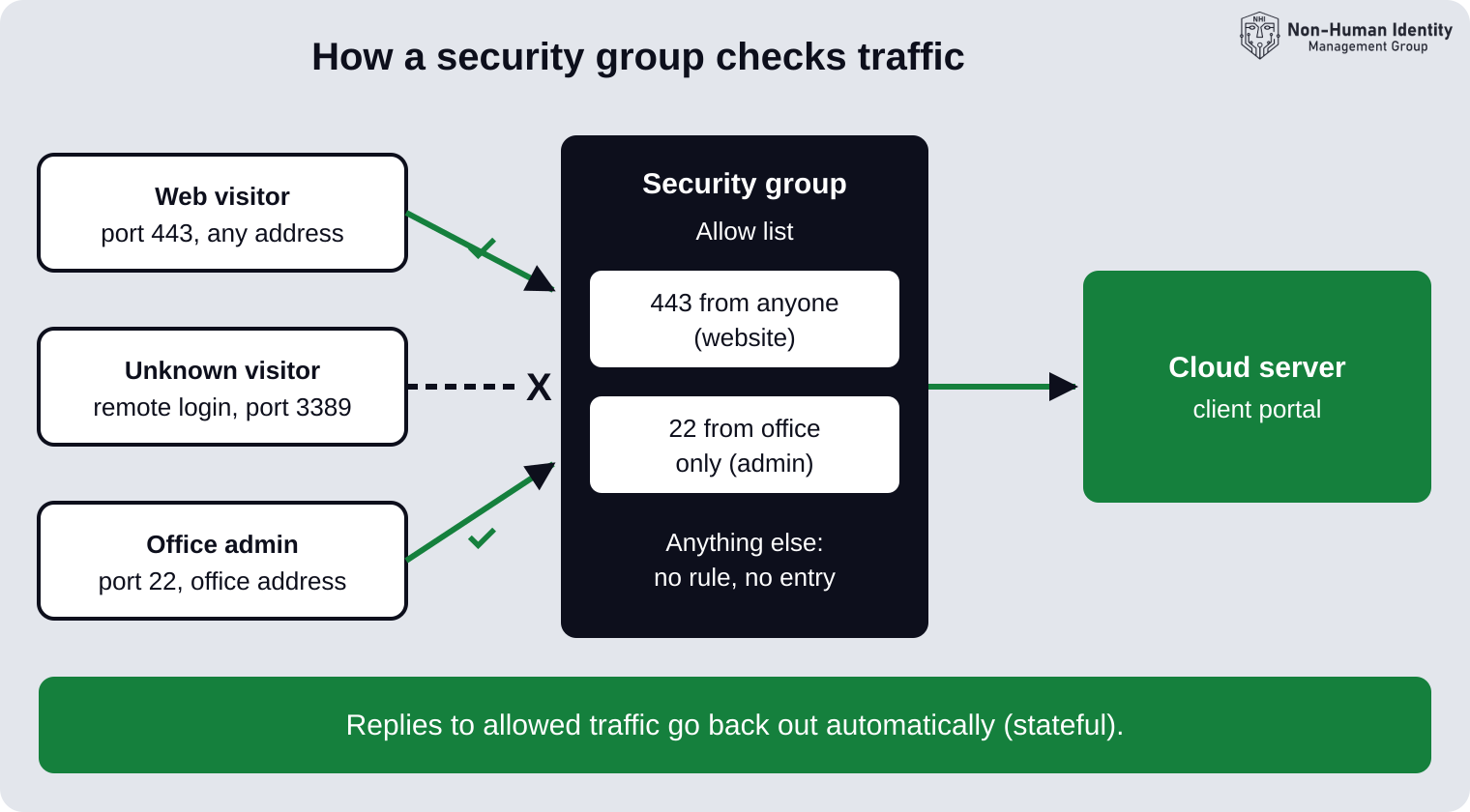
Each rule names three things: where the traffic comes from, which port it uses, and the type of traffic. For example, "anyone may visit the website on port 443" or "only the office may use remote login".
Where the comparison stops working: a guest list checks names. A security group mostly checks addresses and ports. It does not know who is typing, so it cannot replace passwords or sign-in checks.
Why does it matter?
Security groups are often the first barrier between a cloud server and the internet. One loose rule can expose a database or an admin login to anyone who finds it.
If you run a small business in the cloud
What could happen: your supplier opens remote login to the whole internet "just to test", and forgets to close it.
Check this: ask for a plain list of which ports are open, and to whom.
If you are new to cloud work
What could happen: you copy an old rule set from another project and open doors you did not need.
Check this: for every rule, ask "who needs this, and why?" before you save it.
If you are studying for a cloud exam
What could happen: you mix up security groups and network access lists, which work differently.
Check this: learn which one remembers replies and which one can block on purpose.
Next: Firewalls for Beginners
What does it look like?
Here is a made-up set of inbound rules for a small website server, shown as a simple table. Inbound means traffic coming in.
Example only. All values are made up.
Security group: EXAMPLE-web-server-sg
Inbound rules
Port   Type          Source
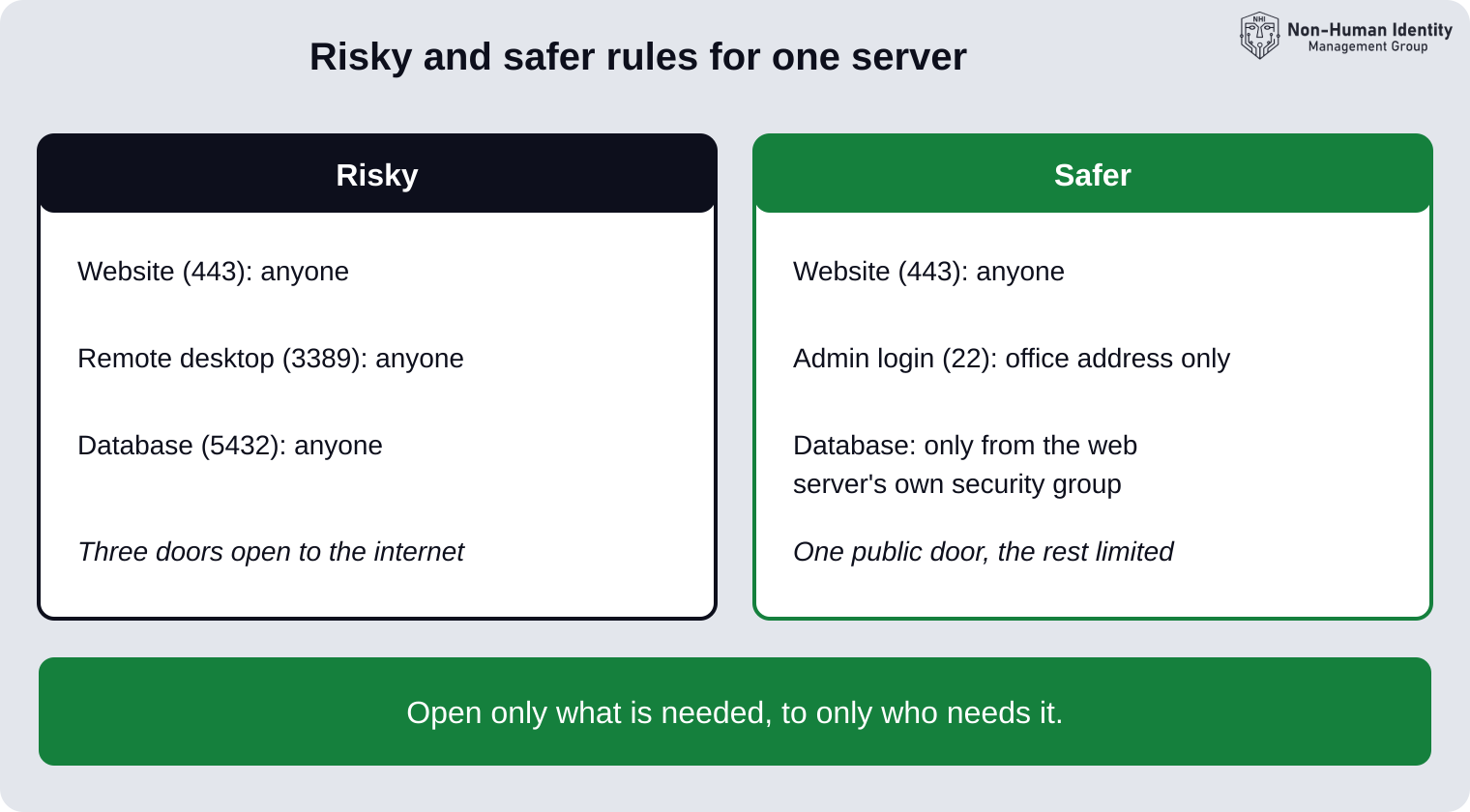
443    HTTPS (web)   0.0.0.0/0          (1)
22     SSH (admin)   203.0.113.10/32    (2)
3389   RDP (admin)   0.0.0.0/0          (3)
5432   Database      0.0.0.0/0          (4)
- Anyone may visit the website. For a public website, that is the point.
- Remote admin login from one office address only. In a real file, this line would contain your office's own address.
- Remote desktop login open to every address on the internet.
- The database door open to every address on the internet.
Why this is risky: rules 3 and 4 let anyone on the internet try to log in or reach the database. Rule 3 is not even needed on this server, which uses rule 2 for admin work.
The safer way: delete rule 3. Change rule 4 so only the web server's own security group may reach the database. AWS lets a rule name another security group as the source, so the rule follows those servers even when their addresses change.[2]
How does it work?
Here is what happens when traffic arrives at a server with a security group on AWS.[1][2]
- The start. A new AWS security group has no inbound rules, so nothing gets in yet. It has one outbound rule that lets all traffic out.
- The rules. You add allow rules for the traffic you need. On AWS you can only write allow rules, not block rules.
- The check. When a connection arrives, it gets in only if a rule allows its address and port.
- The reply. Replies to allowed traffic go back out automatically. This is what stateful means.
- The change. When you edit a rule, AWS applies the change to every server using that security group.
Azure works a little differently. Its network security groups can allow or deny traffic. Each rule has a priority number, and lower numbers are checked first. Once a rule matches, the checking stops.[3] Azure also adds default rules, including one at the bottom that denies all other inbound traffic from outside.[3]
A worked example
Talia Pajari runs Marigold Accountants, a fictional firm with eight staff. Its client portal runs on a cloud server that a supplier, Orla Falk, set up last year.
Talia reads about firms whose cloud servers were left open. She asks Orla a simple question: "Which doors on our server are open, and to whom?"
Orla sends a screenshot of the security group. Talia thinks of the guest list on each office door, and reads each line like a name on that list.
Three rules look fine. Anyone can reach the portal on port 443. Admin login is allowed from the office address only.
But one rule lets every address on the internet reach the database. Orla admits she added it a year ago to fix a problem quickly, and forgot it.
Orla changes the rule so only the portal server can reach the database. The change applies straight away to the server using that group. The portal still works, so the rule was never needed.
Next, Orla checks the database sign-in records for logins from unknown addresses. She finds no suspicious logins in the records available to her. To be careful, she changes the database password anyway.
Last, they agree two habits. Every new rule gets a short note saying who asked for it and why. And Orla sends Talia a plain list of open ports every three months.
Myths and mistakes
| What people think | What is true |
|---|---|
| The cloud provider sets safe rules for me. | The provider gives you the tool. You, or your supplier, decide what the rules allow. |
| A strong password means open ports do not matter. | Open admin doors invite guessing and attacks on the service itself. Close what you do not need. |
| 0.0.0.0/0 means "nobody". | It means every address on the internet. |
| I can block one bad address in an AWS security group. | AWS security groups only allow, they cannot block.[2] Network access lists or other tools do that. |
| A temporary rule will be removed later. | Temporary rules are easy to forget. Give each one an owner and an end date. |
What can I do this week?
- Ask for a plain list of every open port on your cloud servers, and who may reach each one.
- Look for any rule with 0.0.0.0/0 on an admin or database port.
- Ask who added each rule, and whether it is still needed.
- Agree that new rules need a short note and an owner.
Checklist
- Admin ports such as remote login are open only to known addresses, or not at all.
- Databases are reachable only from the servers that need them.
- Every rule has an owner and a reason written down.
- Temporary rules have an end date, and someone checks it.
- Rules are reviewed at least every few months.
- Outbound rules are reviewed too, not just inbound ones.
- Security groups are one layer, alongside strong sign-in and updates.
Common questions
Is a security group the same as a firewall?
Nearly. AWS describes a security group as a virtual firewall for the resources it is attached to. It filters traffic by address and port. It does not read what the traffic says, so it is one layer of defence, not the whole answer.
What is the difference between a security group and a network access list?
A security group protects each server and remembers replies. On AWS, a network access list protects a whole section of the network, can block traffic on purpose and checks each direction separately. See Security Groups vs Network ACLs for the detail.
Does Azure have security groups?
Yes, Azure calls them network security groups. They do the same basic job, but they can also deny traffic, and rules are checked in priority order. Azure adds default rules you cannot delete, but you can override them with your own rules.
Can a server have more than one security group?
Yes, on AWS you can attach several security groups to one resource. That can be tidy, with one group for web traffic and one for admin. It also means you need to check every group to see the full picture of what is open.
Do security groups stop all attacks?
No. They control which addresses and ports can connect. They do not check passwords, spot stolen logins or fix weak software. Use them as one layer, together with strong sign-in, regular updates and monitoring.
Where next?
Ready for the detail? Read the practitioner guide: Security Groups vs Network ACLs. It goes further into how each cloud platform checks rules, how reply tracking works and design patterns for a three-tier app.
Also useful:
- Cloud Networking for Beginners
- Firewalls for Beginners
- Network Segmentation for Beginners
- Security Groups vs Cloud Firewall Services
- Amazon VPC Security Guide
Related NHI Mgmt Group resources: Cloud Misconfiguration Guide · Remote Desktop (RDP) Security Guide · Cloud Security for Beginners
Key terms
- Security group
- A set of cloud traffic rules that acts like a firewall for the resources it is attached to.
- Firewall
- A filter that lets some network traffic through and keeps the rest out.
- Port
- A number that tells a server which service a connection is for.
- IP address
- The number that identifies a device on a network, like a postal address.
- Stateful firewall
- A firewall that remembers allowed connections and lets their replies back through.
- Network ACL
- A list of allow and deny rules that protects a whole section of a cloud network.
- Virtual private cloud
- Your own private section of a cloud provider's network.
Sources and further reading
- Control traffic to your AWS resources using security groups. Amazon VPC User Guide, Amazon Web Services. https://docs.aws.amazon.com/vpc/latest/userguide/vpc-security-groups.html, accessed 28 Nov 2026.
- Security group rules. Amazon VPC User Guide, Amazon Web Services. https://docs.aws.amazon.com/vpc/latest/userguide/security-group-rules.html, accessed 28 Nov 2026.
- Network security groups. Azure Virtual Network documentation, Microsoft Learn. https://learn.microsoft.com/en-us/azure/virtual-network/network-security-groups-overview, accessed 28 Nov 2026.