Cloud security is the set of practices, settings and controls that protect the data, accounts and systems you run on services provided over the internet by someone else, such as cloud email, online file storage or rented servers.
Moving to the cloud does not hand all of your security to the provider. This guide explains, in plain English, who is responsible for what, the main risks and where to start. It is written for newcomers, students, career changers, small business owners and managers who are not security specialists.
By the end of this guide you will be able to:
- Explain what cloud computing and cloud security mean.
- Understand the shared responsibility model and how it changes between IaaS, PaaS and SaaS.
- Describe the main steps to secure a cloud service.
- Identify the first settings to check in your own cloud accounts.
Key takeaways
- Security is shared. The provider looks after its buildings, hardware and core platform; you look after your accounts, your data and how you set things up.
- Your share depends on the service type. Renting raw servers leaves you much more to do than using a ready-made app.
- Accounts are the front door. Strong sign-in, few admins and limited permissions matter in every type of cloud service.
- Settings cause many problems. A file store or database accidentally left open to the public is a classic cloud mistake.
- Turn on logs early. Without records of who did what, you cannot spot or investigate problems.
What it is, in plain English
Cloud computing means using computing resources, such as servers, storage and software, that a provider runs for you and that you reach over the internet. NIST, the US standards body, defines it as a model for convenient, on-demand network access to a shared pool of configurable computing resources that can be quickly set up and released with little management effort.[1]
NIST names three main service models:[1]
- Infrastructure as a service (IaaS): you rent virtual servers, storage and networks, and install and run your own software on them.
- Platform as a service (PaaS): the provider runs the platform, such as a database or app hosting service, and you build or deploy on it.
- Software as a service (SaaS): you use a finished app over the internet, such as cloud email or an online accounting package.
Cloud security covers the protections for all of these. The key idea is the shared responsibility model: the provider and the customer each have security jobs. AWS describes this as the provider handling security "of" the cloud and the customer handling security "in" the cloud.[2]
A helpful comparison is renting a flat. The landlord is responsible for the building's structure, the main entrance and the wiring. You are responsible for locking your own door, deciding who gets a key and not leaving valuables in the window. Where the analogy breaks down: in the cloud, the split changes with the type of service, and many "doors" are settings in a web console that are easy to change by mistake and hard to see from the outside.
Why it matters to you
- If you run a small business: your email, files and accounts probably already live in the cloud. A stolen admin password or a shared folder left open can expose them, whatever the provider does.
- If you are new to a security job: cloud settings, accounts and logs are now part of everyday security work, and you will need to know which jobs belong to your organisation.
- If you are a manager: contracts and provider documentation set out who does what. You remain accountable for the parts that are yours, including data and access.
Major providers say the same thing in different words. Google Cloud states that customers always remain responsible for their access policies and data.[3] Microsoft states that for all cloud deployment types you own your data and identities, and that you always retain responsibility for your data, endpoints, accounts and access management.[4] The UK Cyber Essentials scheme also says cloud services cannot be excluded from its scope, and that the applicant is always responsible for making sure its controls are in place, even where the provider carries some of them out.[6]
How it works, step by step
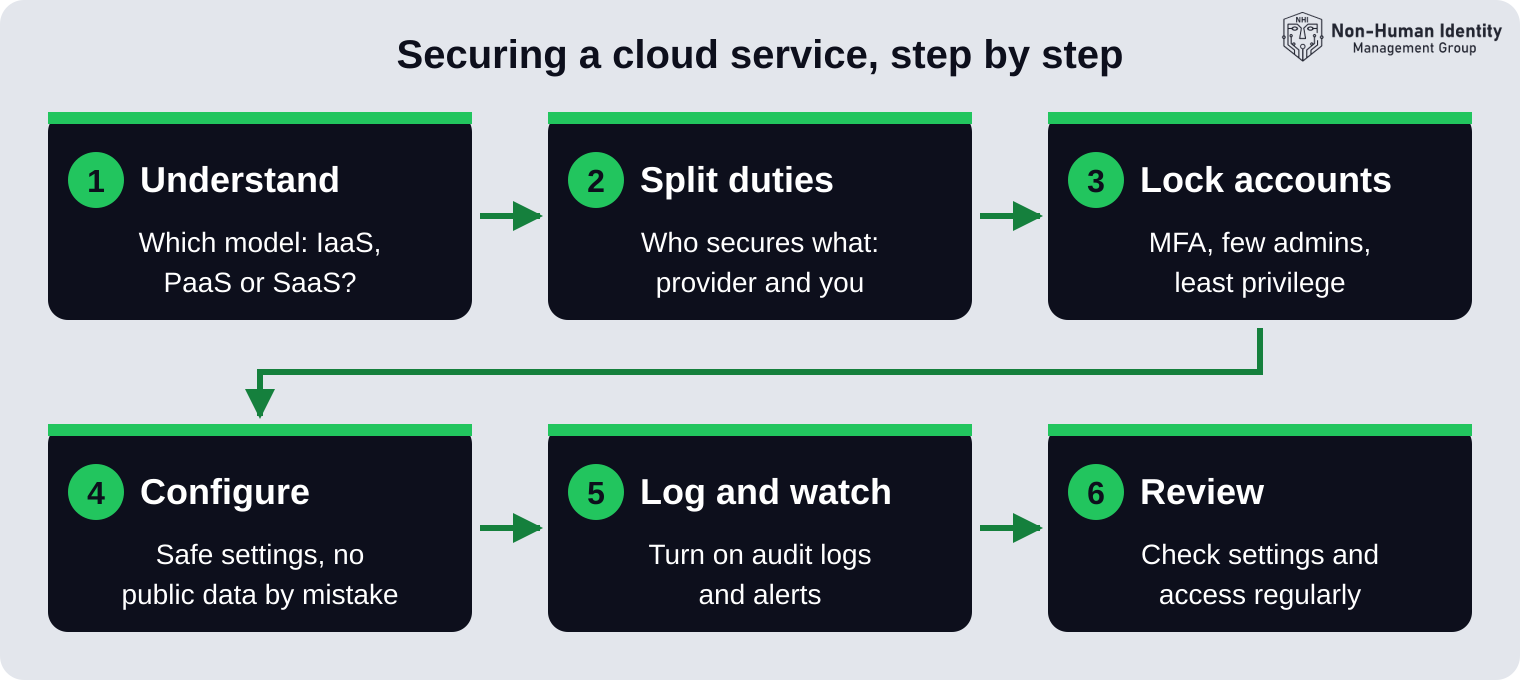
The details depend on the provider and service, but securing a cloud service usually follows these steps.
- Understand the service type. Is it IaaS, PaaS or SaaS? This decides how much of the security work is yours.
- Split the duties. Read the provider's shared responsibility documentation and note which tasks are yours, the provider's or shared. Cyber Essentials expects you to confirm, through contract clauses or the provider's published documents, any control the provider carries out for you.[6]
- Lock down accounts. Require multi-factor authentication (MFA), a second proof of identity beyond a password, for everyone, especially admins. Keep the number of admins small and give people only the access they need, known as least privilege.
- Configure safely. Check sharing and public access settings, turn on encryption where it is not already on, and keep servers you run yourself patched.
- Log and watch. Turn on audit logs, records of who did what and when, and set up alerts for risky events such as new admin accounts.
- Review regularly. Settings drift and staff change. Check accounts, permissions and public sharing on a schedule.
The table below shows how responsibility typically shifts across service types. It is a simplified summary of how providers describe the split; always check your own provider's documentation and contract.
| Task | IaaS (rented servers) | PaaS (managed platform) | SaaS (finished app) |
|---|---|---|---|
| Physical data centres and hardware | Provider | Provider | Provider |
| Operating system updates | You (for example, AWS states customers patch the guest operating system on Amazon EC2)[2] | Mostly provider | Provider |
| Security update management (Cyber Essentials view) | Shared[6] | Shared[6] | Provider[6] |
| Your data and who can see it | You | You | You[3][4] |
| User accounts, MFA and permissions | You | You | You[4] |
How three large providers describe it
The providers below are listed alphabetically, as examples only; the order is not a ranking.
| Provider | How it describes the split |
|---|---|
| Amazon Web Services (AWS) | Security "of" the cloud (AWS protects the infrastructure that runs its services) and security "in" the cloud (the customer's share, which depends on the services chosen).[2] |
| Google Cloud | Shared responsibility, varying by workload type, plus "shared fate", Google's term for an ongoing partnership in which it also provides secure starting templates, guidance and tools.[3] |
| Microsoft | A responsibility matrix across on-premises, IaaS, PaaS and SaaS, in which data, accounts and access management stay with the customer in every model.[4] |
Useful distinctions
- "Secure cloud" is not the same as "securely used cloud". A provider can run a well-protected platform while a customer's own setting leaves data open. A cloud misconfiguration is usually a customer-side setting, not a flaw in the platform.
- Software accounts count too. Apps and scripts often connect to cloud services with keys or service accounts. These need the same care as staff passwords: store them safely, limit what they can do and remove them when no longer needed.
- Exceptions should be controlled. If a file share must be public, for example for a press kit, record who approved it, why and when it will be reviewed.
- Frameworks exist to help you check providers. The NCSC's 14 cloud security principles cover topics such as data in transit protection, separation between customers, identity and authentication, and audit information for customers.[5] NIST SP 800-53 covers the use of outside services in control SA-9 (External System Services).[7]
A worked example
Northfield Architects is a fictional practice with 12 staff. It uses a cloud office suite for email and documents, and rents one virtual server from a cloud provider to host a project-sharing website for clients. Aisha, an office manager with some IT experience, is asked to "check the cloud is secure".
Aisha sorts the services by type:
- Office suite (SaaS): the provider runs and updates the software. Aisha's jobs are accounts, sharing and data. She turns on MFA for everyone, reduces admins from five to two, and finds a project folder shared with "anyone with the link" for a client who finished work a year ago. She removes the link.
- Virtual server (IaaS): here much more is Aisha's job. She finds the server's operating system has not been updated for months and that its remote admin port is open to the whole internet. With the web developer, she turns on automatic updates and restricts admin access to the office's network.
- Logging: she turns on audit logging for the office suite and sets an alert for new admin accounts and for files shared outside the company.
Aisha writes a one-page table of who does what for each service, based on the providers' own documentation, and books a review every quarter. The practice is not immune to attack, but its most obvious gaps are now closed and someone owns each part.
Myths and misunderstandings
| What people think | What is true |
|---|---|
| The cloud provider handles all security. | Providers secure their platform, but customers keep responsibility for their data, accounts and access in every service type.[3][4] |
| The cloud is less secure than our own server room. | Not necessarily. Large providers invest heavily in physical and platform security. Most risk comes from how the service is set up and used. |
| If it is in the cloud, it is backed up. | Not always in the way you need. Check what the provider keeps, for how long, and whether you can restore deleted or overwritten data. |
| SaaS means there is nothing for us to configure. | You still control sign-in rules, admin roles, sharing settings and who can connect other apps.[3] |
| A strong password is enough for the admin account. | Passwords get phished and reused. MFA on every account, especially admins, makes a stolen password much less useful on its own. |
Key terms
- A division of security duties between the cloud provider and the customer.
- Public cloud
- Computing infrastructure operated by a third-party provider and delivered over the internet to many customers.
- IaaS
- Infrastructure as a service: renting virtual servers, storage and networks from a cloud provider.
- PaaS
- Platform as a service: a managed application platform where the provider runs the underlying infrastructure.
- SaaS
- Software as a service: an application hosted and run by the vendor and used over the internet.
- Cloud misconfiguration
- A security failure caused by incorrect permissions, exposure settings or integration design in cloud services.
- Multi-factor authentication
- Requiring two or more independent proofs of identity before access is granted.
- Least privilege
- Giving each user, process and system only the access it needs, for only as long as needed.
- Encryption
- Turning readable data into a scrambled form that cannot be understood without the correct key.
- Audit logs
- Time-stamped records of who did what and when, used for reviews and investigations.
- CSPM
- Cloud security posture management: tools that detect misconfigurations and risky exposures in cloud environments.
Common questions
What is cloud security in simple terms?
It is protecting the data, accounts and systems you keep on internet-based services, by doing your share of the security work and checking the provider does theirs.
Who is responsible for security in the cloud?
Both you and the provider. The provider always looks after the underlying infrastructure; you always look after your data and access. The rest depends on the service type.[3]
What is the most common cloud security mistake?
Many problems come from customer settings rather than the platform: data shared publicly by mistake, admin accounts without MFA, and too many people with too much access. We suggest checking those three first.
Do I need special tools for cloud security?
Not to start. Most providers include MFA, access controls, logging and security recommendations. As you grow, cloud security posture management (CSPM) tools can check settings across many accounts automatically.
How do I check whether a cloud provider is secure?
Read its security and shared responsibility documentation, check for independent certifications you trust, and compare its answers with a framework such as the NCSC's cloud security principles.[5]
Is cloud security different from cybersecurity?
It is part of it. The basics are the same, but in the cloud more of the work is done through settings and accounts, and some of it is done by the provider.
First steps
Three things you can do this week:
- List your cloud services and mark each one as IaaS, PaaS or SaaS, with a named owner.
- Turn on MFA for every account in your main cloud services, starting with admins, and remove admin rights from anyone who does not need them.
- Check public sharing. Look for files, folders or storage set to "anyone with the link" or public, and close those that are no longer needed, following an approved process.
Checklist
- We have a list of the cloud services we use, each with an owner.
- We know which security tasks are ours for each service.
- Every account uses MFA, and admin accounts are few.
- People and apps have only the access they need.
- Public or link-based sharing is reviewed and approved.
- Servers we run in the cloud receive updates.
- Audit logging is on, with alerts for risky events such as new admins.
- We know how to restore data if it is deleted or encrypted.
- We review accounts, permissions and settings at least quarterly.
Simple measures that show progress: the percentage of accounts with MFA, the number of admin accounts, the number of publicly shared items, and the number of cloud services with no named owner.
Check your understanding
1. In the shared responsibility model, what does the customer always remain responsible for?
Answer: their data and their access, meaning accounts, permissions and how sign-in is protected.
2. Which leaves you more security work: IaaS or SaaS?
Answer: IaaS. You run the operating system and software on rented servers, so you must update and configure them yourself.
3. Why is a public file share a cloud security problem even if the provider is well protected?
Answer: because the setting was chosen by the customer. The provider's platform works as designed and gives the data to anyone with the link.
4. Why turn on audit logs early?
Answer: so you have a record of who did what, to spot problems and investigate them. Logs that were never switched on cannot be recovered later.
Suggested learning pathway
- Infrastructure as Code Security for Beginners: a related beginner guide to read next.
- Cyber Security Compliance for Beginners: a related beginner guide to read next.
- Zero Trust for Beginners: a related beginner guide to read next.
- For the wider basics, start with the Small Business Cybersecurity Basics Guide.
- For protecting accounts, read Multi-Factor Authentication for Beginners.
- For limiting access, read Least Privilege for Beginners.
- For the split of duties in depth, see the Shared Responsibility Models Guide.
- For the most common customer-side mistakes, see the Cloud Misconfiguration Guide.
- For the full practitioner view, see the Cloud Security Guide.
Standards and references
- SP 800-145, The NIST Definition of Cloud Computing. National Institute of Standards and Technology (NIST), September 2011. https://csrc.nist.gov/pubs/sp/800/145/final.
- Shared Responsibility Model. Amazon Web Services. https://aws.amazon.com/compliance/shared-responsibility-model/, accessed 27 Nov 2026.
- Shared responsibilities and shared fate on Google Cloud. Google Cloud Architecture Framework, Google, last updated 28 Oct 2026. https://docs.cloud.google.com/architecture/framework/security/shared-responsibility-shared-fate, accessed 27 Nov 2026.
- Shared responsibility in the cloud. Microsoft Learn, Microsoft, last updated 24 Aug 2026. https://learn.microsoft.com/en-us/azure/security/fundamentals/shared-responsibility, accessed 27 Nov 2026.
- The cloud security principles. National Cyber Security Centre (NCSC). https://www.ncsc.gov.uk/collection/cloud/the-cloud-security-principles, accessed 27 Nov 2026.
- Cyber Essentials: Requirements for IT Infrastructure v3.3. National Cyber Security Centre (NCSC), April 2026, effective 27 April 2026. https://www.ncsc.gov.uk/cyberessentials/resources, accessed 27 Nov 2026.
- SP 800-53 Rev. 5, Security and Privacy Controls for Information Systems and Organizations. National Institute of Standards and Technology (NIST). https://csrc.nist.gov/pubs/sp/800/53/r5/upd1/final.
Related NHI Mgmt Group resources: Shared Responsibility vs Shared Fate · NCSC 10 Steps and 14 Cloud Security Principles · Cloud Logging and Audit Trail Guide