Cloud networking is how computers you rent in the cloud are connected, kept apart and reached.
This guide is for anyone whose work, website or shop runs in the cloud. You do not need to build networks to be affected: one wrong network setting can put a private database within reach of the whole internet.
In short
- Each cloud account can have its own private network. AWS and Google Cloud call it a VPC. Azure calls it a virtual network.
- The network is split into smaller sections called subnets. Routes decide where traffic can go.
- Rules on each section or computer decide which traffic is let in. Those rules are your job, not the provider's.
- Keep databases off the internet, and let in only the traffic each computer needs.
What you will learn
- Explain what a cloud network is in one sentence.
- Spot a network rule that lets in too much.
- Explain the difference between a public and a private section.
- Ask your team or supplier how your cloud network is set up.
- Private cloud network (VPC or virtual network)
- your own walled-off network inside a cloud provider.
- Section of the network (subnet)
- a smaller block of addresses inside that network, used to group computers.
- Traffic rule (security group or firewall rule)
- a setting that says which connections may reach a computer.
What is cloud networking?
Think of renting a fenced plot inside a big business park. The park owner builds the outer roads and the fence. Inside your plot, you decide where the paths go, which gates open to the street and who the guards let in.
A cloud provider works the same way. It runs the huge network underneath. Inside it, you get your own private network. AWS and Google Cloud call this a virtual private cloud (VPC). Azure calls it a virtual network, or VNet. The providers are listed here alphabetically.
Inside that network you make smaller sections, called subnets. A route table, a list of directions, tells traffic where it may go. A gateway is a door to another network, such as the internet. Traffic rules then act like guards at each door.[1]
Where the comparison stops working: a real gate is hard to leave open by accident. In the cloud, every road and gate is a setting. One mistyped rule can open a door to the whole internet.
Why does it matter?
Cloud firms look after their buildings, machines and the base platform. You stay in charge of setting up your own services safely. That includes your network rules.[5]
If you run a small business online
What could happen: your shop's customer database is left reachable from the internet.
Check this: ask your supplier which of your systems can be reached from the internet, and why.
If you are new to cloud or IT work
What could happen: you open a rule to "anywhere" to fix a problem quickly, then forget to close it.
Check this: before saving a rule, ask who really needs to connect.
If you manage a technical team
What could happen: nobody reviews network rules, so old openings pile up over the years.
Check this: ask for a list of rules that allow traffic from anywhere, with an owner for each.
What does it look like?
Here is a made-up plan of the network for a small online shop. The numbers are network addresses, called IP addresses. Each one is written as a range.
Example only. All values are made up.
NETWORK  shop-net-EXAMPLE    range 10.0.0.0/16
SECTION  public-web          10.0.1.0/24
  route: to the internet gateway                (1)
SECTION  private-data        10.0.2.0/24
  route: none to the internet                   (2)
RULE web-server: allow HTTPS from anywhere      (3)
RULE database:   allow port 5432 from
                 0.0.0.0/0 (anywhere)           (4)
- The public section has a road to the internet. Web servers go here.
- The private section has no road to the internet. This is where data should live.
- Letting anyone visit the shop's website over a safe link is normal.
- This rule lets anyone online try to reach the database. In a real file, this line would name the exact computers allowed in.
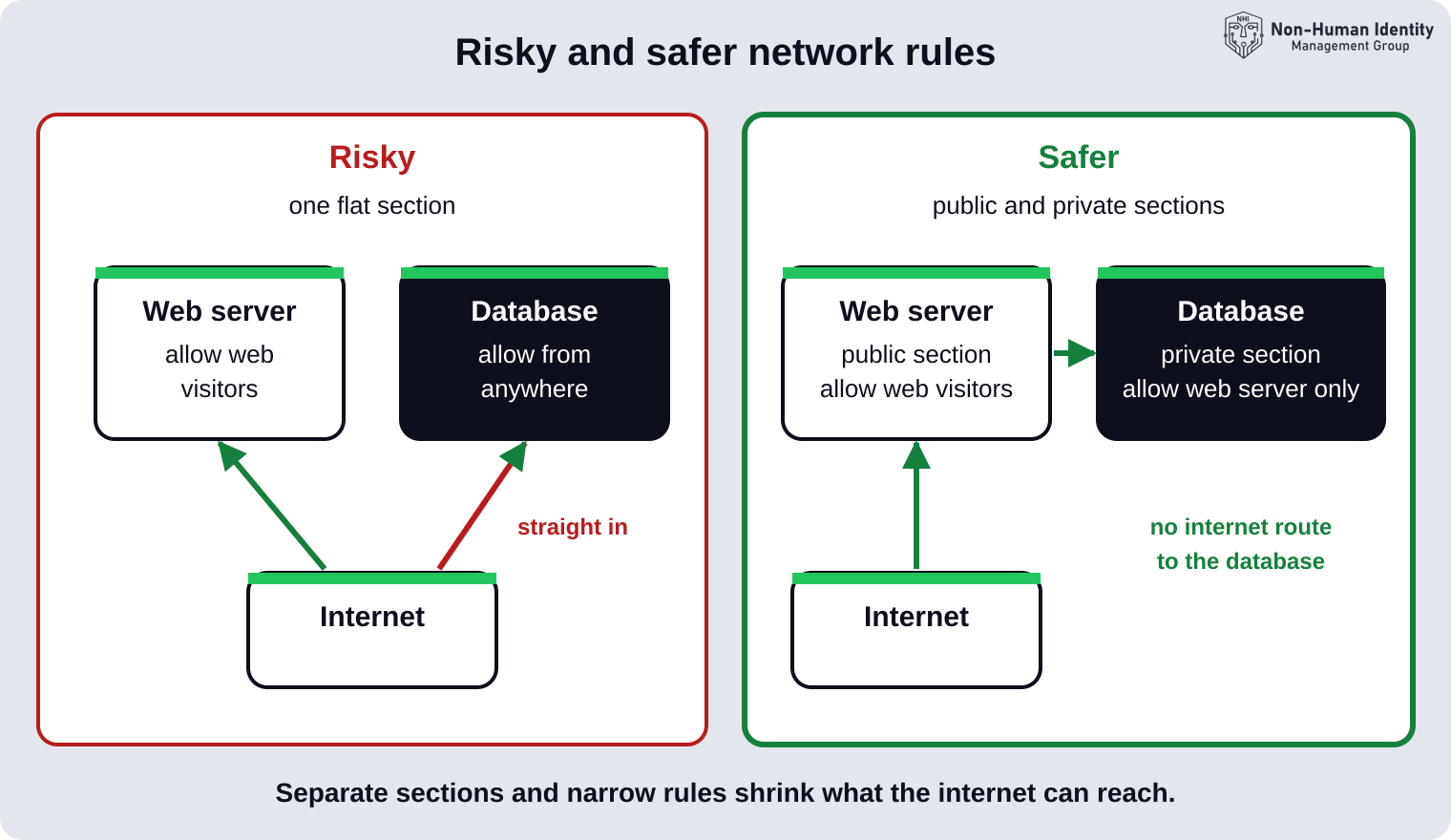
Why this is risky: the database sits in the private section. But the open rule undoes much of that care if any path to it exists.
The safer way: the database rule allows only the web server, and the database has no public address at all.
How does it work?
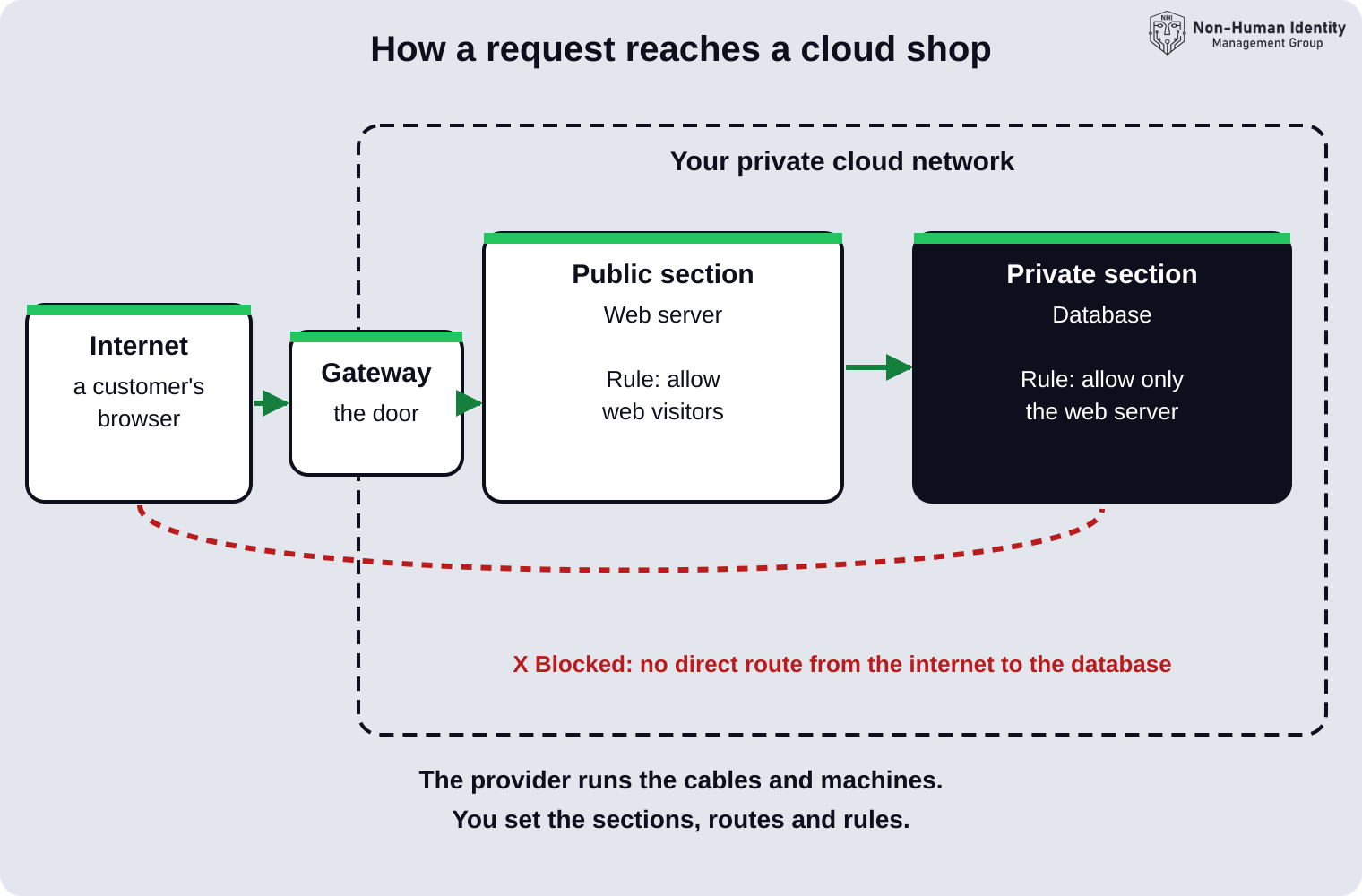
Here is the journey a visitor's request takes to an online shop in the cloud.
- The request arrives. A customer's browser sends a request across the internet to the shop's public address.
- It enters through a gateway. The gateway is the door between the internet and your private network.
- The traffic rules check it. Rules on the web server decide whether this kind of traffic is allowed in.
- The web server asks the database. It sends a request across the private network to the private section.
- The database rules check again. They allow only the web server, so other traffic is turned away.
The three big providers use different names for similar ideas. The table lists them alphabetically, with the starting behaviour their documentation describes.
| Provider | Private network | Traffic rules | Starting behaviour, per the provider's docs |
|---|---|---|---|
| AWS | VPC, with subnets in one zone each | Security groups and network access lists | A security group lets in only the traffic its rules allow, and its default outbound rule allows all traffic.[1][2] |
| Azure | Virtual network (VNet), with subnets | Network security groups | Resources can reach the internet outbound by default. Inbound needs a public address or a public load balancer.[3] |
| Google Cloud | VPC network, which spans regions, with regional subnets | VPC firewall rules | Every network has a built-in rule that blocks inbound traffic, and outbound traffic is allowed unless you add rules.[4] |
Each provider also offers private links to its own services, so traffic can skip the public internet. AWS describes these as VPC endpoints, and Azure as Private Link.[1][3] Google Cloud offers its own private access options, covered in its VPC documentation.[4]
A worked example
This story is made up to show how it can happen.
Niko Nyberg looks after the computers at Blauwe Brug Fietsen, a bike shop in Utrecht with a busy online store. A contractor moved the store to the cloud last year.
One morning, Niko opens the provider's security dashboard for the first time. It flags a warning: a database rule allows traffic from anywhere on the internet.
Niko asks the contractor why. She explains that she opened it during the move to test something. She meant to close it afterwards and forgot.
Together they look at the network. The web server is in a public section, which is fine. The database is in a private section, but it also has a public address, and the open rule lets anyone try to connect.
They change the rule so that only the web server can reach the database. Then they remove the database's public address. Niko checks that the shop still works. Orders still go through.
Next, they look through the database's sign-in records with the contractor. They find no signs of misuse in the records available to them. Niko still changes the database password, to be safe.
Finally, Niko sets a calendar reminder to review every rule that allows "anywhere" once a quarter. Each rule now has a short note saying who asked for it.
What made the difference: Niko asked why the rule existed, instead of assuming someone had a good reason.
Myths and mistakes
| What people think | What is true |
|---|---|
| The cloud provider secures my network for me. | The provider runs the network underneath. You choose the sections, routes and rules. |
| A "private" section means nothing can reach it. | It helps, but a public address or an open rule can still create a way in. Check both. |
| Opening a rule to anywhere is fine for a quick test. | Quick tests are often forgotten. Allow only your own address, and remove the rule when done. |
| Network rules are all I need. | They are one layer. Strong passwords, sign-in checks and updates are still needed. |
| All three providers work the same way. | The ideas are similar, but names and starting settings differ. Read each provider's own guide. |
What can I do this week?
- Ask your team or supplier for a simple diagram of your cloud network.
- List every rule that allows traffic from anywhere, and ask who needs each one.
- Check that databases and file stores have no public address unless there is a clear reason.
- Turn on your provider's built-in security checks, and read what they flag.
Checklist
- I know which cloud providers my organisation uses.
- I can explain what a VPC or virtual network is.
- I know which systems can be reached from the internet.
- Databases sit in private sections with no public address.
- Every "allow from anywhere" rule has an owner and a reason.
- Network rules are reviewed on a regular schedule.
- Someone looks at the provider's security warnings.
Common questions
Is a VPC the same as a VPN?
No. A VPC is your private network inside a cloud provider. A VPN is a protected tunnel that links one place to another across the internet, such as a laptop to an office. A VPN can be used to reach a VPC, but they are different things.
What does 0.0.0.0/0 mean in a rule?
It means any address at all. In an inbound rule, it lets anyone on the internet try to connect. That is normal for a public website. For a database or admin tool, it is usually a mistake, and the rule should name only the computers that need access.
What is the difference between a public and a private subnet?
A public subnet has a route to the internet through a gateway. A private subnet does not. Web servers often sit in public subnets, while databases and internal systems belong in private ones, reached only from inside the network.
Do I need to understand this if a supplier runs my cloud?
Yes, at a basic level. Your supplier sets things up, but your organisation still owns the risk. Knowing the main ideas helps you ask useful questions, such as which systems face the internet and who reviews the rules.
Is a security group a firewall?
In effect, yes. AWS describes a security group as acting like a virtual firewall for the resources it is attached to. Azure and Google Cloud use network security groups and VPC firewall rules for similar jobs.[2]
Where next?
Ready for the detail? Read the practitioner guide: Amazon VPC Security Guide. It goes further into security group and network access list design, flow logs and private endpoints on AWS.
Also useful:
- Azure Virtual Network Security Guide
- Google Cloud VPC and Cloud NGFW Security Guide
- Network Segmentation for Beginners
- Cloud Security for Beginners
- Serverless Computing for Beginners
Related NHI Mgmt Group resources: VPC Endpoints vs NAT Gateways · Firewall Rule Review Checklist · Cloud Security Engineer for Beginners
Key terms
- Virtual private cloud (VPC)
- A walled-off network inside a cloud provider, where the customer chooses the address ranges, sections, routes and gateways.
- Subnet
- A smaller block of addresses inside a network, used to group computers and control traffic.
- Security group
- A set of cloud traffic rules that acts like a firewall for the resources it is attached to.
- Firewall
- A control that filters network traffic by rules, so unwanted connections are blocked.
- IP address
- The number that identifies where network traffic comes from or goes to.
- Private endpoint
- A private connection from your cloud network to a service, so traffic does not cross the public internet.
- The split of security duties between the cloud provider and the customer.
Sources and further reading
- What is Amazon VPC? Amazon Virtual Private Cloud User Guide. Amazon Web Services. https://docs.aws.amazon.com/vpc/latest/userguide/what-is-amazon-vpc.html, accessed 28 Nov 2026.
- Control traffic to your AWS resources using security groups. Amazon Virtual Private Cloud User Guide. Amazon Web Services. https://docs.aws.amazon.com/vpc/latest/userguide/vpc-security-groups.html, accessed 28 Nov 2026.
- What is Azure Virtual Network? Microsoft Learn. Microsoft. https://learn.microsoft.com/en-us/azure/virtual-network/virtual-networks-overview, accessed 28 Nov 2026.
- VPC networks. Google Cloud documentation. Google. https://docs.cloud.google.com/vpc/docs/vpc, accessed 28 Nov 2026.
- Cloud security shared responsibility model. National Cyber Security Centre, published 10 May 2022, reviewed 7 June 2023. https://www.ncsc.gov.uk/collection/cloud/understanding-cloud-services/cloud-security-shared-responsibility-model, accessed 28 Nov 2026.