A Content Security Policy is a rule list a website gives the browser about what a page may run.
This guide is for website owners, people learning web development and anyone who has seen "CSP" in a security report. You do not need to write code to be affected: if your business has a website with a shop, a form or a login, this rule list can help protect your visitors.
In short
- A Content Security Policy (CSP) tells the browser which scripts and other files a page is allowed to use.
- If an attacker sneaks a harmful script into the page, a good policy can stop the browser running it.
- It is an extra layer. It does not replace careful coding, and a loose policy gives little protection.
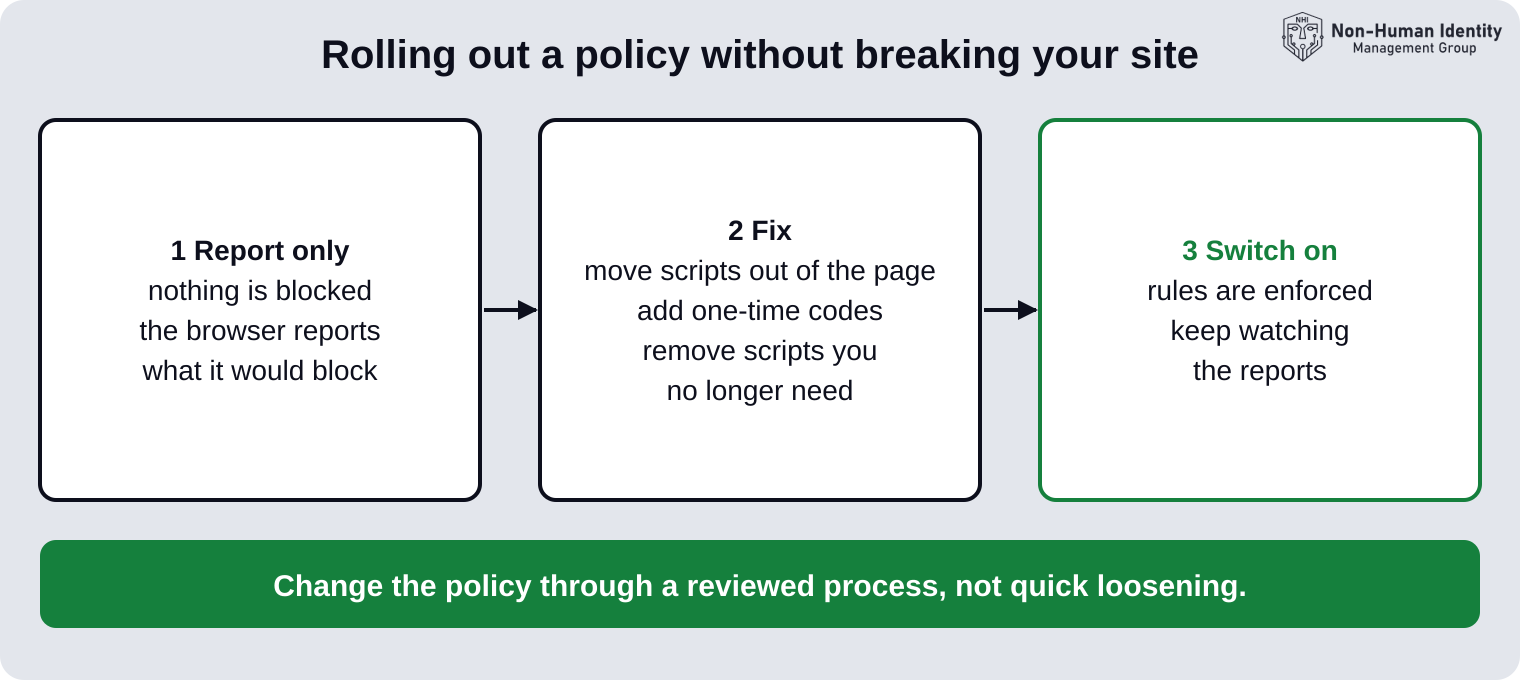
- Start in a "report only" test mode, fix what it flags, then switch the rules on.
What you will learn
- Explain what a Content Security Policy is in one sentence.
- Spot a policy in a website's settings and read its main parts.
- Explain why "report only" mode comes first.
- Ask your web developer or supplier the right questions.
- Small program in a web page (script)
- code the browser runs to make a page do things, like a menu or a payment form.
- Hidden message with the page (header)
- extra information a website sends along with a page, which the browser reads but you do not see.
- Injected script (cross-site scripting)
- an attack where someone gets their own script to run inside another site's page.
What is a Content Security Policy?
Think of the note parents leave for a babysitter. It says who may come into the house and what the children may do. The babysitter follows the note, even if a stranger at the door sounds convincing.
A web page works in a similar way. The website is the parent, the browser is the babysitter, and the Content Security Policy is the note. It travels with the page as a header, a hidden message the browser reads before it shows the page.[1]
The note lists where scripts and other files may come from. Say something on the page tries to load a script from a place not on the list. The browser can then refuse to run it.[1]
Where the comparison stops working: a babysitter can use common sense. A browser follows the policy exactly. If the note is badly written, the browser may block your own menu, or let through the very thing you meant to stop.
Why does it matter?
Its main use is to defend against cross-site scripting. That is when an attacker gets their own code to run inside your page.[1] That code could read what visitors type, such as card details. A policy can also help stop other sites showing your page inside theirs. Tricking people into clicking that way is called clickjacking.[1]
If you own a small business website
What could happen: a harmful script slips onto your checkout page and copies customers' card details.
Check this: ask your web supplier whether the site sends a Content Security Policy, and whether it is switched on or only reporting.
If you are learning web development
What could happen: you add a policy, and parts of your site break because of scripts typed straight into the page.
Check this: try the policy in report-only mode on a test copy first.
If you manage a web team
What could happen: a policy is added once, then loosened bit by bit until it protects very little.
Check this: ask who owns the policy and who approves each new outside script.
Next: Security Headers Guide
What does it look like?
A policy is one line of text sent with each page. Here is a made-up one for a florist's website, split over several lines so it is easier to read.
Example only. All values are made up.
Content-Security-Policy-Report-Only:            (1)
  default-src 'self';                           (2)
  script-src 'nonce-FAKE0000EXAMPLE';           (3)
  object-src 'none';                            (4)
  frame-ancestors 'none';                       (5)
  report-to csp-reports                         (6)
- "Report only" means the browser does not block anything yet. It only reports what it would have blocked.
- By default, files may come only from the site's own address.
- Scripts run only if they carry this one-time code, called a nonce. In a real file, this line would contain a fresh random value for every page.
- Old-style plug-in content is not allowed at all.
- No other site may show this page inside its own page. This helps against clickjacking.
- Where the browser sends its reports, so the team can see what would break.
Why this is risky: some policies allow any script from anywhere. Others allow scripts typed straight into the page. Both give an attacker room to work, while looking like protection.
The safer way: use a short, strict policy built on one-time codes. Test it in report-only mode, fix what it flags, then switch it on.[1]
How does it work?
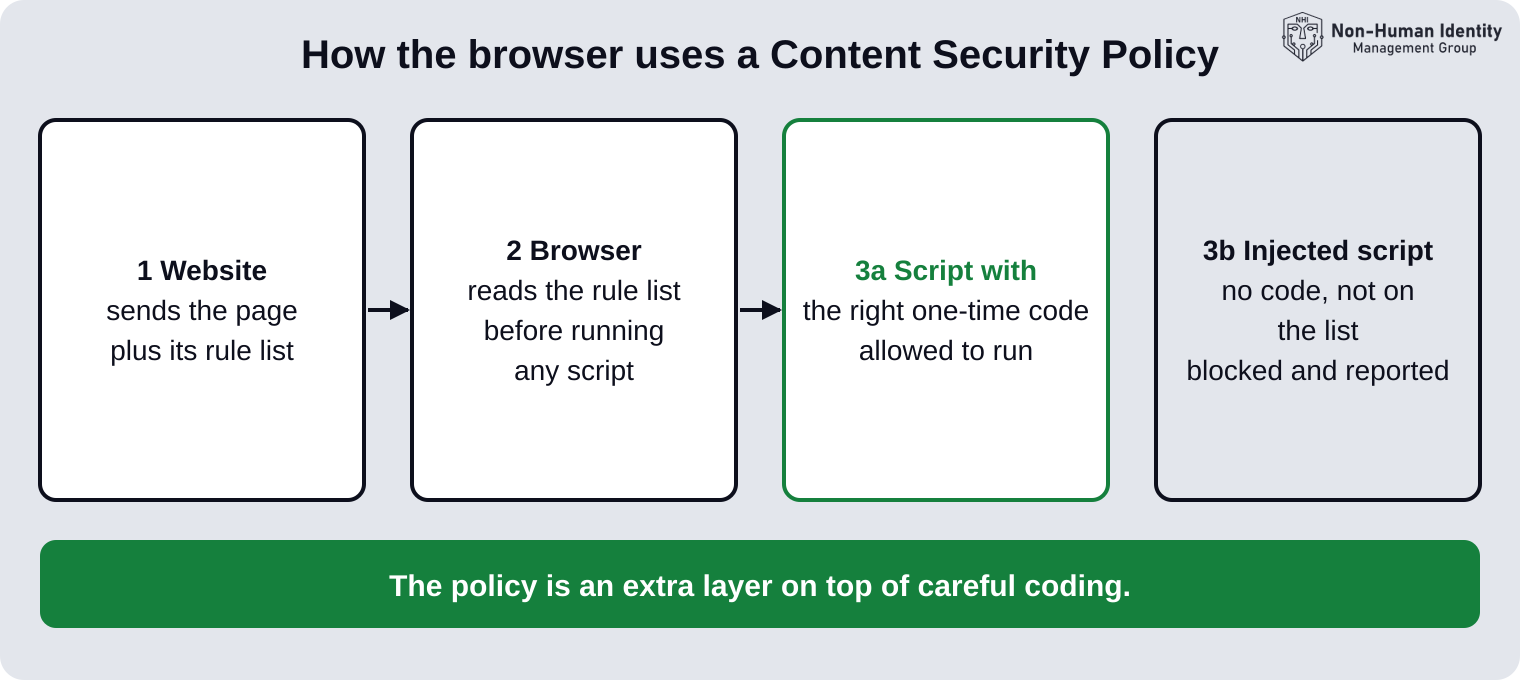
- The site sends the rules. Each time a page is requested, the web server adds the policy as a header.[1]
- The browser reads them first. Before it runs anything, the browser notes which sources are allowed.
- Each script is checked. When the page asks to run a script, the browser checks it against the rules. With a strict policy, a script needs the right one-time code, or nonce, which the server changes every time.[1]
- Allowed or blocked. A script that matches runs. One that does not is blocked, and the browser can send a report about it.
- The team reviews reports. Reports show the team what is being blocked, so they can fix their own pages or spot a real attack.
Getting a policy right takes care. The OWASP Secure Headers Project says a policy needs careful tuning, because a mistake can stop pages working properly.[2] That is why teams start in report-only mode.
A worked example
Wanda Kowal runs Meadow Florist, a small flower shop with an online ordering page. After reading about card skimming on shop websites, she asks her web developer, Amara Quist, whether the site is protected.
Amara checks the site. It has no Content Security Policy at all. She explains it to Wanda as a note for the browser, listing which scripts may run.
Amara adds a strict policy in report-only mode on a Friday. Nothing changes for customers, because report-only mode does not block anything.
On Monday, Amara reads the reports. Three things would have been blocked. One was a small script typed into the order page. One was an old chat widget nobody uses. The last was the payment provider's script.
She moves the small script into its own file and gives it a one-time code. Wanda agrees to remove the old chat widget. For the payment script, Amara follows the payment provider's own guidance for allowing it.
A week later, the reports are quiet. Amara switches the policy from report-only to enforced. She keeps the reports running, and agrees with Wanda that any new outside script must be approved first.
The policy does not make the site attack-proof. Amara still keeps the shop software up to date and checks what visitors type into forms. But if a harmful script does get into the page, the browser is now more likely to refuse to run it.
Myths and mistakes
| What people think | What is true |
|---|---|
| A Content Security Policy is enough on its own. | It is an extra layer. Websites still need to check and clean what users type in. |
| Any policy is better than none. | A very loose policy can look reassuring while blocking almost nothing. |
| Switch it straight on to be safe. | Start in report-only mode, or you may break your own site. |
| Allowing "unsafe-inline" is a harmless quick fix. | It lets scripts written into the page run, which is what many attacks rely on. |
| Once set, the policy looks after itself. | New scripts and suppliers change things. Review the policy and its reports. |
What can I do this week?
- Ask your web supplier if your site sends a Content Security Policy.
- Ask if it is in report-only mode or switched on.
- List the outside scripts your site uses, such as chat, analytics and payments.
- Remove any outside script you no longer need.
- Agree who approves new scripts before they go on the site.
Checklist
- Our site sends a Content Security Policy on every page.
- We tested it in report-only mode before switching it on.
- Scripts are allowed by one-time codes or a short, reviewed list.
- "unsafe-inline" is not used for scripts, or there is a written reason.
- Other sites cannot show our pages inside theirs unless we allow it.
- Someone reads the violation reports.
- New outside scripts are approved before they go live.
- We still check and clean what users type into our forms.
Common questions
How can I tell if a website has a Content Security Policy?
Open the browser's developer tools, reload the page and look at the response headers for the main page. If you see Content-Security-Policy, the site has one. If you see the Report-Only version, it is only reporting and not blocking anything yet.
Will a Content Security Policy slow my site down?
Not in any way most visitors would notice. The browser simply checks scripts against a short list. The real cost is the work to set it up, test it and keep it up to date as your site changes.
What is a nonce?
A nonce is a one-time code the server makes for each page. The policy says "only run scripts carrying this code". An attacker who adds a script to the page is unlikely to know the code, because it changes every time and should not be guessable.
Can I add a policy without a developer?
Sometimes. Some hosting services and website builders let you add headers in their settings. But a policy that is too strict can break your site. We suggest asking someone who knows your site to test it in report-only mode first.
Is a Content Security Policy the same as a web firewall?
No. A web firewall sits in front of your site and checks incoming requests. A Content Security Policy works inside the visitor's browser and limits what the page may run. They help in different places, and many sites use both. See Web Application Firewalls for Beginners.
Where next?
Ready for the detail? Read the practitioner guide: Content Security Policy Guide. It goes further into strict and allow-list policies, nonces and hashes, reporting, and rolling a policy out without breaking production.
Also useful:
- Security Headers Guide
- Cross-Site Scripting for Beginners
- Cross-Site Scripting (XSS) Prevention Guide
- Web Application Firewalls for Beginners
Related NHI Mgmt Group resources: Deprecated Security Headers Reference · TLS and HTTPS for Beginners · Browser Security for Beginners
Key terms
- Content Security Policy (CSP)
- A rule list a website sends to the browser, limiting what a page may load and run.
- Cross-site scripting (XSS)
- An attack where someone gets their own script to run inside another site's page.
- Clickjacking
- Tricking people into clicking something by showing a real page hidden inside another site.
- Nonce
- A random one-time code; in a policy, it marks which scripts the browser may run.
- HTTP header
- Extra information sent with a web page that the browser reads but the visitor does not see.
- Report-only mode
- A test setting where the browser reports what a policy would block, without blocking it.
Sources and further reading
- Content Security Policy (CSP). MDN Web Docs, Mozilla. https://developer.mozilla.org/en-US/docs/Web/HTTP/Guides/CSP, accessed 28 Nov 2026.
- OWASP Secure Headers Project. OWASP Foundation. https://owasp.org/www-project-secure-headers/, accessed 28 Nov 2026.