A cookie consent banner is the message a website shows to ask visitors before it uses optional cookies.
This guide is for people who own, run or market a website, including small businesses and students building their first site. You do not need to write code to be responsible: if your site uses analytics or advertising tools, the banner is part of your job.
In short
- Under UK and EU rules, a site needs a visitor's agreement before it uses most cookies that are not essential to the service.
- Saying no should be as easy as saying yes, and optional cookies should stay off until the visitor chooses.
- The banner only works if the site really waits for the choice before loading those tools.
- Visitors must be able to change their mind later, as easily as they agreed.
What you will learn
- Explain what a cookie banner is for in one sentence.
- Spot the common banner mistakes that regulators point out.
- Check whether your site waits for a choice before loading trackers.
- Ask your web supplier the right questions about your banner.
Status: correct as at 28 November 2026, based on the UK Information Commissioner's Office guidance and the European Data Protection Board cookie banner report. Laws change; check the official text.
This guide explains the topic in general terms and is not legal advice.
- Small file a site saves (cookie)
- a small piece of data a website stores in your browser to remember something.
- Permission pop-up (consent banner)
- the message that asks visitors whether optional cookies may be used.
- Banner tool (consent management platform)
- software that shows the banner, records each choice and switches tools on or off.
What is a cookie consent banner?
Think of a visitors' book at a reception desk, with boxes to tick. Before you hand over extra details, the receptionist asks which ones you are happy to share.
A website works the same way. A cookie is a small file a site saves in your browser. Some cookies are needed for the site to work, like the one that keeps items in a shopping basket. Others are optional, like those used to count visits or show adverts.
A consent banner asks the visitor about the optional ones. The rules also cover similar tracking methods, such as hidden pixels in pages, not just cookies.[1] Many sites use a consent management platform, a banner tool that records each choice and turns tools on or off to match.
Where the comparison stops working: a receptionist waits for your answer before writing anything down. A website can start tracking the moment the page loads, unless it has been set up to wait.
Why does it matter?
A banner that looks fine can still break the rules if trackers run before the visitor chooses. European privacy regulators listed the most common banner mistakes in a joint report.[3]
If you run a small business website
What could happen: a plug-in you added for visitor numbers sets cookies before anyone has agreed.
Check this: ask your web supplier which tools load before the visitor chooses.
If you work in marketing
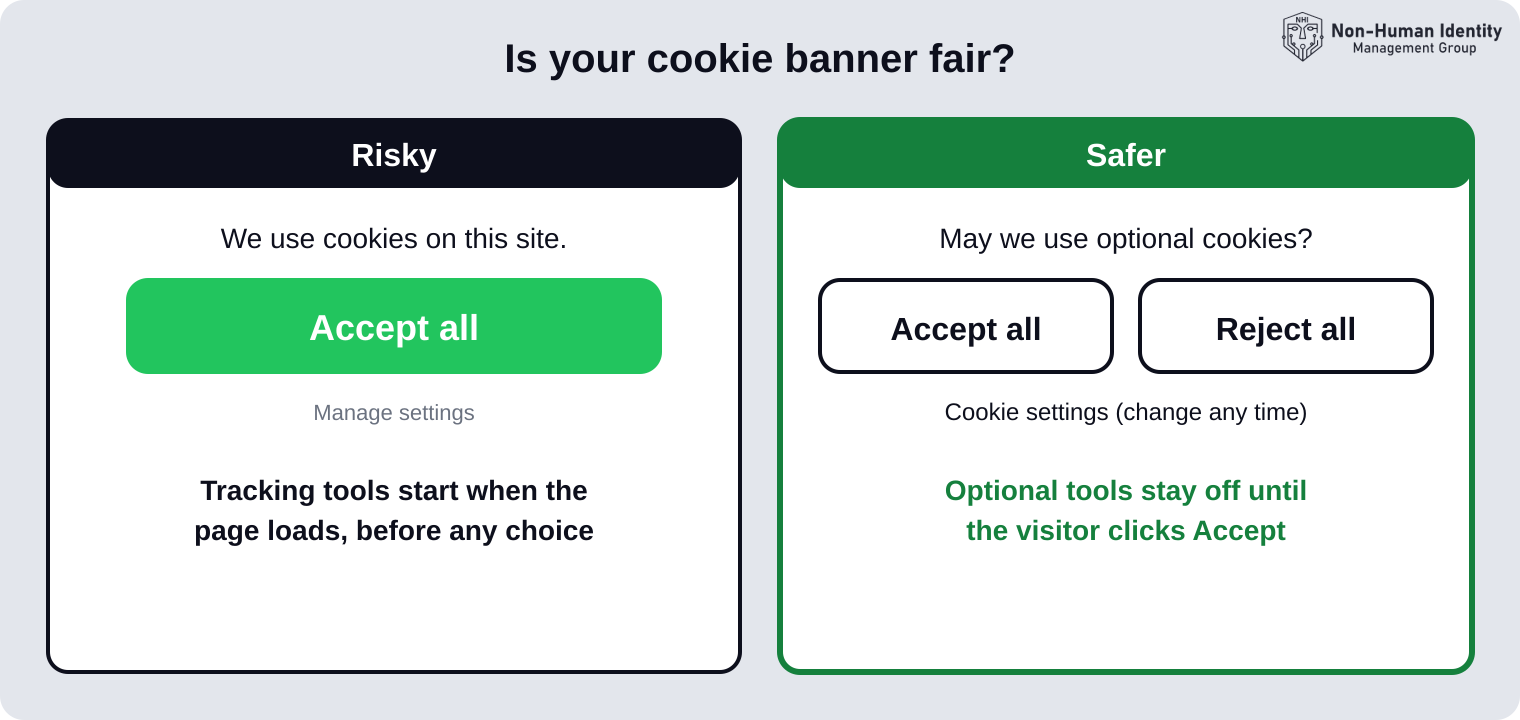
What could happen: a bright Accept button and a hidden Reject link nudge people, and the choice may not count.
Check this: make Accept and Reject the same size and style on the first screen.
If you are building your first website
What could happen: you copy a free banner that shows the message but never actually blocks anything.
Check this: test that optional tools stay off until you click Accept.
What does it look like?
Here is a made-up "Am I affected?" checklist that a website owner could fill in.
Example only. All values are made up.
Website: www.example.com (EXAMPLE Lettings)
[x] Shopping basket or login cookie        (1)
[x] Visitor counting tool                  (2)
[x] Advert or social media pixel           (3)
[ ] Banner has a Reject all button          (4)
[ ] Tools wait until the visitor chooses    (5)
- Cookies the visitor needs for the service they asked for are usually exempt.
- Visitor counting tools set optional cookies. UK rules allow some counting without consent, under conditions.
- Advertising cookies need the visitor's agreement first.
- The box is empty, so saying no is harder than saying yes.
- The box is empty, so trackers may run before any choice.
Why this is risky: the site uses optional trackers. Visitors cannot easily refuse them, and the tools do not wait. The UK regulator says a banner with "accept all" but no "reject all" is poor practice.[2]
The safer way: list every tool on the site and sort each one into needed or optional. Set the optional ones to stay off until the visitor agrees. Put Accept all and Reject all side by side on the first screen.
How does it work?
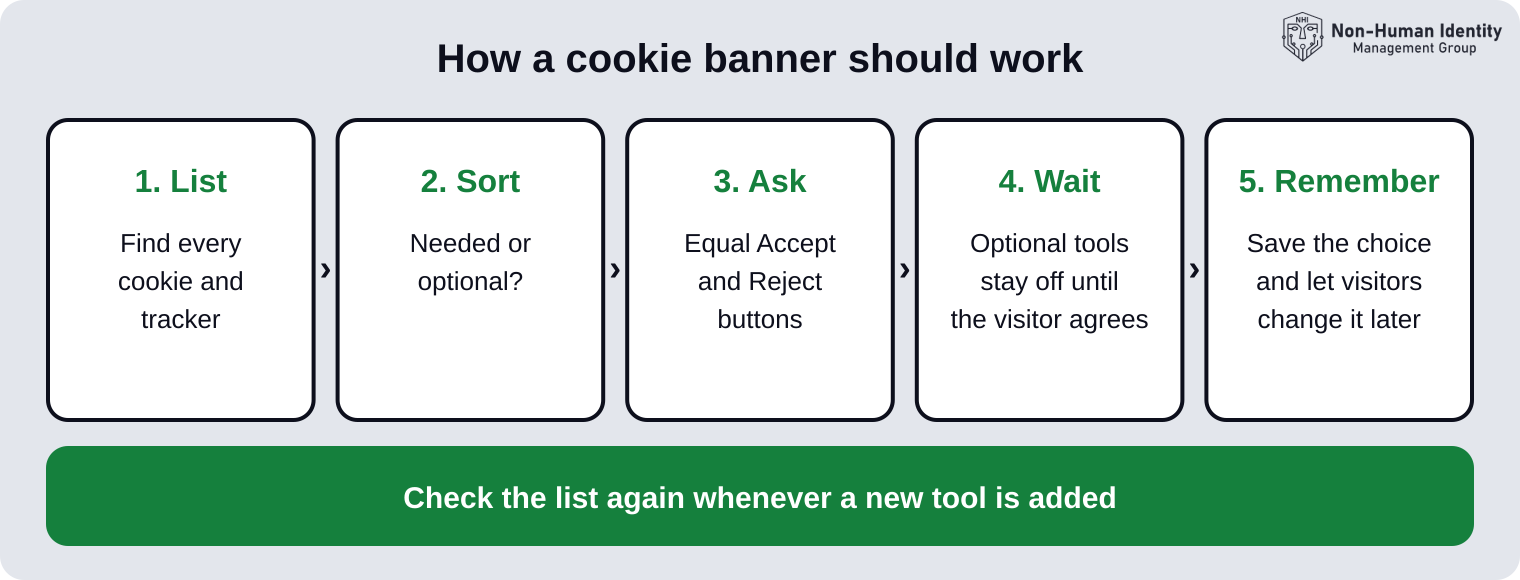
A well set up banner follows these steps.
- The list. The site owner lists every cookie and tracking tool on the site, a check that is often called a cookie audit.
- The sort. Each tool is marked as needed for the service or optional. In the UK, a few uses, such as basic visitor statistics, can be exempt if visitors can object.[1]
- The question. When someone arrives, the banner explains what the optional tools do and asks. Silence or just carrying on browsing does not count as agreement.[2]
- The wait. Optional tools stay switched off until the visitor clicks Accept. Boxes ticked in advance do not give valid consent.[3]
- The record. The banner tool saves the choice, so the site remembers it and can later show what each visitor agreed to.
- The change of mind. A link or icon lets visitors change their choice later, as easily as they gave it.[2]
A worked example
Idris Novak runs Marigold Lettings, a fictional letting agency with a small website. A web developer, Amara Hollis, looks after the site for him.
A customer emails Idris. She says the site's banner only has an Accept button, and asks how she can say no.
Idris thinks of the visitors' book at reception. Nobody should have to tick every box just to get through the door. He asks Amara to check the site.
Amara opens the site in a private browser window and looks at what loads. Before she clicks anything, the visitor counting tool and an advert pixel have already started. The banner is only a message. It does not switch anything off.
She makes a list of every tool on the site. The login cookie for landlords is needed, so it stays on. The advert pixel and the social media button are optional. Basic visitor counting may be exempt under UK rules, but only if visitors can object, so she adds a clear way to opt out.
Next, she replaces the free banner with a banner tool. It shows Accept all and Reject all side by side, in the same style. The optional tools now stay off until a visitor accepts.
Last, she adds a small "Cookie settings" link to the footer of every page. Visitors can change their choice at any time.
Idris replies to the customer to thank her. He also puts a reminder in his diary to ask Amara to check the list again whenever a new tool is added.
Myths and mistakes
| What people think | What is true |
|---|---|
| Showing a banner means the site complies. | The site must also wait for the choice before loading optional tools. |
| "By using this site you agree" is enough. | Carrying on browsing is not valid consent under UK guidance.[2] |
| Ticking the boxes in advance saves visitors time. | Boxes ticked in advance do not give valid consent.[3] |
| A Reject button can live on a second screen. | Regulators expect refusing to be as easy as accepting.[2][3] |
| We can call advertising cookies a "legitimate interest". | European regulators say legitimate interest cannot be the basis for placing or reading cookies.[3] |
What can I do this week?
- Open your site in a private window and note what loads before you click anything.
- Ask your web supplier for a list of every cookie and tracking tool on the site.
- Check that Accept all and Reject all appear side by side on the first screen.
- Add a "Cookie settings" link to every page so visitors can change their choice.
Checklist
- We have a current list of every cookie and tracker on the site.
- Each tool is marked as needed or optional, with a reason.
- Optional tools stay off until the visitor agrees.
- Accept all and Reject all have the same size, colour style and position.
- No boxes for optional cookies are ticked in advance.
- The banner explains in plain words what each optional tool does.
- Visitors can change their choice from every page.
- Someone checks the list whenever a new plug-in or tool is added.
Common questions
Do I need a cookie banner if my site has no adverts?
Possibly. If the site only uses cookies the visitor needs, such as a basket or login, UK guidance treats these as exempt. Many sites also use visitor counting, video players or social media buttons that set optional cookies. List your tools first, then decide.
Is analytics allowed without consent?
Sometimes, in the UK. The regulator lists an exception for collecting visitor statistics only to improve the service, as long as visitors can object. Advertising and profiling uses do not fit it. EU countries have their own rules, so check with your national regulator.
Can I stop people using my site unless they accept cookies?
Be careful. Blocking access unless visitors accept is often called a cookie wall, and regulators look closely at it. Our Consent or Pay Models guide explains the current positions. Take advice before you use one.
Do I have to build the banner myself?
No, most sites use a ready-made banner tool. What matters is the set-up: equal buttons, optional tools off by default and a record of choices. Ask your supplier to show you each of these working. Our Consent Management Platform Buyer's Guide can help.
How often should I check my banner?
We suggest checking it whenever a new plug-in, tag or tool is added, and at least once a year. Sites change over time. A tool added for one campaign can quietly set cookies long after the campaign has ended.
Where next?
Ready for the detail? Read the practitioner guide: Consent Management Guide: Cookies, CMPs and GPC. It goes further into running a cookie audit, browser privacy signals and keeping evidence of each choice.
Also useful:
- Cookie and Tracking Technology Compliance Guide
- Cookies and Online Tracking for Beginners
- UK GDPR for Beginners
- GDPR for Beginners
Related NHI Mgmt Group resources: Dark Patterns and Deceptive Design · Consent Management Platform Buyer's Guide · Data Privacy for Beginners
Key terms
- A small piece of data a website stores in your browser to remember something.
- The message a website shows to ask visitors whether optional cookies may be used.
- Consent management platform
- A banner tool that shows the choice, records it and switches tools on or off to match.
- A cookie the site needs to give the visitor the service they asked for, such as a basket.
- A check that lists every cookie and tracker a site uses and what each one is for.
- Dark pattern
- A design that nudges people towards a choice they might not make if the options were shown fairly.
Sources and further reading
- Guidance on the use of storage and access technologies: What are the exceptions? Information Commissioner's Office (UK). https://ico.org.uk/for-organisations/direct-marketing-and-privacy-and-electronic-communications/guidance-on-the-use-of-storage-and-access-technologies/what-are-the-exceptions/, accessed 28 Nov 2026.
- Guidance on the use of storage and access technologies: How do we manage consent in practice? Information Commissioner's Office (UK). https://ico.org.uk/for-organisations/direct-marketing-and-privacy-and-electronic-communications/guidance-on-the-use-of-storage-and-access-technologies/how-do-we-manage-consent-in-practice/, accessed 28 Nov 2026.
- Report of the work undertaken by the Cookie Banner Taskforce. European Data Protection Board, adopted 17 January 2023. https://www.edpb.europa.eu/system/files/2023-01/edpb_20230118_report_cookie_banner_taskforce_en.pdf, accessed 28 Nov 2026.