Cryptojacking is when someone secretly uses your computers to mine cryptocurrency for themselves.
This guide is for home users, small business owners and anyone new to cloud services. You do not need to own any cryptocurrency to be affected: any computer, phone or cloud account with spare processing power can be a target.
In short
- Cryptojacking borrows your processing power without asking, and the attacker keeps the coins.
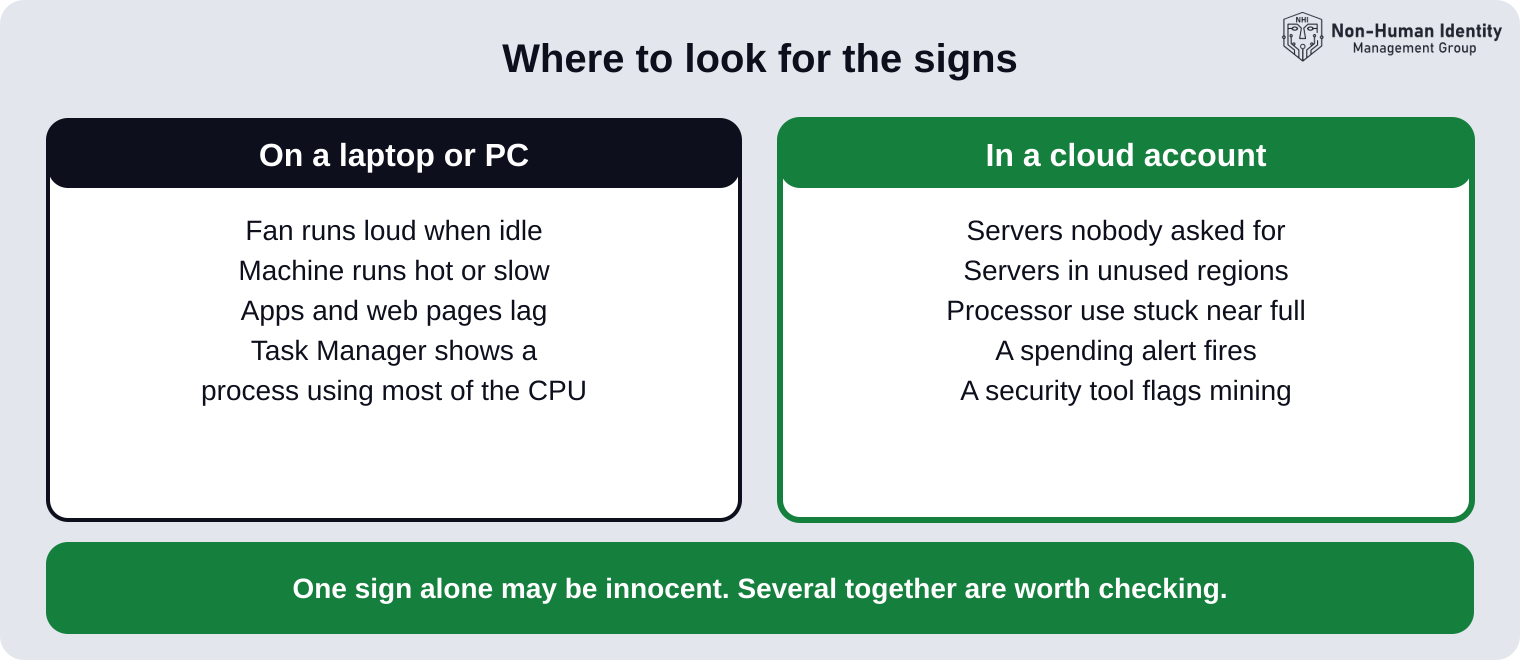
- You may notice a slow, hot or noisy machine, or a sudden jump in a cloud bill.
- Attackers get in through infected downloads, hijacked websites, or stolen or leaked cloud keys.
- Updates, careful downloads, protected cloud keys and spending alerts all lower the risk.
What you will learn
- Explain what cryptojacking is in one sentence.
- Spot the common signs on a computer and in a cloud account.
- Check the basic settings that make cryptojacking harder.
- Ask the right first questions if you suspect it.
- Digital money (cryptocurrency)
- money that exists only online, such as Bitcoin or Monero.
- Making new coins (mining)
- using computers to do heavy sums that can earn new cryptocurrency.
- Rented computers (cloud)
- servers you rent from a provider and pay for by the hour.
What is cryptojacking?
Think of a neighbour who secretly runs an extension lead from your house to power their workshop. Their machines run all day, and you pay the electricity bill.
Cryptojacking works the same way. Some cryptocurrencies reward people who use computers to do heavy sums, called mining. Mining needs a lot of processing power. So an attacker hides mining software, called a miner, on someone else's machine. The machine does the work, and the coins go to the attacker.[1]
The target can be a laptop, a phone, a work server or a cloud account. The processor (the chip that does a computer's thinking, also called the CPU) is the part they want.
Where the comparison stops working: you might spot an extension lead running out of your window. A miner leaves no cable to follow. It often hides behind a normal-looking name and may slow down when you look.
Why does it matter?
Cryptojacking can look like a harmless nuisance, but it costs you money and slows down your work. US cyber security officials list slower systems, higher power use, crashes, damage from heat and lost work time.[1] In the cloud, the cost can be a large bill for servers you never asked for.
If you use a computer at home
What could happen: a free download hides a miner, and your laptop runs hot and slow for weeks.
Check this: keep updates on and download apps only from official stores and sites.
Next: Malware for Beginners
If you run a small business on cloud services
What could happen: a leaked cloud key lets a stranger start dozens of servers and leave you the bill.
Check this: set a spending alert, and ask who holds your cloud keys.
If you are new to IT work
What could happen: you open an admin page to the internet "just for testing", and a miner is running on it soon after.
Check this: keep admin pages behind a login, and close test systems you no longer need.
What does it look like?
Here is a made-up note an IT helper wrote while checking a slow office computer and the firm's cloud account.
Example only. All values are made up.
Slow PC check, office desk 2
Process "sysupdate-FAKE"   CPU 96%   running 9 days   (1)
Connects to pool.example.invalid:0000                 (2)
Cloud account check
New servers: 24, region we never use, started 02:00  (3)
Spending alert: bill 0000% above normal              (4)
- In a real screen, this line would show a process with an ordinary-sounding name using nearly all the processor.
- Miners usually connect to a mining pool, a server where many miners share work.
- Many new servers in an unused region, started at night, is a common sign in the cloud.
- A spending alert is often the first clue a small business sees.
Why this is risky: each sign on its own might be innocent. Together they suggest someone else is using the firm's computers, and the bill keeps growing while they run.[2]
The safer way: treat it as a security incident, not a slow computer. Cut off the attacker's access first, for example by cancelling any leaked cloud keys. Then remove what they started and find out how they got in.
How does it work?
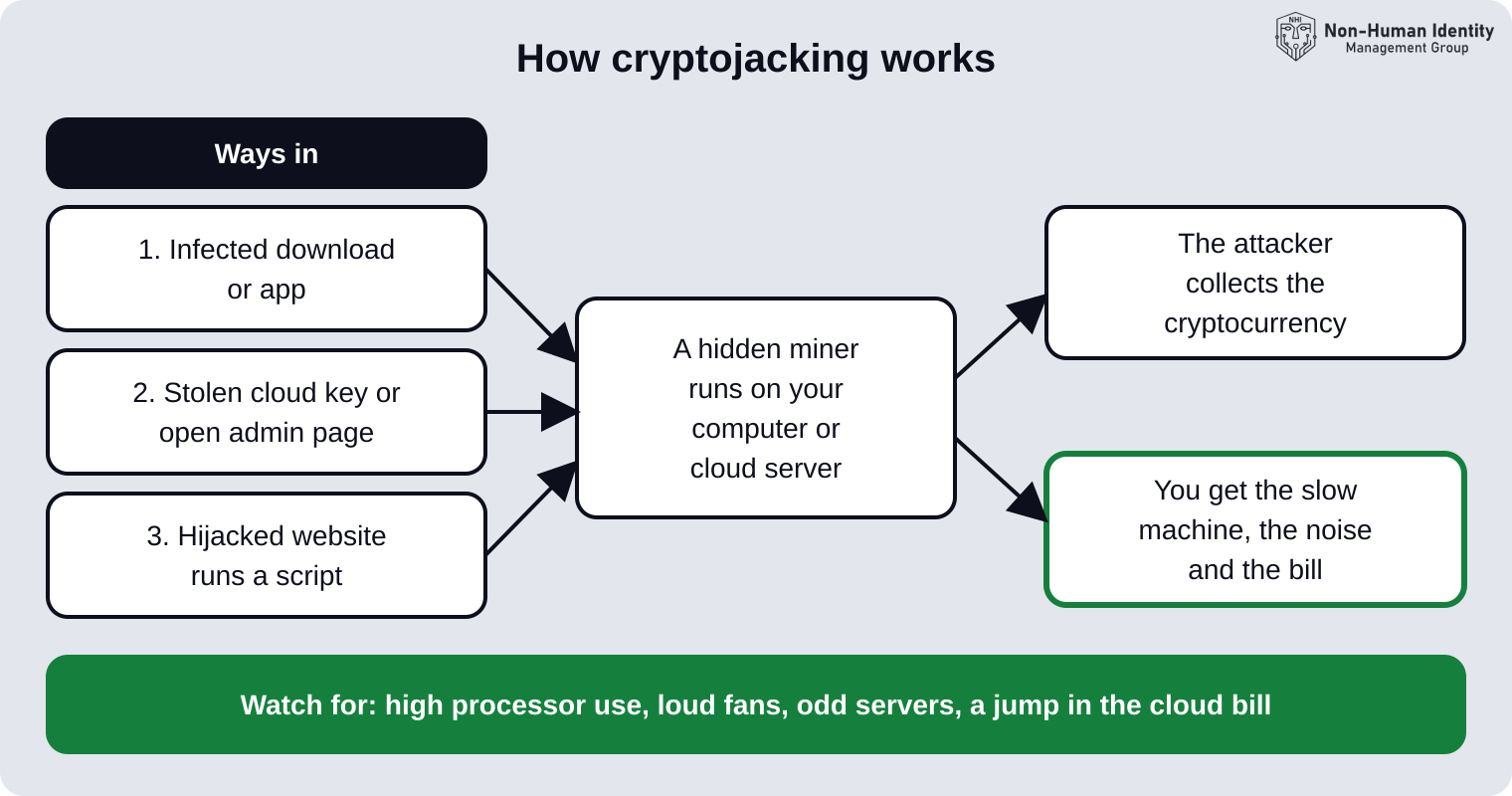
Most cryptojacking follows the same few steps.
- The way in. The attacker gets a foothold. This might be an infected download, a weakness in software that has not been updated, a guessed password, or a cloud key that leaked.[1]
- The miner. They install a miner, often under a name that looks like normal software. In the cloud they may start new servers just for mining.
- The work. The miner uses the processor for hours or days, and sends its results to a mining pool.[2]
- The payout. Any coins earned go to the attacker's wallet. You pay for the power, the wear and the cloud time.
- The clean-up. Once found, access is cut off, the miner and any extra servers are removed, and the way in is closed.
There is also a browser version. A hacked website can run a mining script in your web browser while the page is open. This kind usually stops when you close the page, though some versions keep running.[1]
Cloud accounts are a big target because they can start powerful servers quickly, and someone else pays. In 2020 Microsoft described attackers who found machine learning systems left open on the internet and used them to run a miner.[3] Read our Tesla Kubernetes cryptojacking page for a case where an unprotected admin page exposed cloud keys.
Cloud providers offer tools that help. Some security tools raise an alert when a server talks to addresses linked to cryptocurrency.[4] Spending alerts can warn you about unusual costs, though they may arrive up to a day later.[5] An alert on its own does not cap your spending.[6]
A worked example
Kemal Okafor runs Teal Printers, a fictional print shop with eight staff. Customers upload their artwork through a website that runs on rented cloud servers. Uma Lindahl, a freelance IT helper, looks after it.
One Monday Kemal gets an email from the cloud provider. His spending alert has gone off. The bill for the month is already three times higher than normal, and it is only the 6th.
Kemal remembers the extension lead. Someone is using his power, and he is paying for it. He calls Uma straight away.
Uma logs in and finds twenty new servers in a part of the world the shop never uses. They all started on Saturday night. Each one is running at full power. The provider's security tool has also flagged them for talking to a cryptocurrency address.
She looks at what created them. It was an access key (a password the website uses to talk to the cloud) belonging to the upload website. Last month a developer had pasted that key into a public code project by mistake.
First, Uma cancels the leaked key and gives the website a new one, stored in the provider's secure settings. Next, she shuts down the twenty servers and checks every other region for more. Then she looks for any new users or keys the attacker might have made, and finds none in the records available to her.
Kemal contacts the provider's support team about the bill. He also adds a second, lower spending alert. Uma limits the website's key so it can no longer create servers at all.
The shop lost a weekend of cloud spend, but no customer files were touched in the records Uma could check.
Myths and mistakes
| What people think | What is true |
|---|---|
| I do not own any crypto, so this does not affect me. | Attackers want your processing power, not your coins. Anyone with a computer or cloud account can be a target. |
| It only slows things down, so it is harmless. | It can raise power and cloud bills, wear out hardware and disrupt work.[1] |
| Deleting the miner fixes the problem. | The way in is still open. Close it first, for example by cancelling a leaked key or updating the weak software. |
| A spending alert will stop the bill. | Most alerts only send a warning. You still need to act on it.[6] |
| A slow computer always means cryptojacking. | Many slow computers have ordinary causes. Look for several signs together, such as high processor use with an unknown process. |
What can I do this week?
- Turn on automatic updates for your computers, phones and browsers.
- Open Task Manager (Windows) or Activity Monitor (Mac) and see what normally uses your processor.
- Set a spending alert on every cloud account you pay for.
- Ask your IT helper or supplier where your cloud keys are kept and who can use them.
- Close any test systems or admin pages you no longer use.
Checklist
- Computers, phones and browsers get security updates automatically.
- Security software is installed and kept up to date.
- Apps and add-ons come only from official stores or the maker's own site.
- Default passwords are changed, and admin rights go only to people who need them.
- Cloud keys are stored safely, have an owner and can do only what they need.
- Admin pages and dashboards sit behind a login, not open to the internet.
- Spending alerts are set on every cloud account, and someone reads them.
- Staff know to report a machine that is suddenly hot, loud or slow.
Common questions
Is cryptojacking illegal?
Yes, in most countries. Using a computer without the owner's say is a crime in many places. Mining on your own kit is usually legal. The problem is secretly using other people's machines, power or cloud accounts.
Can my phone be cryptojacked?
Yes, phones can be targets too. US officials list harmful mobile apps as one way miners spread.[1] Install apps only from the official app store, keep the phone updated and remove apps you do not recognise or no longer use.
How do I check my computer for a miner?
Start with Task Manager on Windows or Activity Monitor on a Mac. Sort by processor use while the computer is idle. A process you do not recognise using most of the processor for a long time is worth checking. Then run a full scan with your security software.
Does closing my browser stop browser mining?
Usually, yes. Browser mining often runs only while the hacked page is open. Some versions keep running after you leave the page.[1] If your computer stays busy after closing the browser, restart it and run a security scan.
Who pays the cloud bill after cryptojacking?
Usually the account owner, because the servers ran on their account. Some providers may review a bill caused by misuse, so contact their support quickly. We suggest acting fast either way: every hour the servers run adds to the cost.
Where next?
Ready for the detail? Read the practitioner guide: Cryptojacking Incident Response Playbook. It goes further into triage, containment across cloud regions, removing attacker access and the review after an incident.
Also useful:
- Cryptojacking Guide
- Malware for Beginners
- Botnets for Beginners
- Leaked Secret Response for Beginners
- Browser Security for Beginners
Related NHI Mgmt Group resources: Cloud Incident Response Guide · Malware Guide
Key terms
- Cryptojacking
- Secretly using someone else's computers or cloud account to mine cryptocurrency.
- Cryptocurrency
- Digital money that exists only online and is recorded on a shared ledger.
- Mining
- Using computer power to check and record cryptocurrency payments, which can earn a reward in new coins.
- Malware
- Software made to harm a computer or misuse it without the owner's permission.
- Access key
- A secret code that lets a program or person use a cloud account.
- Patching
- Installing updates that fix known weaknesses in software.
Sources and further reading
- Defending Against Illicit Cryptocurrency Mining Activity. Cybersecurity and Infrastructure Security Agency (CISA). https://www.cisa.gov/news-events/news/defending-against-illicit-cryptocurrency-mining-activity, accessed 28 Nov 2026.
- Resource Hijacking, Technique T1496. MITRE ATT&CK. https://attack.mitre.org/techniques/T1496/, accessed 28 Nov 2026.
- Misconfigured Kubeflow workloads are a security risk. Microsoft Security Blog, 10 June 2020. https://www.microsoft.com/security/blog/2020/06/10/misconfigured-kubeflow-workloads-are-a-security-risk/, accessed 28 Nov 2026.
- GuardDuty EC2 finding types (CryptoCurrency:EC2/BitcoinTool.B). Amazon GuardDuty User Guide, Amazon Web Services. https://docs.aws.amazon.com/guardduty/latest/ug/guardduty_finding-types-ec2.html, accessed 28 Nov 2026.
- Detecting unusual spend with AWS Cost Anomaly Detection. AWS Cost Management User Guide, Amazon Web Services. https://docs.aws.amazon.com/cost-management/latest/userguide/manage-ad.html, accessed 28 Nov 2026.
- Create, edit, or delete budgets and budget alerts. Google Cloud Billing documentation, Google. https://docs.cloud.google.com/billing/docs/how-to/budgets, accessed 28 Nov 2026.