Leaked secret response is the set of steps you take when a password, API key, token, certificate key or other credential has been exposed: report it, switch it off, replace it, check whether anyone used it and find out how it escaped.
This guide is for newcomers, students, career changers and managers who may be the first to hear that "a key is on GitHub" or "a token was pasted in a public channel". It works for any secret type, whether it belongs to a cloud account, a payment service, a database or an AI tool. It does not explain how leaks happen; for that, read Secrets in Code for Beginners and API Keys for Beginners. Here the focus is what to do, in what order, in the first hour.
By the end of this guide you will be able to:
- Explain why switching a leaked secret off comes before cleaning it up.
- Describe the five actions of a first-hour response.
- Identify the evidence to check for misuse of a leaked secret.
- Understand when a leak becomes a wider security incident.
Key takeaways
- Treat every exposed secret as compromised. You rarely know who saw it, so assume someone did.
- Revoke first, tidy later. Deleting the secret from a file, chat or repository does not stop it working. Switching it off at the service that issued it does.
- Replace it without breaking things. Issue a new secret, update the programs that use it, then make sure the old one is dead.
- Check what it was used for. Logs from the issuing service show whether the secret was used, from where and to do what.
- Fix the cause. Find out how it leaked and close that route, or the next secret will leak the same way.
What it is, in plain English
Software and machines prove who they are with secrets. A non-human identity (NHI) is an identity with an account and credentials that represents software or a machine, such as an application, script, pipeline or AI agent. The secret is the credential that proves the NHI may act. See Non-Human Identities for Beginners for the wider picture.
A leaked secret is any secret that has ended up somewhere it should not be: a public code repository, a log file, a support ticket, a screenshot, a shared document or a chat message. Leaked secret response is a small, focused form of incident response, the organised way a team detects, contains, investigates and recovers from a security event.
An everyday comparison is losing the keys to your office. You do not just hope nobody picks them up. You change the locks, give the staff new keys, check whether anyone got in, and work out how the keys were lost. Where the analogy breaks down: a lost physical key is in one place, but a leaked digital secret can be copied endlessly and used from anywhere in the world within minutes, which is why speed matters more.
The OWASP Secrets Management Cheat Sheet says exposed keys should undergo immediate revocation, and that a new secret should be created and deployed quickly, preferably through an automated process.[1]
Why it matters to you
- If you run a small business: a leaked cloud or payment key can lead to stolen data or a large bill for services you never asked for. A calm, quick response limits both.
- If you are new to a security job: leaked secret alerts are among the most common tickets a junior analyst handles. Knowing the order of actions is a core skill.
- If you are a manager: you may need to decide quickly whether to accept a short outage while a key is replaced, and whether the leak needs to be escalated or reported.
A secret that no longer works is no longer dangerous. Until then, anyone holding a copy can act as your software, and their actions can look like normal traffic. Leaks also sit unnoticed for a long time. In the Toyota T-Connect key exposure, BleepingComputer reported that an access key to a customer data server was on a public GitHub repository from December 2017 until 15 September 2022, that the keys were changed on 17 September 2022, and that Toyota said it could not completely rule out third-party access.[6] Without good logs, a team may never know whether a long-exposed secret was used.
Leaked secret response fits into wider guidance. NIST SP 800-61 Revision 3, published in April 2025, sets out incident response recommendations as a Community Profile of the NIST Cybersecurity Framework (CSF) 2.0.[5] NIST SP 800-53 covers incident handling under control IR-4 and managing credentials under IA-5.[7]
How it works, step by step
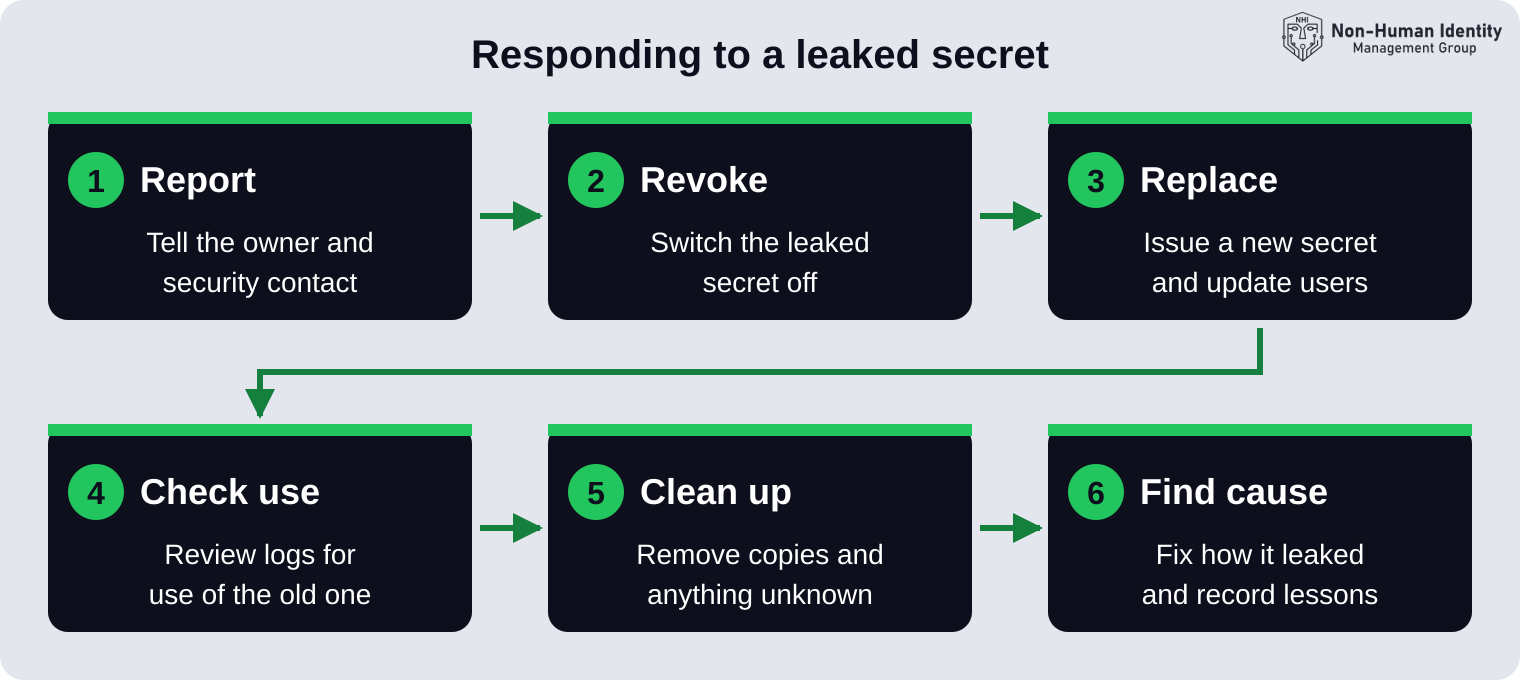
We suggest working through these steps in order. Steps 1 to 3 are the ones to aim for inside the first hour; steps 4 to 6 begin in that hour and may take longer.
- Report and confirm. Tell the secret's owner and your security contact straight away. Note what the secret is, where it was exposed, when, and whether it is public. Do not wait to be certain it was misused.
- Revoke the secret. Switch it off at the service that issued it: delete or disable the key, reset the password, revoke the token. Proceed carefully so the change does not cause an avoidable outage. Google's guidance, for example, is to revoke or reissue a compromised credential while taking care not to break services.[4]
- Replace it. Issue a new secret, store it in a secrets manager rather than in code, and update every program that used the old one. AWS describes creating a new access key, updating applications, deactivating the original key and deleting it only once everything works.[3]
- Check use. Look at the issuing service's logs for activity by the leaked secret since it was exposed: unfamiliar locations, new users or keys, changed permissions, unusual data access or new resources. Google advises searching audit logs for all API calls made by the compromised identity during the incident window.[4]
- Clean up. Remove anything the attacker created, and remove the secret from where it leaked. GitHub's documentation says the first step for a committed secret is to revoke or rotate it, and warns that rewriting history does not remove copies in other people's clones, in forks, or in cached views.[2]
- Find the cause and record it. Work out how the secret escaped and close that route. Write down what happened, what you did and when. OWASP notes responders need the secret's history: who had access, when it was used and when it was last rotated.[1]
What "revoke" means for different secrets
The idea is the same everywhere, but the action differs. The examples below come from cloud provider guidance and are not a full list.
| Secret type | What switching it off usually involves |
|---|---|
| Cloud access key (for example AWS) | Create a replacement, update applications, deactivate the old key, then delete it once everything works.[3] |
| Service account key (for example Google Cloud) | Create and deploy a new key, disable then delete the old one. Access tokens already issued remain valid until they expire, so blocking the account for a period may also be needed.[4] |
| API key for a service | Rotate the key in the provider's console, update applications, then delete the previous key.[4] |
| OAuth client secret | Reset the secret and deploy the new one.[4] |
| Password for a database or service account | Change the password at the database or directory and update everything that uses it. |
When to escalate
We suggest treating the leak as a wider security incident, and bringing in your incident response lead, if any of these are true: logs show the secret was used by someone unknown; the secret gave administrator or broad access; personal or customer data could have been reached; or you cannot see logs at all. Personal data may bring legal reporting duties, so involve whoever handles data protection in your organisation.
A worked example
Northgate Clinic Supplies is a fictional distributor with 60 staff. At 10:05 on a Monday, a developer, Tom, notices that a cloud access key used by the stock system is in a file he pushed to a public repository on Friday evening.
- 10:07, report: Tom messages Aisha, the IT lead, with the repository link and the time of the push.
- 10:15, revoke and replace: Aisha creates a new key for the stock system, stores it in the company's secrets manager and updates the stock application. She deactivates the old key and confirms the stock system still works.
- 10:35, check use: she reviews the cloud provider's activity logs since Friday. She finds calls from an unfamiliar location on Saturday that listed storage buckets, and an attempt to create a new user that failed because the key did not have permission.
- 10:50, escalate and clean up: because the key was used by someone unknown, Aisha opens an incident with the clinic's outside IT security provider. Tom removes the file and Aisha deletes the old key.
- Later that week, find the cause: the key had been copied into a test script. The team turns on secret scanning for its repositories and moves the stock system to a platform identity so no stored key is needed.
The response did not undo Saturday's activity: someone did list the storage buckets, and the incident team still needs to confirm whether any files were read. But the key was switched off within the hour of being noticed, the failed attempt to create a user showed that limited permissions reduced the damage, and the clinic has a timeline to work from.
Myths and misunderstandings
| What people think | What is true |
|---|---|
| We deleted the file, so the problem is solved. | The secret still works until it is revoked. Copies can also remain in clones, forks and cached views.[2] |
| The repository was only public for a few minutes, so nobody saw it. | You cannot know who copied it. Treat any exposure as a compromise and revoke. |
| Resetting the user's password or restarting the app is enough. | Tokens already issued can keep working until they expire, and restarting an app does not revoke stolen credentials.[4][1] |
| If the logs show nothing, there was no misuse. | Only if logging was switched on and covered that secret. No logs means you do not know. |
| Rewriting the repository history is the most urgent step. | Revoking comes first. Once the secret is dead, history clean-up is tidying, and may not be needed at all.[2] |
Key terms
- Secret
- The credential that proves a non-human identity is allowed to act, such as an API key, token, password or certificate.
- Leaked secret
- A credential or key exposed outside its intended trust boundary, through code, logs, repositories, misconfiguration or disclosure.
- Exposed secret
- A secret that can be replayed by an attacker unless it is quickly revoked, rotated and traced across every place it was deployed.
- Secret revocation
- Invalidating an exposed credential so it can no longer be used, in every system that trusts it.
- Credential rotation
- Replacing a secret with a new value to limit how long a compromised one can be used.
- Incident response
- The actions used to detect, contain, investigate and recover from a security event, including revoking compromised accounts and invalidating secrets.
- Blast radius
- The potential scope of damage if a specific credential or identity is compromised.
- Secrets manager
- A system that stores, rotates and delivers credentials such as API keys, passwords, tokens and certificates.
Common questions
Who should I tell first?
The owner of the secret and your security contact. If you do not know who owns it, tell your IT or security team and say where you found it.
What if revoking the secret will break a live service?
Replace it first if you can do so quickly, then revoke. If the secret is public and powerful, a short, approved outage is usually better than leaving it working. Any decision to delay revocation should be a controlled exception: approved by the owner, recorded, monitored and time-limited.
Do I need to rewrite the Git history?
Not as a first step. GitHub says rotation may be enough on its own, and that rewriting history does not reach clones, forks or cached views.[2]
How far back should I check the logs?
At least from when the secret was first exposed. If you do not know when that was, check as far back as your logs go.
Can a short-lived token leak too?
Yes. It is useful to an attacker until it expires, and some cannot be revoked directly. Google notes that service account access tokens remain valid until their expiration time.[4] The damage window is shorter, but the same steps apply.
Does a leaked secret have to be reported to a regulator?
It depends on what the secret could reach and where you operate. A leak that exposed personal data can trigger legal duties, so involve your data protection lead early.
First steps
Three things you can do this week:
- Write a one-page plan. Who to tell, how to reach them out of hours, and the order: report, revoke, replace, check use, clean up, find cause. OWASP recommends documenting whom to alert and the containment steps.[1]
- Find out how to revoke your top five secrets. For each of your most important keys and tokens, note where in the provider's console it can be switched off, and who has permission to do it.
- Check that logs exist. Confirm that the services behind those secrets record who did what, and that someone can read those logs during an incident.
Checklist
- Everyone knows to report a leaked secret immediately, without fear of blame.
- Each important secret has a named owner.
- We know how to revoke each important secret, and who has permission to do it.
- Replacement secrets go into a secrets manager, not back into code.
- Logs for our key services are switched on and kept long enough to investigate.
- We revoke before cleaning up files or history.
- We have clear triggers for escalating a leak to a full incident.
- Each leak ends with a short record of the cause and the fix.
Simple measures that show progress: time from report to revocation, the share of leaks where logs could confirm or rule out misuse, the number of leaks caught by scanning before they went public, and the number of repeat leaks from the same cause.
Check your understanding
1. Why does revoking come before deleting the file?
Answer: deleting the file does not stop the secret working, and copies may already exist. Revoking makes every copy useless.
2. What should you look for in the logs after a leak?
Answer: any use of the leaked secret since it was exposed, especially from unfamiliar places, new users or keys, permission changes, data access or new resources.
3. Name two signs that a leak should be escalated to a full incident.
Answer: for example, the secret was used by someone unknown, it gave broad or admin access, personal data could have been reached, or no logs exist.
4. Why is finding the cause part of the response?
Answer: if the route stays open, the next secret will leak the same way.
Suggested learning pathway
- Start with Non-Human Identities for Beginners for the identities behind these secrets.
- For how leaks happen, read Secrets in Code for Beginners.
- For the most common secret type, read API Keys for Beginners.
- For planned replacement, see Secrets Rotation for Beginners.
- For the wider discipline, see Incident Response for Beginners.
- For a step-by-step playbook, see the API Key Leak Response Playbook.
- For working out what a key could reach, see How to work out what a leaked API key could access and what it actually did.
- NHI Foundation Level Training
Standards and references
- Secrets Management Cheat Sheet (sections 9.1 to 9.3, Incident Response). OWASP Cheat Sheet Series, OWASP Foundation. https://cheatsheetseries.owasp.org/cheatsheets/Secrets_Management_Cheat_Sheet.html, accessed 27 Nov 2026.
- Removing sensitive data from a repository. GitHub Docs, GitHub. https://docs.github.com/en/authentication/keeping-your-account-and-data-secure/removing-sensitive-data-from-a-repository, accessed 27 Nov 2026.
- How do I remediate a potentially compromised AWS account? AWS re:Post Knowledge Center, Amazon Web Services. https://repost.aws/knowledge-center/potential-account-compromise, accessed 27 Nov 2026.
- Handle compromised Google Cloud credentials. Google Cloud documentation, Google. https://docs.cloud.google.com/docs/security/compromised-credentials, accessed 27 Nov 2026.
- SP 800-61 Rev. 3, Incident Response Recommendations and Considerations for Cybersecurity Risk Management: A CSF 2.0 Community Profile. National Institute of Standards and Technology (NIST), April 2025. https://csrc.nist.gov/pubs/sp/800/61/r3/final.
- Toyota discloses data leak after access key exposed on GitHub. BleepingComputer, 10 October 2022. https://www.bleepingcomputer.com/news/security/toyota-discloses-data-leak-after-access-key-exposed-on-github/, accessed 27 Nov 2026.
- SP 800-53 Rev. 5, Security and Privacy Controls for Information Systems and Organizations (IR-4, IA-5). National Institute of Standards and Technology (NIST). https://csrc.nist.gov/pubs/sp/800/53/r5/upd1/final.
Related NHI Mgmt Group resources: Cloud Access Key Leak Playbook · Deleted but Not Revoked · How to revoke a leaked GitHub personal access token and check what it touched