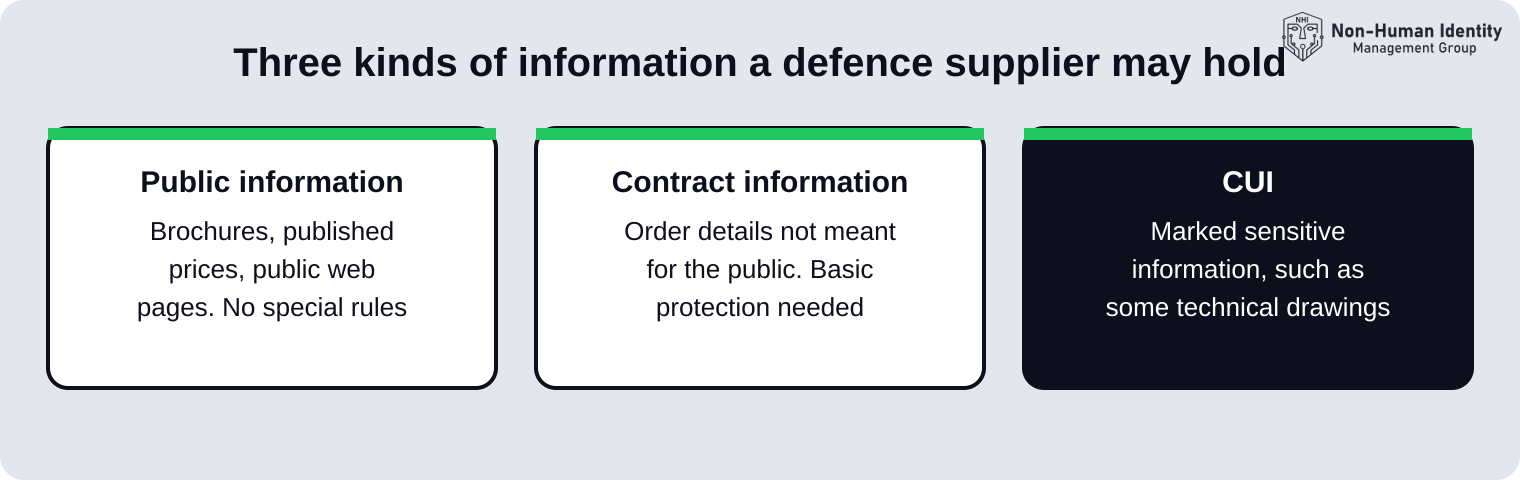
CUI is sensitive US government information that is not secret but must still be protected.
This guide is for staff at small firms that supply the US government, especially defence, and for people new to IT work at those firms. You do not need to be a security expert to be affected: if a customer sends you files marked CUI, your firm has to look after them in set ways.
In short
- CUI stands for Controlled Unclassified Information. It is not classified, but the US government says it needs protecting.
- CUI should be marked with a banner, such as "CUI" or "CONTROLLED", on each page.
- NIST SP 800-171 is the US government's list of security requirements for protecting CUI in company systems.
- Defence contracts often require these requirements, and suspected leaks must be reported quickly.
What you will learn
- Explain what CUI is in one sentence.
- Spot a CUI marking on a file or email.
- Check where CUI is kept at your firm.
- Ask your customer the right questions about the rules that apply.
Status: correct as at 28 November 2026, based on the US government CUI rule (32 CFR Part 2002), NIST SP 800-171 Revision 3 and the defence contract clause DFARS 252.204-7012. Rules change; check the official text.
This guide explains the topic in general terms and is not legal advice.
- Sensitive government information (CUI)
- information that is not classified but must be protected under US rules.
- The rulebook for protecting it (NIST SP 800-171)
- a US government list of security requirements for company systems that hold CUI.
- Label on the file (marking)
- words such as "CUI" that show the information is controlled.
What is CUI?
Think of a letter stamped "handle with care". It is not top secret, but you would not pin it on a public noticeboard. The stamp tells everyone who touches it to take extra care.
Controlled Unclassified Information (CUI) works in a similar way. It is US government information that must be kept safe, or shared only with some people. But it is not secret in the way classified files are.[1] Examples include some drawings for defence kit and some data that is controlled for export.[3]
The US National Archives runs the CUI scheme for the whole government. It keeps a public list of the kinds of CUI. This list is called the CUI Registry.[1][3]
When a firm holds CUI, the government uses one main rulebook for the firm's computers. It is a list of security rules from a US standards body. We explain it below.[2][4]
Where the comparison stops working: a stamp on one letter is easy to see. CUI is often copied into emails, folders and laptops. The copies may lose their label on the way.
Why does it matter?
If your firm handles CUI for a defence customer, the contract can require you to protect it to a set standard and report incidents. Getting it wrong can put the contract at risk.
If you run a small supplier
What could happen: your firm receives CUI drawings and stores them like any other file.
Check this: ask your customer whether you will receive CUI, and which rules your contract sets.
Next: CMMC for Beginners
If you are new to IT at a supplier
What could happen: CUI spreads into personal email, shared drives and old laptops, so far more needs protecting.
Check this: list every system where CUI is kept or sent.
Next: CMMC Scoping Guide
If you are an engineer or designer
What could happen: you email a marked drawing to a new partner who is not allowed to see it.
Check this: look for the marking before you share any customer file.
Next: CUI Guide
What does it look like?
Here is a made-up cover page of a document that holds CUI.
Example only. All values are made up.
CUI                                                  (1)
-------------------------------------------------------
Controlled by: EXAMPLE Agency, Office of FAKE Programs (2)
CUI Category: CTI                                    (3)
Distribution: FAKE-0000                              (4)
POC: example.invalid
Title: Bracket assembly, drawing EXAMPLE-0000
-------------------------------------------------------
CUI                                                  (1)
- The banner. The rule says it can be "CUI" or "CONTROLLED", and it should be the same on every page.[2]
- Who created or controls the information.
- The kind of CUI. CTI is short for Controlled Technical Information, one category in the CUI Registry.[3]
- Limits on who may receive it. In a real file, this line would contain the actual sharing limits.
Why this is risky: once someone copies the drawing into an email or a new file, the banner may be left behind. The information is still CUI.
The safer way: keep CUI in a small set of approved systems. Carry the marking over to any copy or new document that uses it.
How does it work?
The rules link together like this. The CUI rule decides what is CUI and how it is marked. The contract tells your firm to protect it. NIST SP 800-171 says how.
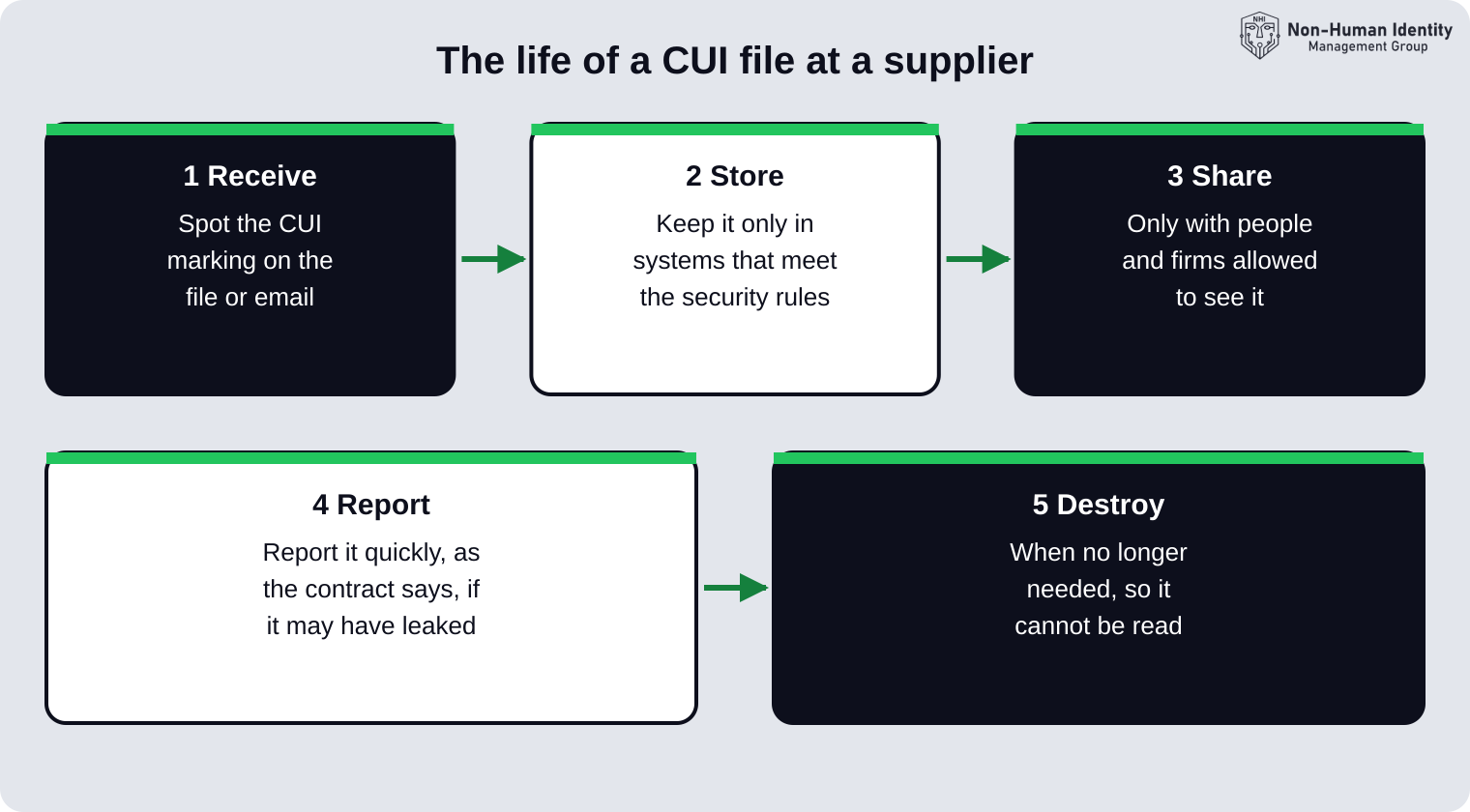
- The government marks the information. It labels CUI and lists the kinds of CUI in the CUI Registry.[2][3]
- The contract passes on the duty. Defence contracts use a clause, often called DFARS 7012, that requires the supplier to apply NIST SP 800-171. Main contractors must pass the clause down to subcontractors who handle this information.[5]
- The firm meets the requirements. NIST SP 800-171 groups its requirements into 17 families, such as access control, incident response and supply chain risk.[4] The contract says which version applies.[5]
- Incidents are reported fast. Under the defence clause, a cyber incident must be reported to the US Department of Defense within 72 hours of finding it.[5]
- Old CUI is destroyed properly. When CUI is no longer needed, it must be destroyed so it is unreadable and cannot be recovered.[2]
For defence work, a separate programme called CMMC checks whether suppliers really meet these requirements. Our CMMC for Beginners guide explains those checks.
A worked example
This story is made up to show how it can happen.
Odile Ilic owns a small engineering firm with fifteen staff. They design brackets for a larger company that builds US military vehicles. Idris Nakamura has just joined as the firm's first IT person.
In his first week, Idris notices a drawing on the shared drive. The top of each page says "CUI". He asks Odile what it means. She is not sure.
Idris reads the contract with her. It includes the defence clause that requires NIST SP 800-171. He then searches for other files with the same marking. He finds copies in three places: the shared drive, an engineer's personal cloud folder and an old laptop in a cupboard.
Odile asks her customer which files are CUI and which rules apply. The customer confirms the drawings are CUI and sends her the details.
Idris sets up one locked folder that only the design team can open. The drawings move there. The personal cloud copy is deleted, and the old laptop is wiped in a way that leaves the data unreadable.
Odile also writes a short note for staff. It says what the marking means, where CUI may be kept and who to tell if something goes wrong.
What made the difference: Idris spotted the marking and asked about it, rather than treating the drawing as an ordinary file.
Myths and mistakes
| What people think | What is true |
|---|---|
| Unclassified means it is not sensitive. | CUI is unclassified but still needs protecting under US rules.[1] |
| If the copy has no marking, it is no longer CUI. | Information taken from CUI is still CUI. Carry the marking over to new documents.[2] |
| NIST SP 800-171 is only for big firms. | The contract clause flows down to subcontractors who handle defence information, whatever their size.[5] |
| Deleting a file is enough when we are done. | CUI must be destroyed so it is unreadable and cannot be recovered.[2] |
| We can decide ourselves what counts as CUI. | The government decides. Ask your customer if you are unsure. |
What can I do this week?
- Ask each US government or defence customer whether you receive CUI.
- Read your contracts for a clause that requires NIST SP 800-171.
- Search your shared drives and email for files marked "CUI" or "CONTROLLED".
- Pick one place where CUI may be kept, and move it there.
- Tell staff who to contact if CUI may have leaked.
Checklist
- We know which customers send us CUI.
- We know which contracts require NIST SP 800-171, and which version.
- Staff can recognise a CUI marking.
- CUI is kept only in approved systems, not personal email or cloud folders.
- Only people who need CUI can open it.
- We know how to report a suspected incident within the contract's deadline.
- Old devices and paper holding CUI are destroyed so the data cannot be read.
Common questions
What is the difference between CUI and classified information?
Classified information is national security information with its own clearances and rules. CUI is not classified. It still needs protecting, or limits on sharing, under US rules. The two have separate rulebooks.
How do I know if a file is CUI?
Look for a banner such as "CUI" or "CONTROLLED" on each page. If information came from a CUI document, treat it as CUI too. If you are unsure, ask the customer who sent it.
Is NIST SP 800-171 the same as CMMC?
No. NIST SP 800-171 is the list of security requirements for protecting CUI. CMMC is the US Department of Defense programme that checks whether suppliers meet them. CMMC Level 2 is based on NIST SP 800-171.
Which version of NIST SP 800-171 do I follow?
Follow the version your contract names. NIST published Revision 3 in May 2024. But the defence clause points to the version in force when the contract was offered, or one the contracting officer allows.
Where next?
Ready for the detail? Read the practitioner guide: NIST SP 800-171 and CMMC 2.0 Guide. It goes further into the requirement families, scoring and gap plans, and how the requirements tie in to CMMC assessments.
Also useful:
Related NHI Mgmt Group resources: DFARS 252.204-7012 Guide · NIST SP 800-171 Rev 3 Requirements Workbook · CMMC Scoping Guide
Key terms
- Controlled Unclassified Information
- Sensitive government information that is not classified but must still be protected.
- NIST SP 800-171
- A US government security guide for protecting sensitive unclassified information in companies.
- Federal Contract Information
- Information made for or given by the US government under a contract that is not meant for the public.
- DFARS 252.204-7012
- A US defence contract clause that requires suppliers to protect defence information and report cyber incidents.
- CMMC
- Cybersecurity Maturity Model Certification, the US Department of Defense programme that checks how contractors protect contract information.
- System security plan
- A document that describes a system and how each security requirement is met.
Sources and further reading
- About Controlled Unclassified Information (CUI). US National Archives and Records Administration, CUI Program. https://www.archives.gov/cui/about, accessed 28 Nov 2026.
- 32 CFR Part 2002, Controlled Unclassified Information (sections 2002.4, 2002.14, 2002.20 and 2002.36). Electronic Code of Federal Regulations. https://www.ecfr.gov/current/title-32/subtitle-B/chapter-XX/part-2002, accessed 28 Nov 2026.
- CUI Registry: Category list and markings. US National Archives and Records Administration. https://www.archives.gov/cui/registry/category-marking-list, accessed 28 Nov 2026.
- NIST SP 800-171 Rev. 3, Protecting Controlled Unclassified Information in Nonfederal Systems and Organizations. NIST, May 2024 (final). https://csrc.nist.gov/pubs/sp/800/171/r3/final, accessed 28 Nov 2026.
- DFARS 252.204-7012, Safeguarding Covered Defense Information and Cyber Incident Reporting. Acquisition.gov. https://www.acquisition.gov/dfars/252.204-7012-safeguarding-covered-defense-information-and-cyber-incident-reporting., accessed 28 Nov 2026.