Ethics in cyber security means using security skills honestly, with permission, and in ways that protect people.
This guide is for students, career changers and anyone curious about how security people decide what is right. Security skills can open doors that should stay shut, so knowing where the lines are matters from your very first lab exercise.
In short
- Testing someone else's system without permission can be a crime, even if you mean well.
- Good security work rests on three habits: get permission, stay within it and be honest about what you find.
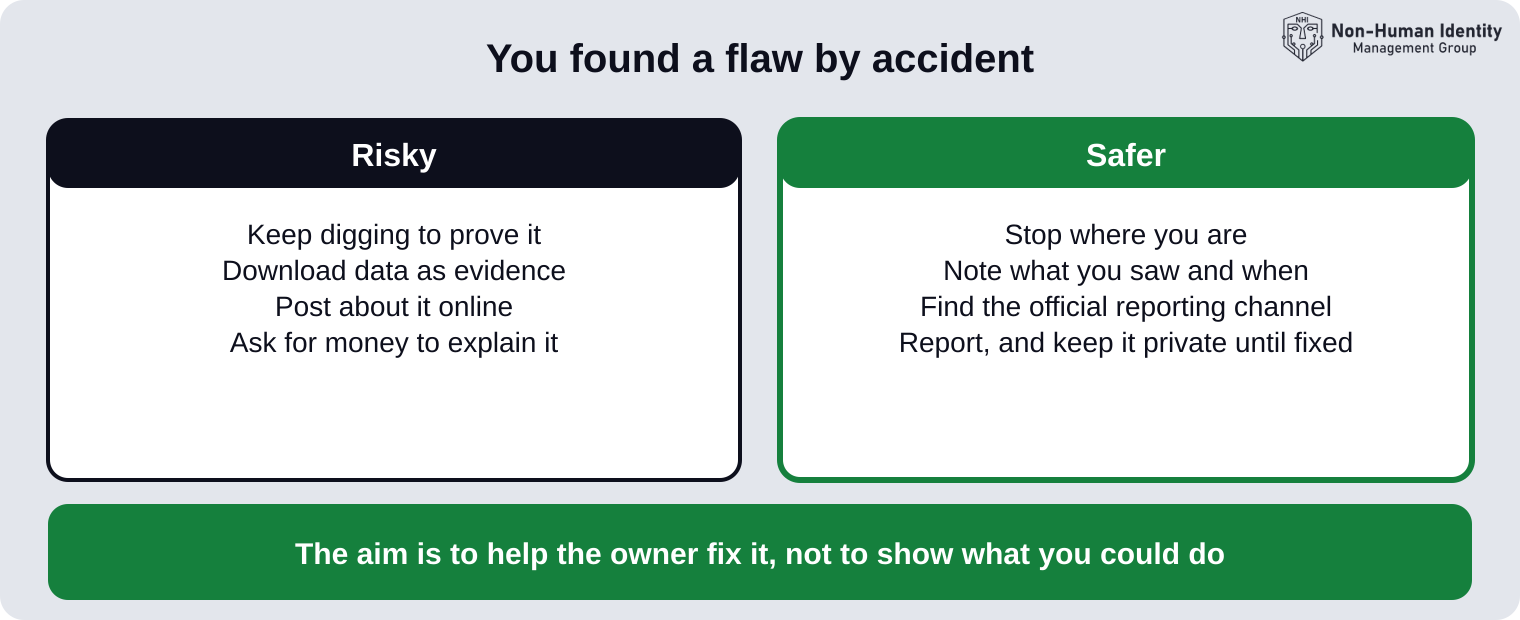
- If you stumble on a flaw, report it through the owner's official channel and do not dig further.
- Professional bodies publish codes of ethics, and some can take away a certification for breaking them.
What you will learn
- Explain why permission is the starting point of ethical security work.
- Check whether a test you want to try is allowed.
- Report a flaw you find by accident in a safe way.
- Ask the right questions when a task feels wrong.
This guide explains the topic in general terms and is not legal advice. Laws differ between countries; check the official text where you live.
- Written go-ahead (authorisation)
- clear permission from the owner of a system to test or access it.
- Agreed limits (scope)
- exactly which systems, times and methods the permission covers.
- Telling the owner (disclosure)
- reporting a security flaw to the people who can fix it.
What is ethics in cyber security?
Think of a doctor. They have the skills and the tools to cut someone open. What makes it treatment, not harm, is the patient's consent and a duty to act in the patient's interest.
Security skills work the same way. Finding a weak password, reading network traffic or breaking into a test system can protect people or hurt them. The difference is permission, honest purpose and care for the people whose data you can see.
Ethics covers more than hacking. It includes keeping secrets you learn at work, being honest in reports, not overstating your skills and speaking up when something looks wrong.
Where the comparison stops working: a patient is one person in front of you. In security, the people affected are often unseen, such as the customers whose records sit on a server you are testing.
Why does it matter?
Security people are trusted with access that others are not. That trust only works if they use it carefully, and the law backs this up.
If you are a student
What could happen: you try a tool from class on your college network "to see if it works" and break the rules, or the law.
Check this: practise only on your own devices, course labs or sites that invite testing.
If you are changing careers into security
What could happen: an employer or client asks you to do something you are unsure about, and you go along with it.
Check this: ask for the request in writing, and ask who approved it.
If you run a small business
What could happen: a stranger reports a flaw in your website, and nobody knows how to respond.
Check this: publish a simple way to report security problems on your website.
What does it look like?
Here is a made-up scenario card. It is the kind of check you can run in your head before you test anything.
Example only. All values are made up.
Am I allowed to test this?
System:      booking.example.invalid             (1)
Who owns it: EXAMPLE Ltd (not me)                (2)
Permission:  "Sure, have a look" in a chat       (3)
Scope:       not written down                    (4)
Personal data on it: yes, customer bookings      (5)
Decision:    STOP until permission is in writing
- The system you want to test. In a real file, this line would contain the address of a website.
- If you do not own it, you need the owner's go-ahead.
- A casual chat message may not come from someone with the right to agree.
- Without written limits, you cannot show what you were allowed to do.
- Real people's data raises the stakes if anything goes wrong.
Why this is risky: UK law makes it an offence to get access to a computer that you know is unauthorised. That law is the Computer Misuse Act. Good intentions are not part of that test.[2]
The safer way: get permission in writing from someone with the authority to give it. Write down the scope, the dates and whom to call if something breaks. Then stay inside it.
How does it work?
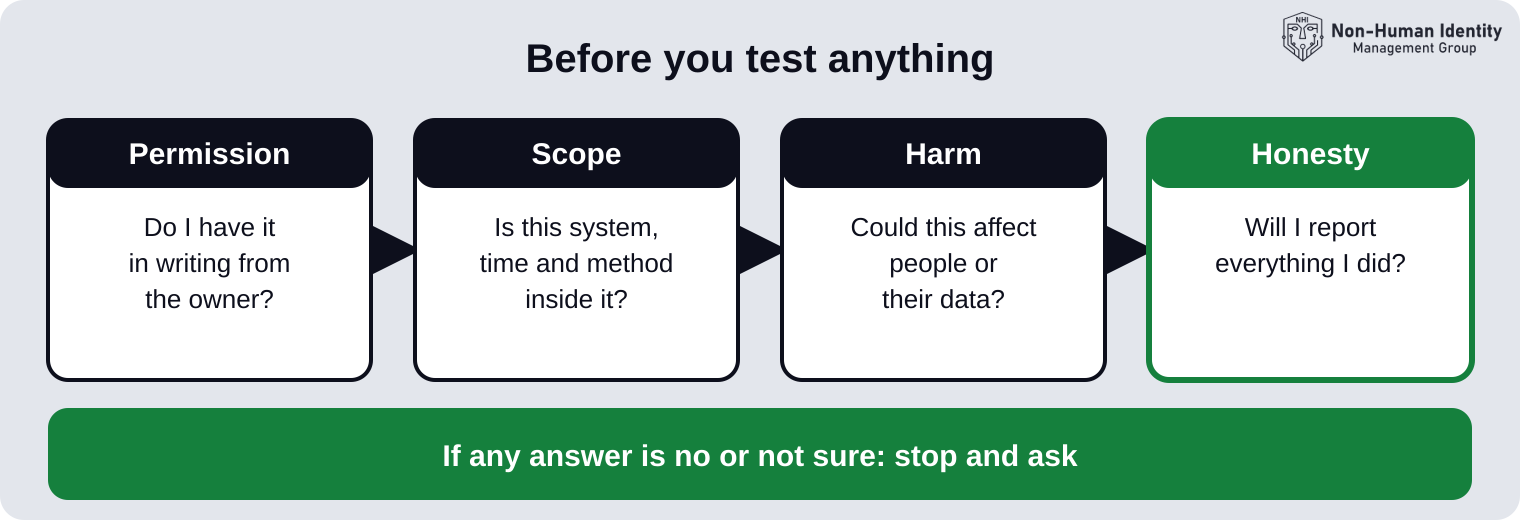
Most ethical choices in security come down to a few questions, asked in order.
- Do I have permission? From the system owner, in writing, from someone able to give it.
- Am I inside the scope? Only the agreed systems, at the agreed times, with the agreed methods.
- Could this harm people or data? If yes, stop and ask before going on.
- Am I being honest? Report what you did and what you found, including mistakes.
- Who needs to know? Tell the owner through their official channel, and keep the details private until it is fixed.
Many organisations publish how they want flaws reported. A common way is a small file called security.txt, kept at a standard place on a website. It must list a contact and an expiry date, and it can link to a reporting policy.[4] In the UK, flaws in government online services can be reported through the Government Vulnerability Reporting Service.[6]
The aim is coordinated disclosure. The finder, the owner and sometimes a national agency agree when the details go public. That way, users can be protected first. The US cyber agency CISA, for example, may publish as early as 45 days after first trying to reach a vendor who does not respond.[5]
A worked example
Talia Rinaldi is a fictional second-year student on a cyber security course. She books an MOT for her car on the website of Hazel Garage, a fictional local garage.
On the confirmation page, she notices the web address ends in a booking number. Out of habit, she wonders what would happen if she changed the number. She stops before she tries it.
Talia remembers the doctor. She has the skill, but she does not have consent. Changing the number to see someone else's booking would mean viewing another customer's details without permission.
She asks her tutor, Pia Marlow, for advice. Pia says the same thing: do not test it, but do tell the garage.
Talia looks for a security.txt file or a security contact on the garage's website. There is none, so she uses the general contact form. She writes a short, polite note. It says what she noticed, that she did not test it, and that the garage may want its web supplier to check it.
She does not post about it online, and she keeps no screenshots of other people's data, because she never looked at any.
A week later the garage owner replies with thanks and says the supplier has fixed it. Talia writes up the experience for her course, leaving out the garage's name.
Myths and mistakes
| What people think | What is true |
|---|---|
| If I mean well, testing is fine. | Under the UK Computer Misuse Act, the question is whether you knew the access was unauthorised, not whether you meant well.[2] |
| A public website is fair game. | Being able to reach a site is not permission to probe it. Look for a published testing or reporting policy. |
| Calling it research protects you. | US prosecutors say they will not charge good-faith security research, but the label does not excuse bad faith, such as demanding money.[3] |
| Ethics is only about hacking. | It also covers honesty, keeping secrets you learn at work and speaking up when something is wrong.[1] |
| Grabbing some data proves the flaw is real. | Taking data can harm people and make your position worse. Describe what you saw instead. |
What can I do this week?
- Read the ISC2 Code of Ethics. It has four short principles.[1]
- Set up a practice lab on your own computer, or use a course lab, for any hands-on learning.
- Look up the main computer misuse law where you live, on an official government site.
- Find the security.txt file of a large company's website and see how it asks for reports.[4]
- Write a one-paragraph plan for what you would do if you found a flaw by accident.
Checklist
- I test only systems I own or have written permission to test.
- I know the scope before I start, and I stay inside it.
- I stop and ask when something could affect people or their data.
- I report what I did and found honestly, including mistakes.
- I keep private what I learn at work or during testing.
- I report accidental finds through the owner's official channel.
- I never ask for money in return for explaining a flaw.
Common questions
Is ethical hacking legal?
Yes, when the owner of the system has given clear permission and you stay within it. The same actions without permission can be a crime. In the UK, the Computer Misuse Act makes knowingly unauthorised access an offence, whatever your reason.[2]
What should I do if I find a flaw by accident?
Stop, and do not test it further. Note what you saw and when. Look for the owner's security contact or security.txt file, and report it there politely. Keep the details private until it is fixed, and never ask for payment.[4]
What is a code of ethics?
It is a short set of principles that a professional body asks its members to follow. The ISC2 code, for example, asks members to protect society, act honestly and legally, serve their clients well and support the profession. Breaking it can cost a member their certification.[1]
What is the difference between a white hat and a black hat?
These are informal labels. A white hat uses hacking skills with permission to help owners fix problems. A black hat breaks in without permission for their own gain. The skills can be the same; the permission and purpose are what differ.
Can I practise hacking skills at home?
Yes, on systems you own or control, such as a lab on your own computer. Training sites and bug bounty programmes that invite testing are also options, within their published rules. Read those rules first, and stay inside them.
Where next?
Ready for the detail? Read the practitioner guide: Professional Ethics in Cyber Security Guide. It goes further into how the professional codes compare, harder disclosure dilemmas and how to build ethics into a security team.
Also useful:
- Certified Ethical Hacker (CEH) for Beginners
- Bug Bounties for Beginners
- Bug Bounty and Vulnerability Disclosure Guide
- Digital Identity Ethics
- AI Ethics Board and AI Review Committee Guide
Related NHI Mgmt Group resources: Professional Ethics in Cyber Security Guide · Digital Identity Ethics · Non-Human Identities for Beginners
Key terms
- Ethics
- Principles about right and wrong that guide how people use their skills and access.
- Permission that decides what a person may access or do.
- Scope
- The agreed systems, times and methods a test may cover.
- Coordinated disclosure
- Reporting a flaw privately so it can be fixed before details are made public.
- Vulnerability disclosure policy
- An organisation's public instructions for reporting security flaws to it.
- security.txt
- A small file on a website that tells people how to report security problems.
- Bug bounty programme
- A scheme where an organisation invites testing within rules and may reward valid reports.
Sources and further reading
- ISC2 Code of Ethics. ISC2. https://www.isc2.org/Ethics, accessed 28 Nov 2026.
- Computer Misuse Act 1990, section 1: Unauthorised access to computer material. legislation.gov.uk, UK Government. https://www.legislation.gov.uk/ukpga/1990/18/section/1, accessed 28 Nov 2026.
- Department of Justice Announces New Policy for Charging Cases under the Computer Fraud and Abuse Act. US Department of Justice, 19 May 2022. https://www.justice.gov/opa/pr/department-justice-announces-new-policy-charging-cases-under-computer-fraud-and-abuse-act, accessed 28 Nov 2026.
- RFC 9116: A File Format to Aid in Security Vulnerability Disclosure. IETF, April 2022 (Informational). https://www.rfc-editor.org/rfc/rfc9116, accessed 28 Nov 2026.
- Coordinated Vulnerability Disclosure Process. CISA. https://www.cisa.gov/coordinated-vulnerability-disclosure-process, accessed 28 Nov 2026.
- Vulnerability Reporting. National Cyber Security Centre. https://www.ncsc.gov.uk/information/vulnerability-reporting, accessed 28 Nov 2026.