Data governance is the set of rules and roles that decide who looks after data and how it is used.
This guide is for managers, small business owners and anyone new to working with data. You do not need to be technical to be affected: if your business keeps customer lists, orders or staff records, someone has to decide who is in charge of them.
In short
- Data governance answers three questions: what data do we have, who is in charge of it, and what are the rules for using it.
- Every important set of data should have a named owner, who decides who may use it and how long it is kept.
- A simple list of your data, called a data catalogue, makes the rest much easier.
- Good governance helps security, privacy and good decisions, because people can trust and find the right data.
What you will learn
- Explain data governance in one sentence.
- Name the three main roles: owner, steward and custodian.
- Spot the warning signs of data that nobody looks after.
- Start a simple list of your own important data.
- Person in charge (data owner)
- the senior person who decides who may use a set of data and for what.
- List of your data (data catalogue)
- a record of what data you hold, where it lives and who owns it.
- Where data came from (data lineage)
- the trail showing where data started and how it moved and changed.
What is data governance?
Think of a public library. Every book has a place on a shelf and a record in the catalogue. There are rules on who may borrow what, and for how long. Librarians look after the books every day, and someone senior sets the rules.
Data governance does the same job for the information a business holds. It is the set of processes that make sure data is managed on purpose, not by accident.[1] In practice it means three things.
- Know what you have. Keep a list of your important data and where it is stored.
- Know who is in charge. Give each set of data a named person who makes decisions about it.
- Agree the rules. Decide who may see it, how good it must be and when it is deleted.
Where the comparison stops working: a library book sits in one place. Data can be copied in seconds to email, laptops and other apps, so it is much harder to keep track of every copy.
Why does it matter?
When nobody owns data, nobody decides who should see it. Nobody fixes its mistakes or deletes it when it is no longer needed. That is how old customer lists end up in forgotten folders, open to the wrong people.
If you run a small business
What could happen: a former supplier still has access to your customer list, because nobody owned the decision to remove them.
Check this: can you name one person in charge of your customer data?
If you manage a team
What could happen: two reports give different sales figures, and nobody knows which one to trust.
Check this: ask where each key figure comes from and who checks it.
Next: Data lineage, data quality and data contracts as security controls
If you are new to a data or IT job
What could happen: you are asked to give someone access to a database, and you do not know who should approve it.
Check this: find out who the owner is before you grant access.
What does it look like?
A data catalogue does not have to be fancy. Here is a made-up first version for a small bakery chain, kept in a shared spreadsheet.
Example only. All values are made up.
Data set        | Where it lives        | Owner        | Who may use it      | Keep for
Customer orders | Online shop (EXAMPLE) | Sales lead   | Sales, accounts     | 6 years   (1)
Staff records   | HR app (EXAMPLE)      | Office lead  | HR only             | per policy
Mailing list    | Email tool (EXAMPLE)  | ??? nobody   | anyone with login   | ???       (2)
Supplier prices | shared-drive/FAKE     | Buyer        | Buying team         | 2 years   (3)
- A data set with a named owner, a clear group of users and a time limit.
- This row is the warning sign: no owner, no access rule and no time limit.
- Even a shared folder counts as a place where data lives, so it goes on the list.
Why this is risky: the mailing list has nobody in charge. Anyone with the login can export it, and it may be kept long after people asked to leave it.
The safer way: give the mailing list an owner, limit who can export it and agree how long contacts are kept. The keep-for times above are only examples. Check your own legal and business needs before you set them.
How does it work?
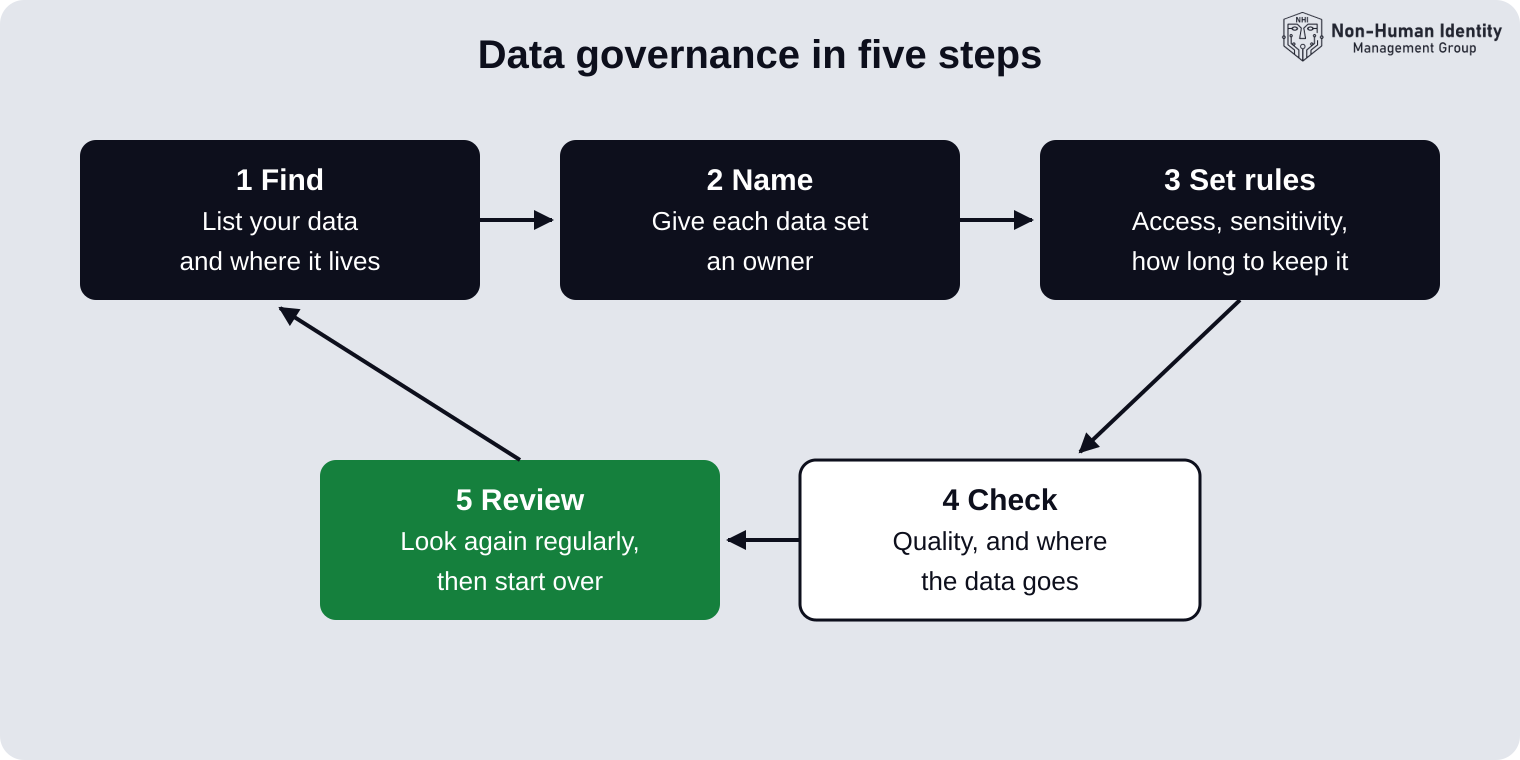
Most organisations build data governance in a few simple steps.
- Find the data. List the important data sets and where each one is stored. This list is the start of your catalogue.
- Name the people. Give each data set an owner, and where it helps, a steward and a custodian (see below).[2]
- Set the rules. The owner decides who may use the data, how sensitive it is and how long it is kept.[2]
- Check the quality. Good data is "fit for purpose": complete, accurate, up to date and free of duplicates.[4]
- Track where it goes. Data lineage shows where data came from and how it moved and changed on the way.[5]
- Review it. Look at the list, the owners and the access at regular intervals, and update them when things change.
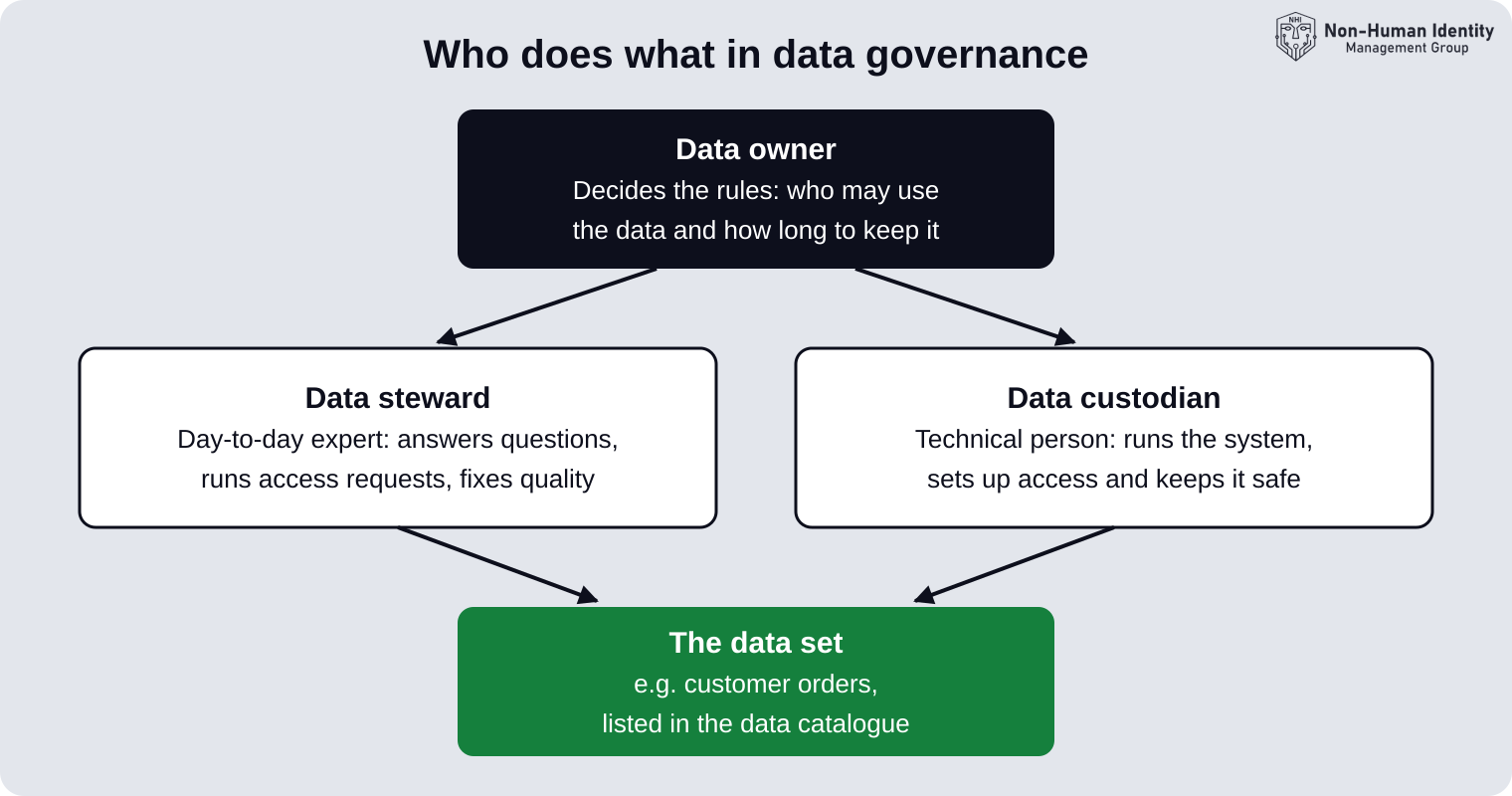
The UK government describes three main roles, and many businesses use similar ones.[2]
- The data owner is a senior person who is accountable for the data. They approve changes and decide who can have access. They do not need to know every detail.
- The data steward is the day-to-day expert. They answer questions, run access and deletion requests and fix quality problems.
- The data custodian is the technical person who runs the system holding the data. They set up the access rules and safeguards the owner asks for.
In a small business, one person may wear two or three of these hats. What matters is that each job has a name next to it.
In the UK public sector, a senior information asset owner is also accountable for protecting their information. They keep an asset register up to date and make sure data is deleted on schedule.[3] Businesses that handle personal data also have to keep records of what they do with it under data protection law.[6] A good catalogue makes both jobs easier.
A worked example
Jana Ilic runs Meadow Bakery, a fictional chain of three bakeries. Her office lead, Darius Pereira, looks after the computers and the shared drive.
One Monday a customer emails. She asked to be removed from the mailing list last year, but she still gets offers. Jana asks Darius to check. He finds three copies of the list. One is in the email tool, one is a spreadsheet on the shared drive and one is on an old laptop.
Jana thinks of the library. The book is on three shelves and nobody is the librarian.
So they sit down for an hour and start a catalogue in a spreadsheet. They list six data sets, where each one lives and who uses it.
Jana makes herself owner of the customer data. She decides that only the email tool holds the mailing list. Darius becomes the custodian. He deletes the spreadsheet copy, wipes the old laptop and limits who can export the list.
The shop manager becomes steward for the list. She handles requests to leave it and checks for duplicates once a month.
Jana also writes a short rule: contacts who have not bought anything in three years are removed, after she checks this fits their legal needs.
Six months later, another customer asks to leave the list. The steward removes her the same day, because there is now one copy and one person in charge.
Myths and mistakes
| What people think | What is true |
|---|---|
| Data governance is only for big companies. | A small business needs the same three answers: what data, who is in charge and what rules. A spreadsheet can be enough to start. |
| IT owns all the data. | IT usually runs the systems. The business person who uses the data and answers for it is normally the owner.[2] |
| Governance is just paperwork. | It decides real things: who gets access, which figures to trust and when data is deleted. |
| Keeping everything is safest. | Old data you do not need can still leak. Keep it only as long as you have a reason to. |
| Once the list is made, the job is done. | Data, people and systems change. The list and the owners need regular review. |
What can I do this week?
- List your five most important data sets and where each one is stored.
- Write a named owner next to each one.
- Look for copies in shared folders, email and old laptops.
- Ask each owner who should have access, and remove anyone who should not.
- Agree how long each data set is kept, and check this against your legal needs.
Checklist
- We have a list of our important data and where it lives.
- Each data set has a named owner.
- Owners have decided who may use their data.
- Each data set has an agreed time limit for keeping it.
- Someone checks the quality of key data, such as customer details.
- We know where our key reports get their figures from.
- Access and owners are reviewed at least once a year.
- Staff know who to ask about any data set.
Common questions
Is data governance the same as data security?
No, but they work together. Governance decides who is in charge and what the rules are. Security puts the locks in place, such as passwords and access settings, that enforce those rules. Without governance, security teams have to guess who should have access.
Who should be the data owner?
Usually a senior person in the part of the business that uses the data most and answers for it. For customer orders that might be the sales lead. They do not need technical skills, but they must be able to make decisions about access and keeping data.
Do I need special software for a data catalogue?
Not at first. A shared spreadsheet listing each data set, where it lives, its owner and its rules is a good start for a small business. Larger organisations often use catalogue tools that find data automatically and show where it flows.
How does data governance help with privacy law?
It gives you the facts the law asks for. Data protection rules expect you to know what personal data you hold, why and for how long. A catalogue with owners and time limits answers those questions, and helps you deal with requests from customers.
What is the difference between data governance and data classification?
Classification is one part of governance. It labels data by how sensitive it is, such as public or confidential. Governance is the wider set of rules and roles, including who owns the data, its quality and how long it is kept.
Where next?
Ready for the detail? Read the practitioner guide: Data Governance and Data Catalogue Security Guide. It goes further into how catalogue tools enforce access, how to secure the catalogue itself and how to roll out governance in stages.
Also useful:
- Data Classification for Beginners
- Data Retention and Secure Deletion for Beginners
- Data Privacy for Beginners
- Data Mapping and ROPA Guide
- AI Governance vs Data Governance
Related NHI Mgmt Group resources: Data lineage, data quality and data contracts as security controls · What Is Data Security for Beginners · Data Classification Guide
Key terms
- Data governance
- The rules and roles that decide who looks after data and how it is used.
- Data owner
- The senior person accountable for a set of data, who decides who may use it.
- Data steward
- The day-to-day expert who answers questions about a data set and fixes quality problems.
- Data custodian
- The technical person who runs the system holding the data and puts access rules in place.
- Data catalogue
- A list of the data an organisation holds, where it lives and who owns it.
- Data lineage
- The trail showing where data came from and how it moved and changed.
- Data quality
- How fit data is for its use, such as whether it is complete, accurate and up to date.
Sources and further reading
- Glossary: data governance (from CNSSI 4009-2022). NIST Computer Security Resource Center. https://csrc.nist.gov/glossary/term/data_governance, accessed 28 Nov 2026.
- Data ownership model. Government Digital Service, GOV.UK, updated 9 September 2026. https://www.gov.uk/government/publications/data-ownership-in-government/data-ownership-model, accessed 28 Nov 2026.
- Guidance on the information asset owner role. Cabinet Office, GOV.UK, updated 1 October 2025. https://www.gov.uk/government/publications/information-asset-owner-role-guidance/guidance-on-the-information-asset-owner-role-html, accessed 28 Nov 2026.
- The Government Data Quality Framework. Government Data Quality Hub, GOV.UK. https://www.gov.uk/government/publications/the-government-data-quality-framework/the-government-data-quality-framework, accessed 28 Nov 2026.
- Data lineage in classic Data Catalog. Microsoft Learn, Microsoft. https://learn.microsoft.com/en-us/purview/concept-data-lineage, accessed 28 Nov 2026.
- Documentation (UK GDPR guidance). Information Commissioner's Office. https://ico.org.uk/for-organisations/uk-gdpr-guidance-and-resources/accountability-and-governance/documentation/, accessed 28 Nov 2026.