Data classification means sorting information into a few levels, by how much harm a leak would cause.
This guide is for anyone who stores files, emails or customer details at work and wants to know which ones need the most care. You do not need a security job to be affected: if your business keeps payroll, customer records or health details, classification helps you protect the right things first.
In short
- Classification puts each piece of information into a level, such as Public, Internal, Confidential or Restricted.
- The level depends on the harm if the data leaked, was changed or was lost.
- A label is only a marker. Rules and tools that act on it give the protection.
- Keep it small: three or four levels with a plain test for each, then review them over time.
What you will learn
- Explain what data classification is in one sentence.
- Spot which of your files belong at the top level.
- Check that each level has rules people can follow.
- Ask who owns each main set of data in your team.
- Sorting by harm (data classification)
- putting information into levels based on the damage a leak would do.
- Tag on a file (sensitivity label)
- a visible marker, such as Confidential, that records the level.
- Person in charge of the data (data owner)
- the person who decides how sensitive a set of data is and who may use it.
What is data classification?
Think of colour-coded folders in an office: green for public, amber for internal, red for secret. Anyone can see at a glance how to treat a folder without reading every page inside.
Data classification does the same for files and emails. You agree a few levels, give each one a plain test, and tag your information with the right level. The tag is called a sensitivity label (a marker stored with the file that names its level).
Each level then comes with handling rules (simple dos and don'ts). For example, who may open it, whether it can be sent outside the business, and how it is thrown away.
Where the comparison stops working: a paper folder stays on one desk. Files are copied and sent on all day. So a label only helps if it travels with the file, and if computer systems can read it too.
Why does it matter?
Without levels, every file is treated the same. Either everything is locked down and work slows, or nothing is protected enough. Some information also carries legal duties. The UK data protection regulator says health data needs extra protection. Using it can create significant risks to people.[1]
If you run a small business
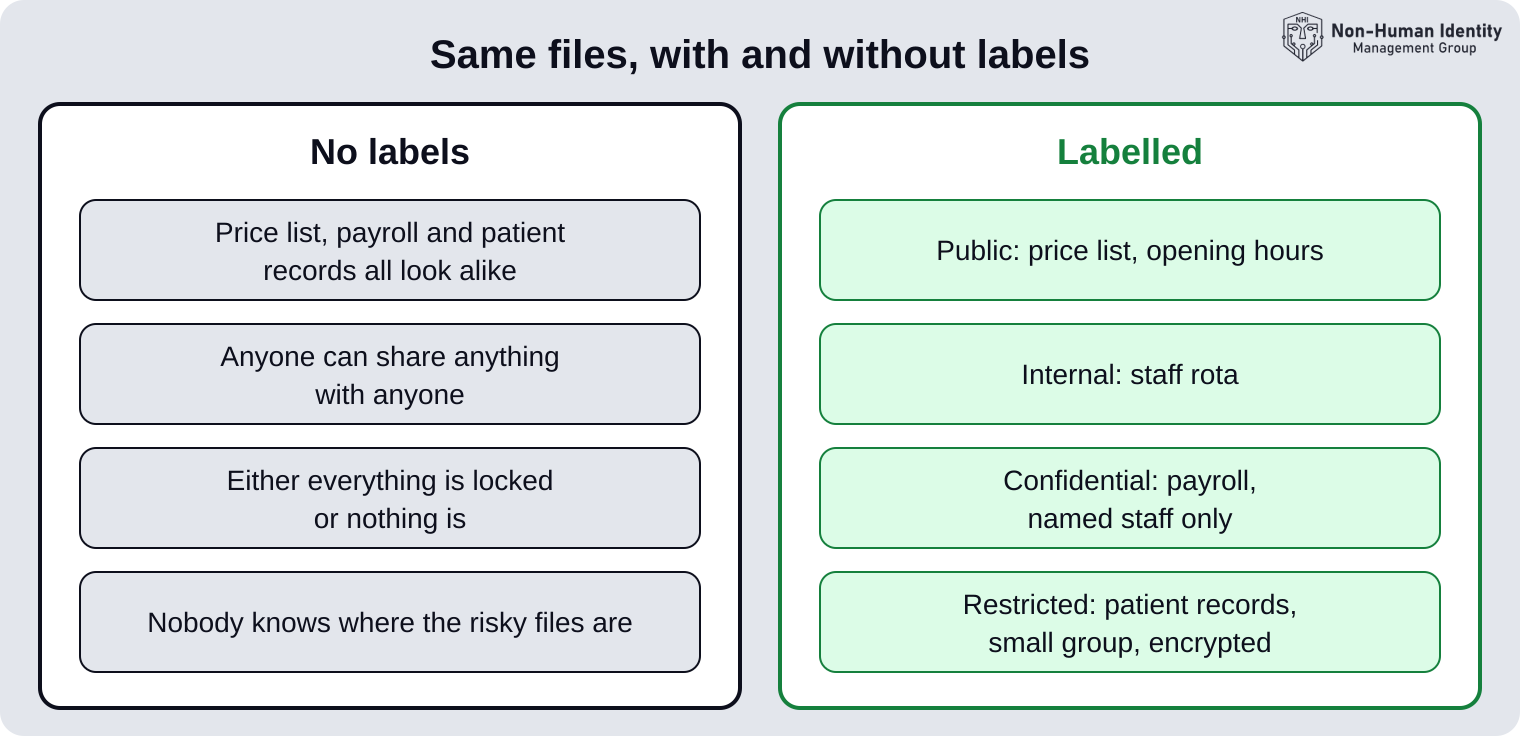
What could happen: payroll and customer records sit next to price lists, and anyone can share them.
Check this: list the five files that would hurt most to lose, and who can open them.
If you manage a team
What could happen: you are the data owner without knowing it, and nobody has decided who may see what.
Check this: agree a level for each main set of your team's data.
If you are new to IT work
What could happen: tools that block risky sharing do nothing, because no file carries a label.
Check this: ask whether new files get a label by default.
What does it look like?
Here is a made-up one-page scheme for a small chemist's shop, with a label sitting in a document header.
Example only. All values are made up.
EXAMPLE PHARMACY LTD - our four levels
PUBLIC        price list, opening hours        (1)
INTERNAL      staff rota, cleaning checklist
CONFIDENTIAL  payroll, supplier contracts       (2)
RESTRICTED    patient records, card details     (3)

Document header: RESTRICTED - named staff only  (4)
File: patient-list-EXAMPLE-0000.xlsx
- Anyone may see these once they are approved for release.
- Data here would harm people or the business if it leaked.
- Health details carry legal duties, so they sit at the top level.
- The label travels with the file and tells people and tools how to treat it.
Why this is risky: a scheme on paper does nothing on its own. If staff can still email the Restricted file to anyone, the label is only a word.
The safer way: link each level to rules. For example, Restricted files open only for named staff and are encrypted (scrambled so only key holders can read them). Many office tools can then act on the label. In Microsoft 365, a label is stored in the file's details and stays with the file. It can add a header or turn on encryption.[2]
How does it work?
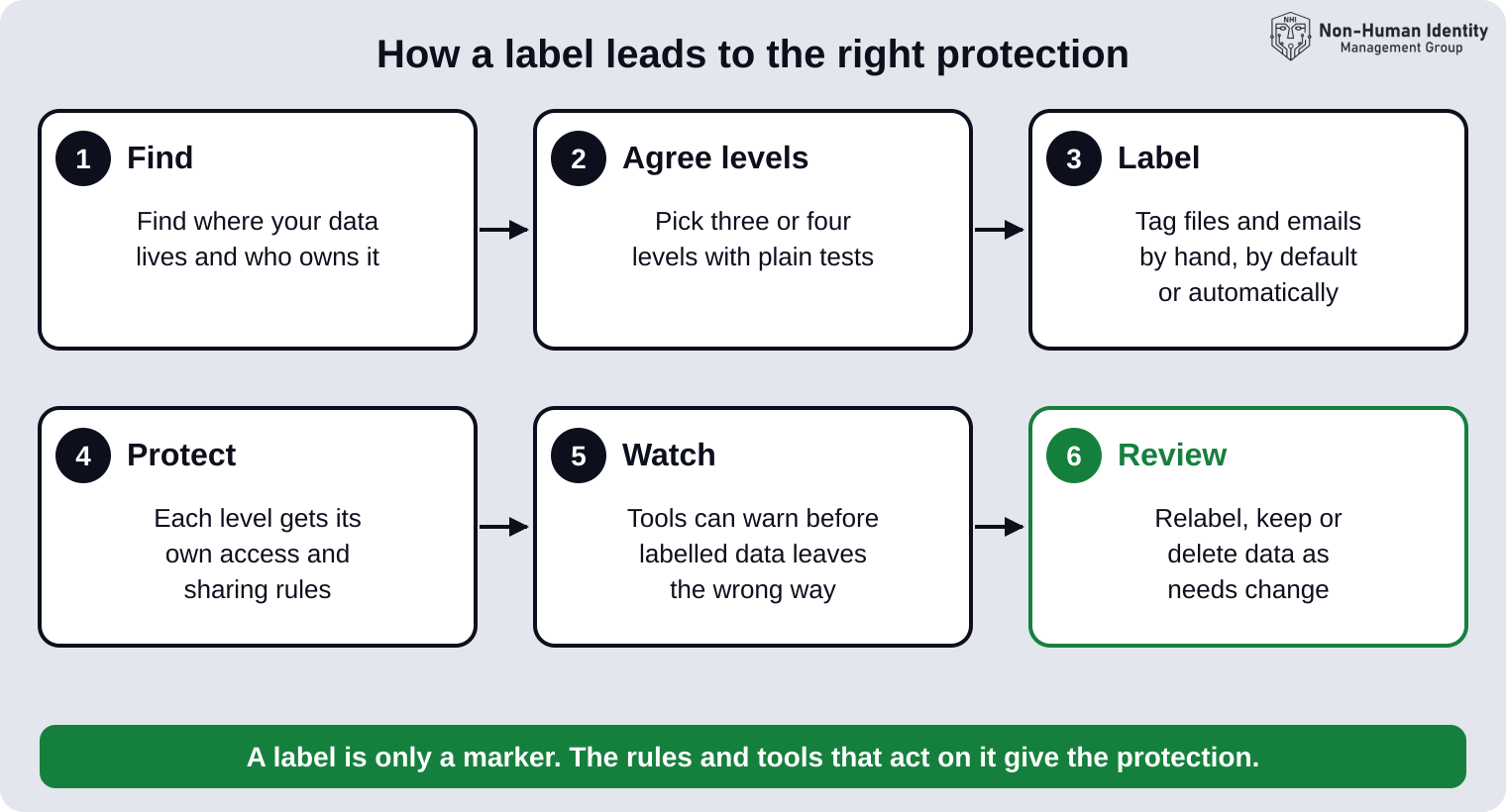
- Find. List where your information lives: shared drives, email, cloud storage and laptops. Name an owner for each main set. This is often called data discovery (finding where your data is).
- Agree levels. Pick three or four levels with plain names and a one-line test for each.
- Label. Tag files and emails. A person can choose the label, or it can be set by default for new files. A tool can also add it when it spots things like card numbers.[2]
- Protect and watch. Link each level to access and sharing rules. Tools called data loss prevention (DLP, tools that warn or block when sensitive data is about to leave) can use the labels.[3]
- Review. Check labels and owners from time to time. Lower the level of data that has become public, and delete data you no longer need.
Big organisations use the same idea. The UK government, for example, uses just three levels for its own information.[4] Most businesses write a simpler scheme of their own.
A worked example
Yasmin Abernethy manages Reedwell Pharmacy, a fictional chemist's shop with nine staff. Files sit in one shared cloud folder, and anyone can share anything.
A new pharmacist asks where the patient records are kept. Yasmin realises she is not sure who can see them. She thinks of colour-coded folders. Red folders should be few and well guarded.
First she lists the main types of information with her deputy: the price list, the staff rota, payroll, supplier contracts and patient records. She names herself as owner of payroll and the lead pharmacist as owner of patient records.
Next they agree four levels: Public, Internal, Confidential and Restricted. Patient records and card details are Restricted. Payroll and contracts are Confidential.
Their IT supplier, Viggo Pereira, sets new files to Internal by default, so nothing starts without a label. He limits the Restricted folder to the pharmacists. He also turns on a warning before anyone shares a Confidential or Restricted file outside the shop.
A month later, a trainee tries to email a patient list to a personal address to work from home. The warning appears and the trainee stops and asks. Yasmin also notices that some staff mark everything Restricted "to be safe". That blocks normal work, so she runs a ten-minute chat on the plain test for each level.
The scheme is not perfect. But the shop now knows where its most sensitive data is, and who decides how it is used.
Myths and mistakes
| What people think | What is true |
|---|---|
| More levels means better security. | Long schemes confuse people and lead to wrong labels. Three or four clear levels usually work better. |
| When in doubt, use the top level. | Over-labelling slows work and teaches people to ignore labels. The UK government policy says protecting information already cleared for release would be disproportionate.[4] |
| A label protects the file by itself. | A label is a marker. Access limits, encryption and warning tools that act on it give the protection. |
| Classification is a one-off project. | New data arrives every day and old data changes value, so labels and owners need regular review. |
| Only security staff classify data. | The people who create and own the data know its value best. Security staff set the scheme and the tools. |
What can I do this week?
- List the five to ten main types of information you hold, where each is kept and who owns it.
- Draft three or four levels on one page, each with a plain test and two example files.
- Find where your top-level data sits and limit it to the people who need it.
- Ask your IT supplier whether new files can get a default label.
Checklist
- We have a written scheme with three or four levels and a plain test for each.
- Each level has simple rules for access, sharing and disposal.
- Each main set of data has a named owner.
- We know where our most sensitive data is stored.
- New files get a default label, so nothing starts unlabelled.
- Staff have had a short briefing on choosing a label.
- Sharing top-level data outside the business is warned or blocked.
- Any exception is approved, recorded and time-limited.
- We review labels, owners and old data at least once a year.
Common questions
How many levels should we have?
We suggest three or four. Fewer levels are easier to choose between, so people label more accurately. The UK government manages its own information with three levels, which shows how far a small scheme can go. Add a level only if a real group of files does not fit any existing one.
Who decides the label?
Usually the person who creates the file picks the label, following the scheme. The data owner settles any disagreement. Tools can also suggest or apply a label for common patterns, such as card numbers, so people do not have to remember every rule themselves.
Should labels be automatic or manual?
Often both. Defaults and automatic rules catch obvious cases, while people handle the judgement calls. Automatic tools can make mistakes, so we suggest starting with warnings rather than blocks, then checking the results before you tighten the rules.
Is classification the same as finding our data?
No. Finding your data, called data discovery, shows where it is. Classification decides how sensitive it is and labels it. You usually need discovery first. See Data Classification vs Data Discovery for the detail.
Where do passwords and keys fit?
At the top level. Passwords, keys and tokens that let software log in to other systems are among the most sensitive data you hold. They are better kept in a dedicated locked store than in files at all. See Secrets Management for Beginners.
Where next?
Ready for the detail? Read the practitioner guide: Data Classification Guide. It goes further into designing a scheme, automatic labelling, linking labels to data loss tools and measuring how well it works.
Also useful:
- Data Classification Policy Template
- Data Loss Prevention for Beginners
- Data Privacy for Beginners
- Encryption for Beginners
Related NHI Mgmt Group resources: Data Classification Tools · Data Classification vs Data Discovery · Data Security for Beginners
Key terms
- Data classification
- Sorting information into levels by how sensitive it is, with handling rules for each level.
- Sensitivity label
- A marker, such as Confidential, that shows how content should be handled. It matters only when rules act on it.
- Data owner
- The person accountable for how a set of data is used and protected.
- Data discovery
- Finding where information lives, so you know what there is to classify.
- Data loss prevention (DLP)
- Tools and rules that spot sensitive data leaving in ways the business does not allow, and warn or block.
- Need-to-know
- Giving people access only to the data they need for their task.
- Data retention
- Keeping records for a set period for legal or business reasons, then disposing of them.
Sources and further reading
- What is special category data? Information Commissioner's Office (ICO). https://ico.org.uk/for-organisations/uk-gdpr-guidance-and-resources/lawful-basis/special-category-data/what-is-special-category-data/, accessed 28 Nov 2026.
- Learn about sensitivity labels. Microsoft Learn, Microsoft. https://learn.microsoft.com/en-us/purview/sensitivity-labels, accessed 28 Nov 2026.
- Get started as a classification labels admin. Google Workspace Admin Help, Google. https://knowledge.workspace.google.com/admin/security/get-started-as-a-classification-labels-admin, accessed 28 Nov 2026.
- Government Security Classifications Policy. Cabinet Office, GOV.UK, updated 5 Aug 2024. https://www.gov.uk/government/publications/government-security-classifications/government-security-classifications-policy-html, accessed 28 Nov 2026.