Denial of wallet is when someone makes a pay-per-use service run up a big bill for its owner.
This guide is for anyone who pays for cloud or AI services, or looks after a small team that does. You do not need to write code to be affected: if your business has an AI chatbot, a website on a cloud service or an AI tool paid by use, a stranger could add to the bill.
In short
- Many AI and cloud services charge for each request, so more use means a bigger bill.
- Denial of wallet happens when someone sends lots of costly requests on purpose, often with a stolen API key.
- The aim may be free AI for the attacker, or simply to cost you money.
- Limits on each user, bill alerts, spending caps where offered and well-kept keys reduce the damage.
What you will learn
- Explain denial of wallet in one sentence.
- Spot the early signs of a bill that is running away.
- Check whether your services send alerts or stop at a limit.
- Ask who looks after the keys that can spend your money.
- Pay as you go (pay-per-use)
- a way of paying where each request or minute of use adds to the bill.
- Software password (API key)
- a secret code one program shows another to prove it may use it.
- Use limit (rate limit)
- a rule that caps how many requests one user can make in a set time.
What is denial of wallet?
Think of a bar tab. You leave your card behind the bar, and anyone who gives your name can order on it. The bar keeps pouring, and you see the total at closing time.
Many AI and cloud services work like that tab. They are pay-per-use, so each request adds a little to the bill. A request is one job sent to the service, such as one question to an AI chatbot. Denial of wallet is when someone sends a flood of costly requests so the owner pays.[1]
The name is a play on "denial of service", where attackers flood a site to knock it offline. Here the site may stay up. The harm is the bill.
Often the way in is an API key. This is a secret code that lets a program use a service and charges the owner's account. An API key is one kind of non-human identity (NHI): a digital identity used by software, not a person. Whoever holds a valid key may be able to spend on that account.
Where the comparison stops working: a bar closes at night. Many online services run all day and night, and requests can come from many places at once. So a bill can grow while everyone is asleep.
Why does it matter?
A small business may not notice until the monthly bill or a card payment fails. AI requests can cost more than simple web traffic, so the total can climb fast.
If you run a small business
What could happen: a stranger finds your AI key and uses it for their own projects on your account.
Check this: ask whoever set up your AI tools whether bill alerts are switched on.
If you are learning to build apps
What could happen: you put an AI key in a public project, and someone copies it within days.
Check this: keep keys out of code, and set a low limit on any test account.
Next: API Keys for Beginners
If you manage a team or a budget
What could happen: a free chatbot on your website is used as a free AI service by strangers.
Check this: ask whether each visitor has a daily limit on how much they can use.
What does it look like?
Here is a made-up daily summary from an AI service, the kind of screen a business owner might see.
Example only. All values are made up.
EXAMPLE AI SERVICE - usage summary (fake account 0000)
Key name         Mon      Tue      Wed
shop-chatbot     310      295      41,800    (1)
test-key-old     0        0        12,600    (2)
Requests from    UK       UK       UK, 40+ other countries   (3)
Cost to date     GBP 2    GBP 2    GBP 900 (FAKE)            (4)
Budget alert     none set                                     (5)
- The chatbot's normal use is a few hundred requests a day. Wednesday is over a hundred times more.
- An old test key that nobody uses is suddenly busy. That often means the key has been copied.
- Requests now come from many countries, not just where the customers are.
- The cost jumps in one day.
- No alert was set, so nobody was told.
Why this is risky: without alerts or limits, the bill keeps growing until someone happens to look. Cost reports can also lag behind real use, so the true total may be higher than the screen shows.[3]
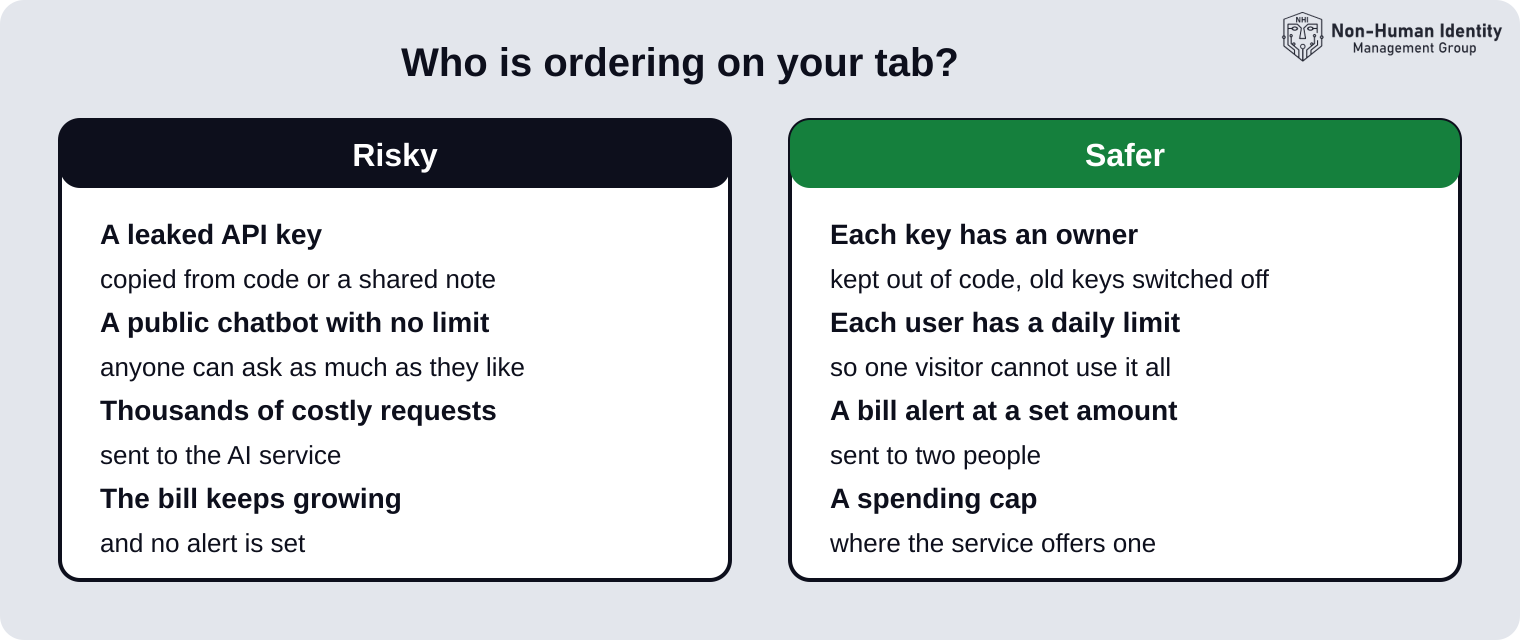
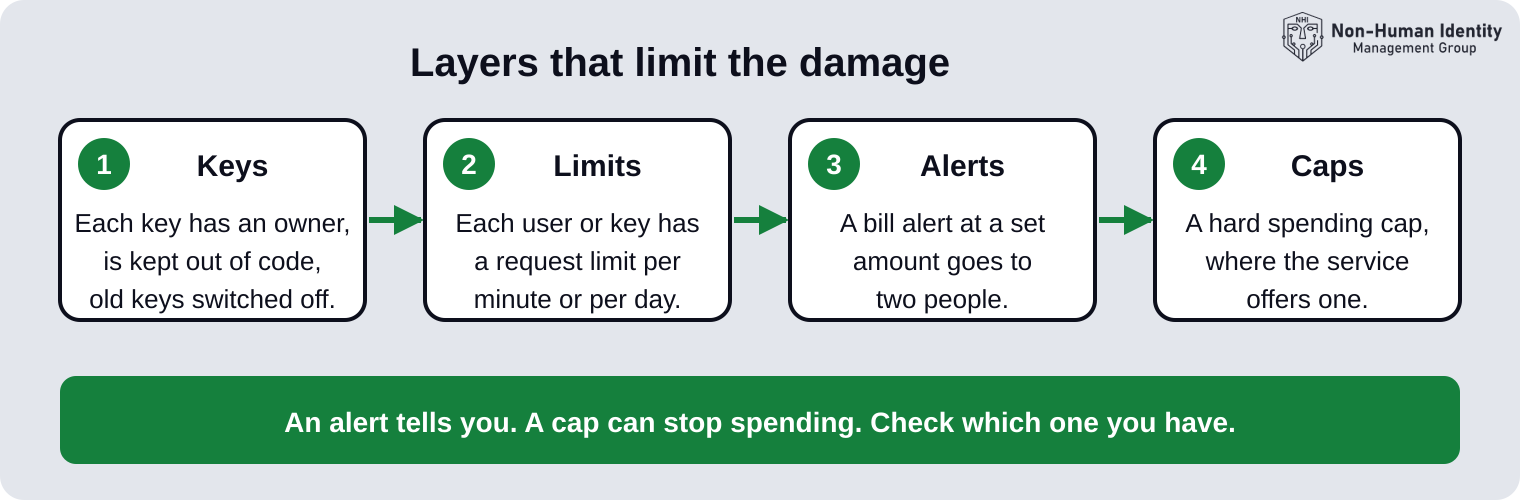
The safer way: each key has a named owner and its own limit. Old keys are switched off. A bill alert goes to two people at a set amount, and a hard spending cap is used where the service offers one.
How does it work?
Here is a common path in plain steps, which explains the risk rather than how to cause it.
- The open tab. A service charges for each request, and a key or a public chatbot can make those requests.
- The way in. Someone gets a key, often from code, a shared file or a chat message, or they simply use a public chatbot with no limit.
- The flood. They send many requests, or very long and costly ones. Some share the access with others as "free AI".[2]
- The silence. If no alert is set, nobody is told, and cost reports can arrive late.[3]
- The bill. The owner pays for the use, unless the provider agrees otherwise.
- The fix. The owner cancels and replaces the key, sets limits and alerts, and checks the account for other changes.
Not every limit works the same way. On some services, a budget only sends an alert and does not stop spending.[3] Others let you set actions that run when a budget is reached, such as blocking new resources.[4] Check what your own service does before you rely on it.
A worked example
Juno Wojcik runs a small online bakery. A freelance developer, Hana Jovanovic, added an AI helper to the shop's website. It answers questions about cakes and delivery.
On a Thursday morning, Juno's bank texts her. A payment to the AI service is far larger than usual. She logs in to the service and sees a usage chart that looks like a cliff.
Juno thinks of the bar tab. Somebody is ordering on it, so the first job is to take the card back. She calls Hana.
Hana looks at the account. Most of the requests use an old test key that she made months ago. She had pasted it into a shared notes page that turned out to be public. She cancels that key straight away. Once the change has taken effect, it should no longer work for anyone who copied it.
Next, Hana makes a new key for the website and stores it in the hosting service's secure settings, not in the code. She gives each website visitor a daily limit on questions. She also sets two bill alerts, one at a low amount and one higher, sent to both her and Juno.
Then Juno contacts the AI service's support team. She explains what happened and asks whether anything can be done about the charges. The outcome is up to the provider, so she keeps notes and screenshots.
Last, they agree a simple rule. Every key has a name, an owner and a reason to exist. Any key nobody needs is switched off.
It takes a morning. Juno is glad the bank's text came early, because each hour of delay could have added to the bill.
Myths and mistakes
| What people think | What is true |
|---|---|
| A budget will stop my spending. | On some services a budget only sends alerts and does not cap use.[3] Check whether yours can stop spending. |
| Nobody would bother with my small account. | A working AI key is useful to anyone who wants free AI. Leaked keys have been shared and used by many people.[2] |
| If the site is still up, there is no attack. | Denial of wallet can leave everything working. The harm shows up in the bill. |
| Deleting the key from the code is enough. | Copies may already exist. Cancel the key at the service and make a new one. |
| The bill on screen is up to date. | Cost reports can lag behind real use, so the true figure may be higher.[3] |
What can I do this week?
- List every AI and cloud service your business pays for by use.
- Set a bill alert on each one, sent to at least two people.
- Find out whether each service can cap spending, not just send alerts.
- Ask for a list of all API keys, who owns each one and which are no longer needed.
- Check that any public chatbot or form has a limit per visitor.
Checklist
- Every pay-per-use service has a bill alert at a sensible amount.
- Alerts go to at least two people, not one inbox.
- A hard spending cap is set where the service offers one.
- Each API key has a named owner, and unused keys are switched off.
- No keys are kept in code, shared documents or chat messages.
- Public chatbots and forms limit how much each visitor can use.
- Someone looks at usage charts at least once a week.
- Everyone knows the first step after a spike: cancel the key, then investigate.
Common questions
Is denial of wallet the same as a denial of service attack?
Not quite. A denial of service attack tries to knock a service offline. Denial of wallet tries to make it too costly to run, and the service may keep working the whole time. Both can use a flood of requests, so the same limits help with both.
Will the provider refund a bill caused by a stolen key?
Not always, so do not count on it. Each provider decides for itself. Contact their support team quickly, explain what happened and keep evidence such as screenshots and dates. Preventing the bill with limits, alerts and caps is far more reliable than hoping for a refund.
Can I set a hard limit on what I spend?
Sometimes. Some services offer a cap that stops use at a set amount. Others only send an alert, or let you set actions that run when a budget is reached.[3][4] Read your provider's billing pages to see which you have.
How do attackers get API keys?
Often from places where keys were left by mistake: code shared online, settings files, shared notes or chat messages. In one case a company's own access token was committed to its code and later misused.[2] Keeping keys in a locked store reduces this risk.
Does a free public chatbot put me at risk?
It can. If anyone can use it and there is no limit per visitor, people may use it as a free AI service on your account. Limits on each visitor, message length limits and usage alerts all help keep this in check.[1]
Where next?
Ready for the detail? Read the practitioner guide: Denial-of-Wallet and AI Agent Cost Runaway Guide. It goes further into token limits, budget controls on each cloud platform and how AI agents can run up costs on their own.
Also useful:
- Cloud Cost Anomalies as Security Signals
- LLM Pricing for Beginners
- SMS Pumping for Beginners
- API Keys for Beginners
Related NHI Mgmt Group resources: AI API key abuse · AI model provider API keys · AI Agent Rate Limits · Denial of AI Service
Key terms
- Denial of wallet
- An attack that uses pay-per-use pricing to run up costs the owner cannot afford.
- API key
- A secret code one program uses to prove it may use another.
- Rate limiting
- A rule that caps how many requests one caller can make in a set time.
- Quota
- A set amount a user, app or key may use in a period, such as a day.
- Spending cap
- A hard limit on how much an account or key can spend in a period.
- Unbounded consumption
- When an AI service has no cap on how much each request or user can use.
Sources and further reading
- LLM10:2025 Unbounded Consumption. OWASP Top 10 for LLM Applications, OWASP GenAI Security Project, 2025. https://genai.owasp.org/llmrisk/llm102025-unbounded-consumption/, accessed 28 Nov 2026.
- Security update (August 2023). Sourcegraph, 2023. https://sourcegraph.com/blog/security-update-august-2023, accessed 28 Nov 2026.
- Create, edit, or delete budgets and budget alerts. Cloud Billing documentation, Google Cloud. https://docs.cloud.google.com/billing/docs/how-to/budgets, accessed 28 Nov 2026.
- Configuring a budget action. AWS Cost Management User Guide, Amazon Web Services. https://docs.aws.amazon.com/cost-management/latest/userguide/budgets-controls.html, accessed 28 Nov 2026.