Sensitive data in logs means passwords, keys or personal details copied into an app's activity records.
This guide is for people new to building or running software, and for anyone who looks after an app. You do not need to write code to be affected: if your business runs a website or app, its records may hold your customers' details.
In short
- Apps keep running records of what they do, called logs. These help people fix problems.
- Logs can end up holding passwords, keys and personal details by accident, often from a quick fix or a fault report.
- Logs are copied to many places and read by many people, so anything in them spreads.
- Decide what never goes in a log, hide what must go in, limit who can read logs and change any password or key found there.
What you will learn
- Explain what a log is and why it can hold private data.
- Spot a log line that shows something it should not.
- Explain why a password found in a log should be changed.
- Ask your team or supplier how they keep logs clean.
- Activity record (log)
- a file or stream where software writes down what it did and when.
- Private details (sensitive data)
- passwords, keys, card numbers and personal details that should stay hidden.
- Hiding part of a value (masking)
- showing only a few characters, such as the last four digits of a card.
What is sensitive data in logs?
Think of a shop's security camera. It is there to record what happens at the till. But if it points the wrong way, it also films every customer typing their PIN.
A log file works like that camera. Apps write short notes about what they do: who signed in, what failed, how long a page took. These notes help developers fix faults and help security teams spot trouble.
The problem starts when a note records too much. A line meant to say "sign-in failed" may also copy the password that was typed. A note about an order may copy the whole customer record, with name, address and card number. A security expert group lists passwords, access keys, card details and sensitive personal data among the things that should usually not go into logs.[1]
Where the comparison stops working: you can see where a camera points. A log line that copies too much looks like any other line, so nobody may notice it for months.
Why does it matter?
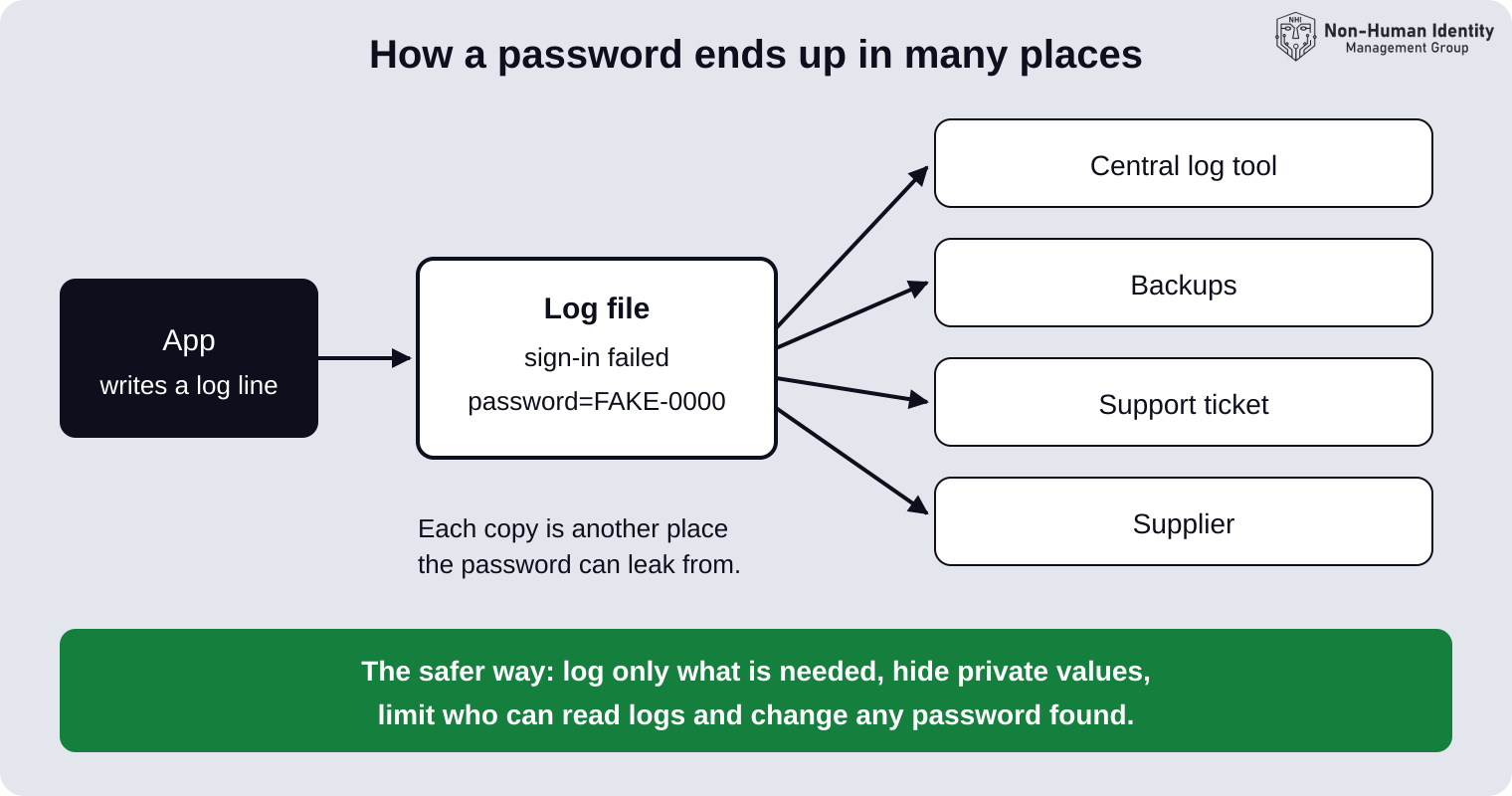
Logs are often treated as harmless, so they are shared widely. They can be sent to log tools, kept in backups, attached to support tickets and read by staff and suppliers. Each copy is another place the data can leak from.
Large firms have made this mistake. In 2018 Twitter said a bug wrote passwords to an internal log before they were scrambled, and asked users to consider changing them.[4]
If you are learning to code
What could happen: you print a whole request to find a bug, and a password goes into the log with it.
Check this: before you add a log line, ask what exactly it will write out.
If you are new to IT support
What could happen: you attach a log to a ticket for a supplier, and it holds customer details.
Check this: skim a log for names, emails and keys before you send it anywhere.
If you run a business with a website or app
What could happen: customer details sit in log files that far more people can open than the main database.
Check this: ask your supplier what their logs record and who can read them.
What does it look like?
Here are made-up log lines from a small online print shop's website.
Example only. All values are made up.
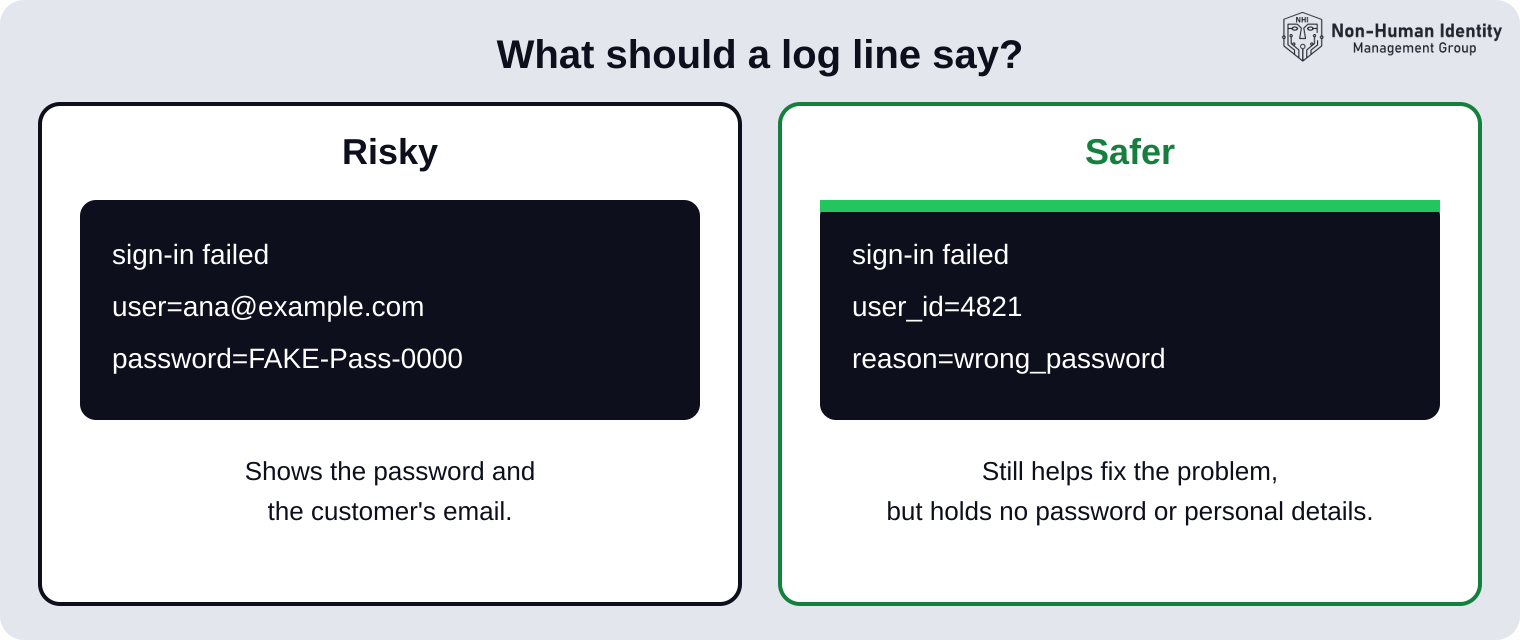
10:02:11 INFO  sign-in failed [email protected] password=FAKE-Pass-0000  (1)
10:02:15 INFO  order saved name="Ana Example" card=0000000000000000      (2)
10:02:16 DEBUG calling payments with key=EXAMPLE-KEY-0000-FAKE          (3)
10:02:20 INFO  sign-in ok user_id=4821                                   (4)
- In a real file, this line would contain the password a customer typed.
- In a real file, this line would contain a full card number and the customer's name.
- A detailed fault-finding line, called a debug line, that copies a payment key.
- A cleaner line: it records an account number, not the person's details or password.
Why this is risky: anyone who can read the log can copy the password, card number and key. If the key is still valid, they may be able to use the payment service as the shop.
The safer way: the app writes only the facts needed to fix problems. It never writes passwords or keys, and it hides most of a card number.[1]
Example only. All values are made up.
10:02:11 INFO  sign-in failed user_id=4821 reason=wrong_password
10:02:15 INFO  order saved order_id=EX-0001 card=****0000
How does it work?
Here is how private details usually find their way into logs and then spread.
- The quick fix. A developer is chasing a fault and logs a whole object, such as a full request or a customer record, to see what is inside.[2]
- The fault report. When something breaks, the app writes an error message. Some error messages copy the data that was being handled at the time.[2]
- The forgotten setting. Detailed debug logging is turned on to test something and left on when the app goes live.[2]
- The spread. Logs are collected into a central tool, backed up and shared with support teams and suppliers.
- The real fix. Change any password or key that appeared, stop the line that wrote it, then remove the copies you can reach.
Some tools can hide known patterns, such as card numbers, as logs are collected. This is called redaction (removing or blanking out private parts). It helps, but it depends on the patterns it was set up to find, so it is a safety net rather than the main fix. We suggest stopping private data at the point where the log line is written.
A worked example
Imani Brandt runs Linden Printers, a fictional print shop that takes orders online. A freelance developer, Bodhi Zamora, looks after the website.
One morning a customer cannot pay. Bodhi turns on detailed logging to see what is going wrong. He finds the fault, fixes it and moves on.
A week later, Imani asks the hosting company for help with slow pages. Their support person, Yara Castell, asks for the logs. Before sending them, Bodhi opens the file to check it.
He spots a problem. Every order line from the past week holds the customer's name, address and a key for the payment service. The detailed logging is still on.
Bodhi tells Imani straight away. They agree an order of work.
First, he creates a new payment key in the payment service and cancels the old one. Once the change has taken effect, the old key should no longer give access. Next, he turns the detailed logging off and changes the order line so it records only the order number.
Then he deletes the affected log files from the server and from the backups he controls. He checks the payment service records and finds no payments he does not recognise in the records available to him. Imani also asks for advice on whether the customer details in the logs need to be reported, since the rules on personal data may apply.
Last, Bodhi sends Yara a cleaned copy of the logs. He adds a step to his routine: check what a log line writes before it goes live.
Myths and mistakes
| What people think | What is true |
|---|---|
| Logs are only read by developers, so it does not matter what is in them. | Logs are copied to tools, backups, tickets and suppliers. Many more people can read them than you might expect. |
| Deleting the log line fixes a leaked password. | Copies may already exist elsewhere. Change the password or key first. |
| Debug logging is harmless. | It records far more detail. Left on in a live app, it can capture private data.[2] |
| A redaction tool will catch everything. | It finds the patterns it was set up for and can miss others. Keep private data out at the source. |
| Only big companies make this mistake. | It can happen in any app. Even large firms have found passwords in their own records.[3] |
What can I do this week?
- Open a recent log and look for passwords, keys, card numbers, emails and addresses.
- Check that detailed debug logging is off in your live app.
- Write a short list of things your apps must never log.
- Ask who can read your logs, and remove anyone who does not need to.
- Agree what to do if a password or key turns up: change it, stop the line, remove copies.
Checklist
- Passwords, keys and tokens are never written to logs.
- Card numbers and other personal details are left out or partly hidden.
- Log lines record named facts, such as an ID or a reason, not whole records.
- Debug logging is off in live apps, or turned on only briefly and on purpose.
- Access to logs is limited to people who need it, and reviewed from time to time.[1]
- Logs are checked before they are attached to tickets or sent to suppliers.
- Any password or key found in a log is changed straight away.
Common questions
What should never go into a log?
Passwords, access keys and tokens, encryption keys, database connection details and full payment card data are the clearest examples. Sensitive personal details, such as health or government ID numbers, should also stay out. A security expert group's guidance on logging lists these and more.[1]
Is it a data breach if personal data is in our logs?
Not automatically. It depends on who could see the logs and whether anyone did. Treat it seriously, limit access, remove copies and get advice on whether it needs to be reported. This guide is general information, not legal advice. See Privacy in Security Logging and Monitoring Guide.
Can we still log enough to fix problems?
Yes. Most faults can be fixed with an ID, the time, what was attempted and why it failed. You rarely need the password or the whole customer record. Recording named facts instead of whole records keeps logs useful and much safer.
What if I find a password or key in a log?
Change it first, at the service that issued it. Then stop the code that wrote it and remove the copies you can reach. Tell the system owner or your security contact. See Leaked Secret Response for Beginners.
Should logs be kept forever just in case?
No. Keeping logs longer than needed means private data sits around longer too. Agree how long each kind of log is kept and delete it after that. See Log Management and Retention Guide.
Where next?
Ready for the detail? Read the practitioner guide: Sensitive Data in Application Logs Guide. It goes further into what to mask, redaction in the logging pipeline and how to find data already sitting in logs.
Also useful:
- Security Logging for Beginners
- JWT and Session Tokens in Code and Logs Guide
- Data Minimisation for Beginners
- Secure Error Handling and Logging Guide
Related NHI Mgmt Group resources: How to find secrets in CI logs and build artefacts · Data Masking vs Data Redaction · Secrets Management for Beginners
Key terms
- Log file
- A record of events written by software over time.
- Logging
- Recording what systems and apps do so people can review it later.
- Debug logging
- Very detailed logging used to trace faults, best kept for testing.
- Masking
- Hiding part of a value, such as a card number, so only a few characters show.
- Redaction
- Removing or blanking out sensitive content so others cannot read it.
- Personal data
- Information that can identify a person, directly or indirectly.
- Secret
- A password, key or token that software uses to prove it is allowed in.
Sources and further reading
- Logging Cheat Sheet. OWASP Cheat Sheet Series, OWASP Foundation. https://cheatsheetseries.owasp.org/cheatsheets/Logging_Cheat_Sheet.html, accessed 28 Nov 2026.
- CWE-532: Insertion of Sensitive Information into Log File. Common Weakness Enumeration, MITRE. https://cwe.mitre.org/data/definitions/532.html, accessed 28 Nov 2026.
- Keeping Passwords Secure. Meta Newsroom, 21 March 2019 (updated 18 April 2019). https://about.fb.com/news/2019/03/keeping-passwords-secure/, accessed 28 Nov 2026.
- Keeping your account secure. Twitter (now X) company blog, 2018. https://blog.x.com/official/en_us/topics/company/2018/keeping-your-account-secure.html, accessed 28 Nov 2026.