Detection engineering is the work of designing, testing and maintaining the rules that turn raw security data into alerts a person can trust and act on.
Security tools collect huge amounts of data, but data on its own does not tell anyone that something is wrong. A detection engineer decides what suspicious behaviour to look for, writes a rule to spot it, proves the rule works and keeps it useful as systems change. This guide is for newcomers, students, career changers and managers who want to understand that work without prior security knowledge. It covers how a rule is built step by step, a worked example, common myths and simple first steps.
By the end of this guide you will be able to:
- Explain what detection engineering is and how it differs from simply owning a security tool.
- Describe the life of a detection rule, from idea to retirement.
- Understand why testing and tuning matter as much as writing rules.
- Identify three practical first steps for a small team.
Key takeaways
- Rules are the product. A monitoring tool only finds what its detection rules tell it to look for, so someone has to design those rules on purpose.
- Start from behaviour, not from data. Good rules begin with a question such as "what would a password-guessing attack look like in our logs?"
- An untested rule is a guess. Safe simulations show whether a rule actually fires when the behaviour happens.
- Noise is a real risk. Too many false alarms train people to ignore alerts, so tuning is part of the job, not an afterthought.
- Rules need upkeep. Systems, attackers and log formats change, so every rule needs an owner, a review date and a way to be retired.
What it is, in plain English
Computers and cloud services keep records of what happens on them, such as sign-ins, programs starting and files changing. These records are called logs, and the wider stream of activity data is called telemetry. Most organisations send their logs to a central platform, often a security information and event management (SIEM) system, where they can be searched.
A detection rule is a saved condition that runs against that data and raises an alert when it matches. For example: "alert if one computer fails to sign in to more than 20 different accounts within ten minutes". Detection engineering is the discipline of designing, testing and maintaining that logic so it stays useful against real attacker behaviour. It covers choosing the right data, writing good rules, managing false alarms and running the workflow that keeps alerts actionable.
An everyday comparison is a smoke alarm. Someone had to decide where to fit it, how sensitive to make it and how to test it. Fit it too close to the kitchen and it goes off every time you make toast, so people pull the battery out. Detection engineering is the careful version of fitting, testing and adjusting those alarms. Where the analogy breaks down: smoke behaves the same way every time, while attackers deliberately change their methods to avoid being noticed, so rules need regular review.
Why it matters to you
- If you run a small business: buying a security tool is not the same as being watched over. Ask your provider which behaviours their rules cover and how they test them.
- If you are new to a security job: detection engineering is a growing role inside security operations teams, and understanding rules, testing and tuning helps you in analyst work too.
- If you are a manager: alert numbers alone say little. Ask how many alerts were real, how quickly they were handled and which attacker techniques you have tested coverage for.
Alerts that nobody trusts are a serious weakness. Palantir's security team, describing why it created a written framework for new alerts, said that alerts reaching production without documentation or peer review led to fatigue, alerting apathy and extra engineering effort.[2] When an important alert arrives among hundreds of useless ones, it is easy to miss.
Government agencies take the same view of the data side. A joint publication led by the Australian Signals Directorate, with partners including CISA, the FBI, the NSA and the UK National Cyber Security Centre, sets out a baseline for event logging so that organisations have the visibility needed to detect threats.[4] In the NIST Cybersecurity Framework (CSF) 2.0, this work sits in the Detect function, for example DE.CM-01 (networks and network services are monitored to find potentially adverse events) and DE.AE-02 (potentially adverse events are analysed).[7] In NIST SP 800-53, the closest controls are SI-4 System Monitoring and AU-6 Audit Record Review, Analysis, and Reporting.[8]
How it works, step by step
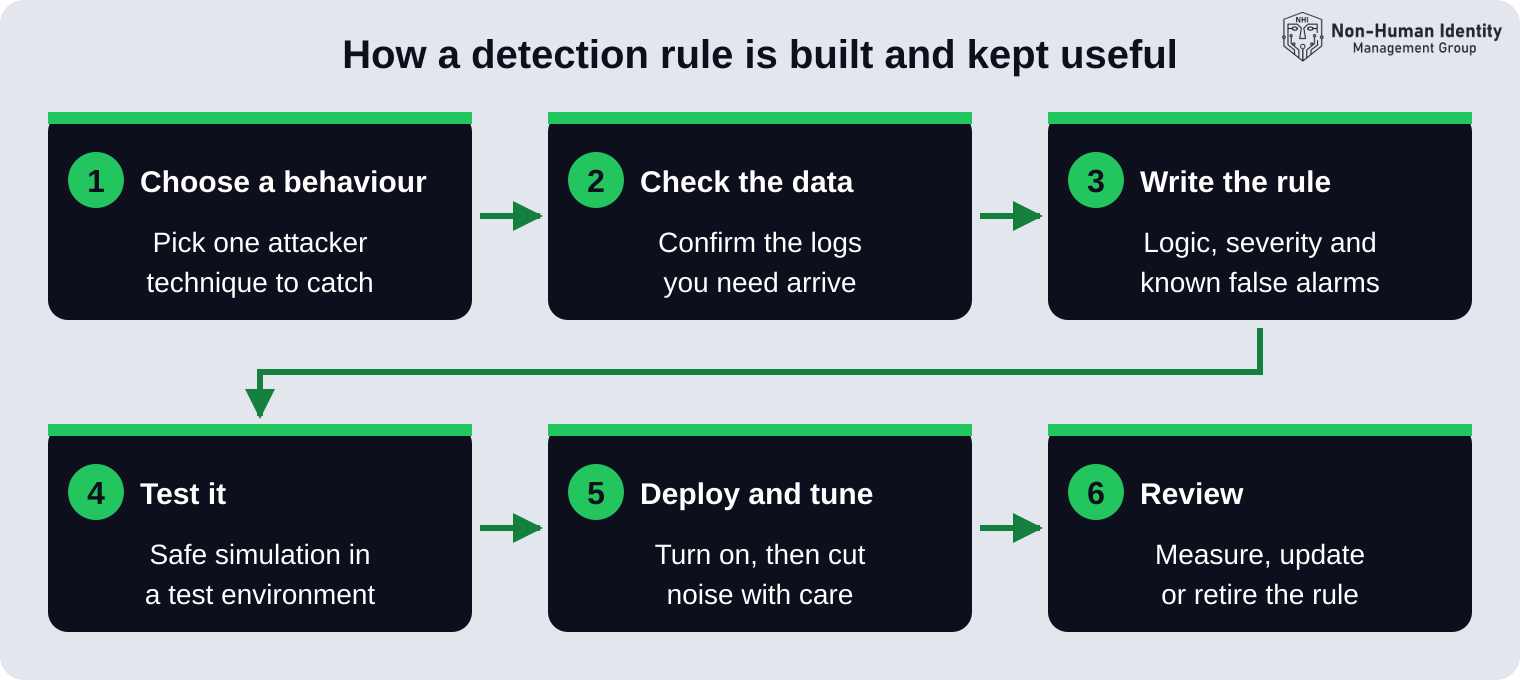
Teams use different tools and names, but most follow a lifecycle like this one.
- Choose a behaviour to catch. Pick one specific attacker technique, ideally from MITRE ATT&CK, a public knowledge base of observed attacker tactics and techniques. For example, password spraying is listed as T1110.003: trying one common password against many accounts to avoid account lockouts.[6]
- Check you have the data. Confirm the right log source is switched on and reaching your SIEM. A rule for failed sign-ins is useless if failed sign-ins are not logged.
- Write the rule and its notes. Write the logic, a severity, and the known harmless causes of a match. Palantir's Alerting and Detection Strategy (ADS) framework asks each new alert to document its goal, technical context, blind spots and assumptions, false positives, validation, priority and response before it goes live.[2]
- Test it safely. Run a harmless simulation of the behaviour in a test environment and check the rule fires. Libraries such as Atomic Red Team provide tests mapped to ATT&CK so teams can test their environments in a repeatable way.[3] Only run such tests with permission and in an agreed scope.
- Deploy and tune. Switch the rule on, often in a quiet "monitor only" mode first, and watch what it catches. Adjust thresholds or add narrow exceptions for known harmless activity. Each exception should be approved, written down and reviewed, because a broad exception can hide a real attack.
- Review, update or retire. Check regularly how often the rule fires, how many alerts were real and whether the data has changed. Update it or retire it when it stops being useful.
Ways of writing rules
| Approach | What it means | Good for |
|---|---|---|
| Indicator match | Alert on a known bad item, such as a malicious file hash or IP address. | Quick wins, but attackers change these items easily. |
| Behaviour rule | Alert on a pattern of activity, such as many failed sign-ins across many accounts. | Lasting value, because the behaviour is harder for attackers to change. |
| Threshold or anomaly | Alert when activity is far above a normal level for that user or system. | Unusual activity, but needs a good baseline and more tuning. |
| Correlation | Alert when several weaker signals happen together, for example a risky sign-in followed by a new mailbox rule. | Higher confidence alerts with fewer false alarms. |
Useful distinctions
- Detection engineering is not threat hunting. Threat hunting is a person searching for signs of attack that rules have not flagged. A good hunt often ends with a new rule, so the two feed each other.
- Sigma is a format, not a product. Sigma is an open rule format written in YAML. A Sigma rule records a title, the log source, the detection logic, a condition, known false positives, a severity level and ATT&CK tags, and tools such as sigma-cli convert it into a specific SIEM's query language.[1]
- Detection as code is a way of working. It means keeping rules in version control with reviews, tests and controlled deployment, the same way software is managed, so changes can be checked and rolled back.
- A false positive is not the same as a benign true positive. A false positive is an alert on activity that does not match what the rule intended. A benign true positive is the right behaviour, done for an approved reason, such as an authorised security test.
A worked example
Harbour Freight Services is a fictional logistics firm with 300 staff and a small security team. Leila, a new analyst, is asked to build the team's first properly documented rule. She chooses password spraying, because staff sign in to the company's Windows network and email every day.
First she checks the data. Windows records a failed sign-in as event ID 4625, which includes the account name, the failure reason, the source network address and the logon type.[5] She confirms those events from the domain controllers reach the SIEM. MITRE notes that attackers may avoid the most visible protocols, so she adds a note that the rule only covers Windows sign-in failures and does not yet cover cloud email sign-ins.[6]
Her rule says: alert when one source address produces failed sign-ins for more than 15 different accounts within 10 minutes. She documents two known harmless causes: a misconfigured scanner and the help desk's password reset tool. With approval from her manager, she runs a harmless test from a lab machine that tries a wrong password against 20 test accounts. The rule fires. She also checks it does not fire when one person mistypes their own password three times.
In its first week in monitor-only mode the rule produces six alerts. Five come from the reset tool, so she adds a narrow, approved exception for that one server and writes a review date next to it. The sixth alert is a real attempt from an unfamiliar address. The team blocks the address and checks whether any account signed in successfully. The rule did not stop the attempt by itself, and it would miss a slower attack spread over many hours, so Leila adds that gap to her backlog for a second rule.
Myths and misunderstandings
| What people think | What is true |
|---|---|
| Our security tool comes with rules, so we are covered. | Built-in rules help, but they do not know your systems. Someone still needs to check which behaviours are covered, whether the data arrives and whether the rules fire. |
| More alerts means better security. | More alerts often means more noise. What matters is how many alerts are real and acted on. |
| Once a rule works, it keeps working. | Log formats, systems and attacker methods change. Rules can quietly stop working, so they need testing and review. |
| The fastest fix for noise is to switch the rule off. | Switching it off removes the noise and the protection. Narrow tuning, approved and recorded, usually keeps the value. |
| You need to be an expert programmer. | Query skills help, but understanding attacker behaviour, logs and your organisation matters just as much. |
Key terms
- Detection engineering
- The discipline of designing, testing and maintaining detection logic so it remains useful against real attacker behaviour.
- Detection rule
- A repeatable condition that turns a pattern in security data into an automated alert or response.
- Telemetry
- The raw data systems produce about activity, such as logs, network flows, process events and API calls.
- Log source
- The system, application or device that produces security or operational logs.
- SIEM
- Security information and event management: a platform that collects and stores logs, normalises them, runs detection rules and supports investigation.
- False positive
- An alert that is not a real issue, such as a rule firing on harmless activity.
- False negative
- A missed detection: a real threat that was not recognised.
- Alert tuning
- Adjusting rules, thresholds and context so alerts are useful signals rather than overwhelming noise.
- Alert fatigue
- When a team receives so many low-value alerts that important events become harder to notice.
- MITRE ATT&CK
- A knowledge base of observed attacker tactics, techniques and procedures, used to map detections and coverage.
- Sigma
- A generic, text-based rule format for describing detections once and converting them for different SIEMs.
- Detection as code
- Managing detection logic like software, with version control, testing and deployment pipelines.
Common questions
What does a detection engineer do day to day?
They choose behaviours to cover, check log sources, write and test rules, review noisy alerts with analysts and retire rules that no longer help.
Is detection engineering the same as working in a SOC?
No. A security operations centre (SOC) team responds to alerts. Detection engineers build and improve the rules that create those alerts. In small teams one person may do both.
Do I need a SIEM to do detection engineering?
Not always. Rules can also run in endpoint, cloud and email security tools. A SIEM helps when you want to combine data from many sources.
What is a good first rule to build?
Something common, clear and well logged, such as many failed sign-ins across many accounts, or a new administrator account being created. We suggest starting where you already have reliable data.
How do you test a rule without causing harm?
Use harmless simulations, in a test environment or on test accounts, with written permission and an agreed scope. Never test against real customer systems without approval.
How do you know if detection engineering is working?
Useful measures include the share of alerts that turn out to be real, the time to triage an alert, how many ATT&CK techniques you have tested rules for, and how many rules have passed a review in the last quarter.
First steps
Three things a small team can do this week:
- List your existing rules. For each one, write down what it is meant to catch, who owns it and when it was last tested.
- Pick one behaviour and check the data. Choose a single technique, such as password spraying, and confirm the logs you need actually reach your monitoring tool.
- Write and test one documented rule. Record the goal, known false positives and blind spots, run an approved harmless test, and start it in monitor-only mode before turning on alerting.
Checklist
- Every detection rule has a named owner and a written purpose.
- Each rule records the attacker behaviour it targets, ideally with an ATT&CK technique ID.
- We have confirmed the log sources each rule depends on are switched on and arriving.
- Known false positives and blind spots are written down for each rule.
- New rules are tested with an approved, harmless simulation before going live.
- New rules start in monitor-only mode before they page anyone.
- Exceptions are narrow, approved, recorded and have a review date.
- Rules are kept in version control so changes can be reviewed and rolled back.
- We review noisy and silent rules at least every quarter.
Check your understanding
1. What is the difference between a false positive and a false negative?
Answer: a false positive is an alert on something harmless; a false negative is a real attack that produced no alert.
2. Why should a rule be tested before it goes live?
Answer: because a rule that has never fired in a test might not work at all, for example if the data it needs is missing or formatted differently.
3. Why are behaviour rules often more durable than indicator rules?
Answer: attackers can change a file or IP address easily, but changing how they behave, such as how they guess passwords, is harder.
4. Why can switching off a noisy rule be risky?
Answer: it removes protection along with the noise. Narrow, recorded tuning usually keeps the rule's value.
Suggested learning pathway
- Start with Logging and Log Management for Beginners to understand the data rules depend on.
- Then read SIEM for Beginners for the platform most rules run on.
- Learn the attacker techniques rules target in MITRE ATT&CK for Beginners.
- See how people search beyond rules in Threat Hunting for Beginners.
- For the full practitioner discipline, read the Detection Engineering Guide.
- For the open rule format, see the Sigma Rules Guide.
- For measuring results, see the Detection Engineering Metrics and KPIs Guide.
- For service accounts, API keys and other non-human identities, see Detection Engineering for Non-Human Identities Guide.
Standards and references
- Rules. Sigma Detection Format documentation, SigmaHQ. https://sigmahq.io/docs/basics/rules.html, accessed 27 Nov 2026.
- Alerting and Detection Strategy Framework. Palantir, GitHub. https://github.com/palantir/alerting-detection-strategy-framework, accessed 27 Nov 2026.
- Atomic Red Team. Red Canary, GitHub. https://github.com/redcanaryco/atomic-red-team, accessed 27 Nov 2026.
- Best Practices for Event Logging and Threat Detection. Australian Signals Directorate's Australian Cyber Security Centre with CISA, FBI, NSA, NCSC-UK and international partners. https://www.cisa.gov/resources-tools/resources/best-practices-event-logging-and-threat-detection, accessed 27 Nov 2026.
- 4625(F): An account failed to log on. Microsoft Learn, Microsoft. https://learn.microsoft.com/en-us/windows/security/threat-protection/auditing/event-4625, accessed 27 Nov 2026.
- Brute Force: Password Spraying, T1110.003. MITRE ATT&CK, The MITRE Corporation. https://attack.mitre.org/techniques/T1110/003/, accessed 27 Nov 2026.
- The NIST Cybersecurity Framework (CSF) 2.0, NIST CSWP 29. National Institute of Standards and Technology (NIST), February 2024. https://csrc.nist.gov/pubs/cswp/29/the-nist-cybersecurity-framework-csf-20/final.
- SP 800-53 Rev. 5, Security and Privacy Controls for Information Systems and Organizations. National Institute of Standards and Technology (NIST). https://csrc.nist.gov/pubs/sp/800/53/r5/upd1/final.
Related NHI Mgmt Group resources: Detection Engineering Maturity Model · Detection Engineer Career Guide · Password Spraying and Credential Stuffing Defence Guide