A SIEM (security information and event management) system is a software platform that collects security logs from across an organisation, puts them in one place and analyses them so that suspicious activity raises an alert for a person to check.
Every laptop, server, firewall and cloud service keeps a diary of what happens on it. On their own, those diaries are too many and too scattered for anyone to read. A SIEM gathers them together and looks for patterns that might mean trouble. This guide is for newcomers, students, career changers and managers who are not security specialists. It explains what a SIEM does, how a log becomes an alert, a worked example, common misunderstandings and simple first steps.
By the end of this guide you will be able to:
- Explain what a SIEM is and what problem it solves.
- Describe the journey from a log entry to an alert.
- Understand why a SIEM needs regular tuning and skilled people.
- Identify practical first steps for a small team.
Key takeaways
- A SIEM brings logs together. It collects records from many systems into one place so they can be searched and compared.
- Rules turn logs into alerts. Detection rules look for patterns, such as many failed sign-ins followed by a success, and raise an alert when they match.
- People still decide. An analyst checks each alert and decides whether it is real, harmless or needs escalating.
- It is not "set and forget". Rules need tuning as your systems and the threats change, or the team drowns in noise.
- What you collect matters most. A SIEM can only spot what is in the logs it receives, so choose and check your log sources carefully.
What it is, in plain English
A log is a record of something that happened on a computer system: someone signed in, a file was changed, a program started, a connection was made. Each single happening is called an event. Systems write events into logs automatically, often thousands every minute.
A SIEM collects those logs from many places, stores them centrally, and analyses them by applying rules and filters. If it finds activity that could be a security problem, it raises an alert so the security team can investigate.[1] NIST, the US standards body, has long described SIEM software as a program that provides centralised logging for many log types.[4]
An everyday comparison is the control room of a large shopping centre. Every door, lift and camera reports to one room. One guard cannot walk every corridor, but in the control room they can notice that the same fire door has opened five times at 3am and send someone to look. A SIEM is that control room for computer systems. Where the analogy breaks down: a guard watches live pictures, while a SIEM mostly reads written records, and it can only notice what its rules tell it to look for.
Why it matters to you
- If you run a small business: without central logs, an intruder can sign in to your email or files and nobody notices for weeks. A SIEM, or a simpler central log service, gives you a chance to spot it sooner.
- If you are new to a security job: a SIEM is often where a junior analyst spends the working day, reading alerts and searching logs. It sits at the heart of most security operations centres.
- If you are a manager: a SIEM is a long-term commitment, not a one-off purchase. Guidance from the Australian Signals Directorate and CISA notes that most SIEM pricing is based on how much data it takes in, and that running one well needs specialist staff and continual training.[1]
Logs also matter after something goes wrong. The UK National Cyber Security Centre (NCSC) points out that logs help you work out the source and extent of a compromise, and that successful detection often needs several data sources together.[6] A single log from one laptop rarely tells the whole story; the same person's activity across email, sign-in and file systems often does.
How it works, step by step
Products differ, but most SIEMs follow the same basic journey.
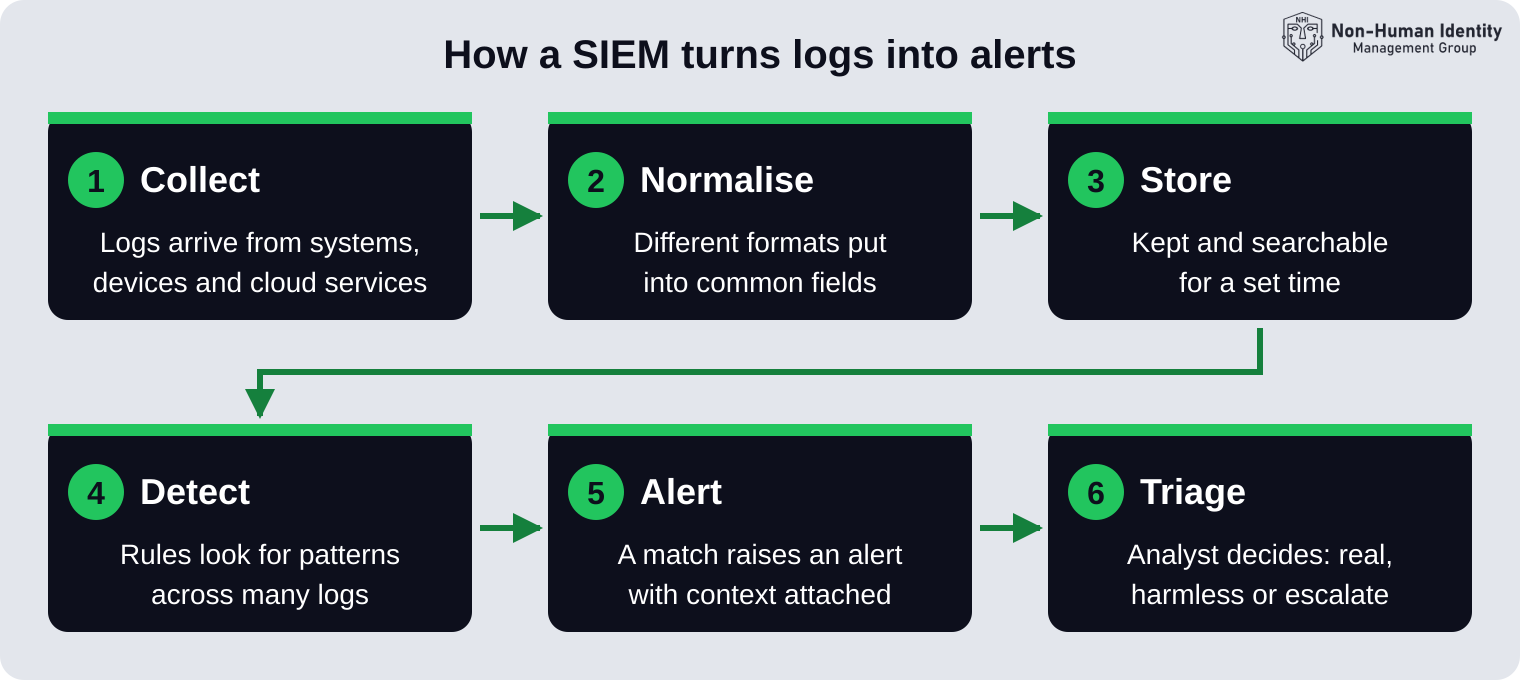
- Choose and connect log sources. A log source is any system that sends logs, such as a sign-in service, a firewall or a cloud platform. Joint guidance from CISA and the Australian Cyber Security Centre lists priority sources, starting with endpoint detection and response (EDR) tools, network devices, and domain controllers that handle Windows sign-ins.[2][3]
- Collect. Logs travel from each source to the SIEM, usually through a small agent program or a forwarding feature built into the system.
- Normalise. Each product writes logs in its own format. The SIEM translates them into common fields such as time, user, source address and action, so one rule can work across many sources. This is called normalisation.
- Store. Logs are kept for a set period so analysts can search back in time. How long you keep them is your log retention period.
- Detect. Detection rules look for patterns. Some rules look at one event; correlation rules combine several events, from one or more sources, that together look suspicious.
- Alert. When a rule matches, the SIEM raises an alert with context: which rule, which user, which device, which time.
- Triage and respond. An analyst reviews the alert, a step called triage, and decides whether it is a real problem, a harmless event or something to escalate under the incident response plan.
- Tune. The team adjusts rules that fire too often or miss things. The ASD and CISA guidance says to keep adjusting a SIEM and testing its effectiveness as the network, technology and threats change.[1]
The table below shows what different log sources can tell you. It is a starting point, not a complete list.
| Log source | Example of what it records | Why a SIEM wants it |
|---|---|---|
| Sign-in service (for example Windows domain controllers or a cloud identity provider) | Successful and failed sign-ins, account changes | Stolen passwords usually show up here first |
| Endpoint detection and response (EDR) | Programs started, files changed, network connections on laptops and servers | Shows what happened on the device itself |
| Firewall, VPN and proxy | Connections allowed or blocked, remote access sessions | Shows traffic entering and leaving the network |
| Cloud platform | Configuration changes, new accounts, access keys created | Many important systems now live in the cloud |
| Email service | Mail flow, forwarding rules, mailbox access | Phishing and mailbox takeover are common starting points |
Useful distinctions
- Log management is not the same as a SIEM. Log management collects, stores and searches logs. A SIEM adds detection rules, alerting and investigation on top. NIST describes log management as covering generating, transmitting, storing, accessing and disposing of log data.[5]
- SIEM and SOAR are different tools. SOAR (security orchestration, automation and response) runs pre-written playbooks to automate some responses, such as isolating a device. The ASD guidance suggests getting the SIEM working well before adding SOAR.[1]
- Where it fits in frameworks. The NIST Cybersecurity Framework 2.0 places this work under Continuous Monitoring (DE.CM) and Adverse Event Analysis (DE.AE), including DE.AE-03, information is correlated from multiple sources.[11] In NIST SP 800-53 the matching controls are AU-6 Audit Record Review, Analysis, and Reporting and SI-4 System Monitoring.[10]
- Rules can be shared. Sigma is an open, generic format for writing detection rules in YAML that describe log events, so a rule written once can be converted for different SIEM products.[7]
A worked example
Hartley Garden Supplies is a fictional online retailer with 60 staff. Its two-person IT team, Leon and Aisha, have just connected three log sources to a SIEM: the Windows domain controllers, the firewall and the cloud email service.
They start with a small number of rules. One of them watches Windows sign-in events. Event 4625 is recorded when an account fails to log on, and event 4624 when an account logs on successfully.[8][9] Their correlation rule says: "alert if one source address fails to sign in to more than 20 different accounts within ten minutes, and any of those accounts then signs in successfully". That pattern matches password spraying, where an attacker tries a few common passwords against many accounts, listed by MITRE ATT&CK as technique T1110.003.[12]
In the first week the rule fires twice. Aisha triages both. The first is a misconfigured printer retrying an old password: a false positive. She adds a note and adjusts the rule to ignore that one device, with Leon's agreement and a review date. The second alert shows failed attempts against 35 accounts from an unfamiliar overseas address, followed by a successful sign-in to a warehouse supervisor's account.
Aisha checks the email logs in the same SIEM search and sees a new forwarding rule created on that mailbox two minutes after the sign-in. She escalates under the company's incident response plan. Leon resets the password, ends the account's sessions, removes the forwarding rule and checks what was accessed. The SIEM did not stop the sign-in. What it did was put the clues from three different systems side by side, so the team could spot the problem within an hour instead of finding out from a customer weeks later.
Myths and misunderstandings
| What people think | What is true |
|---|---|
| Buy a SIEM and you are protected. | A SIEM detects and alerts; it does not block attacks by itself. It needs good log sources, tuned rules and people to respond. |
| Collect every log you can. | More data costs more and can bury important signals. The CISA and ACSC guidance advises prioritising sources and adjusting the order to your own risk.[3] |
| The default rules are enough. | Out-of-the-box rules are a start. They need adjusting to your environment, or they produce noise and miss local risks. |
| More alerts means better security. | Too many low-value alerts cause alert fatigue, where real problems are missed. Fewer, better alerts are usually more useful. |
| A SIEM is only for big companies. | Smaller organisations can use a managed service or start with central logging and a handful of rules. The NCSC suggests that where a full security operations centre is not feasible, you should at least have an effective logging system.[6] |
Key terms
- SIEM
- Security information and event management: a platform that collects and stores logs from many sources, normalises them, runs detection rules and supports search and investigation.
- Event
- Any observable occurrence in a system or network recorded in a log, such as a sign-in, a program starting or a connection.
- Log source
- The system, application or device that generates logs and sends them for collection.
- Log normalisation
- Converting different log formats into a common set of fields so rules and searches work across many sources.
- Correlation rule
- Detection logic that flags when several events occur together in a pattern that suggests higher risk.
- Alert
- A notification raised when a rule or detection condition is met, with context so an analyst can decide what to do.
- Alert triage
- Sorting alerts to decide which need investigation, escalation or dismissal.
- False positive
- An alert that turns out not to be a real problem, such as a rule firing on harmless activity.
- Alert fatigue
- When a team receives so many low-value alerts that important ones become harder to notice.
- Log retention
- The policy for how long logs are kept before they are archived or deleted.
- SOAR
- Security orchestration, automation and response: scripted workflows that automate repetitive security tasks and case handling.
Common questions
What does SIEM stand for?
Security information and event management. It joins two older ideas: storing security information for later review, and watching security events as they happen.
Is a SIEM the same as a security operations centre?
No. A security operations centre (SOC) is a team of people and processes. A SIEM is one of the main tools that team uses.
How long should we keep logs?
Long enough to investigate incidents that are found late and to meet any legal or contract rules that apply to you. The NCSC notes that reviews after incidents sometimes show log storage was too short.[6] Check your own obligations rather than copying another organisation's period.
Why does SIEM cost so much?
Pricing is often tied to the amount of data taken in, and the staff time to tune rules and handle alerts is a large ongoing cost.[1]
Can a SIEM spot attacks on cloud services?
Yes, if the cloud platform's logs are sent to it. Cloud platform logging is one of the priority source groups in the CISA and ACSC guidance.[3]
Do we need a SIEM if we already have EDR?
EDR watches devices closely. A SIEM combines device data with sign-in, network, cloud and email logs, which is how you see an attack that crosses several systems. Many teams use both, with EDR as one of the SIEM's log sources.
First steps
Three things you can do this week:
- List your most important log sources. Start with sign-ins (your identity provider or domain controllers), email and your firewall or VPN. Write down where each one's logs go today, if anywhere.
- Check that time is right everywhere. Logs from different systems can only be compared if their clocks agree. NIST SP 800-53 covers this as control AU-8, Time Stamps.[10]
- Write one useful rule. We suggest starting with repeated failed sign-ins followed by a success, or new mailbox forwarding rules. Test it, record who receives the alert, and note what they should do when it fires.
Checklist
- We know which systems send logs to a central place, and which do not.
- Sign-in, email and network logs are collected as a minimum.
- System clocks are synchronised, so events line up in time.
- We have a written log retention period that matches our legal and contract needs.
- Each alert rule has a named owner and a short note on what to do when it fires.
- Someone reviews alerts every working day, or a managed service does it for us.
- We review noisy rules at least monthly and record every change, including any temporary exception, with a review date.
- We check regularly that each log source is still sending data.
Simple measures that show progress: the number of priority log sources connected and healthy, the share of alerts that turn out to be false positives, the time from alert to first review, and the number of rules tuned or retired each month.
Check your understanding
1. What is the difference between log management and a SIEM?
Answer: log management collects, stores and searches logs. A SIEM does that and adds detection rules, alerting and investigation.
2. Why does a SIEM need normalisation?
Answer: different systems write logs in different formats. Putting them into common fields lets one rule or search work across all of them.
3. What is a correlation rule?
Answer: a rule that combines several events, often from different sources, that together suggest a problem, such as many failed sign-ins followed by a success.
4. Why can too many alerts be a bad thing?
Answer: analysts suffer alert fatigue and may miss the real problem among the noise.
Suggested learning pathway
- Start with the team that uses a SIEM: Security Operations Centres for Beginners.
- Learn what to record first: Security Logging for Beginners.
- See how automation builds on a SIEM: SOAR and Security Automation for Beginners.
- Understand what happens after an alert is escalated: Incident Response for Beginners.
- For the full practitioner view of design, sources and operations, see the SIEM Guide.
- For the difference between storing logs and detecting with them, see SIEM vs Log Management.
- For writing and maintaining good rules, see the Detection Engineering Guide.
- For shareable rule formats, see the Sigma Rules Guide.
Standards and references
- Implementing SIEM and SOAR platforms: Executive guidance. Australian Signals Directorate's Australian Cyber Security Centre (ASD's ACSC) with CISA and partners, first published 27 May 2025. https://www.cyber.gov.au/business-government/detecting-responding-to-threats/event-logging/implementing-siem-soar-platforms/executive-guidance, accessed 27 Nov 2026.
- Guidance for SIEM and SOAR Implementation. Cybersecurity and Infrastructure Security Agency (CISA). https://www.cisa.gov/resources-tools/resources/guidance-siem-and-soar-implementation, accessed 27 Nov 2026.
- Priority logs for SIEM ingestion: Practitioner guidance. ASD's ACSC with CISA and partners. https://www.cyber.gov.au/business-government/detecting-responding-to-threats/event-logging/implementing-siem-soar-platforms/priority-logs-for-siem-ingestion-practitioner-guidance, accessed 27 Nov 2026.
- SP 800-92, Guide to Computer Security Log Management. National Institute of Standards and Technology (NIST), September 2006. Definition via the NIST CSRC glossary: https://csrc.nist.gov/glossary/term/security_information_and_event_management, accessed 27 Nov 2026.
- SP 800-92 Rev. 1 (Initial Public Draft), Cybersecurity Log Management Planning Guide. NIST, 11 October 2023. https://csrc.nist.gov/pubs/sp/800/92/r1/ipd, accessed 27 Nov 2026.
- Device security guidance: Logging and protective monitoring. National Cyber Security Centre (NCSC). https://www.ncsc.gov.uk/collection/device-security-guidance/managing-deployed-devices/logging-and-protective-monitoring, accessed 27 Nov 2026.
- Sigma rules: the basics. SigmaHQ. https://sigmahq.io/docs/basics/rules.html, accessed 27 Nov 2026.
- 4625(F): An account failed to log on. Microsoft Learn, Microsoft. https://learn.microsoft.com/en-us/previous-versions/windows/it-pro/windows-10/security/threat-protection/auditing/event-4625, accessed 27 Nov 2026.
- 4624(S): An account was successfully logged on. Microsoft Learn, Microsoft. https://learn.microsoft.com/en-us/previous-versions/windows/it-pro/windows-10/security/threat-protection/auditing/event-4624, accessed 27 Nov 2026.
- SP 800-53 Rev. 5, Security and Privacy Controls for Information Systems and Organizations (AU-6, AU-8, SI-4). NIST. https://csrc.nist.gov/pubs/sp/800/53/r5/upd1/final.
- The NIST Cybersecurity Framework (CSF) 2.0 (DE.CM Continuous Monitoring, DE.AE Adverse Event Analysis). NIST, 26 February 2024. https://www.nist.gov/cyberframework.
- Brute Force: Password Spraying (T1110.003). MITRE ATT&CK. https://attack.mitre.org/techniques/T1110/003/, accessed 27 Nov 2026.
Related NHI Mgmt Group resources: Log Management and Retention Guide · SIEM vs XDR · Detection Engineering Metrics and KPIs Guide