MITRE ATT&CK is a free, public knowledge base that describes what attackers do during real cyber attacks, organised by their goals and the methods they use to reach them.
Security teams use it as a shared vocabulary, so that "the attacker logged in with a stolen password" becomes a precise, searchable entry that anyone can look up. This guide is for newcomers, students, career changers and managers. It explains how ATT&CK is organised, how defenders use it, a worked example, common misunderstandings and simple first steps. It stays at the level of defence: what to recognise, reduce and detect.
By the end of this guide you will be able to:
- Explain what MITRE ATT&CK is and who makes it.
- Describe the difference between tactics, techniques, sub-techniques and procedures.
- Understand how defenders use ATT&CK to check and improve their defences.
- Identify practical first steps for using ATT&CK in a small team.
Key takeaways
- It is a catalogue of real attacker behaviour. MITRE describes ATT&CK as a globally accessible knowledge base of adversary tactics and techniques based on real-world observations.
- Tactics are the why, techniques are the how. A tactic is the attacker's goal, such as getting in; a technique is a method of reaching it, such as phishing.
- It is a shared language. Technique IDs like T1078 let analysts, tools and reports describe the same behaviour in the same way.
- It is not a checklist to complete. MITRE advises focusing on the behaviours most relevant to your organisation rather than aiming for complete coverage.
- It is free and open. Anyone can use it at no charge, under MITRE's terms of use.
What it is, in plain English
MITRE ATT&CK (pronounced "attack") stands for Adversarial Tactics, Techniques and Common Knowledge. It is maintained by MITRE, a US not-for-profit organisation, and published on its own website. MITRE describes it as "a globally-accessible knowledge base of adversary tactics and techniques based on real-world observations".[1] It is open to any person or organisation at no charge.[2]
ATT&CK has separate collections, called matrices, for Enterprise systems (such as Windows, Linux, cloud and identity services), Mobile devices and Industrial Control Systems (ICS).[1] This guide uses the Enterprise matrix, which most people mean when they say "ATT&CK".
Each matrix is built from four layers:[2]
| Layer | Plain meaning | Example |
|---|---|---|
| Tactic | The attacker's goal at that stage: the "why". | Initial Access (TA0001): getting into the network. |
| Technique | A method used to reach that goal: the "how". | Phishing (T1566). |
| Sub-technique | A more specific version of a technique. | Spearphishing Link (T1566.002). |
| Procedure | The specific way a real attacker carried out a technique, as observed in real attacks. | The exact way one tracked group sent its phishing emails in a reported campaign. |
A helpful comparison is a field guide to birds. It does not tell you which birds will visit your garden, but it gives every bird a name, a picture and typical behaviour, so that two people can agree on what they saw. ATT&CK does the same for attacker behaviour. Where the analogy breaks down: attackers change their behaviour to avoid being seen, and one attack usually involves many techniques in combination, so recognising one "species" is only the start of an investigation.
In the version of the Enterprise matrix published in November 2026, there are 15 tactics: Reconnaissance, Resource Development, Initial Access, Execution, Persistence, Privilege Escalation, Stealth, Defense Impairment, Credential Access, Discovery, Lateral Movement, Collection, Command and Control, Exfiltration and Impact.[1] MITRE updates ATT&CK over time, so names and numbers can change between versions.
Why it matters to you
- If you run a small business: ATT&CK helps you ask suppliers and advisers clearer questions, such as "how would we spot someone using a stolen login?", instead of buying tools on general promises.
- If you are new to a security job: ATT&CK IDs appear in alerts, threat reports, job descriptions and interview questions. Knowing the structure helps you read them quickly.
- If you are a manager: ATT&CK gives a common way to talk about which attacker behaviours you can detect or block, and where the gaps are, without needing deep technical detail.
The US Cybersecurity and Infrastructure Security Agency (CISA) encourages defenders to use ATT&CK because it gives "a common language for threat actor analysis". CISA lists uses such as identifying defensive gaps, assessing security tool capabilities, organising detections, threat hunting and validating mitigation controls.[6] MITRE reports that the most common ways people apply ATT&CK are detections and analytics, threat intelligence, adversary emulation and red teaming, and assessment and engineering.[3]
Many attacks rely on ordinary account abuse rather than clever malware. ATT&CK's Valid Accounts technique (T1078) describes attackers obtaining and abusing legitimate credentials, often without malware, which can make their activity harder to detect.[5] Learning to describe behaviour like this precisely is one of the most useful skills a new defender can build.
How it works, step by step
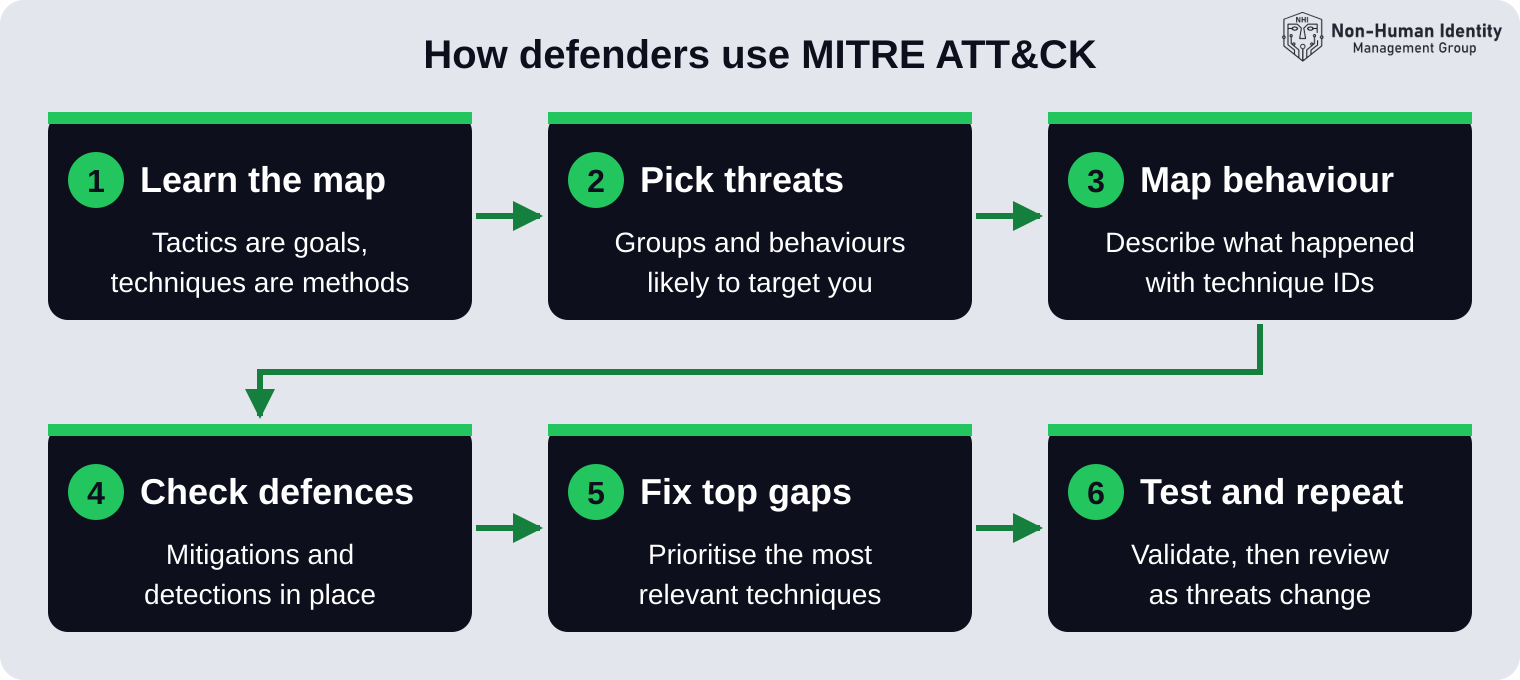
Here is a simple way defenders use ATT&CK. It is a starting pattern, not a formal method.
- Learn the map. Read the tactic names across the top of the Enterprise matrix and open a few technique pages. Each technique page describes the behaviour, lists sub-techniques, and links mitigations, detection guidance and real examples.[5]
- Pick the threats that matter to you. ATT&CK's Groups pages track "activity clusters that are tracked by a common name in the security community", with the techniques reported for each.[4] Your sector's threat reports or your own incidents can tell you which behaviours to look at first.
- Map behaviour to techniques. When you read a threat report or investigate an alert, label each attacker action with the matching tactic and technique. CISA's mapping guidance gives defenders step-by-step instructions for doing this.[6]
- Check your defences. For each priority technique, ask two questions: what reduces the chance it works (a mitigation), and how would we notice it (a detection)? For example, ATT&CK lists multi-factor authentication (M1032) and privileged account management (M1026) as mitigations for Valid Accounts.[5]
- Fix the most important gaps first. MITRE advises focusing on the tactics and techniques most relevant to your organisation, not trying to cover everything.[3]
- Test and repeat. Check that defences work as expected, for example through authorised testing, and review the map as threats and your systems change. MITRE notes that filling out a checklist should not be treated as "done".[3]
Useful distinctions
- ATT&CK tactics are not a strict sequence. The tactic names read left to right, but an attacker may skip some, repeat others or move back and forth. For an ordered, phase-by-phase model, see Cyber Kill Chain for Beginners.
- One technique can serve several goals. Valid Accounts appears under Initial Access, Persistence, Privilege Escalation and Stealth, because a stolen login can help an attacker get in, stay in, gain more rights and blend in.[5]
- Group names are not exact matches. Different security companies track similar activity under different names. MITRE maps overlapping names as "Associated Groups" on a best-effort basis and recommends further research.[4]
- ATT&CK describes attacks; other MITRE resources describe defences. MITRE D3FEND catalogues defensive techniques. Our MITRE ATT&CK vs MITRE D3FEND guide explains how they fit together.
- The ATT&CK Navigator is a viewing tool. MITRE describes it as a way to visualise defensive coverage, plan red and blue team work, and show how often techniques are detected.[3] A coloured map is a planning aid, not proof that defences work.
A worked example
Northgate Builders is a fictional construction firm with 150 staff and a two-person IT team. Aisha, a junior analyst, has been asked to "do something with ATT&CK" after a scare in which a project manager's email account was used to send fake payment requests.
- Describing the incident: Aisha writes up what happened in ATT&CK terms. The project manager received a phishing email with a link (Phishing: Spearphishing Link, T1566.002). The attacker then signed in with the stolen password (Valid Accounts, T1078).[7][5]
- Choosing priorities: rather than looking at the whole matrix, she picks the two techniques from the incident, plus behaviours her industry's threat reports mention often.
- Checking defences: using the mitigations listed on each technique page, she finds that multi-factor authentication is on for administrators but not for everyone, and that nobody reviews sign-ins from unusual countries.
- Acting: the team turns on multi-factor authentication for all staff in stages, adds an alert for unusual sign-ins, and runs a short phishing awareness session.
A month later, a similar phishing email arrives. One person clicks and types their password, but the attacker's sign-in attempt is met by a multi-factor prompt the employee does not recognise, and they report it. The new alert also flags the foreign sign-in attempt. ATT&CK did not block the attack by itself; it helped the team describe what happened, choose sensible fixes and explain them to the directors. The team still resets the password and checks the account, because a single control can be bypassed.
Myths and misunderstandings
| What people think | What is true |
|---|---|
| ATT&CK is a tool you install. | It is a knowledge base on a website, with free data that many security products use. The Navigator is a separate viewing tool.[1][3] |
| The goal is to cover every technique. | MITRE advises focusing on the techniques most relevant to you rather than complete coverage.[3] |
| A green box on the matrix means you are protected. | A technique can be done in many ways. Detecting one procedure does not mean you detect them all, so coverage maps need testing. |
| ATT&CK is only for big security teams. | It is free to use, and a small team can start with a handful of techniques linked to its own incidents.[2] |
| ATT&CK is a guide for attackers. | It describes behaviour already seen in public reporting so that defenders can recognise and counter it. CISA promotes it for defensive analysis.[6] |
| Tactics always happen in order, left to right. | Real attacks can skip, repeat or revisit tactics; the order is a reading aid. |
Key terms
- MITRE ATT&CK
- A knowledge base of observed attacker tactics, techniques and procedures, used by defenders to map detections and assess coverage.
- Tactic
- The attacker's immediate goal in ATT&CK, such as gaining access or stealing credentials.
- Technique
- The method an attacker uses to carry out a tactic, such as phishing.
- Sub-technique
- A more specific description of a technique, shown with a decimal ID such as T1566.002.
- Procedure
- The specific way a real attacker carried out a technique.
- Tactics, techniques and procedures (TTPs)
- A shorthand for how an attacker operates: the goal, the method and the exact implementation.
- Threat actor
- A person or group that deliberately tries to compromise systems, data or trust. ATT&CK tracks groups, not individuals.
- Mitigation
- An action that reduces the likelihood or impact of an attack technique working.
- Threat intelligence
- Information about attackers and their methods that helps teams decide what matters and what to do next.
- Threat-informed defence
- Shaping and testing controls around known attacker behaviour rather than general assumptions.
- Adversary emulation
- Authorised, structured simulation of attacker techniques to test whether defences work as intended.
Common questions
What does ATT&CK stand for?
Adversarial Tactics, Techniques and Common Knowledge. It is usually written with the ampersand and pronounced "attack".
Is MITRE ATT&CK free?
Yes. MITRE says it is open and available to any person or organisation at no charge, subject to its terms of use.[2]
How is ATT&CK different from the Cyber Kill Chain?
The Cyber Kill Chain describes an attack as a short series of ordered phases. ATT&CK goes into much more detail on individual behaviours, and its tactics are not a strict order. Many teams use both. See Cyber Kill Chain for Beginners.
What do the IDs mean?
Tactics start with TA (for example TA0001 Initial Access), techniques start with T (T1566 Phishing), sub-techniques add a decimal (T1566.002), mitigations start with M (M1032 Multi-factor Authentication) and groups start with G.[5][7]
How often does ATT&CK change?
MITRE publishes new versions over time and keeps a version history on the ATT&CK site.[1] Tactic and technique names can change, so check the current site rather than relying on old notes.
Where should a beginner start?
We suggest picking one recent incident or news story, finding the techniques it involved on the ATT&CK site, and reading the mitigations for each. That is more useful than trying to memorise the matrix.
First steps
Three things you can do this week:
- Explore the matrix. Open the Enterprise matrix on the ATT&CK site and read the pages for Phishing (T1566) and Valid Accounts (T1078), including their mitigations.
- Map one incident. Take a recent incident from your organisation, or a public report, and label each attacker step with a tactic and technique. Ask a colleague to check it.
- Pick five priorities. Choose five techniques that matter most to you and write down, for each, what reduces the risk and how you would notice it.
Checklist
- We can explain the difference between a tactic and a technique.
- Our incident reports label attacker behaviour with ATT&CK technique IDs where it helps.
- We have a short list of priority techniques based on our own incidents and sector threats.
- For each priority technique, we know which mitigations we have in place.
- For each priority technique, we know how we would detect it, or we have noted the gap.
- We test important detections, with authorised and agreed exercises, before claiming coverage.
- We review the priority list when new threat reports or incidents change the picture.
- We check the ATT&CK version when sharing mappings, because names can change.
Simple measures that show progress: the number of priority techniques with a tested detection, the number with at least one mitigation in place, the share of incident reports with ATT&CK labels, and when the priority list was last reviewed.
Check your understanding
1. What is the difference between a tactic and a technique?
Answer: a tactic is the attacker's goal (the why), such as Initial Access; a technique is the method used to reach it (the how), such as Phishing.
2. Why does Valid Accounts (T1078) appear under several tactics?
Answer: because using a legitimate login can help an attacker get in, stay in, gain more rights and avoid notice, so it serves several goals.
3. Should a team aim to cover every technique in the matrix?
Answer: no. MITRE advises focusing on the techniques most relevant to your organisation.
4. Does a fully coloured Navigator layer prove you are protected?
Answer: no. It is a planning view. Coverage needs to be tested, because each technique can be carried out in many ways.
Suggested learning pathway
- For the wider picture of attacker information, start with Threat Intelligence for Beginners.
- For who attackers are and what drives them, see Threat Actors for Beginners.
- For an ordered, phase-based model, see Cyber Kill Chain for Beginners.
- For turning techniques into alerts, see Detection Engineering for Beginners.
- For searching for attackers who slipped past alerts, see Threat Hunting for Beginners.
- For the practitioner view of the framework, read the MITRE ATT&CK Guide for Defenders.
- For building a programme around attacker behaviour, read the Threat-Informed Defence Guide.
- For labelling reports accurately, read the Mapping Threat Reports to MITRE ATT&CK Guide.
- For measuring what you can detect, read the MITRE ATT&CK Coverage Mapping Guide.
Standards and references
- MITRE ATT&CK (home page and Enterprise matrix). The MITRE Corporation. https://attack.mitre.org/, accessed 27 Nov 2026.
- ATT&CK FAQ. The MITRE Corporation. https://attack.mitre.org/resources/faq/, accessed 27 Nov 2026.
- ATT&CK Resources: Getting Started. The MITRE Corporation. https://attack.mitre.org/resources/, accessed 27 Nov 2026.
- ATT&CK Groups. The MITRE Corporation. https://attack.mitre.org/groups/, accessed 27 Nov 2026.
- Valid Accounts, Technique T1078, Enterprise. MITRE ATT&CK, The MITRE Corporation. https://attack.mitre.org/techniques/T1078/, accessed 27 Nov 2026.
- Best Practices for MITRE ATT&CK Mapping. Cybersecurity and Infrastructure Security Agency (CISA), first published June 2021, updated January 2023. https://www.cisa.gov/news-events/news/best-practices-mitre-attckr-mapping, accessed 27 Nov 2026.
- Phishing, Technique T1566, Enterprise. MITRE ATT&CK, The MITRE Corporation. https://attack.mitre.org/techniques/T1566/, accessed 27 Nov 2026.
Related NHI Mgmt Group resources: MITRE ATT&CK vs MITRE D3FEND · MITRE ATT&CK T1078 Valid Accounts Guide · MITRE ATLAS Guide