Security logging means having your computers, applications and network devices write down a record of important events, such as sign-ins, changes and errors, so that you can spot trouble and work out what happened afterwards.
This guide is for newcomers, students, career changers and managers who want to understand logs before meeting the tools that use them. It explains what a log is, which events matter, how logs are collected, protected, kept and deleted, and what a small team can do this week. Tools that turn logs into alerts are covered in SIEM for Beginners; detailed retention planning is in the Log Management and Retention Guide.
By the end of this guide you will be able to:
- Explain what a security log is and why it matters.
- Identify which events and log sources to record first.
- Describe how logs are collected, protected, kept and deleted.
- Understand what should never be written into a log.
Key takeaways
- Logs are your evidence. Without them you cannot tell who did what, when, or how far an attacker got.
- Start with sign-ins and changes. Authentication, access and admin changes answer most early incident questions.
- Each entry needs when, where, who and what. Accurate, synchronised time is what lets events from different systems line up.
- Protect and centralise. Copy logs off the machine that made them and limit who can change or delete them, because attackers try to hide their tracks.
- Keep logs long enough, but not secrets. The NCSC suggests at least six months for important logs, and passwords, tokens and keys should never be logged.[2][5]
What it is, in plain English
A log is a record of events that happen on an organisation's computers, networks and cloud services.[1] Each line in a log is an event: for example "user anna signed in from this address at 09:02" or "an account failed to log on". Windows, for instance, records a failed sign-in as event 4625, "An account failed to log on", with fields such as the account name, the failure reason and the network address the attempt came from.[6]
Log management is the whole process around those records. NIST describes it as generating, transmitting, storing, accessing and disposing of log data.[1] Security logging is the part of that process aimed at spotting and investigating attacks.
A good comparison is the visitor book and CCTV in an office reception. They do not stop anyone walking in, but they show who came, when, and where they went, which is exactly what you need after something goes missing. Where the analogy breaks down: computer logs are written automatically by thousands of systems at once, in different formats and with different clocks, so they need collecting, sorting and protecting before they are useful.
Why it matters to you
- If you run a small business: if an email account is taken over, sign-in logs show when it started and what was accessed, which shapes what you tell customers and insurers.
- If you are new to a security job: almost every alert, investigation and audit starts with "show me the logs". Knowing where they live is a core skill.
- If you are a manager: logs are evidence for regulators and auditors that controls work, and their absence is a common finding.
The UK National Cyber Security Centre (NCSC) calls logging the foundation on which security monitoring and situational awareness are built.[2] It also notes that breaches can go undetected for months, and that many organisations only discover their monitoring is broken during a real incident.[3]
How it works, step by step
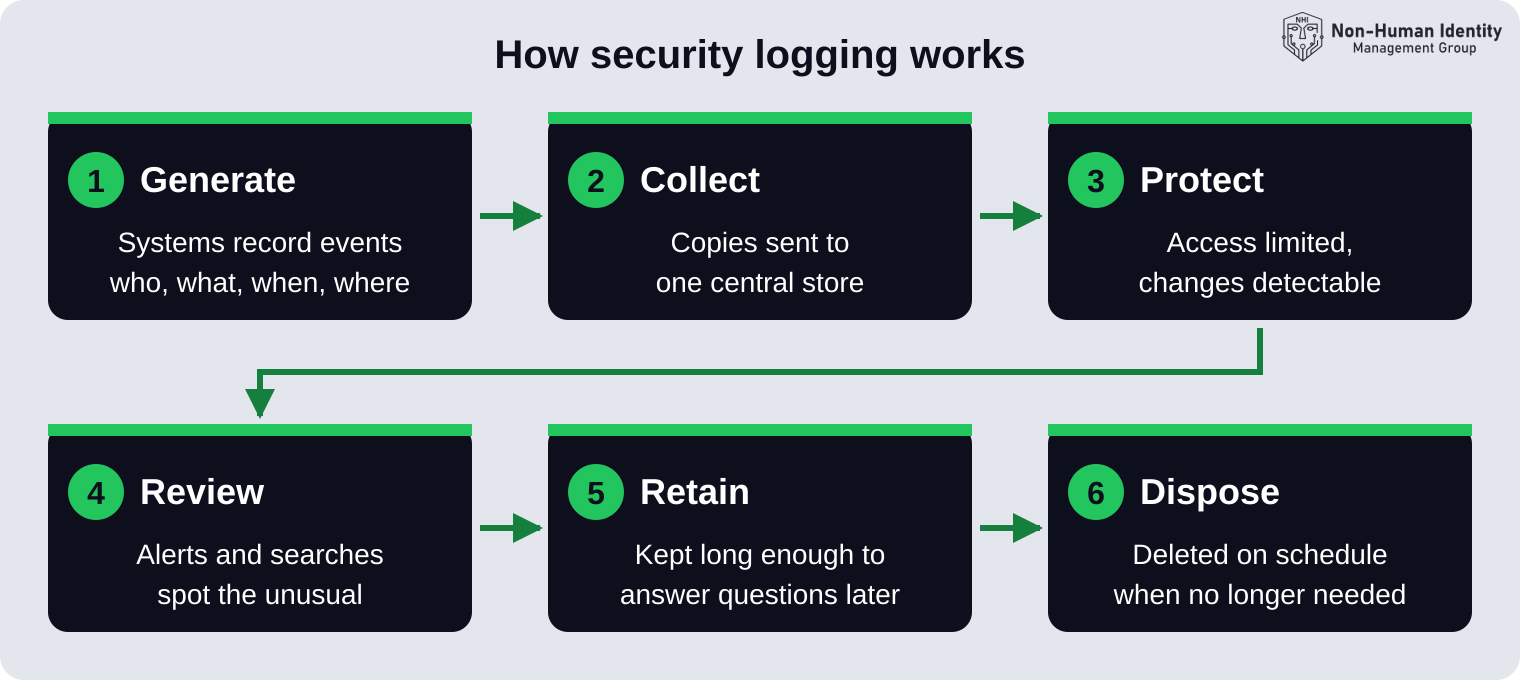
- Decide what questions you need to answer. List the questions you would ask after an incident, such as "who signed in to the finance mailbox?", and choose log sources that answer them.[2]
- Generate the right events. Turn on logging for sign-ins (successes and failures), permission failures, admin actions, use of shared or emergency accounts, and configuration changes. Each entry should record when, where, who and what.[5]
- Set the clocks. Synchronise every log source to an accurate time source and record times in UTC (Coordinated Universal Time), so events from different systems line up.[2]
- Collect centrally. Send copies to one central store, for example with Windows Event Forwarding or by forwarding syslog from Linux servers, so you can search across systems without visiting each one.[4]
- Protect the logs. Encrypt logs in transit, make them hard to tamper with, restrict who can read them and record access to the logs themselves.[3][5]
- Review and alert. Search the logs during investigations and set alerts for patterns that matter, including an alert when logs stop arriving.[3]
- Retain and dispose. Keep important logs long enough to answer questions later, then delete them on a schedule.[2]
The NCSC groups the log sources worth collecting first into three areas.[2]
| Area | Example sources | Questions they answer |
|---|---|---|
| External network communications | Firewall, DNS, web proxy, endpoint agents | Is anything talking to a suspicious address or domain? |
| Authentication and access | Directory service, VPN, remote access, email, document stores | Who accessed what, and when? |
| Asset and configuration information | DHCP records, admin change logs, configuration database | Which device was this, and what changed? |
The OWASP Logging Cheat Sheet lists data that should be removed, masked or never written to logs.[5]
| Record this | Keep this out |
|---|---|
| Date and time of the event | Passwords |
| Application, host and service | Session identifiers (use a hashed value if you must track them) |
| Source address and user identity | Access tokens, encryption keys and connection strings |
| Event type, severity and description | Payment card and bank details, and sensitive personal data |
In formal frameworks, NIST SP 800-53 covers this ground in its audit family, including AU-2 Event Logging, AU-8 Time Stamps, AU-9 Protection of Audit Information and AU-11 Audit Record Retention.[7] The NIST Cybersecurity Framework 2.0 outcome PR.PS-04 says log records are generated and made available for continuous monitoring.[8]
A worked example
Northgate Dental is a fictional group of three dental practices with 30 staff and an outside IT supplier. On a Thursday, the practice manager, Leah, gets a call from a supplier asking why Northgate has changed its bank details. Nobody at Northgate sent that request.
Leah asks the IT supplier for help. Because sign-in logging was switched on for the cloud email service, and logs are kept for six months, the supplier can see a burst of failed sign-ins on the accounts mailbox on Monday, then a successful sign-in from an unfamiliar location, and a new rule that forwarded invoices to an outside address. The times line up across the email logs and the firewall logs because both use UTC.
The supplier removes the forwarding rule, resets the password, ends active sessions and turns on multi-factor authentication. The logs show which messages were forwarded, so Leah can warn the right suppliers. The logs did not stop the attack, and they cannot show everything the attacker read; they did let Northgate act on facts rather than guesses. Afterwards, Northgate adds an alert for new forwarding rules and for sign-ins from new countries.
Myths and misunderstandings
| What people think | What is true |
|---|---|
| Logging is switched on by default, so we are covered. | Defaults vary by product and often miss events you need, or keep them only briefly. Check each important system. |
| More logs are always better. | The NCSC suggests starting with defaults and trimming events least likely to answer incident questions, balancing cost and value.[2] |
| Logs on the server itself are enough. | An attacker with control of that server may be able to change or delete them. Copy logs to a separate, protected store. |
| Logging is the same as monitoring. | Logging records events; monitoring is someone or something reviewing them and acting. You need both. |
| Writing everything down helps investigations. | Logging passwords, tokens or keys creates a new place for attackers to steal them.[5] |
Key terms
- Event log
- A time-ordered record of system, application or security events, used to investigate activity, detect abuse and prove what happened.
- Security log
- A record of activity from a system, application or network device that can be used to detect, investigate or prove security-relevant behaviour.
- Audit log
- Time-stamped records of identity and access events, such as who signed in and what changed.
- Log source
- The system, application or device that generates the logs.
- Log management
- Collecting, storing, searching and organising log data. It is the foundation for visibility, but it is not the same as threat detection.
- Log retention
- The policy for how long logs are kept before archiving or deletion.
- Syslog
- A standard for sending event messages from servers, network devices and applications to central logging systems.
- SIEM
- Security information and event management: a platform that collects logs from many sources, runs detection rules and supports search and investigation.
Common questions
How long should we keep logs?
It depends on your risks, costs and any legal or contract rules. The NCSC recommends keeping your most important logs for at least six months where possible.[2][3] Some regulations or contracts may require longer.
Do I need a SIEM to start logging?
No. You can start by switching on the right logs and keeping copies in a central place. A SIEM adds correlation and alerting once you have good logs to feed it.
What is the single most useful log for a small organisation?
Usually the sign-in and audit log of your main cloud email and identity service, because account takeover is such a common starting point.
Why does time synchronisation matter so much?
If clocks disagree, events from different systems appear in the wrong order and an investigation can draw the wrong conclusion. Recording times in UTC avoids confusion over time zones and clock changes.[2]
Can logs contain personal data?
Yes. Usernames and addresses are personal data in many places, so treat logs as sensitive, limit access and do not keep them longer than you need.
How do we know logging is still working?
Set an alert for when a source stops sending logs, and test now and then with a known event to check it arrives.[3]
First steps
Three things you can do this week:
- Write down five incident questions. For example, who signed in to admin accounts, and from where. Note which system's log would answer each one.
- Check your email and identity service. Confirm that sign-in and audit logging is on and find out how long logs are kept on your current plan.
- Check the clocks. Confirm that servers and network devices take their time from a reliable source. We suggest fixing any that do not before an incident, not during one.
Checklist
- We know which systems produce our most important logs.
- Sign-in successes and failures are logged for email, identity, VPN and remote access.
- Admin actions and changes to security settings are logged.
- All log sources use a synchronised clock.
- Important logs are copied to a central store separate from the systems that made them.
- Only a few named people can read or delete logs, and their access is recorded.
- Important logs are kept for an agreed period, and deleted on schedule after that.
- Passwords, tokens and keys are not written into our logs.
- We get an alert if a key log source stops sending data.
Simple measures that show progress: the share of critical systems sending logs centrally, how many days of logs you can actually search, and how long it takes to answer "who signed in to this account last week?".
Check your understanding
1. What four things should every log entry tell you?
Answer: when it happened, where (which system), who was involved and what happened.
2. Why copy logs away from the system that created them?
Answer: an attacker who controls that system may try to delete or change its logs to hide their activity.
3. Name two things that should never be written into a log.
Answer: any two of passwords, session identifiers, access tokens, encryption keys, connection strings or payment card details.
4. What is the difference between logging and monitoring?
Answer: logging records events; monitoring is reviewing those records and acting on what they show.
Suggested learning pathway
- For the team that uses logs every day: Security Operations Centres for Beginners.
- For turning logs into alerts: SIEM for Beginners.
- For what happens when an alert becomes an incident: Incident Response for Beginners.
- For using logs as evidence: Digital Forensics for Beginners.
- For retention periods and storage design: the Log Management and Retention Guide.
- For a control-by-control view: the CIS Control 8 Audit Log Management Guide.
- For Windows specifics: the Windows Event Log Guide.
Standards and references
- SP 800-92 Rev. 1 (Initial Public Draft), Cybersecurity Log Management Planning Guide, 11 October 2023. National Institute of Standards and Technology (NIST). https://csrc.nist.gov/pubs/sp/800/92/r1/ipd, accessed 27 Nov 2026.
- Introduction to logging for security purposes. National Cyber Security Centre (NCSC). https://www.ncsc.gov.uk/guidance/introduction-logging-security-purposes, accessed 27 Nov 2026.
- 10 Steps to Cyber Security: Logging and monitoring. National Cyber Security Centre (NCSC). https://www.ncsc.gov.uk/collection/10-steps/logging-and-monitoring, accessed 27 Nov 2026.
- Device security guidance: Logging and protective monitoring. National Cyber Security Centre (NCSC). https://www.ncsc.gov.uk/collection/device-security-guidance/managing-deployed-devices/logging-and-protective-monitoring, accessed 27 Nov 2026.
- Logging Cheat Sheet. OWASP Cheat Sheet Series, OWASP Foundation. https://cheatsheetseries.owasp.org/cheatsheets/Logging_Cheat_Sheet.html, accessed 27 Nov 2026.
- 4625(F): An account failed to log on. Microsoft Learn (previous versions), Microsoft. https://learn.microsoft.com/en-us/previous-versions/windows/it-pro/windows-10/security/threat-protection/auditing/event-4625, accessed 27 Nov 2026.
- SP 800-53 Rev. 5, Security and Privacy Controls for Information Systems and Organizations. National Institute of Standards and Technology (NIST). https://csrc.nist.gov/pubs/sp/800/53/r5/upd1/final.
- The NIST Cybersecurity Framework (CSF) 2.0, 26 February 2024. National Institute of Standards and Technology (NIST). https://www.nist.gov/cyberframework.
Related NHI Mgmt Group resources: Log Management and Retention Guide · Windows Event Forwarding Guide · NTP Security Guide