Email authentication lets mail servers check that an email really comes from the domain it claims.
This guide is for anyone who has been told to "sort out DMARC" and wants to understand it first. You do not need to be technical. If your business sends email from its own web address, these checks help stop criminals sending fake mail in your name.
In short
- Basic email has no built-in check, so anyone can put your address in the From line.
- SPF lists the servers allowed to send for you. DKIM adds a digital seal to each message.
- DMARC checks that a passing result matches the address people see, says what to do on failure, and sends you reports.
- Start by watching with a DMARC policy of "none", then tighten step by step.
What you will learn
- Explain what SPF, DKIM and DMARC each check.
- Spot the signs that your domain has no protection yet.
- Check which services send email in your name.
- Ask your email supplier for safe first steps.
- Your web address (domain)
- the name after the @ in your email address, such as example.com.
- Faking the sender (email spoofing)
- sending a message that looks as if it came from someone it did not.
- Public address book (DNS)
- the internet's directory, where a domain owner publishes records that anyone can look up.
What is email authentication?
Think of a company that sends letters. It keeps a list of approved couriers, and it puts a wax seal on every envelope. It also posts a notice telling the post office what to do with fake letters.
Email authentication works the same way, using three records. Each one is published in the DNS, the internet's public address book. Only the owner of a domain can change its DNS records, so they act like official notices.
SPF (Sender Policy Framework) is the courier list. It names the mail servers allowed to send email for your domain.[1]
DKIM (DomainKeys Identified Mail) is the seal. Your mail service signs each message with a secret key. The receiver checks the seal using a matching public key it looks up in your DNS.[2]
DMARC is the notice. It asks receivers to check that a passing SPF or DKIM result matches the From address people see. It also says what to do when the checks fail, and where to send reports.[3]
Where the comparison stops working: a seal only shows which domain sent the letter, not that the sender is honest. A criminal can still send well-sealed mail from a similar-looking domain they own.
Why does it matter?
Without these checks, criminals can send email that looks as if it comes from you. Your customers may then trust a fake bill or link. The UK National Cyber Security Centre says these measures make it difficult for criminals to spoof your email address.[4]
If you run a small business
What could happen: customers get a fake invoice "from you" and pay a criminal.
Check this: ask whoever runs your email whether your domain has SPF, DKIM and DMARC records.
If you are new to IT work
What could happen: you add a new newsletter service, it is not on the SPF list, and genuine mail starts landing in spam.
Check this: keep a list of every service that sends email in your organisation's name.
If you receive lots of email at work
What could happen: a message passes every check, but comes from a lookalike domain with one letter changed.
Check this: read the full sender address, and confirm payment requests by another route.
Next: Phishing for Beginners
What does it look like?
Here is a made-up set of records for a small firm's domain. This is what someone would see if they looked the domain up in DNS.
Example only. All values are made up.
example.com  TXT  "v=spf1 include:mail.example.invalid -all"   (1)
sel1._domainkey.example.com  TXT  "v=DKIM1; p=EXAMPLE0000FAKE"   (2)
_dmarc.example.com  TXT  "v=DMARC1; p=none; rua=mailto:[email protected]"   (3)
old-example.com  (no DMARC record)   (4)
- The SPF record. It lists one mail service as allowed to send. In a real file, this line would name every service that sends for the firm.
- The DKIM record. It holds the public key receivers use to check the seal.
- The DMARC record. "p=none" means watch only, and "rua" says where to send reports.
- A second domain the firm owns but does not use for email. It has no DMARC record.
Why this is risky: "none" only watches, and the unused domain has no protection, so criminals could send mail in its name.
The safer way: read the reports, fix any genuine senders that fail, then move to a stricter policy. Give every domain a DMARC record, even ones that never send email.[5]
How does it work?
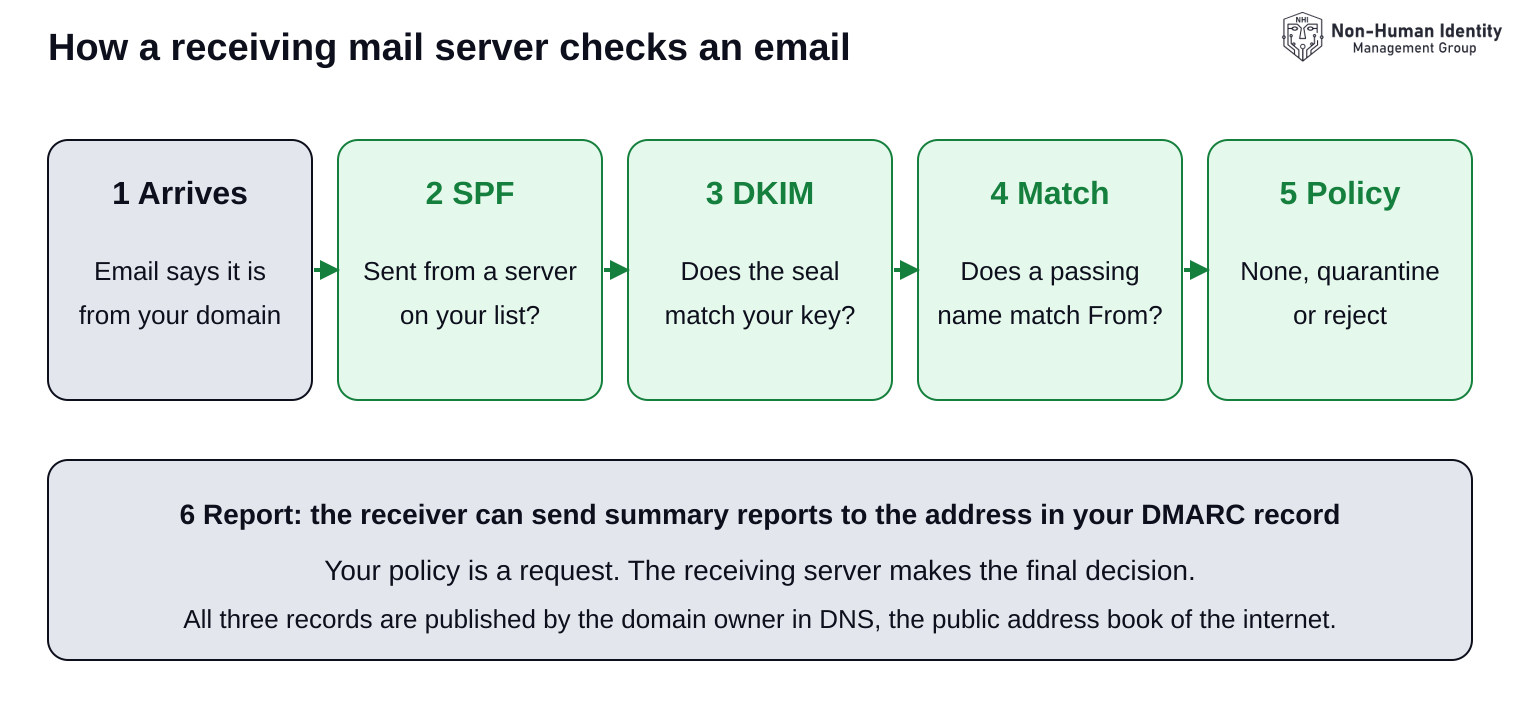
When an email arrives that says it is from your domain, the receiving mail server can run these checks:
- SPF check. Is the sending server on your list? An SPF check may make at most 10 extra DNS lookups. Going over that limit gives an error, so a long list of services can break SPF.[1]
- DKIM check. The server fetches your public key and checks that the seal is valid and the sealed parts have not changed.[2]
- Matching, called alignment. DMARC asks whether the domain that passed SPF or DKIM matches the From address the reader sees.[3]
- Policy. If neither check passes and matches, the server looks at your DMARC policy. "None" means report only, "quarantine" means treat as suspicious, often the spam folder, and "reject" means refuse it. Your policy is a request, and the receiver makes the final decision.[3]
- Reports. Receivers that support it send summary reports to the address in your DMARC record. They show which servers sent mail as you and whether it passed.[5]
Large mailbox providers now expect this. Google sets rules for people who send around 5,000 or more messages a day to Gmail users. They must use both SPF and DKIM and publish a DMARC record, where "none" is the minimum policy.[6] The DMARC standard itself was updated in May 2026.[3]
A worked example
Rosalind Engel runs a small made-up flower shop with its own web address. Staff use a cloud email service. The shop also sends order updates through its online shop and a monthly newsletter through a mailing service.
One morning, two customers ring about an email "from the shop". It asks them to pay an overdue bill through a link. Nobody at the shop sent it.
She calls her IT supplier, Rosalind Tanaka. Together they look up the domain. The SPF record lists only the cloud email service, and there is no DMARC record at all.
In the first week, they add the online shop and the mailing service to SPF. They switch on DKIM in all three services. Then they publish a DMARC record set to "none", with an address for reports.
Over the next few weeks, the reports show an old website contact form also sending as the shop. It fails both checks, so they move it onto the cloud email service. The reports also show the fake messages coming from servers the shop has never used.
Once every genuine sender passes, they move to "quarantine" and watch the reports. Later they move to "reject". They agree that if a genuine service starts failing, they will step back for a set time, note why, and fix it.
Fake mail using the shop's exact domain is now much more likely to be blocked or sent to spam by receivers that check DMARC. It does not stop lookalike domains, so the shop also tells customers the shop does not ask for payment by email link.
Myths and mistakes
| What people think | What to do instead |
|---|---|
| Go straight to "reject" to be safe. | Start with "none", find every genuine sender in the reports, then tighten in stages.[5] |
| "None" is enough once it is set up. | "None" only watches. Set a date to move to "quarantine" and then "reject". |
| More SPF records give more protection. | Keep one SPF record per domain, within the 10 lookup limit.[1] |
| Only our main email service sends as us. | Newsletters, invoicing, booking systems and web forms often do too. Set up SPF or DKIM for each one. |
| Domains we do not use for email need nothing. | Give every domain a DMARC record, including unused ones.[5] |
| A message that passes DMARC is safe. | It only shows the mail came from the domain it names. Criminals can set up their own lookalike domains. |
What can I do this week?
- Check what you have. The UK National Cyber Security Centre has a free email check. It tests your domain against its advice.[4]
- List every service that sends email for you, such as staff mail, newsletters, bills and web forms.
- Ask your email supplier to switch on DKIM for each service and to publish a DMARC record set to "none" with a report address.[5]
- Agree who reads the reports and when you will review them.
Checklist
- I can say in one sentence what SPF, DKIM and DMARC each check.
- Each domain that sends email has exactly one SPF record, within the lookup limit.
- DKIM is switched on for every service that sends as our domain.
- Every domain we own, including unused ones, has a DMARC record.
- Someone reads the DMARC reports regularly.
- We have a dated plan to move from "none" to "quarantine" to "reject".
- Any step back to a weaker policy is approved, recorded and time-limited.
Common questions
Do I need all three?
Yes, for the best protection. SPF and DKIM are the two checks, and DMARC ties them to the address people see. DMARC also tells receivers what to do on failure and sends you reports. Without DMARC, receivers have no instruction from you about fake mail.
Will DMARC stop all phishing?
No. It helps against fake mail that uses your exact domain. It does not stop criminals using a lookalike domain, or sending from a real account they have broken into. People still need to read sender addresses carefully and check unusual requests.
What does a policy of "none" do?
It watches without changing delivery. Receivers send you reports about mail using your domain, but they do not block anything because of your policy. The UK National Cyber Security Centre suggests starting here, so you can find all your genuine senders first.
Could this stop my genuine email arriving?
It can, if you move to "quarantine" or "reject" before every genuine sender passes. That is why the safe path starts with "none" and uses the reports. Fix each failing service, then tighten the policy in stages.
Who sets these records up?
Usually whoever manages your domain and email, such as an IT supplier or your email provider. The records go in your DNS settings. Each sending service, such as a newsletter tool, also has its own steps for DKIM in its help pages.
Where next?
Ready for the detail? Read the practitioner guide: DMARC, SPF and DKIM Guide. It goes further into record settings, alignment choices and planning a rollout to "reject".
Also useful:
- Email Security for Beginners
- Phishing for Beginners
- Business Email Compromise for Beginners
- DMARC, SPF and DKIM Failure Troubleshooting Guide
Related NHI Mgmt Group resources: Email Security Guide · Email Identity and BEC Guide · DKIM Replay Attacks Guide
Key terms
- Email Spoofing
- Making a message look as if it came from a trusted sender when it did not.
- SPF
- A DNS record that lists which servers may send email for a domain.
- DKIM
- A digital seal on each email, checked with a public key published in DNS.
- DMARC
- A DNS record that tells receivers how to handle mail that fails SPF and DKIM checks, and where to send reports.
- DNS
- The internet's public directory, where domain owners publish records anyone can look up.
- DMARC Alignment
- The check that the domain that passed SPF or DKIM matches the visible From address.
- Business email compromise
- Fraud that uses fake or taken-over email to trick people into paying or sharing data.
Sources and further reading
- RFC 7208, Sender Policy Framework (SPF) for Authorizing Use of Domains in Email, Version 1, section 4.6.4. S. Kitterman, Internet Engineering Task Force (IETF), April 2014. https://www.rfc-editor.org/rfc/rfc7208, accessed 28 Nov 2026.
- RFC 6376, DomainKeys Identified Mail (DKIM) Signatures (STD 76). D. Crocker, T. Hansen and M. Kucherawy, IETF, September 2011. https://www.rfc-editor.org/rfc/rfc6376, accessed 28 Nov 2026.
- RFC 9989, Domain-Based Message Authentication, Reporting, and Conformance (DMARC). IETF, May 2026 (Proposed Standard; obsoletes RFC 7489 and RFC 9091). https://www.rfc-editor.org/info/rfc9989, accessed 28 Nov 2026.
- Email security and anti-spoofing. National Cyber Security Centre (NCSC). https://www.ncsc.gov.uk/collection/email-security-and-anti-spoofing, accessed 28 Nov 2026.
- Implement a DMARC policy of 'none'. National Cyber Security Centre (NCSC). https://www.ncsc.gov.uk/collection/email-security-and-anti-spoofing/implement-a-dmarc-policy-of-none, accessed 28 Nov 2026.
- Email sender guidelines FAQ. Google Workspace Admin Help, Google. https://support.google.com/a/answer/14229414, accessed 28 Nov 2026.