Encryption is the process of turning readable data into scrambled data, using a mathematical recipe and a secret key, so that only someone holding the right key can turn it back.
This guide is for newcomers, students, career changers and managers who keep hearing "is it encrypted?" and want a clear answer. It explains what encryption is, why it matters, the two main types, where it protects your data and where it does not, and the simple steps a small team can take this week. You do not need any maths or security background.
By the end of this guide you will be able to:
- Explain what encryption, plaintext, ciphertext and keys mean.
- Describe the difference between symmetric and asymmetric encryption.
- Understand the difference between protecting stored data and data on the move.
- Identify three practical steps to check and improve encryption in a small organisation.
Key takeaways
- Encryption hides meaning, not existence. Anyone can see that encrypted data is there, but without the key it looks like random noise.
- The key is everything. Well-known algorithms are public; your protection comes from keeping the key secret and available to the right people.
- There are two main types. Symmetric encryption uses one shared key; asymmetric encryption uses a public key and a private key.
- Stored data and moving data need separate protection. Disk encryption protects a lost laptop; TLS (the padlock in your browser) protects data crossing the internet.
- Encryption is one layer, not the whole answer. Once data is unlocked for use, a thief with your password or malware on your device can often read it.
What it is, in plain English
Readable data, such as a document or a message, is called plaintext. Encryption runs that plaintext through an algorithm, a fixed set of mathematical steps, together with a key, a long secret number. The result is ciphertext: data that looks meaningless. Turning ciphertext back into plaintext with the right key is called decryption. NIST, the US standards body, defines encryption as the process of changing plaintext into ciphertext using a cryptographic algorithm and key.[1]
An everyday comparison is a padlocked box. Anyone can buy the same model of padlock, and anyone can see the box. What keeps the contents private is that only you hold the key. Encryption works the same way: the algorithm is public and widely tested, and the secret is the key. Where the analogy breaks down: a strong padlock can still be cut open with enough force, whereas well-chosen modern encryption with a long key is designed so that guessing the key would take an impractically long time. Attackers therefore go after the key, the password protecting it, or the moment the data is unlocked, rather than the maths.
The UK Information Commissioner's Office (ICO) describes encryption as a process that uses a secret key to encode information, so that only people with the key can read it.[2]
Why it matters to you
- If you run a small business: laptops and phones get lost or stolen. If the storage is encrypted and the device is switched off, the person who finds it should not be able to read your customer files without the password.[3]
- If you are new to a security job: "is it encrypted at rest and in transit?" is one of the first questions in audits, supplier questionnaires and data protection reviews. You need to know what each part means.
- If you are a manager: encryption reduces the harm when something is lost or intercepted, but it depends on keys, passwords and recovery plans that someone must own.
Data is exposed in two broad situations. Data at rest is stored somewhere: on a laptop, a server, a USB stick or a backup. Data in transit is moving across a network, such as a web form being submitted or an email being sent. Each needs its own protection. The ICO notes that full disk encryption keeps data scrambled while a laptop is switched off, but that encryption offers little protection once a user has unlocked and decrypted the data.[3] For data on the move, it describes HTTPS as HTTP combined with TLS (Transport Layer Security) and says organisations must not use any version of the older SSL protocol.[4]
How it works, step by step
The details vary between products, but the basic journey of a piece of data is the same.
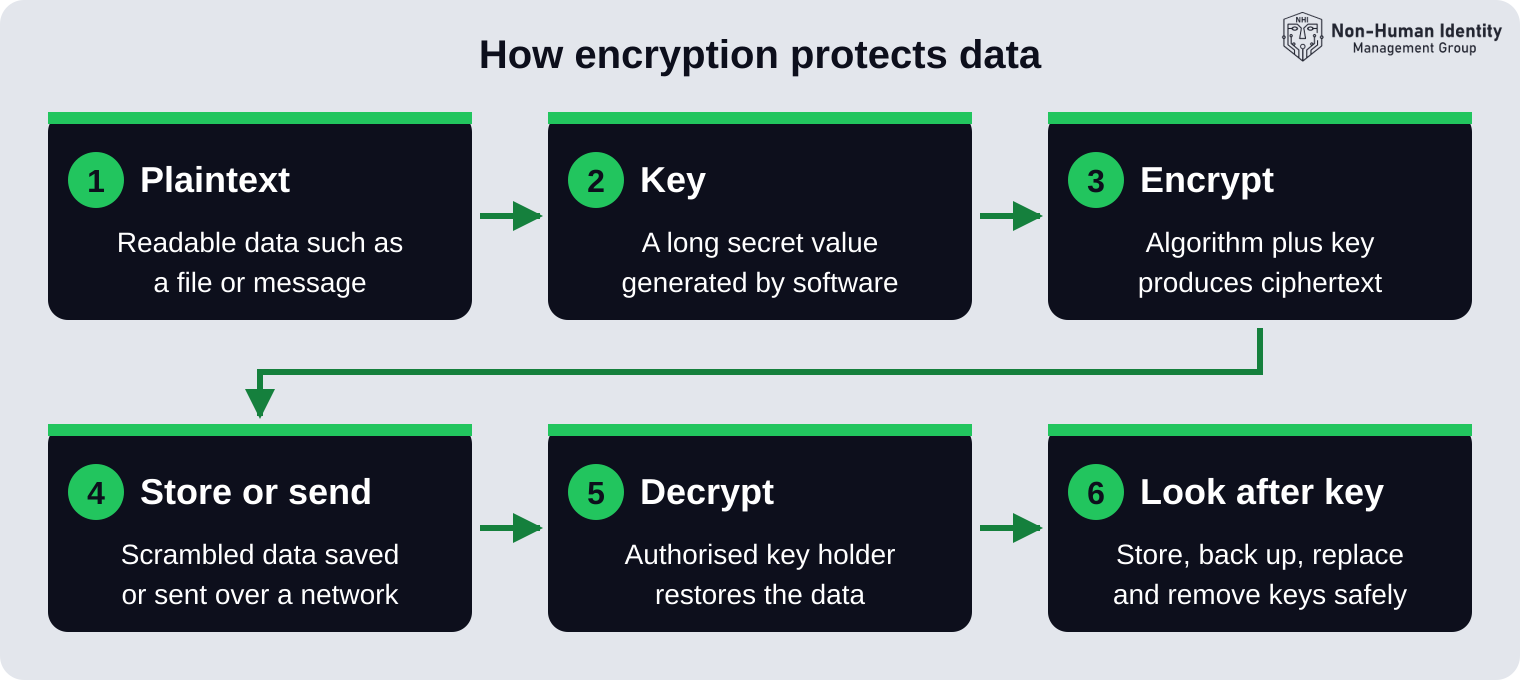
- Choose a trusted algorithm. You use a well-known, tested algorithm built into your device or software, never a home-made one. The ICO says organisations should use a trusted and verified algorithm rather than attempting to develop their own cryptography.[5] The most widely used algorithm for scrambling data is AES (Advanced Encryption Standard), which NIST published as FIPS 197 in 2001.[8]
- Create a key. The software generates a long random key. The longer and more random it is, the harder it is to guess.
- Encrypt. The algorithm combines the plaintext with the key and produces ciphertext.
- Store or send. The ciphertext is saved to disk or sent across the network. Anyone who intercepts it sees only scrambled data.
- Decrypt. An authorised person or system with the right key turns the ciphertext back into plaintext so it can be used.
- Look after the key. Keys are stored safely, backed up, replaced when needed and removed when no longer used. If the key is lost, the data may be lost too; if it is stolen, the protection is gone.[5]
Symmetric and asymmetric encryption
There are two main families. The ICO describes symmetric encryption as using the same key for both encrypting and decrypting, and asymmetric encryption as using one key to encrypt and a different key to decrypt.[2]
| Type | How the keys work | Good at | Main challenge |
|---|---|---|---|
| Symmetric | One secret key locks and unlocks | Fast; used for disks, files and bulk data | Getting the shared key safely to everyone who needs it[2] |
| Asymmetric | A public key that can be shared and a private key the owner keeps secret | Letting strangers send you protected data without first sharing a secret | Slower; the private key must be very well protected[2] |
In practice many systems use both. When your browser connects to a website over HTTPS, asymmetric techniques help the two sides agree a fresh shared key, and symmetric encryption then protects the rest of the conversation. The TLS and HTTPS for Beginners guide explains that handshake in plain English.
Useful distinctions
- Encryption is not hashing or encoding. Encryption can be reversed with the key. Hashing is designed to be one-way, and encoding (such as Base64) only changes the format and protects nothing. See Encoding, Encryption and Hashing for Beginners.
- Encryption at rest is often switched off by default. The ICO warns that full disk encryption may not be enabled by default and should be checked.[3]
- Transport encryption is not end-to-end encryption. TLS protects data between your device and a server, but the server can read it. End-to-end encryption keeps data scrambled until it reaches the intended recipient. See End-to-End Encryption for Beginners.
- Quantum computers matter mainly for asymmetric encryption. NIST published its first three post-quantum cryptography standards (FIPS 203, 204 and 205) in August 2024 and encouraged administrators to begin moving to them as soon as possible.[9] See Quantum Computing and Security for Beginners.
A worked example
Hartley & Rowe is a fictional accountancy firm with 12 staff. Its office manager, Nadia, looks after IT alongside her main job.
One evening, a junior accountant, Tom, leaves his laptop on a train. It holds spreadsheets with client names, addresses and tax details. Nadia's first question is whether the laptop's disk was encrypted.
Six months earlier, after a supplier questionnaire asked about encryption, Nadia had checked every laptop. On the Windows laptops she confirmed BitLocker was turned on and that each recovery key was saved to the company's cloud directory. On the two Macs she turned on FileVault and stored the recovery keys away from the computers. Microsoft describes BitLocker as addressing data theft or exposure from lost, stolen or poorly decommissioned devices.[6]
Because Tom's laptop was encrypted and had been shut down, the person who finds it would need Tom's password to read the files. Nadia still treats it as a security incident: she changes Tom's password, signs him out of the firm's cloud services, and records what happened and why she judged the risk to clients as low. If the laptop had been left switched on and unlocked, the encryption would have offered much less protection, so the firm also sets laptops to lock automatically after a few minutes.[3]
Encryption did not make the loss harmless. It reduced the chance that client data would be read, and gave Nadia a clear basis for her decisions. Whether to report an incident like this to a regulator depends on the facts and the law that applies, so firms should take advice rather than assume encryption settles the question.
Myths and misunderstandings
| What people think | What is true |
|---|---|
| Encrypted data is safe whatever happens. | Once data is decrypted for use, malware, an unlocked screen or a stolen password can expose it. The ICO calls encryption only one component of a robust data security strategy.[3] |
| A secret, home-made algorithm is safer than a public one. | Public, well-tested algorithms such as AES are the safer choice; the secret should be the key, not the method.[5] |
| The padlock in the browser means the website is trustworthy. | It means the connection is encrypted. A fraudulent website can have a padlock too. |
| Losing the key is just an inconvenience. | Without the key or recovery key, encrypted data may be gone for good. Apple warns that losing both your password and FileVault recovery key means your files can be lost forever.[7] |
| Encryption is only for big companies. | Most modern laptops and phones include built-in encryption that a small team can turn on in minutes.[3] |
Key terms
- Encryption
- Turning readable data into ciphertext so it cannot be understood without the correct key.
- Plaintext
- Information in its original, readable form before encryption is applied.
- Ciphertext
- The unreadable output produced when plaintext is encrypted.
- Encryption key
- The secret value used with an algorithm to encrypt or decrypt data.
- Decryption
- Turning encrypted data back into usable information with the correct key.
- Symmetric encryption
- Encryption that uses the same secret key to encrypt and decrypt.
- Asymmetric encryption
- Encryption that uses a public key to share or verify information and a private key to decrypt or sign.
- Encryption at rest
- Protection for stored data on disks, databases, backups or cloud storage.
- Encryption in transit
- Protection for data while it moves across a network, normally with TLS.
- Full-disk encryption
- Encrypting a whole storage drive so data is unreadable without the key if the device is lost or stolen while switched off.
- Recovery key
- A highly sensitive backup credential used to regain access when the normal password or unlock method is unavailable.
- Key management
- Looking after keys through their whole life: creation, storage, use, replacement and retirement.
Common questions
What is encryption in simple terms?
It is a way of scrambling data with a secret key so that only people or systems holding the key can read it.
What is the difference between encryption at rest and in transit?
At rest protects stored data, such as a laptop drive or a backup. In transit protects data as it travels across a network, such as a web page loading over HTTPS. You usually need both.
Can encryption be broken?
Modern, well-chosen algorithms with long keys are designed so that guessing the key is impractical. Real-world failures usually come from weak passwords, stolen keys, old protocols or data read after it has been decrypted.
Is HTTPS the same as encryption?
HTTPS is web traffic protected by TLS, which uses encryption. It protects the connection, not the data once it reaches the server.[4]
What happens if I lose the encryption key?
If you have no recovery key or backup, you may lose the data permanently. That is why recovery keys must be stored safely and separately from the device.[7]
Do quantum computers make encryption useless?
No. The main concern is for today's asymmetric methods, and NIST has already published replacement standards that organisations are starting to adopt.[9]
First steps
Three things you can do this week:
- Check every laptop and phone. Confirm built-in encryption is on: BitLocker or device encryption on Windows, FileVault on Mac, and a passcode on phones. Microsoft notes BitLocker can be enabled on Windows Pro, Enterprise and Education editions, and device encryption on supported devices.[6]
- Find and secure the recovery keys. Make sure each recovery key is backed up somewhere safe, away from the device, and that you know who can retrieve it.[7]
- Check your website and email use HTTPS and TLS. Visit your own site and confirm it loads over HTTPS on every page. We suggest asking your website provider to confirm SSL and early TLS versions are switched off.[4]
Checklist
- Every company laptop has full-disk encryption switched on, and we have checked it rather than assumed it.
- Recovery keys are backed up, stored away from the device and accessible only to named people.
- Phones and tablets used for work have a passcode and built-in encryption on.
- Devices lock automatically after a short idle period.
- USB sticks and external drives that hold personal data are encrypted, or not used.
- Our website uses HTTPS on every page.
- Cloud storage and backups holding sensitive data are encrypted, and we know who controls the keys.
- We review our use of encryption at least once a year.[5]
Check your understanding
1. What is the difference between plaintext and ciphertext?
Answer: plaintext is readable data; ciphertext is the scrambled version produced by encryption.
2. Why is a lost, switched-off encrypted laptop less of a worry than an unencrypted one?
Answer: the data on the drive stays scrambled and cannot be read without the password or key.
3. In symmetric encryption, how many keys are used?
Answer: one shared secret key, used both to encrypt and to decrypt.
4. Why does the padlock in your browser not prove a website is honest?
Answer: it shows the connection is encrypted, not who runs the site or whether they are trustworthy.
Suggested learning pathway
- Start with the bigger picture in Data Security for Beginners.
- To tell encryption apart from look-alikes, read Encoding, Encryption and Hashing for Beginners.
- For data on the move, read TLS and HTTPS for Beginners.
- For messaging apps, read End-to-End Encryption for Beginners.
- For looking after keys, read Cryptographic Key Management for Beginners.
- For the technical foundations, see the Cryptography Basics Guide.
- For laptop encryption in depth, see the Disk Encryption Guide: BitLocker and FileVault.
- For the full practitioner view, including key custody and post-quantum planning, see the Encryption Guide.
Standards and references
- Glossary: Encryption. NIST Computer Security Resource Center, National Institute of Standards and Technology (NIST). https://csrc.nist.gov/glossary/term/encryption, accessed 27 Nov 2026.
- What is encryption? Information Commissioner's Office (ICO), UK GDPR guidance (marked as under review). https://ico.org.uk/for-organisations/uk-gdpr-guidance-and-resources/security/encryption/what-is-encryption/, accessed 27 Nov 2026.
- Encryption and data storage. Information Commissioner's Office (ICO). https://ico.org.uk/for-organisations/uk-gdpr-guidance-and-resources/security/encryption/encryption-and-data-storage/, accessed 27 Nov 2026.
- Encryption and data transfer. Information Commissioner's Office (ICO). https://ico.org.uk/for-organisations/uk-gdpr-guidance-and-resources/security/encryption/encryption-and-data-transfer/, accessed 27 Nov 2026.
- How do we implement encryption? Information Commissioner's Office (ICO). https://ico.org.uk/for-organisations/uk-gdpr-guidance-and-resources/security/encryption/how-do-we-implement-encryption/, accessed 27 Nov 2026.
- BitLocker overview. Microsoft Learn, Microsoft. https://learn.microsoft.com/en-us/windows/security/operating-system-security/data-protection/bitlocker/, accessed 27 Nov 2026.
- Protect data on your Mac with FileVault. Mac User Guide, Apple. https://support.apple.com/guide/mac-help/protect-data-on-your-mac-with-filevault-mh11785/mac, accessed 27 Nov 2026.
- Block Cipher Techniques. NIST Computer Security Resource Center, National Institute of Standards and Technology (NIST). https://csrc.nist.gov/projects/block-cipher-techniques, accessed 27 Nov 2026.
- NIST Releases First 3 Finalized Post-Quantum Encryption Standards. National Institute of Standards and Technology (NIST), 13 August 2024. https://www.nist.gov/news-events/news/2024/08/nist-releases-first-3-finalized-post-quantum-encryption-standards, accessed 27 Nov 2026.
Related NHI Mgmt Group resources: Database and Storage Encryption Guide · Digital Signatures vs Encryption · Client-Side vs Server-Side Encryption