Global Privacy Control is a browser setting that asks websites not to sell or share your personal data.
This guide is for people who browse the web and for anyone who runs a website. You do not need technical skills to use it: one setting in your browser sends the request to every site you visit. If you run a website for a business, some US laws expect you to act on it.
In short
- Global Privacy Control (GPC) is a signal your browser sends to every website you visit.
- It asks the site not to sell or share your personal data, for example for targeted ads.
- It is a request, not a blocker. In California and some other US states, covered businesses must treat it as a valid opt-out.
- Some browsers send it by default, and others let you turn it on in settings.
What you will learn
- Explain what Global Privacy Control does in one sentence.
- Turn the signal on in your browser.
- Explain what it does not do, such as blocking cookies.
- Check whether a website you run responds to it.
Status: correct as at 28 November 2026, based on the Global Privacy Control website, the draft specification and the California Attorney General's CCPA pages. Laws change; check the official text.
This guide explains the topic in general terms and is not legal advice.
- Do-not-sell request (opt-out)
- telling a business you do not want it to sell or share your personal data.
- Automatic opt-out (opt-out preference signal)
- a setting that sends your opt-out to every website for you.
- Ads that follow you (targeted advertising)
- ads chosen using what you did on other websites and apps.
What is Global Privacy Control?
Think of a "No junk mail" sticker on your letterbox. You put it up once, and every leaflet delivery sees it. You do not have to ask each company one by one.
Global Privacy Control, or GPC, works the same way for websites. You switch it on once in your browser. After that, the browser tells every site you visit that you do not want your personal data sold or shared.[2]
"Sharing" here mostly means passing your data on so that other firms can show you ads based on what you do across different websites.[3]
GPC is not a finished standard yet. It is being developed by a W3C group (W3C is a body that writes web standards).[2]
Where the comparison stops working: a sticker has no legal force, and some people ignore it. GPC can also be ignored by some sites. But in California and some other US states, covered businesses are expected by law to honour it.[3]
Why does it matter?
Without a signal like GPC, you would need to find and click an opt-out link on every site. GPC lets you make the request once. In a settlement with California's Attorney General, the retailer Sephora agreed to pay 1.2 million US dollars. One problem the Attorney General named was that Sephora had not processed opt-outs sent through GPC.[4]
If you browse at home
What could happen: your browsing is used to build a profile for ads across many sites.
Check this: see if your browser has a "do not sell or share" setting, and turn it on.
If you run a website for a business
What could happen: visitors send GPC, your site ignores it, and you may break a state privacy law.
Check this: ask your web supplier whether your site detects GPC and what it does next.
If you are new to privacy work
What could happen: a team thinks a cookie banner is enough and misses the signal.
Check this: learn which laws your business must follow on opt-outs.
What does it look like?
For you, GPC is usually just a tick box in your browser settings. Behind the scenes, the browser adds a short line to each request it sends to a website. Here is a made-up example.
Example only. All values are made up.
BROWSER SETTINGS SCREEN
  [x] Tell websites not to sell or share my data   (1)

WHAT THE BROWSER SENDS TO A SITE
  GET /shop HTTP/1.1
  Host: www.example.com
  Sec-GPC: 1                                       (2)

WHAT THE SITE SHOULD DO
  Visitor 0000-FAKE: opt-out received              (3)
  Ad partner data sharing: OFF for this visitor    (4)
- The tick box you switch on once. Firefox uses this wording.
- The browser adds this line, called a header, to every request. The value 1 means the setting is on.
- The site spots the signal and records the opt-out.
- The site stops selling or sharing that visitor's data with ad partners.
Why this is risky: the signal only works if the site acts on it. A site that never checks for it will carry on sharing data as before.
The safer way: visitors turn the signal on and use other privacy tools too. Site owners make sure their site detects the signal and switches off selling and sharing for that visitor.[1]
How does it work?
Here is how the signal travels from your browser to a business.
- You switch it on. Some browsers, such as Brave and DuckDuckGo, send GPC by default. In Firefox you turn it on in the privacy settings. Some add-ons, such as Privacy Badger, can send it from other browsers too.[2]
- Your browser sends it. With every page you load, the browser adds a header (a short note attached to each web request) saying
Sec-GPC: 1. Websites can also check it in the page.[1] - The website reads it. A site that supports GPC spots the signal. Sites can also publish a small file saying they support it.[1]
- The business acts. It treats the signal as your request not to sell or share your data. In California this is a valid opt-out request.[3]
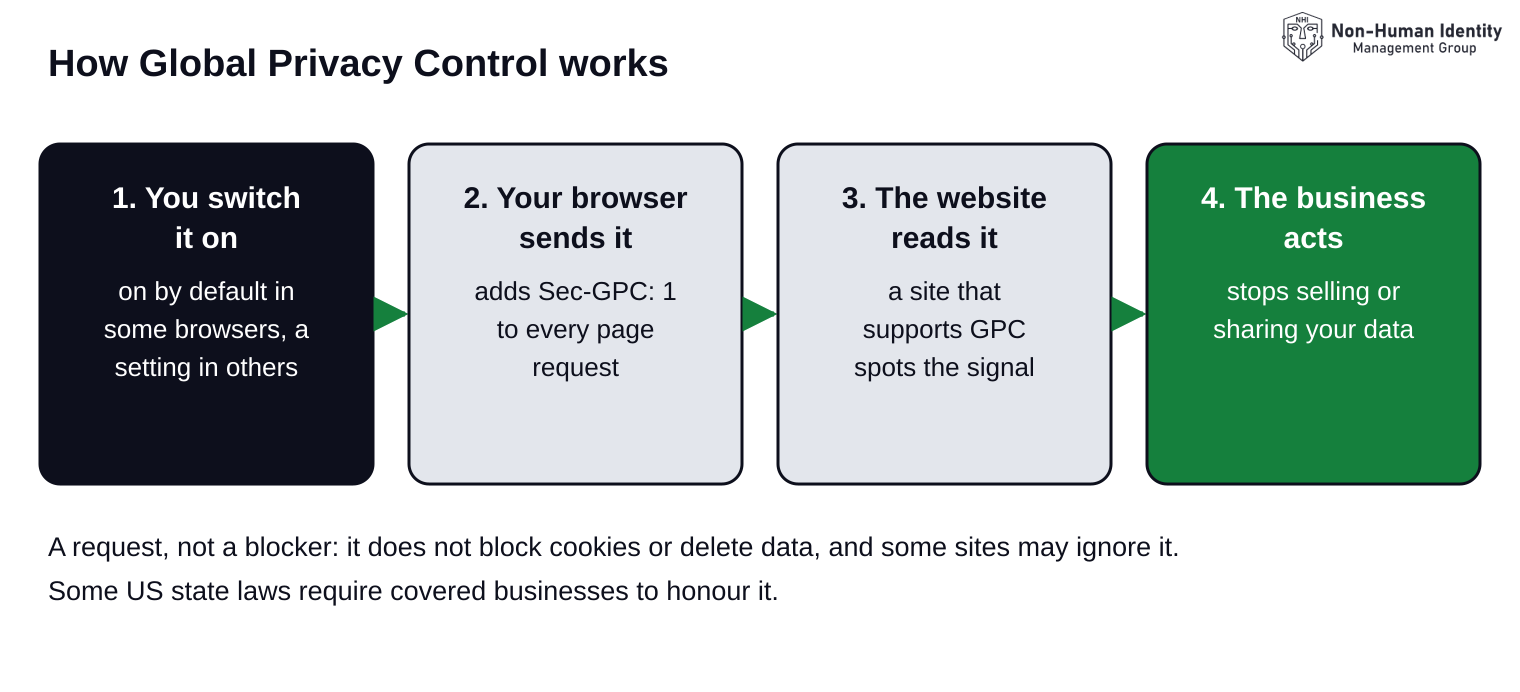
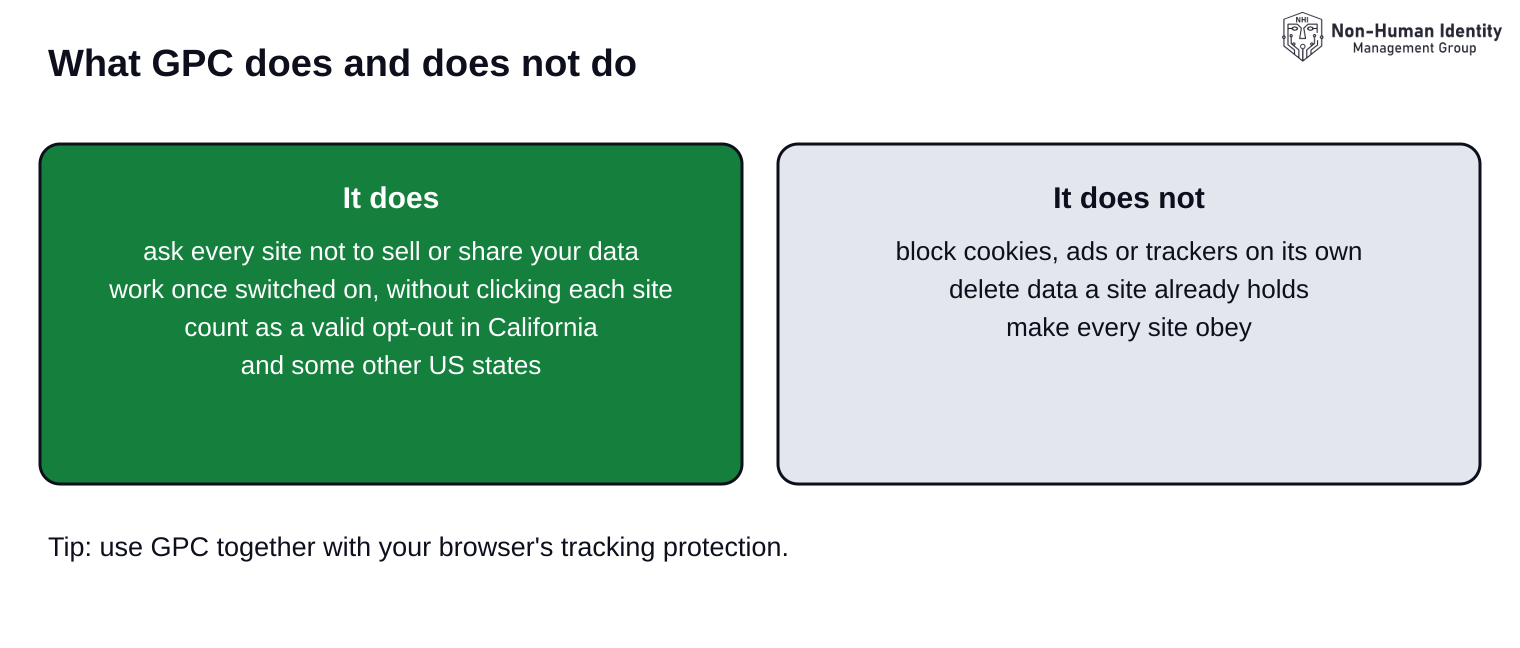
GPC has limits. It does not block cookies or ads by itself. It is not a request to delete your data.[1] Mozilla puts it simply: GPC is a signal, not a blocker.[5] Outside the US, the GPC website says the signal may also act as a general request under laws such as GDPR. How far that goes depends on the local law.[2]
A worked example
Jonah Grover lives in California. He notices that after he looks at running shoes on one site, adverts for the same shoes follow him everywhere.
He opens Firefox settings and goes to Privacy and Security. He ticks "Tell websites not to sell or share my data". He also checks that the browser's tracking protection is switched on.[5]
Jonah knows the setting is a request, not a wall. Some sites may not act on it. Under California law, a covered business that sells or shares data must treat his GPC signal as a valid opt-out.[3]
His friend, Farah Ueda, runs a small online shop. Jonah asks whether her site responds to the signal. Farah is not sure. She asks her web supplier. They find that the shop's cookie banner ignores GPC, while an ad partner still receives visitor data.
Farah asks the supplier to detect the signal and switch off sharing with ad partners for those visitors. She also asks for a short test each month to check it still works. She takes advice on whether California's law covers her shop, since not every small business is covered.
A business that has received an opt-out generally must wait at least 12 months before asking the person to opt back in.[3] Farah notes this for her team.
The lesson: one tick box can make a request to every site, but it only helps when the sites listen.
Myths and mistakes
| What people think | What is true |
|---|---|
| GPC blocks all tracking. | It is a request not to sell or share data. Use tracking protection as well. |
| GPC deletes my data. | It does not ask for deletion. Use a site's deletion request for that. |
| Every website must obey it. | Only where a law requires it, such as for covered businesses in California and some other US states. |
| GPC is the same as Do Not Track. | They are different signals. GPC is tied to legal opt-out rights in some places. |
| A cookie banner covers us, so we can ignore GPC. | In California, a covered business must treat GPC as a valid opt-out request. |
What can I do this week?
- Check whether your browser sends GPC, and turn it on if it does not.
- Switch on your browser's tracking protection as well.
- If you use several devices, turn GPC on in each browser.
- If you run a website, ask your supplier whether it detects GPC.
- If it does, ask what the site switches off when the signal arrives.
Checklist
- I know GPC asks sites not to sell or share my data.
- I know it does not block cookies or delete data.
- GPC is on in each browser I use.
- Tracking protection is on too.
- Site owners: our site detects the signal.
- Site owners: selling and sharing stop for visitors who send it.
- Site owners: we test this regularly and keep a record.
Common questions
Which browsers support Global Privacy Control?
Brave and DuckDuckGo send it by default, according to the GPC website. Firefox lets you turn it on in its privacy settings. Some add-ons, such as Privacy Badger, can add the signal to other browsers. Support changes over time, so check your browser's own help pages.
Is GPC legally binding?
In some places. In California, a covered business that sells or shares personal data must treat GPC as a valid opt-out request. Some other US states have similar rules. Elsewhere, it depends on local law, and a site may choose whether to honour it.
Does GPC stop cookies?
No. GPC asks sites not to sell or share your data. It does not block cookies, ads or trackers by itself. For that, use your browser's tracking protection or a privacy add-on alongside GPC, and review cookie choices on each site.
Does GPC work in the UK or EU?
The GPC website says the signal can act as a general request under GDPR to limit the sale or sharing of your data. How regulators treat it there is less settled than in California. Cookie consent rules in the UK and EU still apply separately.
How can a website owner tell if their site respects GPC?
Ask your web supplier to test it. They can visit the site with GPC switched on and check that data sharing with ad partners stops for that visit. Keep a record of each test, because regulators may ask how you honour the signal.
Where next?
Ready for the detail? Read the practitioner guide: Universal Opt-Out and Global Privacy Control Laws Guide. It goes further into which US states require the signal, what counts as a valid signal, how regulators test it and how to prove compliance.
Also useful:
- Consent Management Guide: Cookies, CMPs and GPC
- Cookies and Online Tracking for Beginners
- US Privacy Laws for Beginners
- Browser Privacy and Security Settings Guide
- CCPA and CPRA
Related NHI Mgmt Group resources: Cookie Consent Banners for Beginners · Data Privacy for Beginners · Cookie and Tracking Technology Compliance Guide
Key terms
- Global Privacy Control (GPC)
- A browser signal asking websites not to sell or share your personal data.
- Opt-out preference signal
- A setting that sends your opt-out to every site automatically.
- Universal opt-out mechanism
- The term some US state laws use for a signal like GPC.
- Cross-context behavioural advertising
- Ads chosen using your activity across different websites and apps.
- HTTP header
- A short note a browser attaches to each request it sends to a website.
- Do Not Track
- An older browser signal asking sites not to track you, separate from GPC.
- Browser extension
- An add-on that gives a web browser extra features.
Sources and further reading
- Global Privacy Control (GPC), draft specification. W3C Privacy Working Group, GitHub. https://w3c.github.io/gpc/, accessed 28 Nov 2026.
- Global Privacy Control: Take control of your privacy. Global Privacy Control. https://globalprivacycontrol.org/, accessed 28 Nov 2026.
- California Consumer Privacy Act (CCPA): frequently asked questions. State of California Department of Justice, Office of the Attorney General. https://oag.ca.gov/privacy/ccpa, accessed 28 Nov 2026.
- Attorney General Bonta Announces Settlement with Sephora as Part of Ongoing Enforcement of California Consumer Privacy Act. State of California Department of Justice, 24 August 2022. https://oag.ca.gov/news/press-releases/attorney-general-bonta-announces-settlement-sephora-part-ongoing-enforcement, accessed 28 Nov 2026.
- Global Privacy Control. Mozilla Support, Mozilla. https://support.mozilla.org/en-US/kb/global-privacy-control, accessed 28 Nov 2026.