Hardware hacking means opening a device to study how its chips and circuit board can be reached and controlled.
This guide is for students, home lab hobbyists and anyone curious about how security researchers test gadgets. It is also useful if your business buys or makes smart devices, because a weak spot on the board can expose every unit sold.
In short
- Most devices have small test connections on the board, left there so the factory can load and fix the software.
- Two common ones are UART (a text console) and JTAG (a deep control port for the chip).
- If these are left open, someone holding the device may read its software, secrets or settings.
- Good makers turn them off or lock them before sale. Researchers only test devices they own or have permission to test.
What you will learn
- Explain what UART and JTAG are in plain words.
- Spot why an open test connection is a security problem.
- Check the questions to ask a device maker or supplier.
- Start learning safely and legally in a home lab.
- Factory test door (debug interface)
- a connection on a circuit board that engineers use to check and repair a device.
- Device software (firmware)
- the built-in software that runs a gadget, such as a router or camera.
- Text console (UART)
- a simple connection that shows the device's messages and may accept typed commands.
What is hardware hacking?
Think of a shop with a staff door at the back. Customers use the front door, with its lock and alarm. Staff use the back door to bring in stock, and sometimes it is left on the latch.
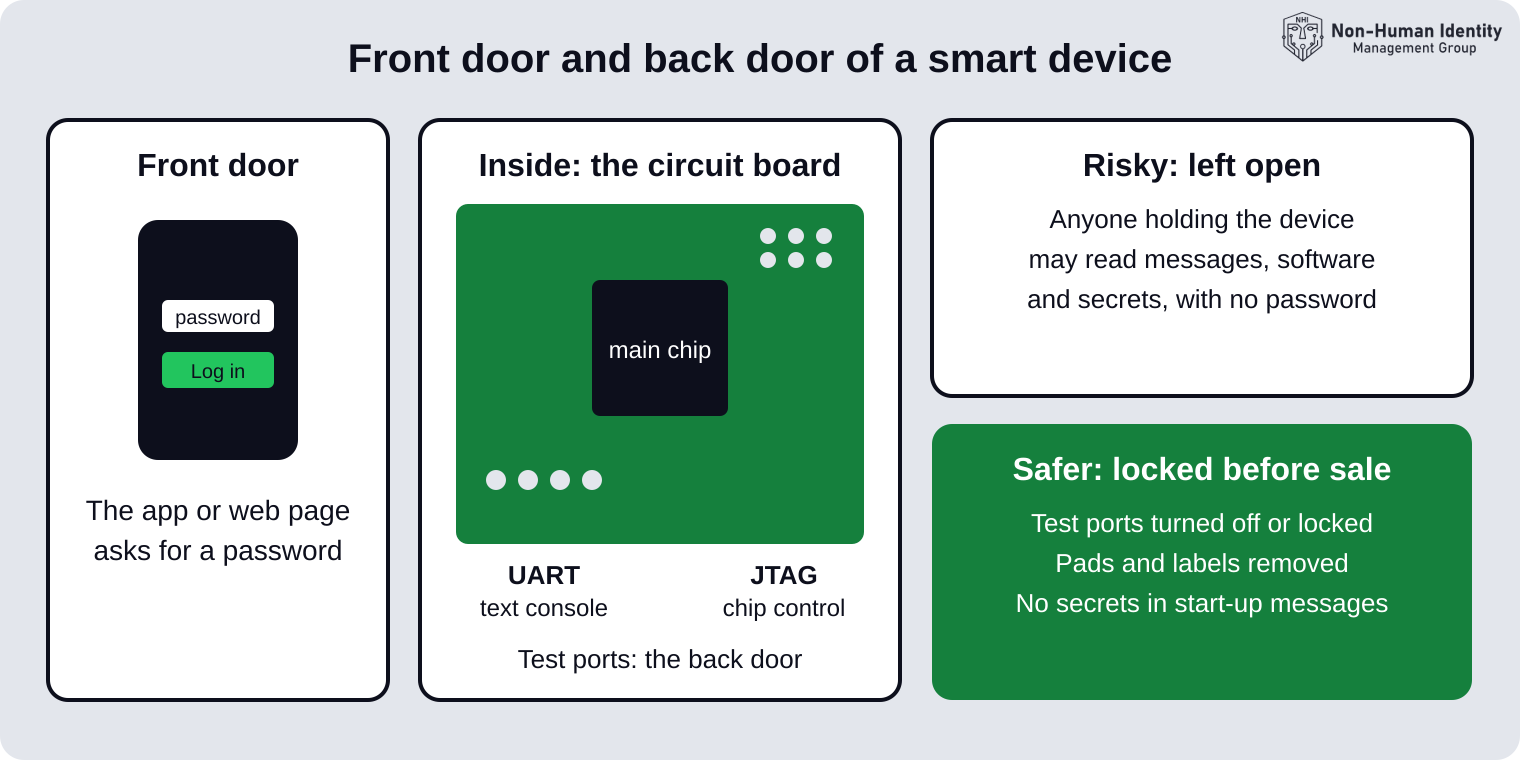
A smart device works the same way. You use its front door: the app, the web page or the buttons, which ask for a password. Inside the case, the circuit board often has test connections, called debug interfaces. Factory staff use them to load the built-in software, called firmware, and to find faults.
Two are very common. UART is a simple serial connection, a link that sends text one character at a time. It is often used as a text console that shows start-up messages. JTAG is a test port that can pause the main chip and read or change its memory.[1][2]
Hardware hacking, in the sense this guide uses, is the research skill of finding those back doors and checking whether they are locked. Done with permission, it helps makers fix problems before criminals find them.
Where the comparison stops working: a shop's back door is easy to see. Test connections can be tiny unlabelled pads on the board. Finding and identifying them takes study, tools and patience.
Why does it matter?
An open test connection can skip the password on the front door. Security guidance says UART has no built-in login, lock or encryption of its own. Some devices open a full admin text console with no password at all.[1]
If you are a student or hobbyist
What could happen: you test a device you do not own, and break the law or a contract without meaning to.
Check this: practise only on your own old devices or on boards sold for learning.
If your business makes or sells smart devices
What could happen: one open test port lets a researcher, or a criminal, pull the same secret out of every unit you sold.
Check this: ask your engineers whether test ports are turned off or locked in the final product.
If you buy devices for work
What could happen: a lost or second-hand device gives away Wi-Fi passwords or account keys stored inside.
Check this: wipe devices before they leave your control, and ask suppliers how they protect stored secrets.
What does it look like?
Here is a made-up note a student might write after opening an old router of their own.
Example only. All values are made up.
Lab notes: my old router, model EXAMPLE-R100
Board: 4 small pads in a row near the main chip  (1)
Pads labelled on board: TX RX GND                (2)
Console shows start-up text, then:
  "Device EXAMPLE-R100  firmware 0.0-FAKE"       (3)
  "wifi_key=FAKE-0000-EXAMPLE"                   (4)
Second set of 10 pads, unlabelled                (5)
- A row of pads like this is a common sign of a UART test connection.
- Printed labels make the port easy to find. Guidance says to remove them on final products.[3]
- Start-up messages can show the firmware version. That helps a researcher look up known flaws.
- In a real file of start-up messages, this line would contain a Wi-Fi password shown in plain text.
- A bigger group of pads may be a JTAG port. Checking needs care and the chip maker's papers.
Why this is risky: anyone who holds the device can reach these pads. They may read the messages, and the secret, with no password.[1]
The safer way: the maker turns the console off before sale. It removes the pads or labels. Start-up messages hold no secrets. JTAG is switched off, or needs strong proof before it works.[3][4]
How does it work?
At a high level, a researcher studying a device they are allowed to test follows these stages.
- Get permission and a spare. Use a device you own, or one the owner has agreed in writing that you may test. Expect it may break.
- Look at the board. Open the case and photograph the board. Note the main chips and any rows of pads or pins.
- Identify the test doors. Use the chip maker's public documents to work out which pads are UART, JTAG or similar.
- Check whether they are locked. Does the console ask for a password? Does the chip refuse debug access? Security guidance treats an unlocked debug port as a weakness.[2]
- Report what you find. If a product has a real flaw, tell the maker through its security contact or bug bounty, and give them time to fix it.
Makers have several ways to lock the back door. A European baseline for consumer smart devices says debug interfaces must be turned off or protected by strong access control.[4] An open security checklist for smart devices also asks makers to remove debug headers from final boards.[3]
Many chips have one-time switches, often called fuses. Once set, they are designed to keep debug access turned off. For example, one popular chip family keeps JTAG off when its secure start-up features are on.[5] Secure boot is one of those features. It means the chip checks that its software is genuine before running it.
A worked example
Cyrus Kowal is a second-year student who wants to learn about device security. Their tutor, Noor Haddad, suggests starting with an old home router from a cupboard.
Noor sets two rules. Only test devices Cyrus owns. Keep notes of everything, so any finding can be explained later.
Cyrus opens the router and photographs the board. Near the main chip is a row of four pads labelled TX, RX and GND. Cyrus remembers the shop's staff door. These look like the back door's handle.
With Noor watching, Cyrus connects a low-cost USB serial adapter and opens a terminal program on a laptop. Start-up messages scroll past. Among them is a line that seems to show the router's Wi-Fi password in plain text.
Noor explains what that means. Anyone who borrows or buys this router second-hand could read the same thing. The front door's password does nothing here.
Cyrus checks the maker's website. The model is old and no longer receives updates. A newer model might be different, so Cyrus is careful not to claim more than the test shows.
Noor shows Cyrus the maker's security contact page. Because the model is out of support, they agree a short, factual report is still worth sending. Cyrus writes what was found, on which model and firmware, with no secrets included.
Cyrus also resets the router to factory settings before recycling it. The lesson sticks: the back door matters as much as the front.
Myths and mistakes
| What people think | What is true |
|---|---|
| Hardware hacking is always illegal. | Testing devices you own, or with written permission, is a normal research skill. Testing other people's devices without permission can break the law. |
| If the app has a strong password, the device is safe. | Test ports on the board can skip the app's password if they are left open.[1] |
| Hiding the documents keeps the port secret. | Security guidance says hiding documentation is not enough protection. The port needs to be off or locked.[2] |
| You need a costly lab to start. | Many learners begin with an old device of their own and low-cost tools. Expensive gear comes later, if at all. |
| Finding a flaw means you should post it online. | Tell the maker first through its security contact, and give it time to fix the problem. |
What can I do this week?
- Find an old device you own and no longer need, and keep it for learning.
- Read the security contact or bug bounty page of one maker you like.
- If you buy devices for work, ask suppliers whether debug ports are locked in the final product.
- Reset and wipe any device before you sell, recycle or return it.
Checklist
- I only test devices I own or have written permission to test.
- I keep notes of what I did and found.
- I never share secrets I find, even from my own devices.
- I report real flaws to the maker before talking about them in public.
- Devices we make have debug ports turned off or locked before sale.
- Devices we make never print passwords or keys in start-up messages.
- Devices we buy come from makers with a security contact and an update policy.
Common questions
Is hardware hacking legal?
Testing your own devices is generally fine, but laws and product terms vary by country. Testing someone else's device or system without permission can be a crime. If you are unsure, ask the owner in writing, follow a bug bounty's rules, or get advice before you start.
What is the difference between UART and JTAG?
UART is a simple text link that often shows start-up messages and a console. JTAG is a deeper test port that can pause the main chip and read or change its memory. Both are useful to engineers, and both should be off or locked in finished products.[1][2]
What do I need to start learning?
Start with an old device you own, a small screwdriver set and a notebook. Many learners later add a low-cost USB serial adapter and a multimeter, a tool that measures electricity. A home lab guide can help you plan the rest safely.
Can hardware hacking lead to a job?
Yes, it is a useful skill. It is used in device testing, product security and hardware security engineering roles. Some researchers also report device flaws through bug bounty programmes. See Bug Bounties for Beginners for how reporting works.
How do makers stop this?
They turn debug ports off or lock them with strong access control before sale. They remove test pads and labels, keep secrets out of start-up messages and use secure boot so only genuine software runs.[3][4]
Where next?
Ready for the detail? Read the practitioner guide: Debug Interfaces Security Guide. It goes further into the lock-down options built into chips, what the standards require and how to check devices you buy.
Also useful:
- IoT and Hardware Penetration Testing Guide
- Firmware for Beginners
- Penetration Testing for Beginners
- Bug Bounties for Beginners
- Hardware Security Engineer Career Guide
Related NHI Mgmt Group resources: Firmware and Boot Security Guide · Hardware Root of Trust Guide · Building a Cybersecurity Home Lab Guide
Key terms
- Debug interface
- A connection engineers use to look inside and control a device while testing or fixing it.
- Firmware
- The built-in software that runs a device at a low level.
- UART
- A simple serial link, often used as a text console that shows a device's start-up messages.
- JTAG
- A test port that gives deep access to a chip, such as pausing it and reading its memory.
- Bootloader
- The first small program that starts when a device switches on and loads the main software.
- Secure boot
- A start-up check that each piece of software is genuine before it is allowed to run.
- Bug bounty programme
- A set of rules, often with rewards, for reporting security flaws to an organisation.
Sources and further reading
- Universal Asynchronous Receiver-Transmitter (ISTG-INT[UART]). OWASP IoT Security Testing Guide, OWASP Foundation. https://owasp.org/owasp-istg/03_test_cases/internal_interfaces/universal_asynchronous_receiver_transmitter.html, accessed 28 Nov 2026.
- CWE-1191: On-Chip Debug and Test Interface With Improper Access Control. MITRE Common Weakness Enumeration. https://cwe.mitre.org/data/definitions/1191.html, accessed 28 Nov 2026.
- IoT Security Verification Standard (ISVS), V5 Hardware Platform Requirements. OWASP Foundation. https://github.com/OWASP/IoT-Security-Verification-Standard-ISVS/blob/master/en/V5-Hardware_Platform_Requirements.md, accessed 28 Nov 2026.
- ETSI EN 303 645 V3.1.3: Cyber Security for Consumer Internet of Things: Baseline Requirements (provisions 5.6-3, 5.6-4A, 5.6-4B). ETSI, September 2024. https://www.etsi.org/deliver/etsi_en/303600_303699/303645/03.01.03_60/en_303645v030103p.pdf, accessed 28 Nov 2026.
- Security Overview, ESP-IDF Programming Guide (ESP32). Espressif Systems. https://docs.espressif.com/projects/esp-idf/en/stable/esp32/security/security.html, accessed 28 Nov 2026.