High availability means designing a service so it keeps working when one of its parts fails.
This guide is for students and people new to IT work who keep hearing about "uptime" and "five nines". You do not need to be an engineer. If customers use your website, booking system or app at any hour, how long it can be down is a business decision, not just a technical one.
In short
- High availability (HA) keeps a service running through everyday failures, like a crashed server or a lost data centre.
- It works by having more than one of each important part, and switching to a healthy one when something breaks.
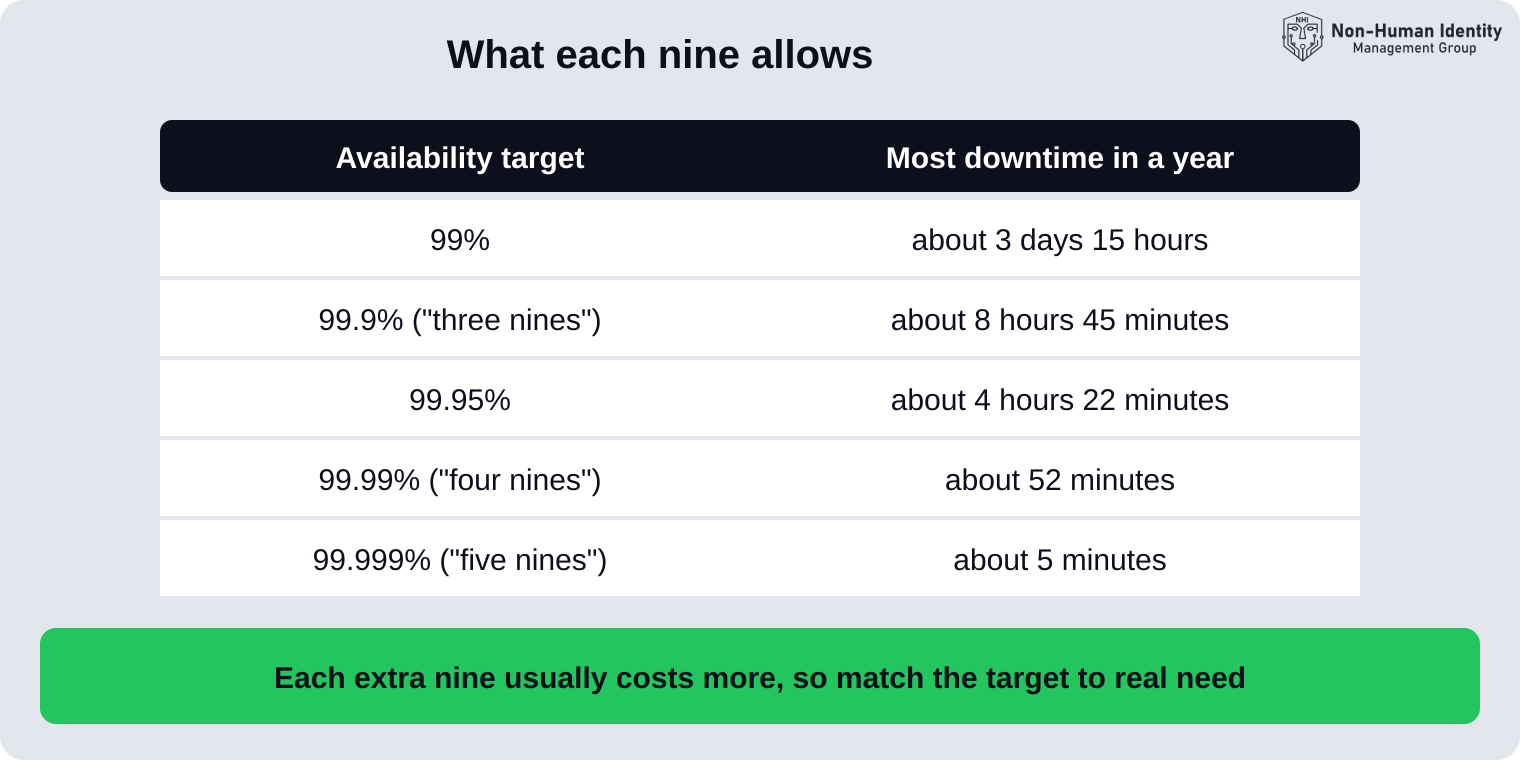
- Availability is measured as a percentage of time. Each extra "nine" allows much less downtime, and usually costs more.
- HA is not a backup. A deleted or damaged file can be copied to every spare as well.
What you will learn
- Explain what high availability means in one sentence.
- Spot a single point of failure in a simple system.
- Explain what an uptime target such as "three nines" means in hours per year.
- Ask the right questions about how a service copes when a part fails.
- Time a service works (availability)
- the share of time a service does its job when people need it, shown as a percentage.
- Weak link (single point of failure)
- one part that, if it breaks, stops the whole service.
- Switching over (failover)
- moving work from a broken part to a healthy spare.
What is high availability?
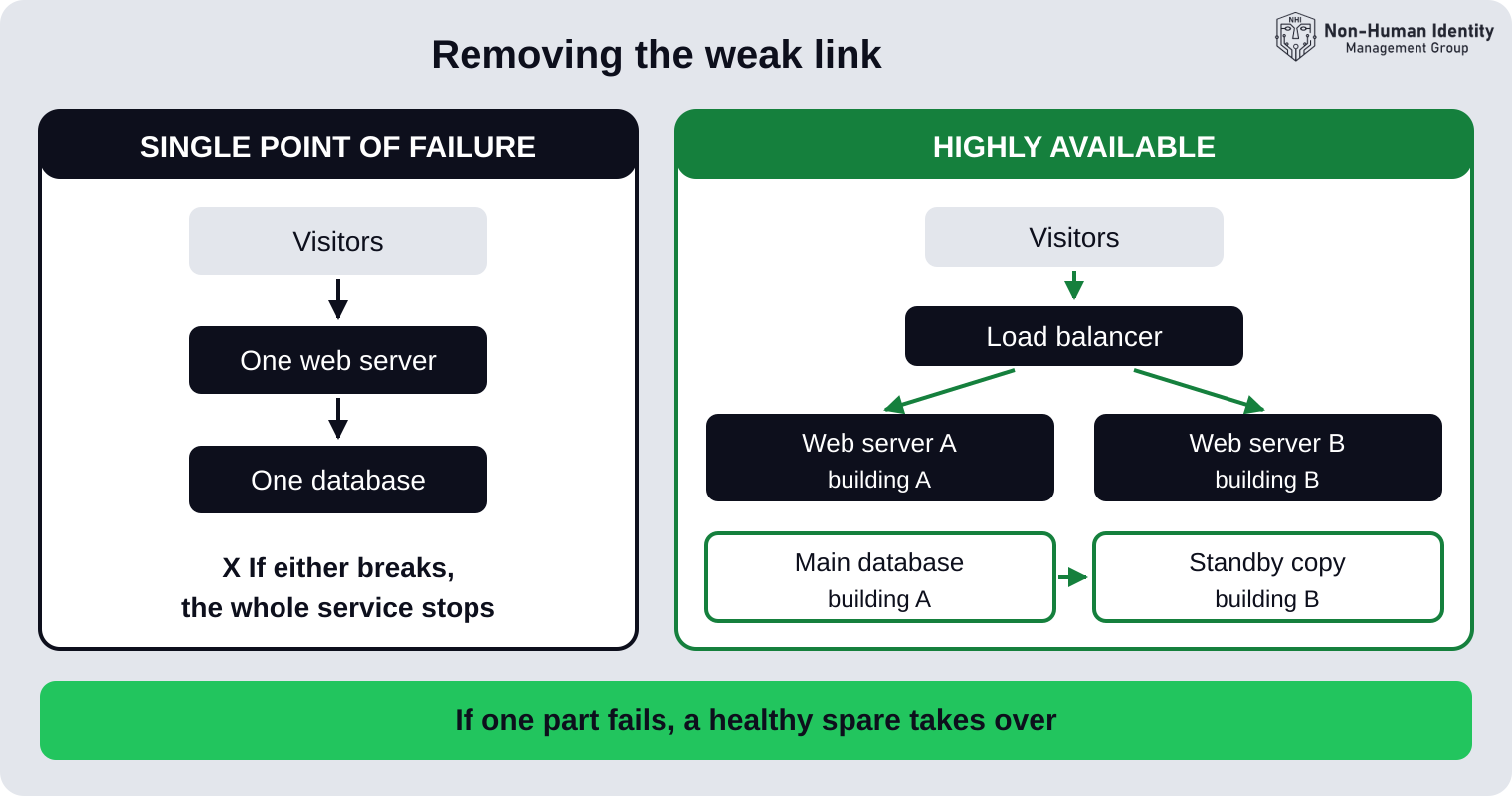
Think of a supermarket with several tills open. If one till breaks, the queue moves to the next one. Shoppers may wait a little longer, but nobody is sent home.
High availability works the same way for computer services. Instead of one server, there are two or more doing the same job. A traffic director, called a load balancer, sends each visitor to a working server. It checks each server regularly, and stops sending visitors to one that fails the check.[4]
Having more than one of each part is called redundancy. Microsoft's guidance describes it as running several identical copies of a part, so one failure does not take down the whole system.[2]
Where the comparison stops working: all the tills sit in one shop. If the power goes, they all stop together. Computer services can spread their spares across separate buildings, or even separate regions, to avoid that. And if a price is wrong on the till system, every till shows the same wrong price.
Why does it matter?
Downtime costs money, trust and sometimes safety. A target of 99.9% sounds close to perfect, but it still allows about 8 hours and 45 minutes of downtime a year.[1]
If you are new to IT work
What could happen: you restart "just one server" for an update and the whole website goes down.
Check this: ask whether each important part has a spare before you touch it.
If you are studying IT or computing
What could happen: you mix up high availability with backups and disaster recovery in an exam or interview.
Check this: learn one plain sentence for each, and how they differ.
Next: Business Continuity and Disaster Recovery for Beginners
If you run a small business
What could happen: your booking system runs on one server, and a failure on a busy day means lost sales.
Check this: ask your supplier what uptime they promise in writing, and what happens if they miss it.
What does it look like?
Here is a made-up status page for a small website. It is the kind of view an IT team might see.
Example only. All values are made up.
Service: bookings.example.com     Target: 99.9% a month
Load balancer        OK                         (1)
  web-server-a       OK    building A           (2)
  web-server-b       DOWN  building B, removed  (3)
Database (main)      OK    building A           (4)
Database (copy)      none                       (5)
This month so far:   99.96% available
- The traffic director. It sends visitors only to servers that answer its checks.
- One healthy web server is still serving visitors.
- A failed server, taken out of use, so visitors are not sent to it.
- The main database. All bookings are stored here.
- No standby copy of the database. If it fails, the site stops.
Why this is risky: the web servers have a spare, but the database does not. That makes the database a single point of failure.
The safer way: give each important part a spare, ideally in a separate building, and test the switch-over on a quiet day.
How does it work?
- Find the weak links. List each part the service needs, such as web servers, the database, the network and the sign-in system. Ask, "if this one breaks, does everything stop?"
- Add spares. Run at least two of each important part. Put them in separate buildings where you can. Cloud providers call these separate sites availability zones.[3]
- Keep checking health. A load balancer or monitor checks each part at regular intervals, often every 30 seconds or so. Parts that fail the check are taken out of use.[4]
- Switch over. In an "active-active" set-up, all copies serve visitors at once, so the others take the load. In "active-passive", a standby waits and is switched on when the main one fails.[2]
- Measure and test. Track how much of the time the service really worked. Practise switching over, so you learn about problems before a real failure.
A worked example
Otto Rosen has just started as an IT assistant at Sorrel Lettings, a letting agency with four branches. Tenants use an online portal to report repairs, often late at night.
In his first month, the portal goes down one Saturday evening for three hours. Dario Pajari, who looks after the agency's IT supplier contract, asks Otto to find out why.
Otto draws the system on a whiteboard. There are two web servers behind a load balancer, which looks good. But there is only one database, in one data centre. A disk failed in that database server, and nothing else could take over.
Otto checks the supplier contract. It promises 99.9% uptime a month. He works out that this allows about 43 minutes of downtime in a 30-day month, so three hours is well over.[1] Dario raises it with the supplier and asks for a plan.
The supplier proposes a standby copy of the database in a second availability zone, with automatic switch-over. Otto asks one more question he learned on a course. "If someone deletes the repairs table by mistake, does the standby delete it too?" The answer is yes. So they also keep regular backups that can be restored to an earlier point in time.[3]
Two months later, they test a switch-over on a quiet Tuesday morning. The portal pauses for under a minute in their test, then carries on.
Myths and mistakes
| What people think | What is true |
|---|---|
| High availability is the same as a backup. | HA keeps a service running. Backups let you go back in time. A deleted file can be copied to every spare. |
| The cloud is highly available by default. | Many cloud services offer HA options, but you often have to choose them and set them up. |
| 99.9% means almost no downtime. | It allows about 8 hours and 45 minutes a year. |
| Two servers in the same rack are enough. | A power or network fault can hit both. Spread spares across separate buildings where you can. |
| If the spare exists, the switch-over will work. | Untested switch-overs can fail. Practise them on a quiet day. |
What can I do this week?
- Pick one important service and draw its parts on a single page.
- Circle any part that has no spare. That is a single point of failure.
- Find the uptime promise in the supplier's contract or service level agreement.
- Work out how many hours of downtime a year that promise allows.
- Ask when the switch-over was last tested, and what happened.
Checklist
- We know the uptime target for each important service.
- Each important part has at least one spare.
- Spares sit in separate buildings or availability zones where possible.
- Something checks the health of each part and stops sending work to failed ones.
- We have tested a switch-over in the last year.
- Backups exist alongside HA, and we have tested a restore.
- Someone is alerted when a part fails, even if the service keeps running.
Common questions
What is the difference between high availability and disaster recovery?
High availability handles everyday failures, like a broken server or one lost data centre, and aims to keep the service running. Disaster recovery covers bigger events, like losing a whole region or a cyber attack, and is about getting back up after a stop. Most organisations need both.
What does "five nines" mean?
It means 99.999% availability. That allows about five minutes of downtime in a whole year.[1] It is a very demanding target. It suits services such as phone networks and cash machines more than a small firm's website.
Is high availability expensive?
Usually, yes, more than a single server. You pay for spare parts that may sit idle, and for the work to keep copies in step. Active-active set-ups tend to cost more than active-passive ones.[2] Match the target to how much downtime really costs you.
Does planned maintenance count as downtime?
Some teams leave it out of their figures, but AWS advises against that, because users may still want the service during maintenance.[1] Check how your supplier counts it in the contract.
Where does security fit in?
Spares need the same care as the main parts. A standby server needs updates, and its passwords and keys need protecting too. Sign-in systems and secret stores are often hidden weak links, so check they have spares as well.
Where next?
Ready for the detail? Read the practitioner guide: Cloud Region Outage Resilience. It goes further into multi-region designs, traffic steering, and how to test moving a service out of a failed region.
Also useful:
- Disaster Recovery vs High Availability
- Redundancy for Beginners
- Load Balancers for Beginners
- Backup Security for Beginners
Related NHI Mgmt Group resources: Secrets Manager Resilience Guide · Cloud Disaster Recovery Strategies · Windows Failover Cluster Security
Key terms
- High availability
- Designing a service to keep working when one of its parts fails.
- Availability
- The share of time a service works when people need it, shown as a percentage.
- Redundancy
- Having more than one of an important part, so one can fail without stopping the service.
- Single point of failure
- One part that stops the whole service if it breaks.
- Failover
- Moving work from a failed part to a healthy spare.
- Load balancer
- A traffic director that shares visitors between servers and skips ones that fail checks.
- SLA
- A service level agreement: a supplier's written promise, such as an uptime target.
Sources and further reading
- Availability (Reliability Pillar, AWS Well-Architected Framework). Amazon Web Services. Marked by AWS as historical reference. https://docs.aws.amazon.com/wellarchitected/latest/reliability-pillar/availability.html, accessed 28 Nov 2026.
- Architecture strategies for designing for redundancy (Azure Well-Architected Framework). Microsoft Learn, Microsoft. https://learn.microsoft.com/en-us/azure/well-architected/reliability/redundancy, accessed 28 Nov 2026.
- Disaster recovery options in the cloud (Disaster Recovery of Workloads on AWS). Amazon Web Services. https://docs.aws.amazon.com/whitepapers/latest/disaster-recovery-workloads-on-aws/disaster-recovery-options-in-the-cloud.html, accessed 28 Nov 2026.
- Health checks for Application Load Balancer target groups. Elastic Load Balancing documentation, Amazon Web Services. https://docs.aws.amazon.com/elasticloadbalancing/latest/application/target-group-health-checks.html, accessed 28 Nov 2026.