A load balancer shares incoming visitors across several servers, so no single server gets overloaded.
This guide is for new IT staff, developers and anyone curious about how busy websites stay up. If your business has a website or app that must not go down, there is a good chance a load balancer sits in front of it, and it needs looking after.
In short
- A load balancer sits in front of a group of servers and sends each visitor to one of them.
- It checks the servers regularly and stops sending visitors to any that fail those checks.
- Because every visitor passes through it, it is a good place to handle encryption, logging and some blocking.
- It only protects what is behind it if the servers cannot also be reached directly, so check for side doors.
What you will learn
- Explain what a load balancer does in one sentence.
- Spot the parts of a simple load balancer set-up.
- Check whether servers can be reached without going through it.
- Ask the right questions about its health checks and logs.
- Computer that answers visitors (server)
- a computer that sends web pages or data to people who ask for them.
- Traffic sharer (load balancer)
- a system that spreads incoming visitors across several servers.
- Regular test (health check)
- a small request sent to each server to see whether it is working.
What is a load balancer?
Think of a busy supermarket with a member of staff at the front of the tills. They wave each shopper to the next free till. If a till breaks, they stop sending people to it.
A busy website often runs on several servers, which are computers that answer visitors. A load balancer sits in front of them. Visitors connect to the load balancer, and it passes each request to one of the servers behind it.[1]
It also runs a health check, a small test request sent to each server again and again. A server that keeps failing is taken out of the rota until it passes again.[2]
Where the comparison stops working: shoppers can see the tills and walk to any of them. Website visitors usually see only the load balancer's address. If a server can also be reached directly, that is a side door the load balancer does not watch.
Why does it matter?
Every visitor passes through the load balancer. That makes it useful for keeping a site up, and an important thing to set up with care.
If you are new to IT work
What could happen: you look at a server's records to trace a visitor, but see only the load balancer's address.
Check this: find out where the visitor's real address is recorded, and which logs to trust.
If you are a developer
What could happen: your app trusts a "visitor address" value that the visitor could have filled in themselves.
Check this: ask which address values the load balancer adds, and only trust those.
If you manage a website for a business
What could happen: the site stays up during a busy sale because the load balancer moves visitors away from a struggling server.
Check this: ask your supplier whether your site uses more than one server and how failures are handled.
What does it look like?
Here is a made-up summary of a small shop's load balancer settings, as it might appear on a settings screen.
Example only. All values are made up.
LOAD BALANCER: shop-front (EXAMPLE)
Public address:   shop.example.com, port 443 (HTTPS)  (1)
Certificate:      EXAMPLE-CERT-0000                   (2)
Servers behind:   web-1, web-2                        (3)
Sharing method:   take turns
Health check:     ask /health every 30 seconds        (4)
Access logs:      OFF                                 (5)
- The one address visitors use. Port 443 is the usual door for encrypted web traffic.
- In a real file, this line would contain the name of the certificate that proves the site's identity to visitors.
- The servers the visitors are shared between.
- The test the load balancer runs on each server.
- Records of each visit are switched off.
Why this is risky: with logs off, nobody can look back at who visited or what they asked for. The settings also do not show whether web-1 and web-2 can be reached directly, skipping the load balancer.
The safer way: turn on access logs and keep them somewhere safe. Make sure the servers accept web traffic only from the load balancer. Check that the health check tests something meaningful.
How does it work?
Here is what happens when you visit a website that uses a load balancer.
- You connect. Your browser connects to the load balancer's address, not to any one server.
- The lock is opened. Many load balancers handle the encryption, shown as HTTPS. They hold the site's certificate and decrypt your request before passing it on.[3]
- A server is picked. The load balancer chooses a server using a simple rule. Common rules are taking turns, or picking the server with the fewest people already connected.[4]
- Only healthy servers are used. Servers that have failed several health checks in a row are left out until they pass again.[2]
- Your address is passed on. The server sees the load balancer as the sender, so the load balancer adds a note with your address. A note the visitor wrote themselves should not be trusted.[5]
- The answer comes back. The server replies to the load balancer, which sends the answer to you.
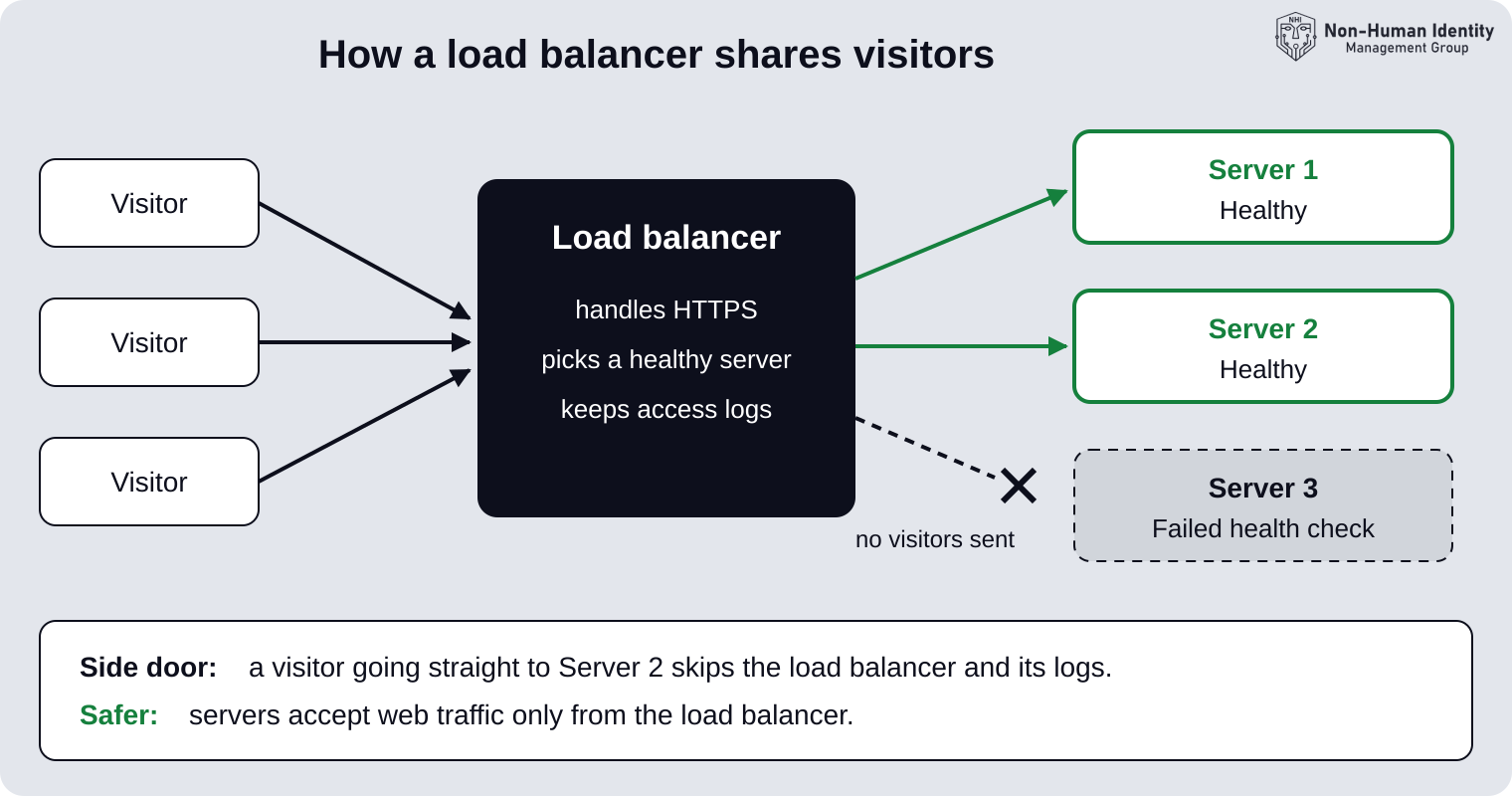
Some services behave in a surprising way when every server fails at once. One cloud provider's load balancer then sends visitors to all of them anyway, called failing open, rather than sending them nowhere.[2] This is why it helps to know your own set-up and not assume.
Load balancers come in different kinds. Some only pass connections along without reading them. Others read each web request and can send it to different servers by web address.[1] A related tool, the reverse proxy, also stands in front of servers, and many reverse proxies can share load too.
A worked example
Freya Strand has just joined Alder Nursery, a fictional plant nursery with a busy online shop. Her manager, Lars Nakamura, asks her to learn how the website is put together.
Freya draws the path a visitor takes. Browser, then the load balancer, then one of two web servers. It looks tidy.
Then she checks each server. One of them, web-2, has its own public address and still answers web requests on it. Anyone who finds that address can skip the load balancer, its encryption and its logs.
She thinks of the supermarket. The member of staff at the front only helps if shoppers cannot slip in through the back door.
Freya tells Lars. Together they change web-2's settings so it accepts web traffic only from the load balancer. They test it, and the direct address now gets no reply.
Next, Freya looks at the health check. It asks for a page that always says "OK", even when the shop's database is down. Lars agrees to point it at a page that also checks the database, so a broken server is taken out of the rota.
Last, they turn on the load balancer's access logs. Freya writes a short note: the path, the side door they closed and where the logs live. In the records available to them, they find no sign that anyone used web-2's direct address.
Myths and mistakes
| What people think | What is true |
|---|---|
| A load balancer is a security tool. | Its main job is sharing traffic and keeping the site up. It can help security, but it is not a full defence on its own. |
| If the load balancer is safe, the servers are hidden. | Servers with their own public address can still be reached directly. Close those side doors. |
| The visitor address in a request can always be trusted. | Visitors can fill in their own address note. Trust only the value your load balancer adds.[5] |
| A passing health check means the site works. | A check that only asks for a simple page can pass while the database is down. Test what matters. |
| Failed servers always get no traffic. | Some services send traffic to every server if all of them fail at once.[2] |
What can I do this week?
- Draw the path a visitor's request takes to your website, naming each box.
- Check whether any server behind a load balancer can be reached directly.
- Find out whether the load balancer's access logs are on, and where they are kept.
- Ask what the health check actually tests.
- Note who owns the load balancer's certificate and when it runs out.
Checklist
- We know which load balancers we run and who looks after each one.
- Servers behind a load balancer accept web traffic only from it.
- Access logs are switched on and kept safely.
- Health checks test something meaningful, not just a static page.
- The site's certificate has an owner and a renewal plan.
- Apps trust only the visitor address value the load balancer adds.
- We know what our load balancer does if every server fails.
Common questions
Is a load balancer the same as a reverse proxy?
They overlap. Both sit in front of servers and pass requests on. A reverse proxy may do one server's job, such as handling encryption or caching. A load balancer's main job is sharing visitors across several servers. Many products do both. See Reverse Proxies for Beginners.
Does a load balancer stop attacks?
Partly. Sharing traffic helps a site cope with sudden busy periods, and many load balancers can add logging and some blocking. On its own it is not a full defence against floods of fake traffic or attacks on the app itself. Other tools usually sit alongside it.
What happens to my connection if a server breaks?
Usually you are sent to another server. Once the broken server fails enough health checks in a row, the load balancer stops sending new visitors to it. Some visits already in progress on that server may be interrupted and need to be tried again.
Do small businesses need a load balancer?
Often not directly. Many small sites run on hosting or cloud services that include one behind the scenes. It is worth asking your supplier whether your site runs on more than one server and how they handle a server failure.
Why do servers see the load balancer's address instead of mine?
Because the load balancer makes its own connection to the server on your behalf. To keep your address, it adds a note to the request that names you. Apps should only trust that note when the load balancer itself added it.
Where next?
Ready for the detail? Read the practitioner guide: Load Balancer Security Guide. It goes further into encryption settings, locking down the servers behind it and what to log and monitor.
Also useful:
- Reverse Proxies for Beginners
- Content Delivery Networks (CDNs) for Beginners
- API Gateways for Beginners
- How to automate certificates on load balancers
Related NHI Mgmt Group resources: Security Requirements for Selecting a Load Balancer · Network Security for Beginners · Cloud Networking for Beginners
Key terms
- Load balancer
- A system that spreads incoming traffic across several servers so none is overloaded.
- Health check
- A regular test request that shows whether a server is working.
- Failover
- Moving traffic to a healthy backup when the main system fails.
- Reverse proxy
- A go-between that receives visitors' requests and passes them to servers behind it.
- TLS
- The encryption that protects web traffic on its way, shown as HTTPS in the browser.
Sources and further reading
- What is Elastic Load Balancing? Elastic Load Balancing User Guide, Amazon Web Services. https://docs.aws.amazon.com/elasticloadbalancing/latest/userguide/what-is-load-balancing.html, accessed 28 Nov 2026.
- Health checks for Application Load Balancer target groups. Amazon Web Services. https://docs.aws.amazon.com/elasticloadbalancing/latest/application/target-group-health-checks.html, accessed 28 Nov 2026.
- Create an HTTPS listener for your Application Load Balancer. Amazon Web Services. https://docs.aws.amazon.com/elasticloadbalancing/latest/application/create-https-listener.html, accessed 28 Nov 2026.
- Using nginx as HTTP load balancer. nginx documentation. https://nginx.org/en/docs/http/load_balancing.html, accessed 28 Nov 2026.
- HTTP headers and Application Load Balancers (X-Forwarded headers). Amazon Web Services. https://docs.aws.amazon.com/elasticloadbalancing/latest/application/x-forwarded-headers.html, accessed 28 Nov 2026.