Uptime monitoring is an automatic check that warns you when a website or online service goes down.
This guide is for small business owners, students and people new to IT work who want to know how outages are spotted. You do not need to be technical to benefit: if customers book, buy or log in online, an outage costs you trade and trust.
In short
- An uptime monitor visits your site on a schedule, the way a customer would, and checks the reply.
- Good monitors check from several places, so one bad internet route does not cause a false alarm.
- When checks keep failing, the monitor sends an alert to a named person.
- A monitor can also warn you before your site's security certificate runs out.
What you will learn
- Explain what an uptime monitor checks and how often.
- Spot the difference between "the page answers" and "the page works".
- Check who gets the alert when your site goes down.
- Ask your web supplier the right questions about monitoring.
- Automatic site check (uptime check)
- a small test that visits a web address on a schedule and records whether it replied properly.
- Warning message (alert)
- a text, email or app message sent when checks keep failing.
- Outage notice board (status page)
- a separate page that tells customers whether a service is working.
What is uptime monitoring?
Think of a friend who rings your shop every few minutes, just to check that someone picks up. If nobody answers three times in a row, they call your mobile.
An uptime monitor does the same job for a website. Every few minutes it asks for a page and looks at the reply. If the reply is missing, slow or wrong for a set number of tries, it sends an alert.
Engineers call this black-box monitoring: testing the service from the outside, as a user would see it.[1] It does not need to know how the site is built. It only cares whether a visitor would get a working page.
"Uptime" simply means the time a service is up and working. "Downtime" is the time it is not.
Where the comparison stops working: your friend can hear a confused voice on the phone. A basic monitor only sees a code that means "fine". The page can still be broken, unless you tell the monitor which words a working page should contain.
Why does it matter?
Without monitoring, the first sign of an outage is often a customer complaint. By then, orders and bookings may already be lost.
Outages also have security causes. A forgotten security certificate, a hacked page or a flood of fake traffic can all take a site down. A monitor helps you notice quickly, whatever the cause.
If you run a small business website
What could happen: your booking page is down all weekend and you hear about it on Monday.
Check this: ask your web supplier whether anyone is alerted out of hours, and who.
If you are new to IT support
What could happen: alerts go to a shared inbox that nobody reads at night.
Check this: make sure each alert goes to a named person, with a back-up.
If you are studying computing
What could happen: you learn to build sites but not how teams know when they break.
Check this: set up a free check on a practice site and watch what an alert looks like.
What does it look like?
Here is a made-up uptime check and the alert it sent, for a small lettings agency.
Example only. All values are made up.
Check name:   Lettings site home page
Address:      https://www.example.com/book-a-viewing
Every:        5 minutes, from 3 regions        (1)
Must contain: "Book a viewing"                 (2)
Alert after:  2 regions fail for 1 minute      (3)
Send alert:   on-call phone, then team email   (4)

ALERT 02:14  Lettings site home page DOWN
             Reply: error 503 from 3 of 3 regions
- Checking from several places means one bad internet route is less likely to cause a false alarm.
- The page must show these words. A blank or error page fails, even if the server replies.
- The monitor waits for repeated failures before it alerts, to cut false alarms.
- In a real file, this line would name a person on call and a back-up.
Why this is risky: without a "must contain" rule, a broken page that still sends a "fine" code would pass. With no named person, the alert may sit unread until morning.
The safer way: check the pages that earn money, such as booking or checkout, not just the home page. Ask for words a working page shows, and send alerts to a person, not only to an inbox.
How does it work?
Most uptime services follow the same basic loop. Cloud providers such as Amazon Web Services and Google Cloud describe it in their own guides.
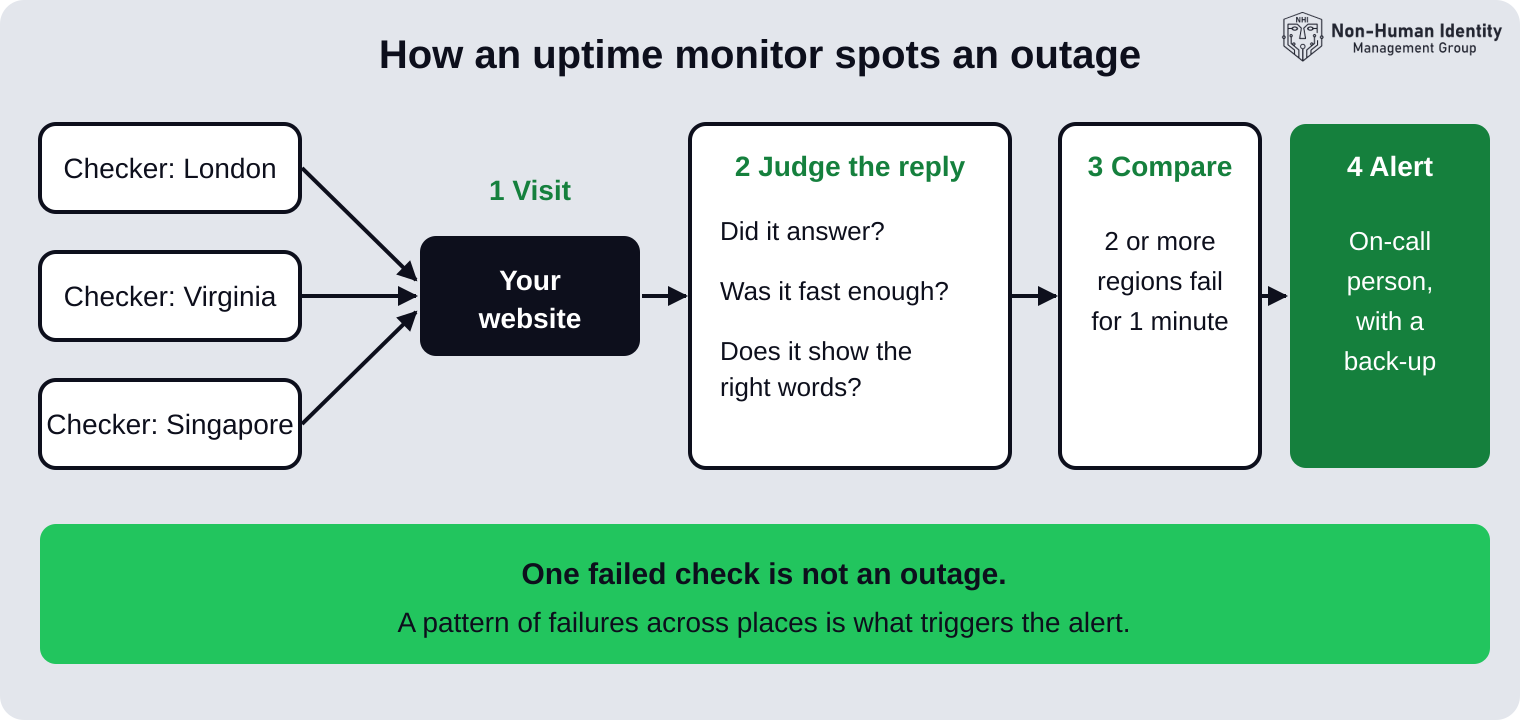
- Visit. The monitor sends a request to your web address on a schedule. Google Cloud's checks can use web requests or a simple connection test, and run from several locations around the world.[2]
- Judge the reply. It checks the reply code, how fast the reply came, and, if you ask, whether certain words appear. Amazon's checks look for your chosen text near the start of the page.[3]
- Check the certificate. For secure (https) addresses, a check can fail if the site's security certificate has expired or does not match the site name.[2]
- Compare places. Results from different places are combined. Amazon, for example, treats a site as healthy only if more than 18% of its checkers say so. This stops a site being marked down just because one area cannot reach it.[3]
- Wait for a pattern. One failed check is not enough. Google Cloud's default sends an alert when at least two regions report failures for at least one minute.[2]
- Tell someone. The alert goes to the people and channels you chose, such as a phone app, a text or email.
Big teams also watch the inside of their systems, such as memory and error counts. This is called white-box monitoring, meaning it uses signals from inside the system.[1] Security teams sometimes track how long each server has been running since its last restart. An unexpected restart can point to a fault or to tampering.[4] For a small website, an outside uptime check is the usual first step.
A worked example
Hana Achterberg runs Slate Lettings, a fictional agency with six staff. Tenants book viewings on its website, which a freelancer, Dario Ueda, looks after.
One Saturday the booking page goes blank. The server still replies, but the form has vanished after a plugin update. Nobody notices until Monday, when Hana finds three angry emails and no bookings.
Hana remembers the friend who rings the shop. She asks Dario to set up that friend for the website.
Dario adds an uptime check on the booking page, not just the home page. It runs every five minutes from three regions. The page must show the words "Book a viewing", so a blank page now fails.
He sends alerts to his phone first, with Hana as the back-up. He also turns on a warning for when the site's security certificate is close to running out.
Two weeks later, at 7 on a Sunday morning, Dario's phone buzzes. The booking form has failed in all three regions for over a minute. He rolls back a faulty update in twenty minutes, before most tenants are awake.
Hana adds a short line to the website footer pointing to a simple status page, hosted by a different provider. If the main site is down again, tenants can still see what is happening.
Myths and mistakes
| What people think | What is true |
|---|---|
| If the server replies, the site is working. | A page can reply "fine" and still be blank. Ask the monitor to look for words a working page shows. |
| Checking the home page is enough. | The pages that earn money, like booking or checkout, matter most. Check those too. |
| More alerts mean better safety. | Too many alerts teach people to ignore them. Alert only on problems that need a person to act.[1] |
| Our hosting company watches the site for us. | Many hosts watch their own servers, not your pages. Ask what they check and who they tell. |
| One failed check means the site is down. | A single failure can be a blip on one route. Good monitors wait for a pattern across places. |
What can I do this week?
- List the two or three pages on your site that matter most to customers.
- Ask your web supplier whether those pages are checked, how often and from where.
- Name one person to receive alerts, plus a back-up for holidays and nights.
- Turn on a warning for when your site's security certificate is close to expiring.
- Test the alert once, so you know what it looks like and that it arrives.
Checklist
- Our key pages, not just the home page, have uptime checks.
- Checks run from more than one location.
- Each check looks for words that a working page shows.
- Alerts go to a named person with a back-up.
- We have tested that an alert really arrives.
- Certificate expiry is monitored.
- We have a way to tell customers about an outage, hosted separately from the main site.
Common questions
How often should a site be checked?
Every few minutes suits most small sites. Busy shops may check more often. Amazon's health checks, for example, can run every 10 or 30 seconds.[3] Faster checks find outages sooner, but cost more and can create more alerts to handle.
Is uptime monitoring the same as high availability?
No. High availability is about designing a service so it keeps running when parts fail. Uptime monitoring is about noticing when it stops. You usually want both: a sturdy design, and a check that tells you quickly when something still goes wrong.
Can a monitor tell me why my site is down?
Usually only partly. It shows what a visitor sees, such as an error code, a slow reply or a bad certificate. Finding the cause needs someone to look at the server, its records and recent changes.
Do I need a status page?
It helps once customers rely on your service. A status page tells people you know about a problem. It works best when it is hosted separately, so it stays reachable when the main site is down.
Is uptime monitoring a security control?
Partly. It does not stop attacks, but it helps you notice their effects quickly. A defaced page, an expired certificate or a flood of fake traffic can all show up first as a failed check.
Where next?
Ready for the detail? Read the practitioner guide: D3-PUM Platform Uptime Monitoring. It goes further into tracking server restarts, the records that show them and how to tell a fault from tampering.
Also useful:
- High Availability for Beginners
- DDoS Attacks for Beginners
- Website Defacement for Beginners
- Certificate Expiry Outages and 47-Day TLS Certificates Guide
- Alert Fatigue Reduction Guide
Related NHI Mgmt Group resources: Website Security for Beginners · Security Logging for Beginners · Disaster Recovery vs High Availability
Key terms
- Uptime
- The time a website or service is available and working as expected.
- Uptime check
- An automatic visit to a web address on a schedule to see whether it replies properly.
- Synthetic monitoring
- Scripted checks that act like a visitor, from chosen places and at set times, to test a service before real users hit a problem.
- Monitoring
- Collecting and watching chosen signals from systems, so that known problems raise an alert.
- Alert fatigue
- When so many low-value alerts arrive that important ones become harder to notice.
- Status page
- A separate page that tells customers about outages, hosted apart from the main service so it stays reachable.
- TLS certificate
- A digital file that proves a website is genuine and lets browsers connect securely. It has a fixed expiry date.
Sources and further reading
- Monitoring Distributed Systems. Site Reliability Engineering, Google. https://sre.google/sre-book/monitoring-distributed-systems/, accessed 28 Nov 2026.
- Create public uptime checks. Cloud Monitoring documentation, Google Cloud. https://docs.cloud.google.com/monitoring/uptime-checks, accessed 28 Nov 2026.
- How Amazon Route 53 determines whether a health check is healthy. Amazon Route 53 Developer Guide, Amazon Web Services. https://docs.aws.amazon.com/Route53/latest/DeveloperGuide/dns-failover-determining-health-of-endpoints.html, accessed 28 Nov 2026.
- Platform Uptime Monitoring (D3-PUM). MITRE D3FEND. https://d3fend.mitre.org/technique/d3f:PlatformUptimeMonitoring/, accessed 28 Nov 2026.