iMessage and RCS are two ways your phone sends texts, and each one decides whether a message is encrypted.
This guide is for anyone who texts friends, family or customers and wants to know who else could read those messages. You do not need to know anything about technology. If your business texts customers or staff, the same rules apply to those chats.
In short
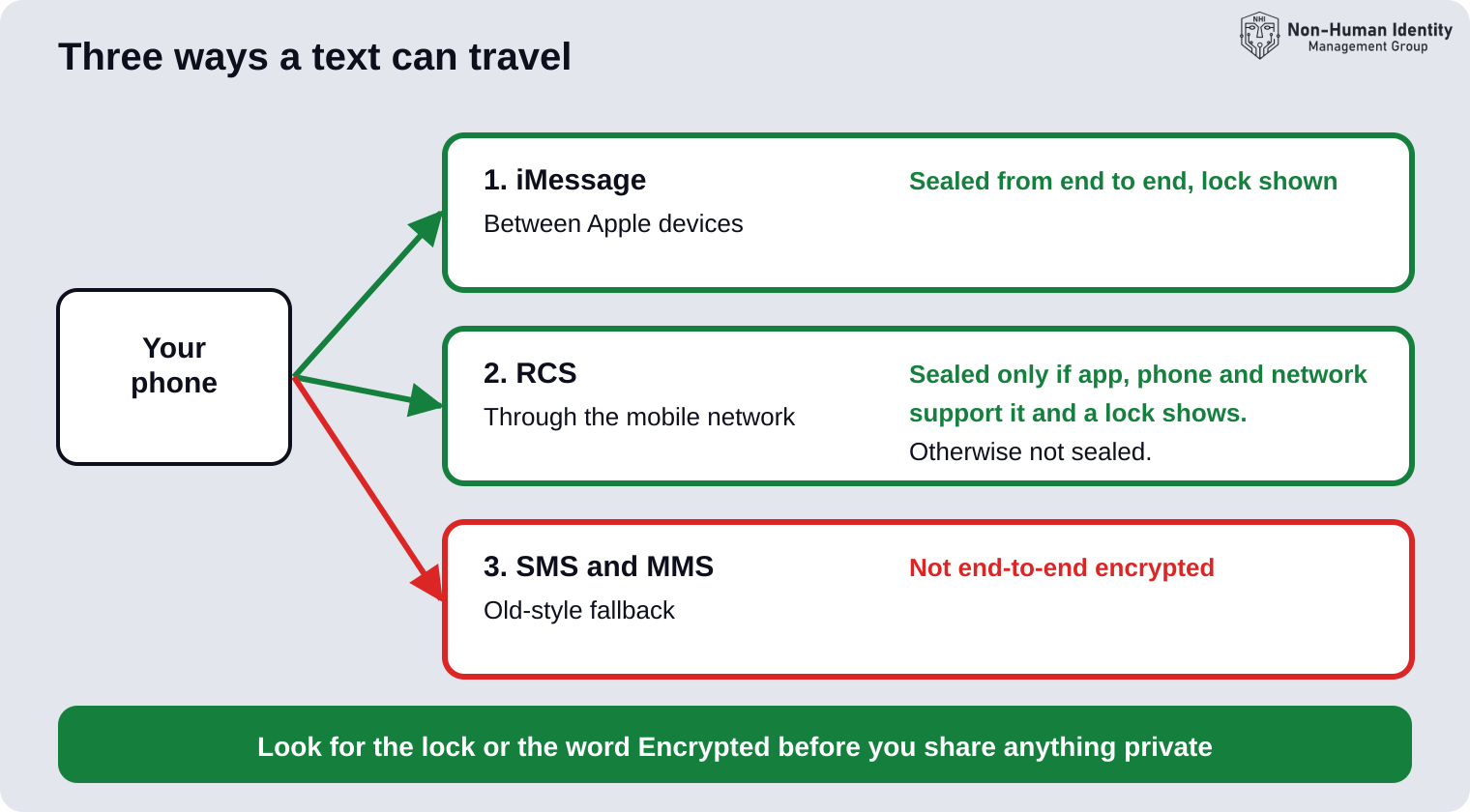
- Your phone can send a text in three ways: iMessage, RCS or plain SMS and MMS. The way it travels decides how well it is protected.
- iMessage is end-to-end encrypted. RCS can be, when the conditions are met. Plain SMS and MMS are not.
- Bubble colours give a hint, but they mean different things in different apps.
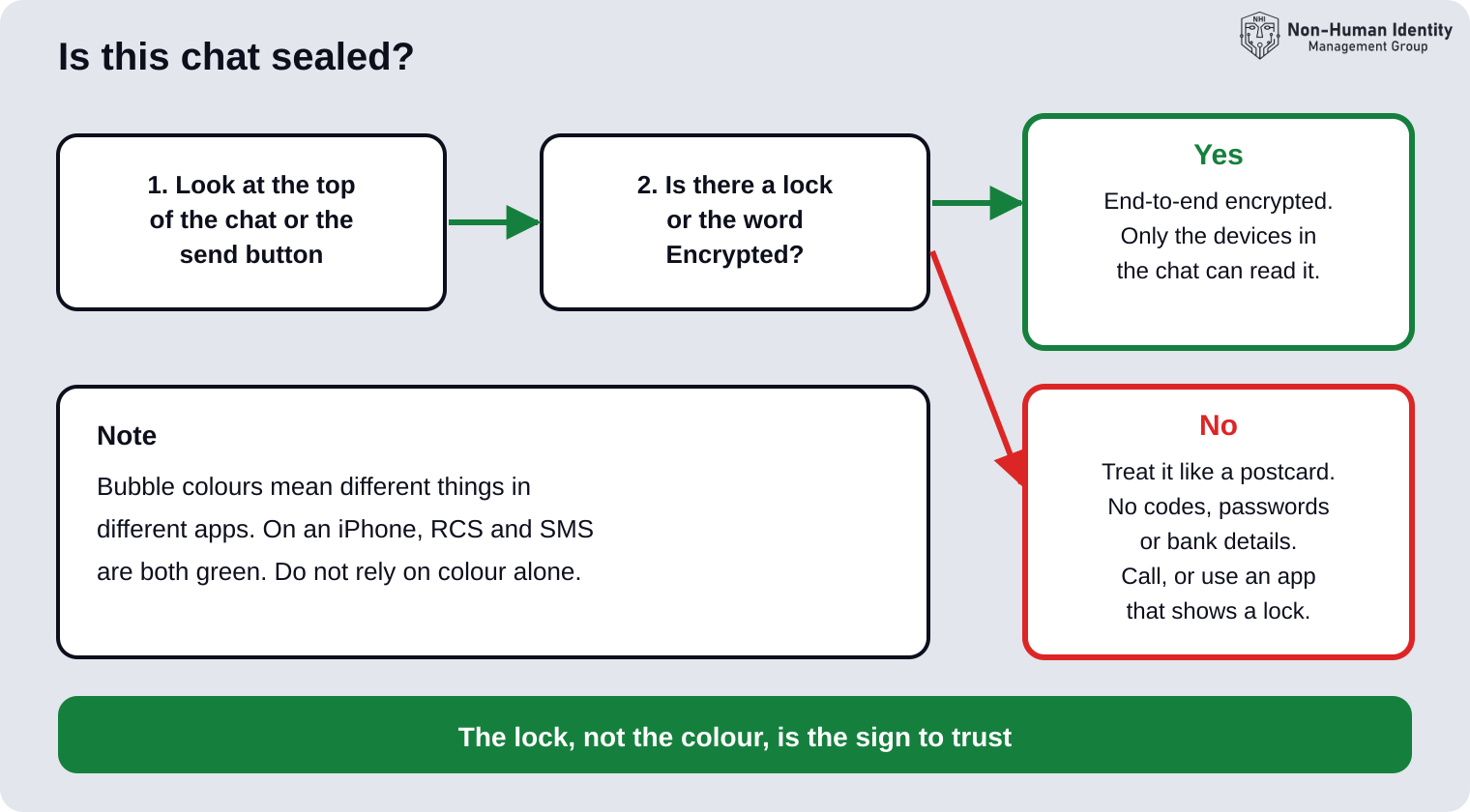
- The best check is the lock icon or the word "Encrypted" in the chat. No lock means you should treat the chat as unprotected.
What you will learn
- Explain the difference between iMessage, RCS and plain text messages.
- Spot whether a chat on your phone is encrypted.
- Explain why a chat between an iPhone and an Android phone may be less protected.
- Choose what to share by text and what to keep for a safer channel.
- Sealed from end to end (end-to-end encryption)
- scrambling a message so only the sender's and the receiver's devices can read it.
- Modern texting (RCS)
- an upgrade to old-style texts, run by mobile networks, with photos, typing dots and read receipts.
- Old-style texts (SMS and MMS)
- the original text and picture messages that work on almost any phone.
What are iMessage and RCS?
Think of the difference between a sealed letter and a postcard. A sealed letter can only be read by the person who opens it. A postcard can be read by anyone who handles it on the way.
Your phone's messages app can send a text in more than one way. Each way is like a different postal service. Some seal the message, and some send it as a postcard.
- iMessage is Apple's own service. It works between Apple devices over the internet, using Wi-Fi or mobile data.
- RCS (Rich Communication Services) is a newer kind of texting run by mobile networks. It adds things like typing dots and better photos.
- SMS and MMS are the original text and picture messages. They work on almost any phone, even with no internet.
The app picks the way for you. So two chats in the same app can have very different protection.
Where the comparison stops working: a postcard is easy to spot in your hand. A text sent the less protected way can look almost the same as a sealed one. So you need to look for the small signs in the app.
Why does it matter?
Many people assume every text is private. In fact, only some chats are sealed from end to end, and it can change from one chat to the next.
If you text family across iPhone and Android
What could happen: you share a bank detail, thinking the chat is sealed, but it travels the less protected way.
Check this: look for the lock icon or the word "Encrypted" before you share anything private.
If you run a small business
What could happen: staff send customer details by text, where they may not be protected.
Check this: agree which kinds of information may be sent by text, and which may not.
If you use texts for sign-in codes
What could happen: a code sent as a plain SMS is less protected than a code shown in an app.
Check this: where a service offers it, use an authenticator app or a passkey instead of text codes.
What does it look like?
Here is a made-up messages screen. It shows the small signs to look for at the top of each chat.
Example only. All values are made up.
Chat 1: "Mum (EXAMPLE)"
  [lock] Encrypted                     (1)
  "Here is the door code: 0000"

Chat 2: "Plumber (EXAMPLE)"
  Text Message                         (2)
  "Your quote is 000.00, reply YES"

Chat 3: "Gym (EXAMPLE)"
  RCS, no lock shown                   (3)
  "Class moved to 6pm"
- A lock and the word "Encrypted" show the chat is sealed from end to end.
- "Text Message" means old-style SMS. In a real message app, this chat would not be end-to-end encrypted.
- An RCS chat with no lock is not sealed from end to end. Apple says that if you do not see the indicator, your RCS messages are not protected.[1]
Why this is risky: chats 2 and 3 look much like chat 1 at a glance. A door code sent there is not sealed from end to end.
The safer way: check for the lock before you send anything private. If there is no lock, call instead. Or use an app that shows the chat is encrypted.
How does it work?
Each time you press send, your phone makes a few quick choices for you.
- The app checks who you are texting. On an iPhone, if the other person also uses iMessage, the message goes by iMessage, in a blue bubble.[1]
- If not, it tries RCS. RCS needs a supported phone, a supported mobile network and an internet connection. On an iPhone, RCS shows in green bubbles.[1]
- If neither works, it falls back to SMS or MMS. These are not end-to-end encrypted.[1][3]
- Encryption is added where the route allows it. The phone scrambles the message with keys that live on the devices themselves. Apple says it does not store iMessage content and cannot decrypt it.[2]
- The app shows a sign. A lock icon, or the word "Encrypted", tells you the chat is sealed from end to end.[1][3]
What each app says, in its own words (apps are listed alphabetically, and this is not a ranking):
- Apple Messages on iPhone. Apple says iMessage chats are end-to-end encrypted and show a lock. RCS chats can be end-to-end encrypted when everyone's mobile network supports it. Apple calls this a beta, and says it needs iOS 26.5 and a supported network. Encrypted RCS chats show "Encrypted" with a lock at the top.[1]
- Google Messages on Android. Google says RCS chats are encrypted automatically when both people use Google Messages with RCS chats turned on, over data or Wi-Fi. A lock shows on the send button and by each message's time. If either person loses RCS or data, the lock goes and the chat can drop to SMS.[3]
Behind the scenes, the mobile industry body, the GSMA, published a new RCS standard in March 2025. It adds end-to-end encryption that is meant to work between different companies' apps.[4] Support depends on your app, phone and network, so the lock in the chat is still the thing to check.
A worked example
Leila Corrigan has an Android phone. Her dad, Hal Strand, has an iPhone. For years their chats were old-style texts, with no lock on either screen.
One evening Hal needs the code for Leila's key safe so he can feed her cat. He starts to type it into their usual chat. Then he remembers a tip from a friend: look for the lock first.
He checks the top of the chat. There is no lock and no "Encrypted" label. So he does not send the code. He phones Leila instead and reads it out.
The next weekend they sit down together. Leila opens Google Messages and checks that RCS chats are turned on. Hal opens Settings on his iPhone and checks for updates. Then they check their chat again.
The chat now shows as RCS. They look for the lock. If it shows, they know the chat is sealed from end to end. If it does not, they agree on a simple rule: no codes, passwords or bank details by text.
They also agree on a second rule. If either of them gets an odd message asking for money or a code, they will call first. They use a number they already know.
Nothing bad happened to Leila and Hal. They just swapped a guess for a quick check, and they now know which kind of message is safe for which kind of chat.
Myths and mistakes
| What people think | What is true |
|---|---|
| All text messages are private. | Old-style SMS and MMS messages are not end-to-end encrypted. Only some chats are sealed. |
| Blue means safe and green means unsafe. | Colours mean different things in different apps. On an iPhone, RCS and SMS are both green. Check for the lock instead. |
| Once a chat is encrypted, it stays encrypted. | A chat can drop back to SMS if someone loses RCS or data. Check again before you send something private. |
| Encryption means a message is from who it says. | Encryption hides the content. A scammer can still send you a sealed message. Check odd requests another way. |
| Encrypted chats stay protected wherever they are kept. | Backups of your chats can be protected in a different way from the chats themselves. Check your backup settings too. |
What can I do this week?
- Open your three most used chats and look for a lock or the word "Encrypted".
- Update your phone and your messages app, so you get the latest security features.
- Turn on RCS chats in your messages app settings, if your phone and network offer them.
- Agree with family on what never goes by text, such as codes, passwords and bank details.
- Move private chats to an app that shows encryption clearly, if your usual chat shows no lock.
Checklist
- I know the three ways my phone can send a text.
- I check for a lock or "Encrypted" before I share anything private.
- I do not rely on bubble colours alone.
- My phone and messages app are up to date.
- RCS chats are turned on where my phone and network support them.
- I never send passwords, sign-in codes or bank details by plain text.
- I check odd requests by calling a number I already know.
Common questions
Are texts between an iPhone and an Android phone encrypted?
Sometimes. If the chat uses old-style SMS, it is not end-to-end encrypted. If it uses RCS, it can be, when both apps, both phones and the networks support it. The only way to know for a given chat is to look for the lock icon or the word "Encrypted".
Why are some of my messages green and some blue?
Colours show which way a message travelled. On an iPhone, blue means iMessage and green means RCS or SMS. In Google Messages, dark blue means RCS and light blue means SMS or MMS. Because the colours differ between apps, check the lock rather than the colour.
Can my mobile network read my texts?
For old-style texts, possibly. Old-style SMS messages are not end-to-end encrypted, so they are not sealed against the services that carry them. A chat that shows the lock is sealed from end to end. Only the devices in that chat should be able to read it.
Does encryption stop scam texts?
No. Encryption keeps a message private on its way. It does not check whether the sender is honest. A scammer can send you an encrypted message too. Treat any unexpected request for money, codes or personal details with care, whatever the chat shows.
What is MLS, which I have seen in the news about RCS?
MLS (Messaging Layer Security) is the encryption method the GSMA chose for its newer RCS standard. It is designed to let apps from different companies seal chats between each other. You do not need to set it up. Your app, phone and network either support it or they do not.
Where next?
Ready for the detail? Read the practitioner guide: Messaging and Email Encryption Hub. It goes further into how each messaging app documents its encryption, how chat backups and metadata are handled, and how teams describe messaging in policies.
Also useful:
- iMessage and RCS Encryption
- End to End Encryption for Beginners
- Private Messaging Apps for Beginners
- Text Message Scams for Beginners
Related NHI Mgmt Group resources: Encrypted Chat Backups Compared · End-to-End Encryption and Messaging Protocols Guide · SIM Swap Fraud for Beginners
Key terms
- End-to-end encryption
- Scrambling a message so only the devices at each end of the chat can read it.
- Encryption
- Turning readable information into scrambled data that needs the right key to read.
- iMessage
- Apple's messaging service for sending texts, photos and files between Apple devices over the internet.
- RCS
- Rich Communication Services, a modern form of texting run by mobile networks, which can be encrypted when supported.
- SMS and MMS
- The original text and picture message services, which are not end-to-end encrypted.
- Metadata
- Information about a message, such as who sent it and when, rather than what it says.
Sources and further reading
- About iMessage, RCS and SMS/MMS. Apple Support, Apple. https://support.apple.com/en-us/104972, accessed 28 Nov 2026.
- iMessage security overview. Apple Platform Security, Apple. https://support.apple.com/guide/security/imessage-security-overview-secd9764312f/web, accessed 28 Nov 2026.
- End-to-end encryption in Google Messages. Google Messages Help, Google. https://support.google.com/messages/answer/10262381, accessed 28 Nov 2026.
- RCS encryption: a leap towards secure and interoperable messaging. GSMA, 14 March 2025. https://www.gsma.com/newsroom/article/rcs-encryption-a-leap-towards-secure-and-interoperable-messaging/, accessed 28 Nov 2026.