A private messaging app scrambles your chats so only you and the people you message can read them.
This guide is for anyone who chats with family, friends or colleagues on their phone and wants those chats to stay private. You do not need any technical knowledge to set up the main protections.
In short
- Pick a chat app that uses end-to-end encryption, so the app company cannot read your messages.
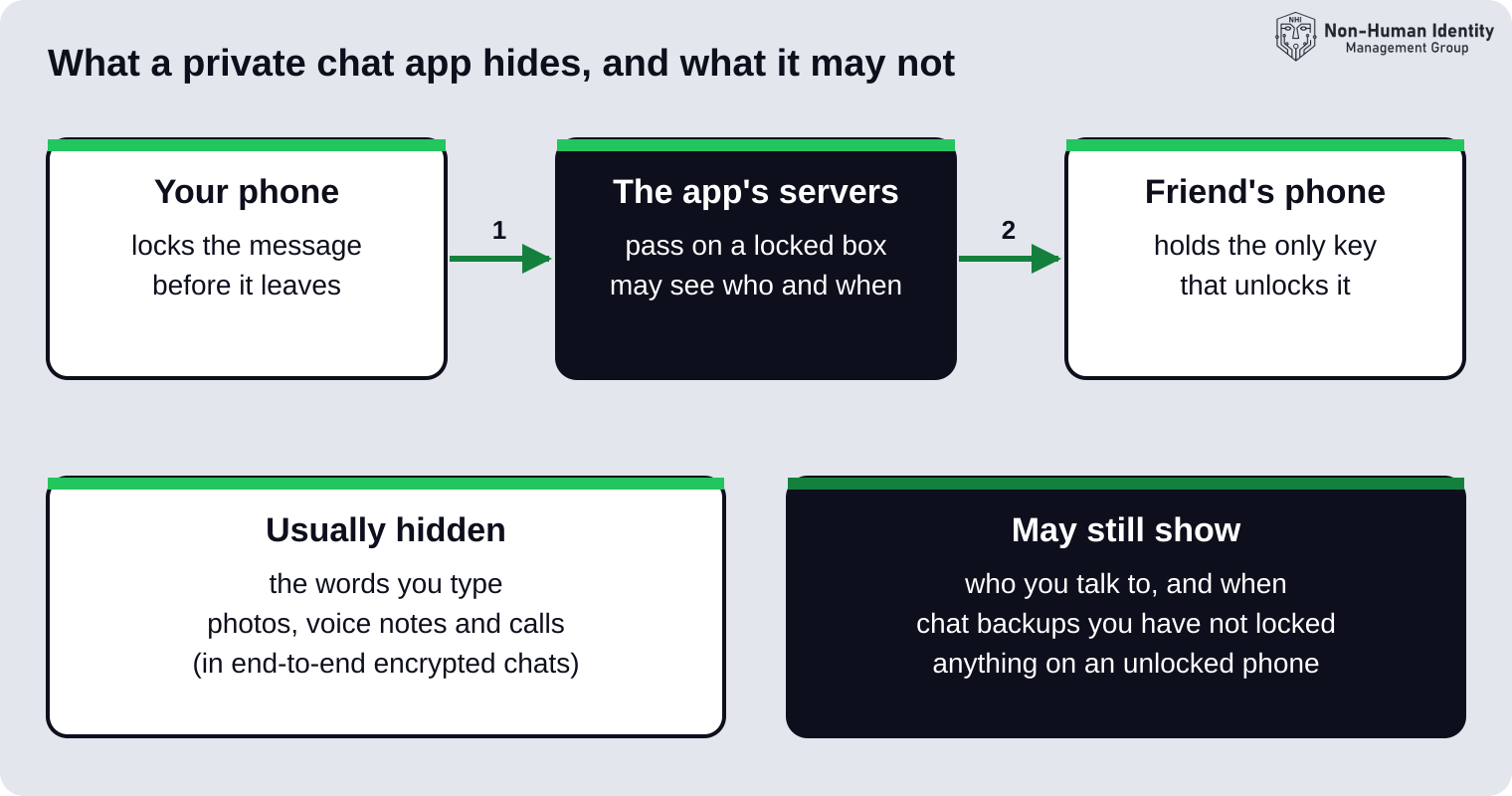
- Encryption hides what you say, but the app may still know who you talk to and when.
- Turn on the app's PIN or two-step check, so nobody can move your account to a new phone.
- Lock your chat backups and your phone, because those are the easiest ways in.
What you will learn
- Explain what end-to-end encryption does and does not hide.
- Check the five settings that matter most in your chat app.
- Spot the warning that a contact's security code has changed.
- Ask the right questions before you trust a new chat app.
- Locked chat (end-to-end encryption)
- messages are scrambled on your phone and only unscrambled on the phone of the person you send them to.
- Data about your chats (metadata)
- details such as who you messaged and when, but not what you said.
What is a private messaging app?
Think of a locked box that only the person you send it to has the key for. The postal service carries the box, but it cannot open it. A private messaging app works like that for your chats.
When you press send, the app scrambles your message on your phone. This is called end-to-end encryption. The scrambled message travels through the app company's computers, called servers. Only your friend's phone holds the key to unscramble it.[1]
Not every way of sending a message works like this. Ordinary phone calls and text messages (SMS) are not encrypted end to end.[1] Some apps only encrypt the message on its way to their servers, so the company can read a copy.
Where the comparison stops working: a postal service can see the address on a box. A chat app can often see who you message and when, even if it cannot read the words. This information is called metadata.[1]
Why does it matter?
Your chats hold a lot about you: plans, photos, money talk and private worries. If someone else gets into them, they can read, copy or pretend to be you.
If you chat with family
What could happen: a scammer takes over your account and messages your family asking for money.
Check this: turn on the app's PIN or two-step check today.
If you run a small business
What could happen: customer details shared in a group chat end up on a lost or shared phone.
Check this: agree which app staff use, and who can join work groups.
If you share sensitive news
What could happen: old messages stay on your phone or in a backup for years.
Check this: use disappearing messages for chats you do not need to keep.
What does it look like?
Example only. All values are made up.
FakeChat  |  Settings > Privacy and security
Messages: end-to-end encrypted ........ ON    (1)
Two-step PIN .......................... OFF   (2)
Chat backup to cloud .................. ON
  Backup encryption ................... OFF   (3)
Disappearing messages (new chats) ..... OFF   (4)
Who can add me to groups .............. Everyone (5)
[ Chat with Joaquin EXAMPLE ] Security code changed.  (6)
- Good. The words in your chats are scrambled end to end.
- No PIN, so a criminal with a stolen text code could set up your account on their phone.
- Your backup copy sits in the cloud without its own lock.
- Every message is kept until you delete it.
- Strangers can drop you into scam groups.
- Usually a new phone. Check with your friend another way if it was unexpected.
Why this is risky: the chats are encrypted, but the account and the backup are the open doors.
The safer way: turn on the PIN, lock the backup, set disappearing messages where it suits you and limit who can add you to groups.
How does it work?
- Each phone makes its own keys. When you install the app, your phone creates secret keys that stay on it.[1]
- Your phone locks the message. It scrambles each message so that only your friend's key can unlock it.
- The servers pass it on. The app company delivers the scrambled message. It may still record who sent it and when.[1]
- Your friend's phone unlocks it. The message appears as normal text on their screen.
- You can check the keys. Some apps give each chat a security code, called a safety number. If you and your friend see the same code, nobody is secretly sitting in the middle.[2]
A safety number often changes for an ordinary reason, such as your friend getting a new phone. If it changes often or when you did not expect it, check with them another way.[2]
Backups need a separate look. Some apps can copy your chats to a cloud service. In WhatsApp, for example, you can add a password or a long key to that backup so it is locked as well.[4]
A worked example
This story is made up to show how it can happen.
Isaac Yilmaz is a delivery driver in Ohio. He uses one chat app for his family group, his football team and his landlord.
One evening he gets a text with a six-digit code he did not ask for. A minute later a message arrives in the app from "Support". It says his account is being checked and asks him to reply with the code.
Isaac nearly does it. Then he remembers his sister's warning: the code is a key to his account, and real support teams do not ask for it. Anyone who has it could set up his account on their own phone. He deletes the message and blocks the sender.
He opens the app's settings. He turns on the two-step PIN, so a code on its own is no longer enough. He stores the PIN in his password manager. Next he sees that his chat backup goes to the cloud with no lock, so he turns on backup encryption.
He also changes who can add him to groups to "My contacts". He has been pulled into two crypto "investment" groups that month.
The next week, a chat shows that his brother's security code has changed. Isaac does not panic. He phones his brother, who says he has just bought a new phone. That fits, so Isaac carries on.
What made the difference: Isaac treated the code as a key, not a number, and added a PIN so one stolen code is not enough.
Myths and mistakes
| What people think | What is true |
|---|---|
| Encrypted means nobody can see anything about my chats. | The words are hidden, but the app may still see who you talk to and when.[1] |
| Text messages are just as private as a chat app. | Ordinary texts are not encrypted end to end. Use an encrypted app for private chats.[1] |
| Disappearing messages mean nobody can keep a copy. | The other person can still photograph their screen. Use them to tidy up, not to protect you from the person you message.[3] |
| My backups are as safe as my chats. | Not always. Some backups need their own lock, which you turn on in the app.[4] |
| Sharing a sign-in code with "support" is fine. | Keep sign-in codes to yourself. Whoever has the code may be able to take your account. |
What can I do this week?
- Turn on the PIN or two-step verification in each chat app you use.[5]
- Check whether your chat backup is locked, and add a password if the app offers one.
- Set who can add you to groups to your contacts only.
- Turn on disappearing messages for chats you do not need to keep.
- Set a screen lock on your phone, so a lost phone does not open your chats.
Checklist
- My main chat app uses end-to-end encryption for one-to-one and group chats.
- The app's PIN or two-step verification is turned on.
- My PIN is stored safely, for example in a password manager.
- My chat backup is locked with its own password or key, or switched off.
- Only my contacts can add me to groups.
- I check with a friend another way if their security code changes unexpectedly.
- My phone has a screen lock and stays up to date.
- I never share sign-in codes, even with someone claiming to be support.
Common questions
Which messaging app is the most private?
The best choice is an app that uses end-to-end encryption by default for all chats, including groups, and that collects little data about you. Check the app's own help pages for what it encrypts and what it keeps. The people you talk to need to use the same app.
What does "security code changed" mean?
It usually means your contact has a new phone or has reinstalled the app. Signal, for example, says this is the common reason. If it happens often or out of the blue, check with your contact by phone or in person before sharing anything private.[2]
What happens if I forget my chat app PIN?
You may be locked out for a while. Signal, for example, cannot reset your PIN. With its registration lock on, you may wait up to seven days to set up your account again. Store the PIN in a password manager so you do not lose it.[6]
Can the police or the app company read my encrypted chats?
Not on their journey, if the app is working as designed. Only the phones in the chat hold the keys. But anyone who can open your unlocked phone, or an unlocked backup, can read what is stored there. That is why the phone lock and the backup lock matter.[1]
Where next?
Ready for the detail? Read the practitioner guide: Securing Messaging Apps Guide. It goes further into app settings, linked devices and choosing a chat app for work.
Also useful:
- End to End Encryption for Beginners
- Multi-Factor Authentication for Beginners
- Account Takeover for Beginners
- Text Message Scams for Beginners
Related NHI Mgmt Group resources: Securing Your Smartphone Guide · Password Managers for Beginners · Social Media Security for Beginners
Key terms
- End-to-end encryption
- A way of scrambling messages so only the sender and the person receiving them can read them.
- Encryption
- Scrambling information so that only someone with the right key can read it.
- Metadata
- Information about a message, such as who sent it, to whom and when, rather than what it says.
- Multi-factor authentication (MFA)
- Asking for two or more kinds of proof, such as a code and a PIN, before letting you in.
- Safety number
- A code for each chat that you can compare with your contact to check your messages reach only them.
- Smishing
- A scam sent by text or chat message that tries to trick you into sharing codes, money or details.
Sources and further reading
- Communicating With Others. Surveillance Self-Defense, Electronic Frontier Foundation (EFF), last reviewed 6 August 2024. https://ssd.eff.org/module/communicating-others, accessed 28 Nov 2026.
- What is a safety number and why do I see that it changed? Signal Support. https://support.signal.org/hc/en-us/articles/360007060632-What-is-a-safety-number-and-why-do-I-see-that-it-changed, accessed 28 Nov 2026.
- Set and manage disappearing messages. Signal Support. https://support.signal.org/hc/en-us/articles/360007320771-Set-and-manage-disappearing-messages, accessed 28 Nov 2026.
- About end-to-end encrypted backup. WhatsApp Help Center. https://faq.whatsapp.com/490592613091019, accessed 28 Nov 2026.
- Turn on 2-step verification (2SV). National Cyber Security Centre (NCSC), reviewed 21 December 2021. https://www.ncsc.gov.uk/collection/top-tips-for-staying-secure-online/activate-2-step-verification-on-your-email, accessed 28 Nov 2026.
- Signal PIN (including Registration Lock). Signal Support. https://support.signal.org/hc/en-us/articles/360007059792-Signal-PIN, accessed 28 Nov 2026.