Input validation means checking that data sent to an app is what the app expects, before using it.
This guide is for students, junior developers and anyone who builds, tests or buys a website or app. You do not need to write code to follow it. If your business has an online form, a booking page or an upload button, this is about you.
In short
- Anything that comes from outside the app, such as a form, a file or a link, can be wrong or harmful.
- The app should check the type, length, range and format of each value, using a list of what is allowed.
- Checks in the browser help honest users, but the server must check again, because the browser can be skipped.
- Checking input is one layer. Apps still need safe database queries and safe display of text.
What you will learn
- Explain what input validation is in one sentence.
- Spot values in a form that an app should reject.
- Explain why the server must check, not only the browser.
- Ask a developer how uploads and saved data are checked.
- Outside data (input)
- anything an app receives from a person or another system, such as typed text, a link or a file.
- List of what is allowed (allow-list)
- a rule that accepts only known good values and rejects the rest.
- The app's own computer (server)
- the machine that runs the app and stores its data, out of the user's hands.
What is input validation?
Think of the goods-in desk at a warehouse. Each delivery is checked against the order before it goes on the shelves. Wrong item, wrong size or a damaged box, and it is sent back.
Input validation does the same job for an app. Every time someone fills in a form, clicks a link or uploads a file, the app receives input. Input validation checks that the data meets the app's needs before the app uses it.[1]
There are two kinds of check. The first asks, is this the right shape? An age should be a whole number and an email address should look like one. The second asks, does it make sense? An age of minus five is a number, but it is not a real age.[1]
Where the comparison stops working: a goods-in desk only sees the outside of the box. A value can pass every check and still cause harm later, depending on how the app uses it. That is why validation is one layer, not the whole defence.
Why does it matter?
Apps that trust input can save nonsense, crash, or be tricked into doing things they should not. Many well-known web flaws, such as SQL injection and cross-site scripting, start with input the app did not handle safely.
If you are learning to code
What could happen: you check a form only in the browser, and someone sends data straight to your server instead.
Check this: make sure every check also runs on the server.
If your business has a website form
What could happen: junk or harmful entries fill your bookings, or a strange file lands on your site.
Check this: ask your web supplier how forms and uploads are checked.
If you test apps
What could happen: a field accepts any length of text, and a very long entry breaks a page.
Check this: try empty, too long and out-of-range values in each field.
What does it look like?
Here is a made-up booking sent to a gym's website. Some values should be accepted. Others should be turned away.
Example only. All values are made up.
Booking received by example.invalid
name      = Example Person          ok
email     = not-an-email            (1)
age       = -5                      (2)
class_id  = 999999                  (3)
notes     = [40,000 characters]     (4)
photo     = profile.jpg.exe         (5)
- The wrong shape. It does not look like an email address.
- The right shape, a number, but it makes no sense as an age.
- No class has this number. Only values on the timetable should be accepted.
- Far longer than any real note. A length limit should apply.
- A file name that tries to look like a photo. The name alone proves nothing about what is inside.[1]
Why this is risky: if the server saves all of this, the bookings fill with junk. A file that is not really a photo could end up on the website.
The safer way: the server checks each field against what is allowed. It rejects what fails, with a clear message, and stores only what passes.
How does it work?
Good validation follows a few simple steps on the server, every time input arrives.
- Treat it as untrusted. Anything from outside the app could be wrong, whoever seems to send it.
- Check the shape. Is it the right type, length and format, such as a date that is really a date?[1]
- Check that it makes sense. Is the value possible for this task, such as a booking date in the future?[1]
- Compare with what is allowed. Accept known good values. Trying to list every bad value tends to miss some, so the rule is to allow, not to block.[1]
- Reject clearly, then use it safely. Turn away what fails. Then handle what passes in a safe way when it is stored or shown.
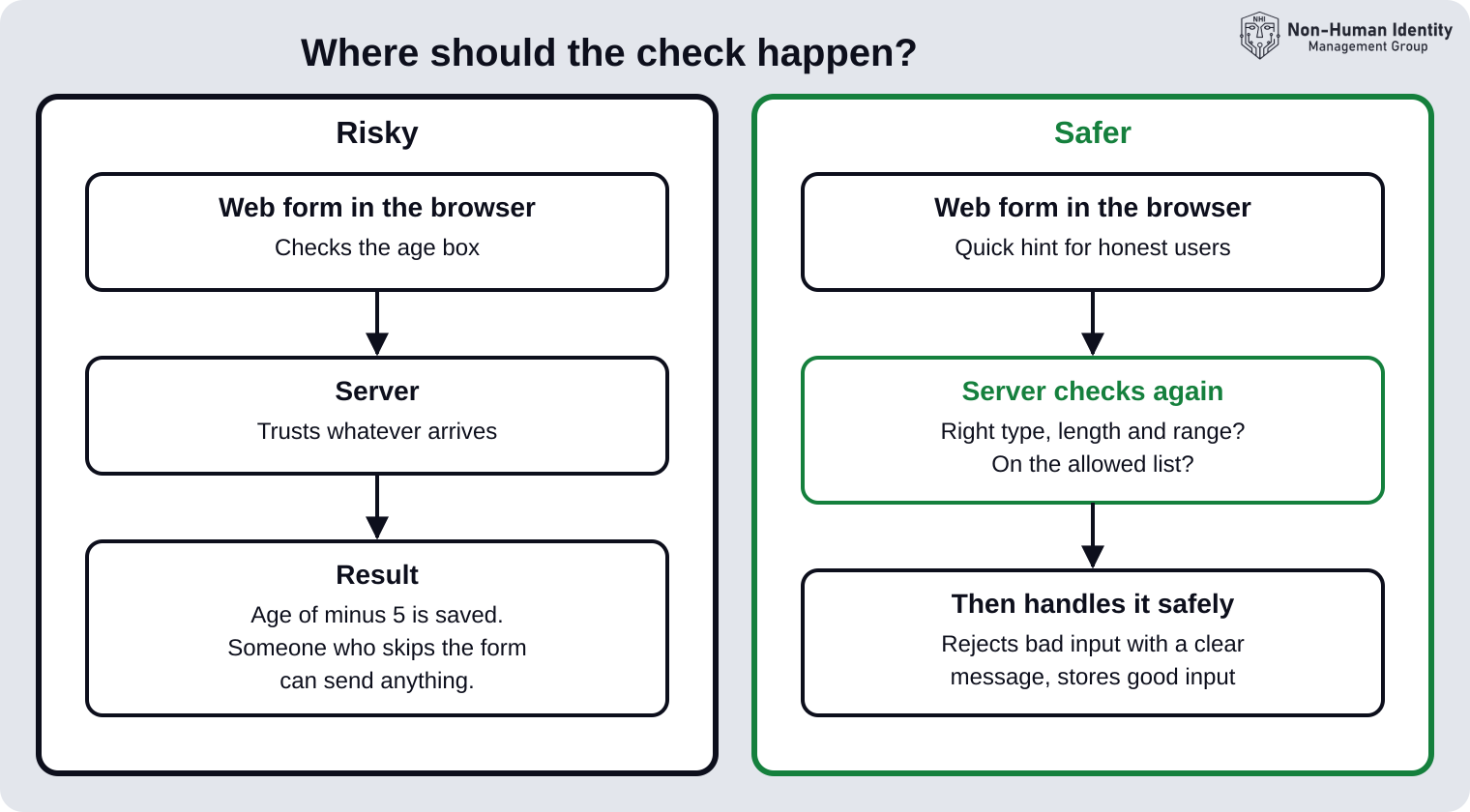
Browser checks are useful for quick feedback, but they can be bypassed. So the server should check the same fields again.[1]
Two kinds of input need extra care. The first is file uploads, such as photos or CVs. The file name and the type the browser reports can be faked. So apps should allow only the file types they need, set a size limit and give the file a new name. They should also store it away from the public website.[2]
The second is saved data blobs. Some apps pack data into a bundle to store or send, called serialisation, and unpack it later, called deserialisation.[3] Some unpacking methods can run code hidden in the bundle. Security guidance warns against unpacking such bundles from untrusted sources, and suggests simpler data formats where possible.[3]
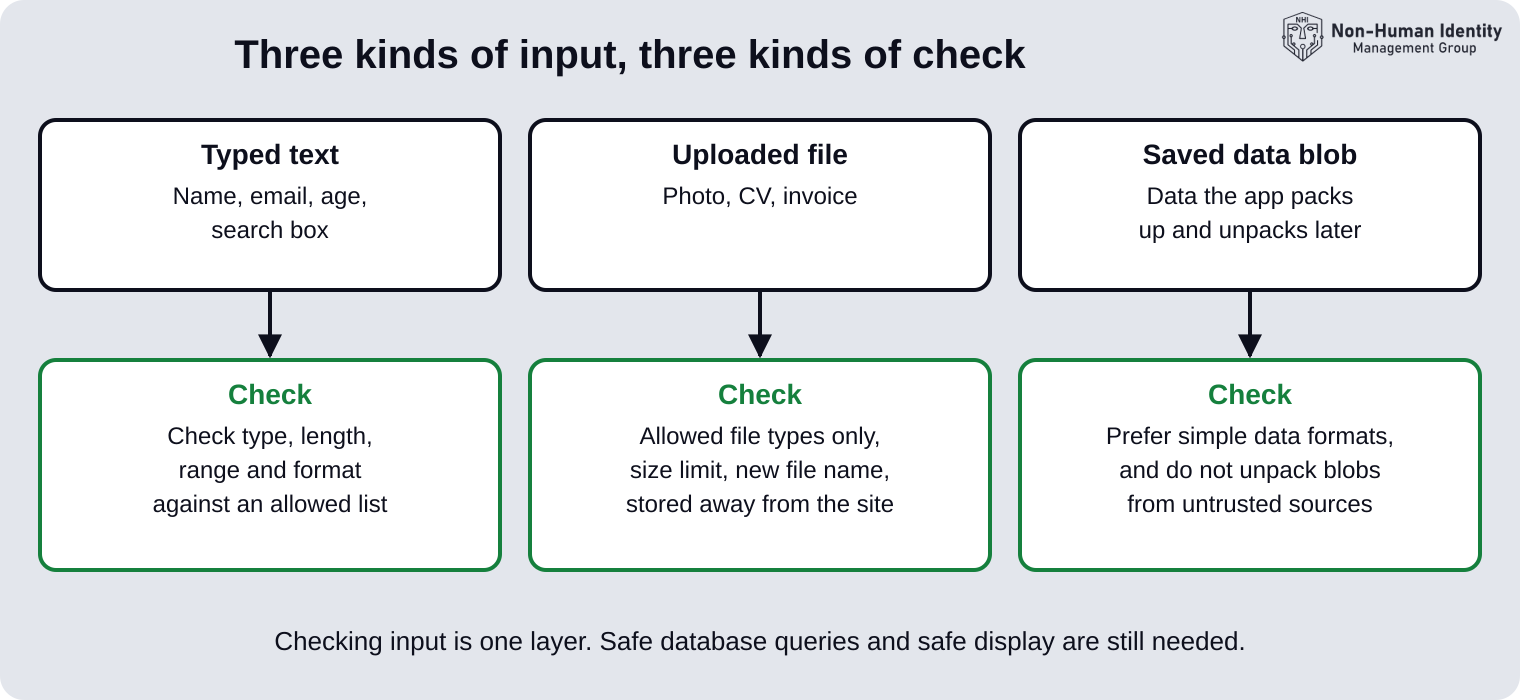
Validation is not the main fix for every flaw. To stop SQL injection, apps use safe database queries, called parameterised queries, which keep data apart from commands. To stop cross-site scripting, apps make text safe before showing it on a page, called output encoding.[1]
A worked example
Amara Castell is a junior developer at a small web agency. Her first job is the class booking form for Basalt Gym, a fictional gym with three sites.
She adds checks to the form in the browser. If someone types letters in the age box, a red message appears. She is pleased with it and sends it for review.
Darius Varga, the senior developer, looks it over. "Nice hints," he says. "Now try this." He sends a booking straight to the server with a tool, skipping the form. The server saves an age of minus five and a class that does not exist.
Amara thinks of the goods-in desk. The browser check is a note on the box, not the person at the door. So she adds the same checks on the server. Ages must be whole numbers between 16 and 99. Class numbers must match the timetable. Notes are limited to 500 characters.
Then she looks at the photo upload. The form accepts any file with a name ending in .jpg. Darius points out that the name proves little. She changes it to accept only image types the gym needs, under a size limit. Each file gets a new name and is stored outside the public site.
Last, Darius checks how bookings are saved. The database code already uses parameterised queries, so typed text stays data. The form goes live a day later than planned, and Amara now writes server checks first.
Myths and mistakes
| What people think | What is true |
|---|---|
| The browser checks the form, so the server is safe. | Browser checks can be bypassed. Check on the server too.[1] |
| Block the bad characters and you are done. | Lists of bad values tend to miss things. Allow known good values instead.[1] |
| A file ending in .jpg is a photo. | The name and reported type can be faked. Check what the file is, and store it safely.[2] |
| Validation stops SQL injection. | It helps, but the main fix is parameterised queries. For pages, it is output encoding.[1] |
| Only data from strangers needs checking. | Data from partners, other systems and logged-in users is input too. Check it all. |
What can I do this week?
- List every place your app takes input: forms, links, uploads and other systems.
- Check that each field has a server check for type, length and range.
- Try an empty, a very long and an out-of-range value in each form you own.
- Ask how uploaded files are checked, renamed and stored.
- Ask whether the app unpacks data bundles from outside, and in what format.
Checklist
- Every input is checked on the server, not only in the browser.
- Each field has rules for type, length, format and sensible range.
- Rules accept known good values rather than trying to block bad ones.
- Rejected input gets a clear message and is not stored.
- Uploads are limited by type and size, renamed and stored away from the public site.
- Data bundles from untrusted sources are not unpacked with risky methods.
- Database queries are parameterised, and text is encoded before display.
Common questions
Is browser validation pointless?
No, it is useful, just not for security. Browser checks give honest users quick feedback, such as a red message under a wrong date. But anyone can send data straight to the server and skip them. So treat browser checks as a courtesy and server checks as the real gate.
What is the difference between validation and sanitising?
Validation decides whether to accept input, and rejects it if it fails. Sanitising changes input, for example by removing characters. Changing input can alter its meaning and still leave gaps. We suggest rejecting bad input, then handling good input safely where it is used.[1]
Does input validation stop SQL injection?
Not on its own. Validation narrows what can get in, which helps. The main fix for SQL injection is a parameterised query, which keeps data and commands apart. For text shown on a page, the main fix is output encoding.[1] See SQL Injection for Beginners.
Why are file uploads risky?
Because the app is storing something a stranger made. The file name and type can be faked, and a harmful file could end up where others can open it. Allow only the types you need, limit the size, rename files and store them away from the public site.[2]
Do apps that talk to other apps need validation?
Yes. Data from another system, a partner or an AI tool is still input. It can be wrong, out of date or changed on the way. Check it with the same rules you use for people, on your own server.
Where next?
Ready for the detail? Read the practitioner guide: Input Validation and Output Encoding Guide. It goes further into validation rules by data type, output encoding for each place text appears, and how to test both.
Also useful:
- Secure File Upload Handling Guide
- Secure Deserialisation Guide
- Cross-Site Scripting for Beginners
- Command Injection for Beginners
Related NHI Mgmt Group resources: Allowlist vs Denylist · File Upload Security Guide · Insecure Deserialisation Guide
Key terms
- Input validation
- Checking that outside data has the type, format and range an app expects before using it.
- Server-side validation
- Checks that run on the app's own computer, where users cannot skip them.
- Allow-list
- A list of known good values. Anything not on it is rejected.
- Deserialisation
- Unpacking stored or sent data back into a form the app can use.
- Parameterised query
- A database query that keeps the data apart from the command, so input stays data.
- Output encoding
- Making text safe before it is shown on a page, so it displays as text.
Sources and further reading
- Input Validation Cheat Sheet. OWASP Cheat Sheet Series, OWASP Foundation. https://cheatsheetseries.owasp.org/cheatsheets/Input_Validation_Cheat_Sheet.html, accessed 28 Nov 2026.
- File Upload Cheat Sheet. OWASP Cheat Sheet Series, OWASP Foundation. https://cheatsheetseries.owasp.org/cheatsheets/File_Upload_Cheat_Sheet.html, accessed 28 Nov 2026.
- Deserialization Cheat Sheet. OWASP Cheat Sheet Series, OWASP Foundation. https://cheatsheetseries.owasp.org/cheatsheets/Deserialization_Cheat_Sheet.html, accessed 28 Nov 2026.