Command injection is when typed text tricks an app into running extra commands on its computer.
This guide is for anyone who builds, buys or looks after a website or web tool. You do not need to write code to be affected: if your business runs web tools, a flaw like this can let a stranger use your server.
In short
- Some apps pass what you type to the computer's command line, a text box for giving the computer orders.
- If the app glues your text straight into a command, extra text may be run as orders too.
- Those orders run with the app's own access, so the damage depends on what the app is allowed to do.
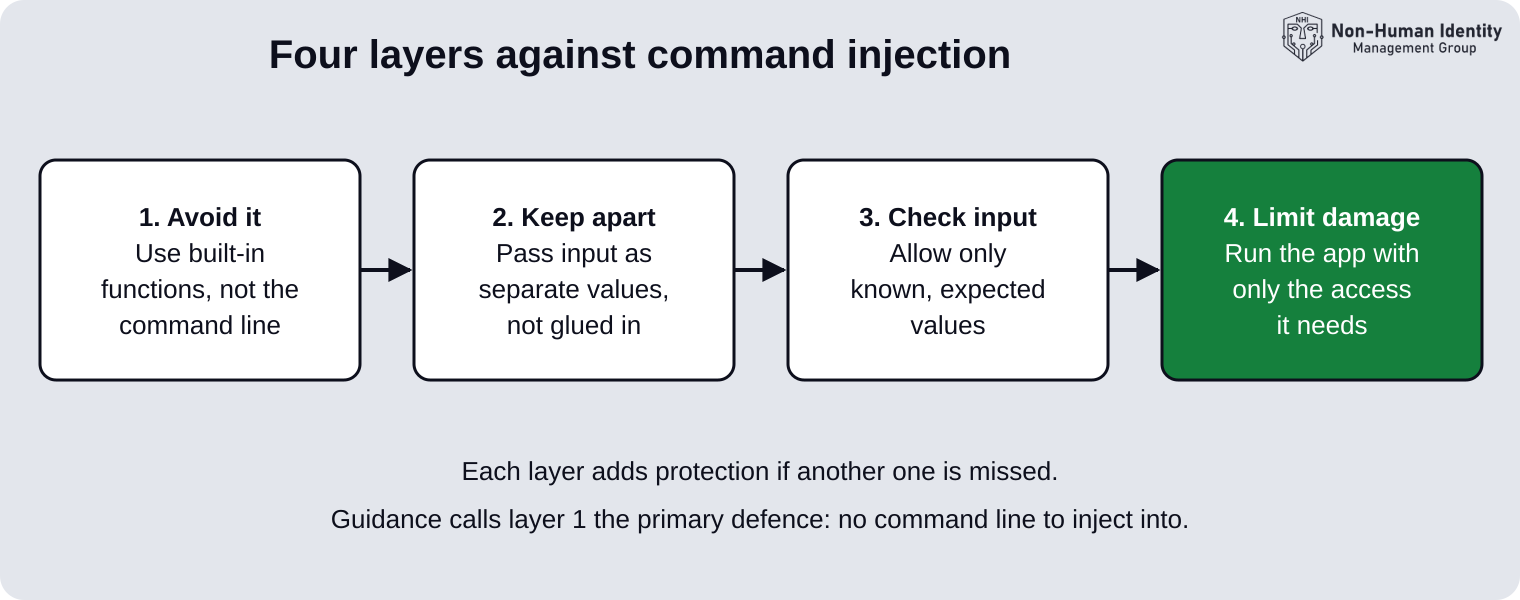
- The best fix is to avoid the command line and use built-in functions. Checking input and limiting access add more layers.
What you will learn
- Explain what command injection is in one sentence.
- Spot the risky pattern of text glued into a command.
- Explain the four layers developers use to avoid it.
- Ask your developers or suppliers the right questions.
- Computer's order box (command line)
- a place where people or programs type orders for the computer to carry out.
- Sneaking in orders (injection)
- hiding instructions inside ordinary input so a program obeys them.
- Approved list (allow-list)
- a short list of the only values a program will accept.
What is command injection?
Think of a café where the till prints your order slip and the cook does everything on it. You write "toast" in the notes box. Someone else writes "toast, then open the safe". If the cook reads the whole slip as orders, that is a problem.
Command injection works the same way. Some apps need the computer to do a job, like resize a photo or check a website. A quick way to do that is to send an order to the command line. If the app glues the text a visitor typed into that order, the visitor's extra words can become orders too.[1]
The orders run with the same access as the app itself.[1] If the app can read customer files, so can the extra orders.
Where the comparison stops working: a cook might notice an odd request and stop. A computer usually carries out every order it is given, without asking why.
Why does it matter?
A single flaw like this can hand a stranger a way to run orders on your server. In 2024, two US government agencies urged software makers to remove this kind of flaw. They said it was still common and had been used against devices at the edge of company networks.[3]
If you pay someone to build web tools
What could happen: a handy feature, like a file converter, lets a stranger run orders on your server.
Check this: ask whether any feature passes visitor input to the command line.
If you are learning to code
What could happen: a quick script that joins text into a command ends up on a live website.
Check this: look for a built-in function before you reach for the command line.
If you look after servers or network devices
What could happen: a known flaw in a device's web page is used before you install the fix.
Check this: keep a list of devices with web admin pages and install updates promptly.
What does it look like?
Here is a made-up sketch of how a risky photo tool might work. It is plain-English pseudo-code (a rough outline, not a working program), and it holds no attack text.
Example only. All values are made up.
# photo resizer on example.com (sketch only)
name = text the visitor typed in "File name"   (1)
order = "resize-photo " + name                 (2)
send order to the command line                 (3)

# safer version
check name is on the approved list             (4)
resize_photo(file = name)                      (5)
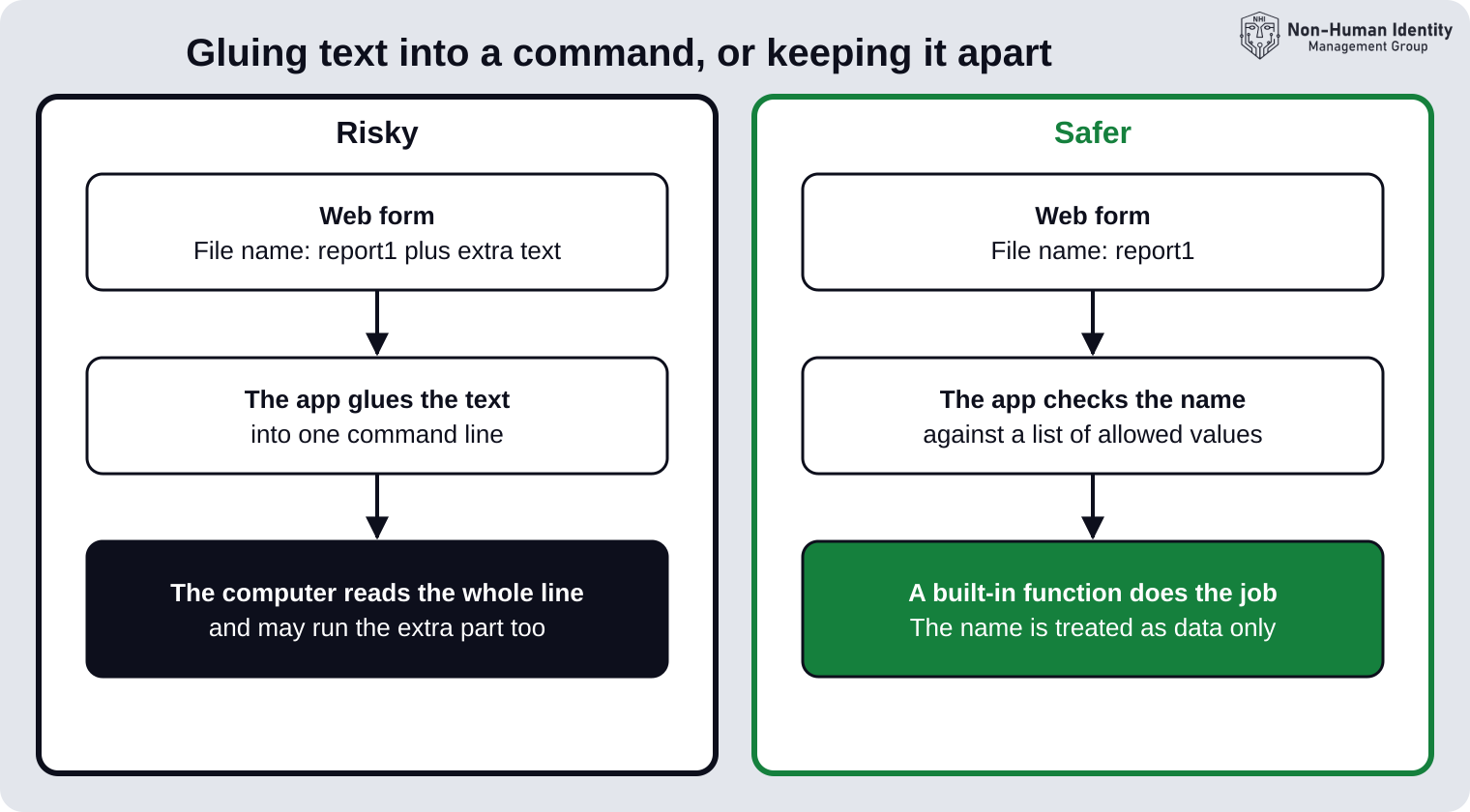
- This line takes whatever the visitor typed, with no checks.
- The visitor's text is glued onto the order, so it becomes part of the order.
- The whole line goes to the command line, which may treat extra text as more orders.
- The safer version first checks the name against an approved list.
- A built-in function does the job, and the name is passed as data, not as part of an order.
Why this is risky: the app cannot tell where its own order ends and the visitor's text begins. Extra text may be treated as a new order, run with the app's access.
The safer way: use a built-in function so there is no command line involved. If a command is truly needed, pass the visitor's text as a separate value and accept only approved values.[2]
How does it work?
Here is the usual path, from a small shortcut to a big problem.
- The shortcut. A developer needs the computer to do a job and sends an order to the command line.
- The glue. To make the order, the app joins fixed words with text a visitor typed.
- The trick. Someone types extra text that the command line reads as another order.
- The run. The computer carries out every order, using the app's own access.[1]
- The fix. Developers remove the command line call and keep input apart from orders. They check input against an approved list and give the app only the access it needs.[2]
Security guidance from OWASP, a non-profit that publishes free web security advice, calls avoiding the command line the primary defence. Where a command cannot be avoided, it says to keep data separate from the command and to check input against approved values. It also says apps should run with the lowest access they need.[2] That last idea is called least privilege.
A worked example
This story is made up to show how it can happen.
Lucy Fairbairn manages the office at Riverside Veterinary Group, a practice with four branches. Staff use a small web tool on the practice network to check that each branch's booking system is online.
The practice hires Chloe Pritchard, a freelance developer, to add a new feature. Before she starts, she reads the old code. She spots that the "check a branch" box glues whatever staff type into a command line order.
She tells Lucy straight away. "Nobody has misused it as far as I can see," she says. "But anyone who can reach this page could try to make the server run other orders."
Lucy thinks of the café slip. The cook should cook toast, not open the safe. So she asks Chloe what the fix looks like.
Chloe replaces the command line call with a built-in function that checks a website directly. Then she swaps the free text box for a drop-down list of the four branches, so only approved values get through. She also moves the tool to a user account that can do only this one job.
Last, Chloe checks the server's records for odd orders since the tool went live. She finds no signs of misuse in the records available to her.
Lucy adds one line to future supplier contracts: tools must not pass visitor input to the command line without approval. She thanks Chloe for raising it early, when it was cheap to fix.
Myths and mistakes
| What people think | What is true |
|---|---|
| Only public websites are at risk. | Internal tools can be reached by staff, suppliers or anyone who gets onto the network. |
| Blocking a few odd characters fixes it. | Block lists are easy to miss things with. Avoid the command line, or accept only approved values.[2] |
| A firewall will catch it. | A firewall can help, but the fix belongs in the code itself. |
| It is the same as SQL injection. | Both sneak orders into input. SQL injection targets a database. Command injection targets the computer's command line. |
| Our app has little access, so it does not matter. | Limited access reduces harm. The flaw should still be fixed. |
What can I do this week?
- Ask your developers or suppliers whether any feature sends visitor input to the command line.
- List the web tools and devices with web admin pages that your business runs.
- Check that those devices get security updates promptly.
- Ask what access each web app's account has, and whether it needs all of it.
Checklist
- Apps use built-in functions instead of the command line where they can.
- Where a command is needed, input is passed as separate values, not glued in.
- Input is checked against an approved list of values.
- Each app runs with only the access it needs.
- Code reviews look for text being joined into commands.
- Devices and web tools receive security updates promptly.
- Suppliers agree in writing to follow these rules.
Common questions
Is command injection the same as SQL injection?
No, but they are close cousins. Both sneak orders into ordinary input. SQL injection targets the database that stores a site's data. Command injection targets the computer's command line, which can reach files and other programs. See SQL Injection for Beginners.
Can I tell if a website I use has this flaw?
Usually not, and you should not test sites you do not own. Testing other people's systems without permission can be illegal. If you think you have found a flaw, use the site's official reporting route. See Bug Bounties for Beginners.
Why not just block dangerous characters?
Because block lists are easy to get wrong. There are many ways to write the same thing, and one gap may be enough. Guidance says to avoid the command line, or to accept only approved values and keep them apart from the order itself.
Who is responsible for fixing it?
The people who build and run the software. Developers fix the code, and the business owner makes sure suppliers follow safe rules. Government guidance in 2024 urged software makers to remove this kind of flaw at the source, rather than leave it to customers.[3]
Does least privilege stop command injection?
No, it limits the harm. If an app has only the access it needs, any extra orders can do less. It is one layer. The main fix is still to keep visitor input out of commands.
Where next?
Ready for the detail? Read the practitioner guide: Command Injection Guide. It goes further into safe coding patterns by language, testing methods and how to review code for this flaw.
Also useful:
- Input Validation and Output Encoding Guide
- Secure Coding for Beginners
- SQL Injection for Beginners
- The OWASP Top 10 for Beginners
- Least Privilege for Beginners
Related NHI Mgmt Group resources: Secure Coding Guide · OWASP Top 10 Guide · Application Security for Beginners
Key terms
- Command injection
- A flaw where typed input tricks an app into running extra orders on its computer.
- Injection
- Hiding instructions inside ordinary input so a program obeys them.
- Shell
- The program behind the command line that reads typed orders and carries them out.
- Input validation
- Checking that input is the kind of value a program expects before using it.
- Allow-list
- A list of the only values or destinations a program will accept.
- Least privilege
- Giving each person or program only the access it needs, and no more.
Sources and further reading
- Command Injection. OWASP Foundation. https://community.owasp.org/attacks/Command_Injection, accessed 28 Nov 2026.
- OS Command Injection Defense Cheat Sheet. OWASP Cheat Sheet Series, OWASP Foundation. https://cheatsheetseries.owasp.org/cheatsheets/OS_Command_Injection_Defense_Cheat_Sheet.html, accessed 28 Nov 2026.
- CISA and FBI Release Secure by Design Alert on Eliminating OS Command Injection Vulnerabilities. Cybersecurity and Infrastructure Security Agency (CISA), 10 July 2024. https://www.cisa.gov/news-events/alerts/2024/07/10/cisa-and-fbi-release-secure-design-alert-eliminating-os-command-injection-vulnerabilities, accessed 28 Nov 2026.