An intrusion detection system watches network activity for signs of attack; an intrusion prevention system can also block it.
This guide is for anyone who has seen the letters IDS and IPS and wants to know what they do. You do not need a networking background. If your business has a firewall, these tools are often the next layer that looks inside the traffic it lets through.
In short
- An IDS watches and warns. An IPS sits in the path of traffic and can also block what it finds.
- They spot attacks in two main ways: by matching known patterns, or by noticing activity that is unusual.
- Every tool raises some false alarms and misses some attacks, so people need to review and tune it.
- An alert nobody reads gives little protection, so decide who checks alerts before you switch one on.
What you will learn
- Explain the difference between an IDS and an IPS.
- Read a simple alert and spot what it is telling you.
- Check who reviews alerts in your organisation.
- Ask the right questions before turning on blocking.
- Warning tool (intrusion detection system, or IDS)
- software that watches activity and raises an alert when something looks like an attack.
- Blocking tool (intrusion prevention system, or IPS)
- a tool that does the same job and can also stop the activity.
- False alarm (false positive)
- an alert about something that turns out to be harmless.
What is intrusion detection and prevention?
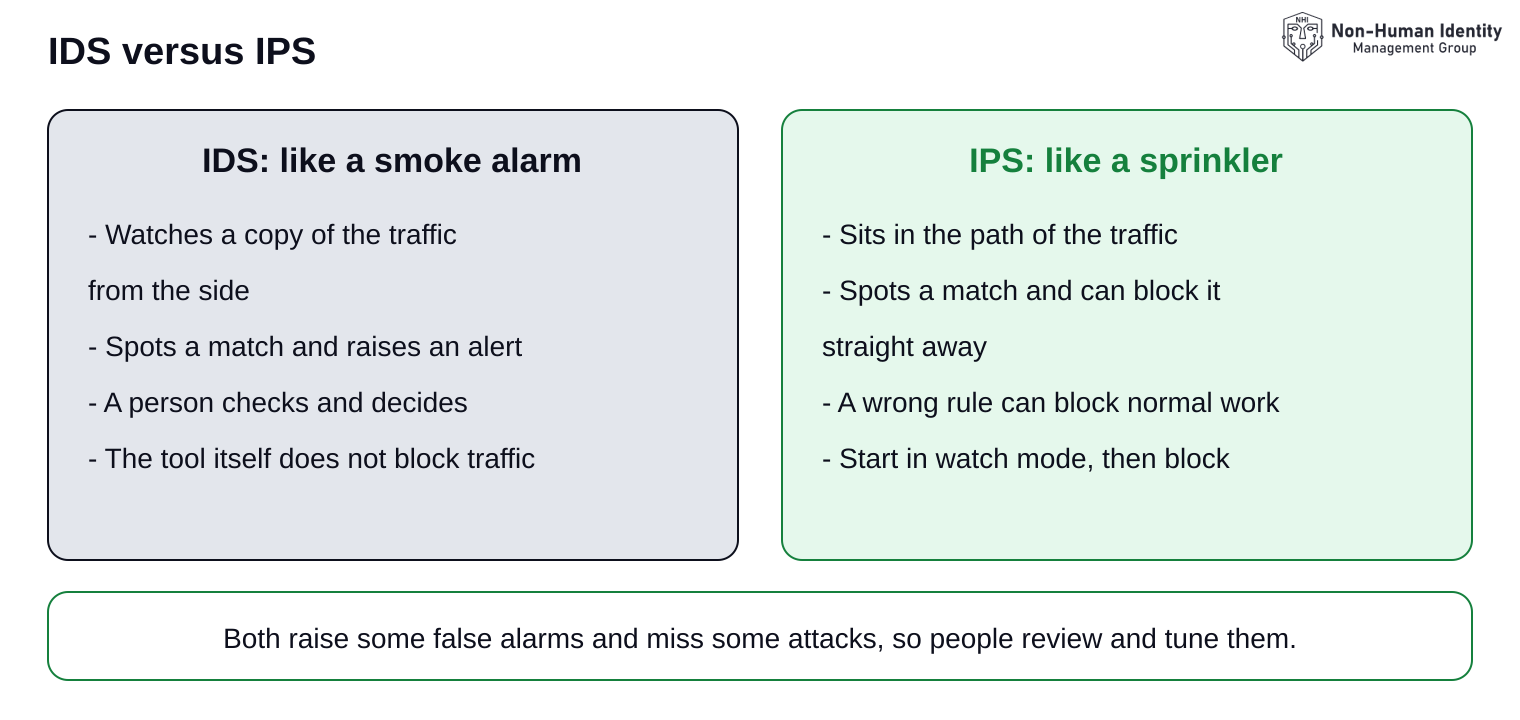
Think of a smoke alarm and a sprinkler. The smoke alarm notices trouble and makes a noise, but it does nothing about the fire. A sprinkler notices trouble and acts on it straight away.
An IDS is like the smoke alarm. It watches activity on a network or a computer and looks for signs of a possible attack. When it finds one, it raises an alert for a person to check.
An IPS is like the sprinkler. It does everything an IDS does, and it can also try to stop what it finds.[2] For example, it can end the connection, or block the address the attack came from.
Some tools watch a whole network. Others run on a single computer or server, and watch what happens there.
Where the comparison stops working: a smoke alarm rarely goes off for no reason. An IDS can raise many false alarms, and it can miss attacks that look like normal traffic.
Why does it matter?
A firewall decides which connections are allowed in. It usually does not look closely at what those allowed connections carry. Attackers often hide in traffic that looks ordinary at first glance.
If you run a small business
What could happen: a staff laptop picks up harmful software, and nobody notices it talking to an attacker for weeks.
Check this: ask your IT supplier whether anything watches your network traffic, and who reads the alerts.
If you are new to security work
What could happen: you face hundreds of alerts on your first day and cannot tell which ones matter.
Check this: ask how alerts are ranked, and which rules are known to be noisy.
If you manage IT
What could happen: a new blocking rule stops a normal business system, such as payroll, on the busiest day of the month.
Check this: run new rules in watch mode first, and agree who may switch them to blocking.
Next: SIEM for Beginners
What does it look like?
Here is a made-up alert, the kind of line an IDS might send to a security team.
Example only. All values are made up.
ALERT  2026-11-28 09:14  severity: high               (1)
Rule:  "Possible known malware contacting its server"  (2)
From:  laptop-0000 (192.0.2.10)                        (3)
To:    bad-site.example.invalid (198.51.100.7)         (4)
Action taken: alert only (watch mode)                  (5)
Times seen today: 42
- How serious the tool thinks this is. It is a guess, not a verdict.
- The rule that fired. Rules describe a known pattern, so a person still has to confirm it.
- The device inside your network. In a real file, this line would contain the name of a staff laptop.
- Where the traffic was going. Here it is an address linked to past attacks.
- In watch mode, the tool only reports. An IPS in blocking mode could have stopped the connection.
Why this is risky: 42 hits in one morning means the laptop keeps trying. If nobody reads the alert, it can carry on for weeks.
The safer way: someone checks high alerts each day, cuts the laptop off the network if needed and records what they found.
How does it work?
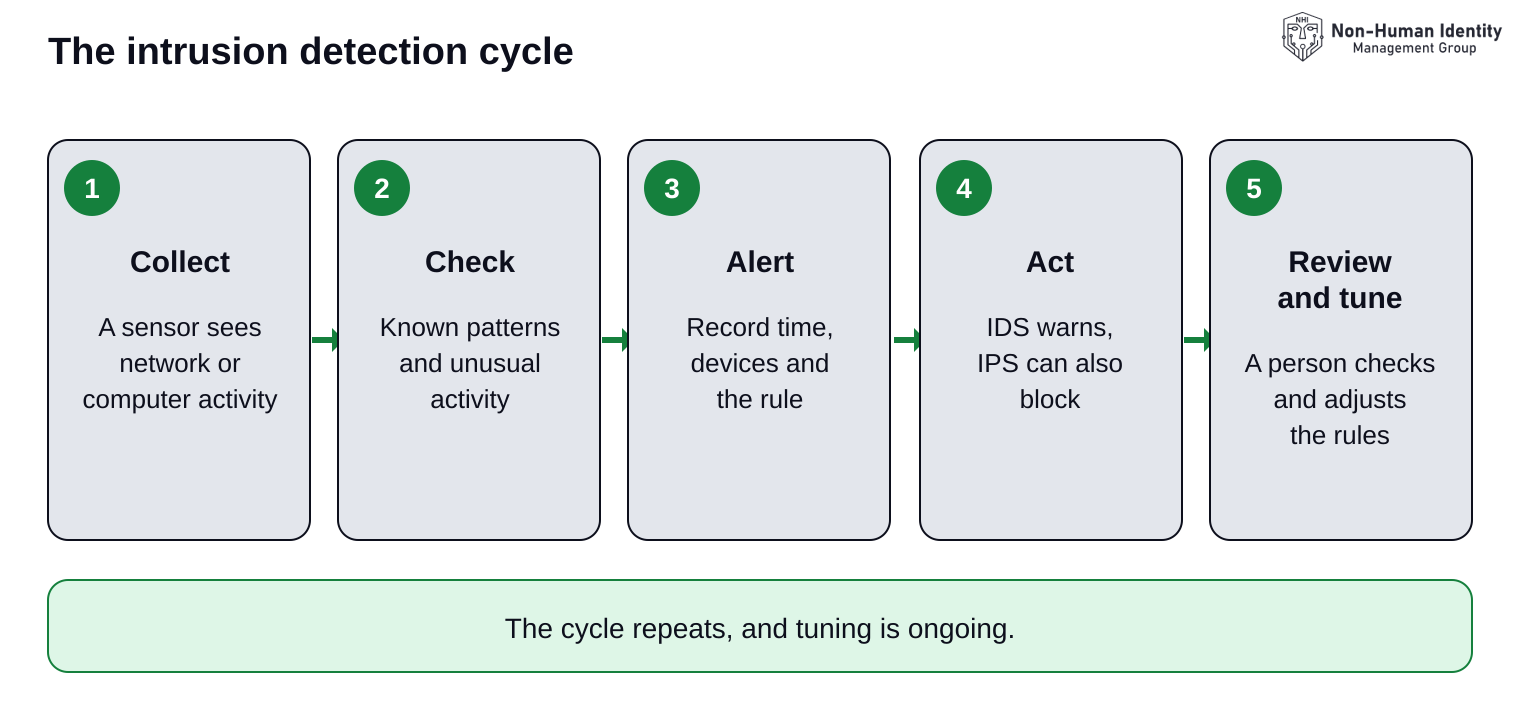
Products differ, but most follow the same basic cycle.
- Collect. A sensor, which is a listening point, gets a copy of network traffic or watches one computer. An IPS sits directly in the path of the traffic instead.
- Check. The tool compares what it sees with known attack patterns, called signatures. It may also look for activity that is far from normal, which is called anomaly detection.
- Alert. If something matches, the tool records the time, the devices involved and the rule that fired.
- Act. An IDS only alerts. An IPS can also end the connection, block the source or ask a firewall to block it.[2]
- Review and tune. A person decides if the alert is real. The team then adjusts the rules to cut false alarms and close gaps.
Each way of checking has a weak spot. Signatures are good at known attacks but largely miss new ones they have no pattern for.[2] Anomaly detection can catch the unfamiliar, but it often raises many false alarms.[2]
The two kinds of mistake pull against each other. A false alarm flags harmless activity as an attack. A miss, called a false negative, lets a real attack through. Cutting one usually raises the other.[2]
Free, open-source tools exist as well as paid products. Suricata, for example, is one engine that can act as an IDS or an IPS.[3]
A worked example
Leon Lund is the IT lead at a made-up accountancy firm with 60 staff and one office. The firm has a firewall, but Leon cannot see what happens inside the traffic it allows.
With Zuri Cardoso, the firm's outside IT partner, he sets up an IDS in watch mode. It looks at a copy of the traffic between the office and the internet. Alerts go to a shared inbox that both of them check each morning.
In week one there are hundreds of alerts a day. Most come from a backup tool and an old printer that behave oddly but harmlessly. Leon notes why each is harmless. Zuri narrows those rules so they skip those two devices, with a reminder to review the change in three months.
By week three, alerts drop to a handful a day. One shows a laptop trying again and again to reach an address linked to past attacks. Zuri cuts the laptop off the network and finds an unwanted browser add-on. She removes it, and the user's passwords are changed.
In month two, Leon switches a small set of trusted rules to blocking. First he checks that they never fired on normal business traffic. The rest stay in watch mode.
The IDS did not catch every threat, and it still needs regular care. It did give the firm a view it lacked before, a fast response to one real problem and a careful path from watching to blocking.
Myths and mistakes
| What people think | What is true |
|---|---|
| A firewall already does this. | A firewall decides which connections may pass. An IDS or IPS looks inside allowed traffic for signs of attack. |
| Once installed, it looks after itself. | Rules need regular tuning, and alerts need a named person to review them. |
| More alerts means better protection. | Too many alerts hide the real ones. Fewer, better rules usually help more. |
| Turn on blocking from day one. | Start in watch mode, check rules against normal traffic, then switch trusted rules to blocking. |
| Signatures catch every attack. | They catch known patterns. New or changed attacks can slip past.[2] |
What can I do this week?
- Ask what watches your network today, whether it is a tool, a service or nothing at all.
- Name an owner for alerts and agree how often they check them, even if it is once a day.
- Write down noisy rules and why they are harmless, so the next person does not chase the same false alarm.
- Agree a rule for blocking. New rules run in watch mode first, and one named person approves the switch.
Checklist
- I can explain the difference between an IDS and an IPS in one sentence.
- We know which parts of our network, if any, are watched for attacks.
- A named person reviews alerts on a set schedule.
- Serious alerts reach someone who can act on them, even outside office hours.
- We record why noisy rules are harmless before we narrow or silence them.
- New blocking rules start in watch mode and are approved before they block.
- We review our rules and alert levels at least every few months.
Common questions
What is the difference between an IDS and an IPS?
An IDS watches and warns, while an IPS can also act. An IDS usually looks at a copy of the traffic and sends alerts. An IPS sits in the path of the traffic, so it can end a connection or block a source when it finds a match.[2]
Do I still need a firewall if I have an IPS?
Yes, in most cases. A firewall decides which connections are allowed at all. An IPS looks inside the traffic that is allowed. They do different jobs, and many modern firewalls now include IPS features, so ask your supplier what yours already does.
Why are there so many false alarms?
Because tools have to guess. Rules match patterns, and harmless systems sometimes look like attacks. Cutting false alarms usually means more misses, so many teams accept some noise.[2] Tuning the rules for your own network is how you find the right balance.
Is an IDS the same as a SIEM?
No. An IDS watches activity and creates alerts. A SIEM collects logs and alerts from many tools in one place, so a team can see the bigger picture. Many teams send their IDS alerts into a SIEM, so the two often work together.
Can an IDS protect a single computer?
Yes. A host-based tool runs on one computer or server and watches what happens there, such as changes to files and settings.[1] Network tools watch traffic between machines. Many organisations use both, because each sees things the other can miss.
Where next?
Ready for the detail? Read the practitioner guide: IDS and IPS Guide. It goes further into where to place sensors, how detection rules are written and tuned, and how to move safely from alerting to blocking.
Also useful:
- Firewalls for Beginners
- Network Detection and Response for Beginners
- SIEM for Beginners
- Suricata IDS Guide
- Alert Triage Guide
Related NHI Mgmt Group resources: NDR Guide · Alert Fatigue Reduction Guide · Zeek Network Monitoring Guide · Wireless intrusion detection
Key terms
- Intrusion Detection System
- A tool that watches network or computer activity and raises alerts about possible attacks, without blocking them.
- Intrusion Prevention System
- A tool in the path of traffic that can block activity it judges to be an attack.
- Signature-Based Detection
- Spotting attacks by matching activity against known patterns.
- Anomaly Detection
- Spotting activity that is far from what is normal for a network or system.
- False Positive
- An alert about activity that turns out to be harmless.
- False negative
- A real attack that a tool fails to flag.
- Sensor
- The listening point that collects the traffic or activity a tool checks.
Sources and further reading
- SP 800-94, Guide to Intrusion Detection and Prevention Systems (IDPS), February 2007. National Institute of Standards and Technology (NIST). https://csrc.nist.gov/pubs/sp/800/94/final, accessed 28 Nov 2026.
- Guide to Intrusion Detection and Prevention Systems (IDPS), NIST SP 800-94, full text, sections 2 and 4. National Institute of Standards and Technology (NIST), February 2007. https://nvlpubs.nist.gov/nistpubs/Legacy/SP/nistspecialpublication800-94.pdf, accessed 28 Nov 2026.
- What is Suricata. Suricata User Guide, Open Information Security Foundation (OISF). https://docs.suricata.io/en/latest/what-is-suricata.html, accessed 28 Nov 2026.