Windows Autopilot is a Microsoft service that sets up new work laptops from the cloud, without IT staff touching them.
This guide is for newcomers to IT work, small business owners and new starters who wonder why their laptop set itself up. If your company buys Windows laptops, how they are set up decides how safe they are on day one.
In short
- Autopilot lets a new laptop go straight from the maker to the user, then set itself up when they sign in.
- The laptop must first be registered on the company's Autopilot list, using its unique hardware ID.
- After sign-in, the laptop joins the company and a management tool such as Intune sends settings and apps.
- When a laptop leaves the company, remove it from the list, or it can keep getting your setup.
What you will learn
- Explain what Windows Autopilot does in one sentence.
- Spot the three moments that matter: registering, first sign-in and retiring a laptop.
- Check that laptops leaving your company are removed from the list.
- Ask your supplier how they register your new devices.
- Laptop fingerprint (hardware hash)
- a unique ID built from details such as the make, model and serial number.
- Device manager (Intune)
- a Microsoft tool that sends settings, apps and rules to work devices.
- First start-up screens (out-of-box experience)
- the setup screens you see the first time you turn on a new Windows laptop.
What is Windows Autopilot?
Think of ordering furniture with assembly included. The shop delivers straight to your home, and the fitter builds it to the plan you picked. You just open the door.
Windows Autopilot does this for work laptops. Without it, IT staff often unpack each laptop, wipe it, load the company's software and post it on. With Autopilot, the laptop goes from the maker or supplier straight to the user. Microsoft describes it as a set of cloud services that set up and prepare new devices for work.[1]
The user only connects to a network and signs in with their work account. The laptop then fetches the company's plan and sets itself up.[1]
Where the comparison stops working: no fitter comes to the door. The laptop reads the plan from the internet, so the company must keep its list of laptops accurate. A laptop left on the list after it is sold can still be pointed at the company's setup.
Why does it matter?
Setup is when a laptop gets its security settings. If that step is rushed or skipped, a laptop can start work without them.
If you are new to IT work
What could happen: you set up laptops by hand and miss a setting on one of them.
Check this: ask whether your team uses Autopilot and who manages the device list.
If you run a small business
What could happen: an old laptop is sold but still listed, so it keeps getting your company setup.
Check this: make removal from the Autopilot list part of selling or scrapping a laptop.
If you are a new starter
What could happen: you are unsure whether the setup screens are genuine.
Check this: the sign-in page should show your company's name and logo.
What does it look like?
Here is a made-up line from a company's Autopilot device list, as an IT person might see it.
Example only. All values are made up.
Autopilot devices: EXAMPLE Ltd
Serial         Model            Group        Status
EX-0000-0001   Laptop 14 FAKE   Sales        Registered   (1)
EX-0000-0002   Laptop 14 FAKE   (none)       Registered   (2)
EX-0000-0003   Laptop 13 FAKE   Finance      Registered   (3)
# 0003 sold to a staff member in June
- A laptop ready to ship to a new sales starter.
- A laptop with no group. It gets the default setup, not a planned one.
- A laptop that has left the company but is still on the list.
Why this is risky: the sold laptop can still be pointed at your company's setup. The one with no group may get settings nobody chose for it.[2]
The safer way: every listed laptop has a planned setup, and laptops that leave the company are removed from the list.
How does it work?
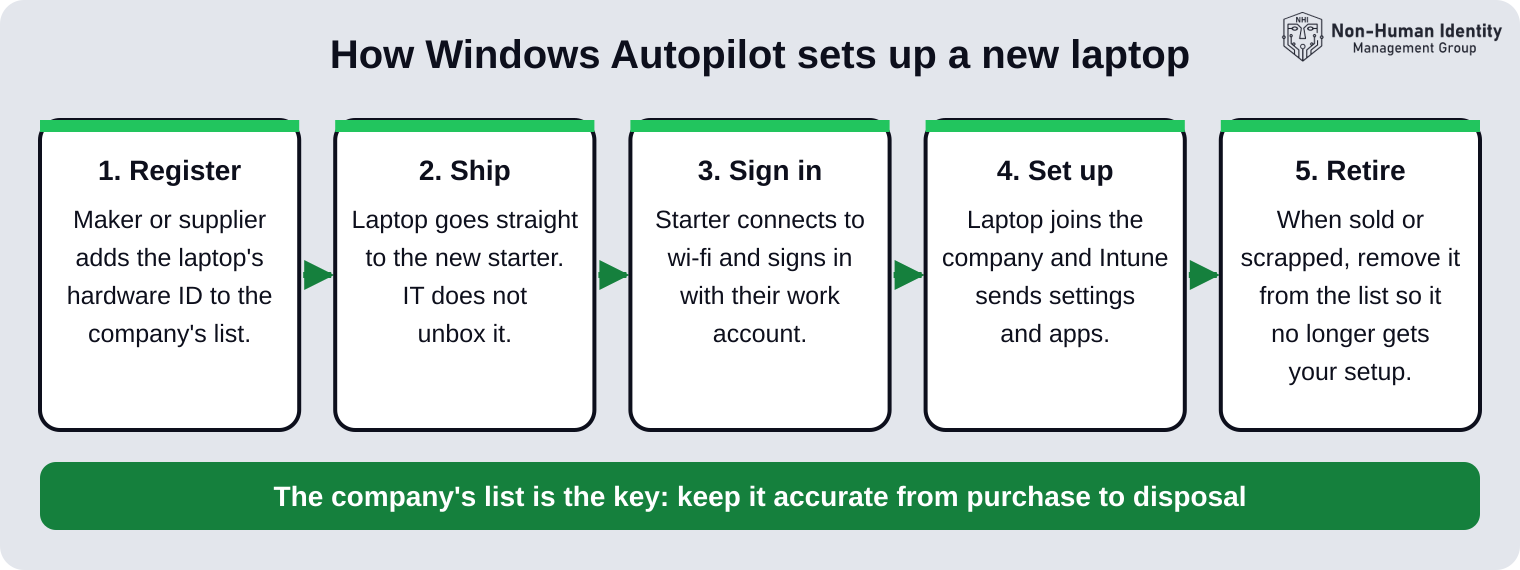
Here is the life of one laptop under Autopilot.
- Register. The maker, a supplier or the company's IT team adds the laptop's hardware hash to the company's list.[2]
- Ship. The laptop goes straight to the user, still in its box.
- Sign in. The user picks a language, connects to wi-fi and signs in with their work account.[3]
- Set up. The laptop joins the company's directory, Microsoft Entra ID, and signs up to Intune. A progress screen may show while settings and apps arrive.[3]
- Retire. When the laptop leaves the company, IT removes it from Intune and from the Autopilot list, in the order Microsoft gives.[2]
Microsoft also offers a newer option for Windows 11 called Autopilot device preparation. It uses one profile for the setup and can mark devices as company-owned before sign-in.[4] The basic idea is the same: the laptop sets itself up from a plan the company keeps in the cloud.
A worked example
Bodhi Lindahl looks after IT for a design studio of thirty people. Until this year he set up every laptop by hand at his desk. Each one took most of a morning, and he sometimes forgot a setting.
This year the studio starts using Autopilot. When Bodhi orders laptops, he asks the supplier to register them to the studio's account. The laptops appear on the Autopilot list before they are even delivered.[2]
Kaia Corrigan joins the studio as a junior designer. Her new laptop is posted to her home, still sealed. On her first morning she turns it on, picks English (UK) and connects to her home wi-fi.
The sign-in page shows the studio's logo, which reassures her. She signs in with the work account details Bodhi sent her. A progress screen appears while the studio's settings and apps install. Within the morning she is ready to work, and Bodhi has not touched the laptop.[3]
Later that month, the studio sells five old laptops. Bodhi has added a step to his checklist. Before each laptop goes, he notes its serial number and deletes it from Intune. Then he removes it from the Autopilot list and checks that it has gone.[2]
The buyers get clean laptops that set up as their own, not as studio machines.
Myths and mistakes
| What people think | What is true |
|---|---|
| Autopilot means IT has nothing to do. | IT still plans the setup, keeps the list accurate and removes old laptops. |
| Wiping a laptop before selling it is enough. | A wiped laptop can stay on the Autopilot list. Remove it from the list as well.[2] |
| Any laptop can be added to Autopilot later. | Laptops are usually registered by the maker or supplier, or by IT uploading their hardware hash.[2] |
| Replacing a part does not matter. | A big repair such as a new main board can break the match, so the laptop must be registered again.[2] |
| Autopilot is the same as Intune. | Autopilot gets the laptop set up and signed up. Intune then manages it day to day. |
What can I do this week?
- Ask your IT team or supplier whether new laptops are registered for Autopilot.
- Find out who looks after the Autopilot device list.
- Check the list for laptops your company no longer owns.
- Add "remove from Autopilot" to your steps for selling or scrapping a laptop.
Checklist
- New laptops are registered by the maker, supplier or IT team.
- Every laptop on the list has a planned setup profile.
- The sign-in page shows our company name and logo.
- New users sign in with their own work account.
- Laptops leaving the company are removed from Intune and the Autopilot list.
- Laptops with a new main board are registered again.
Common questions
Does Autopilot reinstall Windows?
Not usually. Microsoft says Autopilot uses the copy of Windows that the maker put on the laptop. It adds the company's settings, apps and rules to that copy. IT does not need to wipe it and load its own copy.[1]
Do I need Intune to use Autopilot?
Autopilot signs laptops up to a tool that manages them, and Intune is Microsoft's own. Microsoft says the automatic sign-up to Intune needs a paid Entra ID plan (P1 or P2). Check your licences with your supplier.[1]
Can Autopilot set up a laptop someone already uses?
Yes, in some cases. Microsoft says Autopilot can also reset and reuse laptops, and help fix broken ones. A feature called Autopilot Reset can get a used laptop ready for a new person. IT does not need to rebuild it from scratch.[1]
Is Autopilot only for big companies?
No. Small firms can gain too, because they rarely have spare IT time. The main costs are the right licences and the habit of keeping the list up to date as laptops come and go.
Where next?
Ready for the detail? Read the practitioner guide: Zero-Touch Device Provisioning Security Guide. It goes further into supplier trust, device ownership claims and how setup can be abused.
Also useful:
- Microsoft Intune for Beginners
- Mobile Device Management for Beginners
- Microsoft Entra ID for Beginners
- Windows Security for Beginners
Related NHI Mgmt Group resources: Configuration Manager to Intune · Secure Boot and TPM for Beginners · Apple Business Manager Security
Key terms
- Windows Autopilot
- A Microsoft cloud service that sets up new work laptops when the user signs in.
- Hardware hash
- A unique ID for a laptop, built from details such as its make, model and serial number.
- Microsoft Intune
- A Microsoft tool that sends settings, apps and rules to work devices and keeps them managed.
- Microsoft Entra ID
- Microsoft's cloud directory of a company's users and devices.
- Device enrolment
- Signing a device up to a management tool so it can receive company settings.
- Out-of-box experience
- The setup screens shown the first time a new Windows laptop is turned on.
- Zero-touch provisioning
- Setting up a device for work without IT staff handling it.
Sources and further reading
- Overview of Windows Autopilot. Microsoft Learn, Microsoft. https://learn.microsoft.com/en-us/autopilot/overview, accessed 28 Nov 2026.
- Windows Autopilot registration overview. Microsoft Learn, Microsoft. https://learn.microsoft.com/en-us/autopilot/registration-overview, accessed 28 Nov 2026.
- Windows Autopilot user-driven mode. Microsoft Learn, Microsoft. https://learn.microsoft.com/en-us/autopilot/user-driven, accessed 28 Nov 2026.
- Overview of Windows Autopilot device preparation. Microsoft Learn, Microsoft. https://learn.microsoft.com/en-us/autopilot/device-preparation/overview, accessed 28 Nov 2026.