A mobile driving licence is an official driving licence stored on your phone and checked by tapping or scanning.
This guide is for anyone offered a licence on their phone, and for shops, venues and firms that check ID. If your business sells age-restricted goods or hires out vehicles, you may soon be shown one.
In short
- A mobile driving licence, often called an mDL, is issued by the same body that issues your plastic card.
- The checker's reader confirms the licence is genuine by checking a digital seal, not by looking at the screen.
- You can share only what is needed, such as "over 18", and you approve each share on your phone.
- A picture of a licence on a screen is easy to fake. Checkers should use a proper reader or app.
What you will learn
- Explain what a mobile driving licence is and who issues it.
- Spot the difference between a real check and someone looking at a screen.
- Check what a reader is asking for before you agree to share.
- Ask whether you still need to carry your plastic card.
- Licence on your phone (mDL)
- an official driving licence or ID card placed on a phone by the body that issues licences.
- Digital seal (digital signature)
- a code added by the issuer that a reader can check to prove the details have not been changed.
- Sharing only what is needed (selective disclosure)
- handing over one fact, such as your age band, instead of your whole licence.
What is a mobile driving licence?
Think of a sealed envelope from your licensing office, with a wax stamp only that office can make. Anyone can check the stamp. If someone opened the envelope and changed a word, the stamp would show it.
A mobile driving licence works the same way. The licensing body puts your licence details on your phone, with a digital seal. When you show it, the checker's reader tests the seal. If the seal is right, the reader trusts the details.
In the US, licensing bodies work together through one national group. It describes an mDL as a driving licence or ID card "provisioned to a mobile device", which means placed on it by the issuer.[1] You add it to a phone wallet app or a state app. You do not make it yourself by taking a photo.
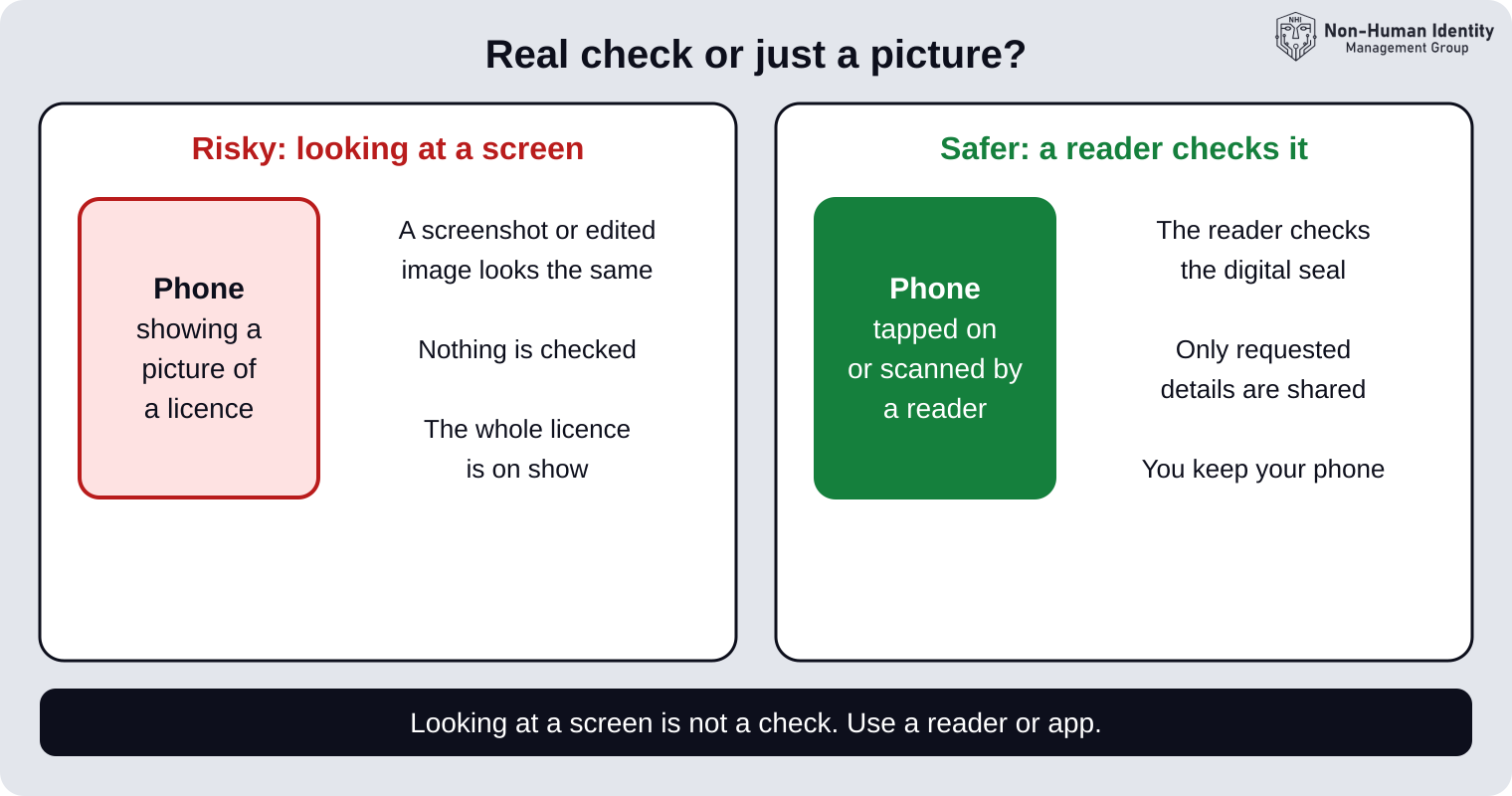
Where the comparison stops working: a wax seal can be checked by eye. A digital seal can only be checked by a reader or app. Looking at the phone screen proves very little.
Why does it matter?
A licence on a phone can be safer than a plastic card, but only when it is checked properly. A screen alone can be copied or faked.
If you carry ID every day
What could happen: you hand over your unlocked phone, and a stranger sees your messages and photos.
Check this: you should tap or scan, not hand over your phone. Officers in the US are told they do not need to touch it.[1]
If your shop checks ages
What could happen: a staff member accepts a picture of a licence that was edited on a laptop.
Check this: ask your till or ID supplier whether it can read a mobile licence properly.
If you are new to identity work
What could happen: your app collects the full licence when it only needed to know the person is over 18.
Check this: ask for the fewest details the task needs.
What does it look like?
When a reader asks for your details, your phone shows a request screen. Here is a made-up one.
Example only. All values are made up.
EXAMPLE wallet: Share your ID?
Requested by:  Example Off-Licence (verified reader)  (1)
They are asking for:
  Age over 18 .............. YES                      (2)
  Photo .................... [FAKE photo]             (3)
  Will they keep it? ....... No                       (4)
[ Cancel ]        [ Share with Face ID or passcode ]  (5)
- Who is asking. Some readers prove who they are, so the wallet can show their name.
- One fact, not your date of birth or address.
- The photo lets the checker compare the face in front of them.
- Whether the reader says it will store the details.
- Nothing is shared until you approve it on your own phone.
Why this is risky: if you tap Share without reading, you may hand over more than the task needs.
The safer way: read who is asking and what they want. Cancel if the request asks for more than the task needs.
How does it work?
Most mobile licences follow one international standard. It sets out how the phone, the reader and the issuer fit together.[3]
- Add it. The licensing body checks who you are and puts your licence on your phone, with its digital seal.
- Start the check. You show a QR code or tap your phone on the reader. The QR code holds no licence details. It only sets up a secure link.[1]
- See the request. The reader asks for certain details. Your phone shows what is being asked.
- Approve it. You agree with your face, fingerprint or passcode. The phone sends only those details, over a scrambled link.
- Check the seal. The reader checks the digital seal against the issuer's public keys. In the US, these keys are shared through a trust list run by the licensing bodies' group.[4]
- Compare the face. The checker compares the photo with the person in front of them.
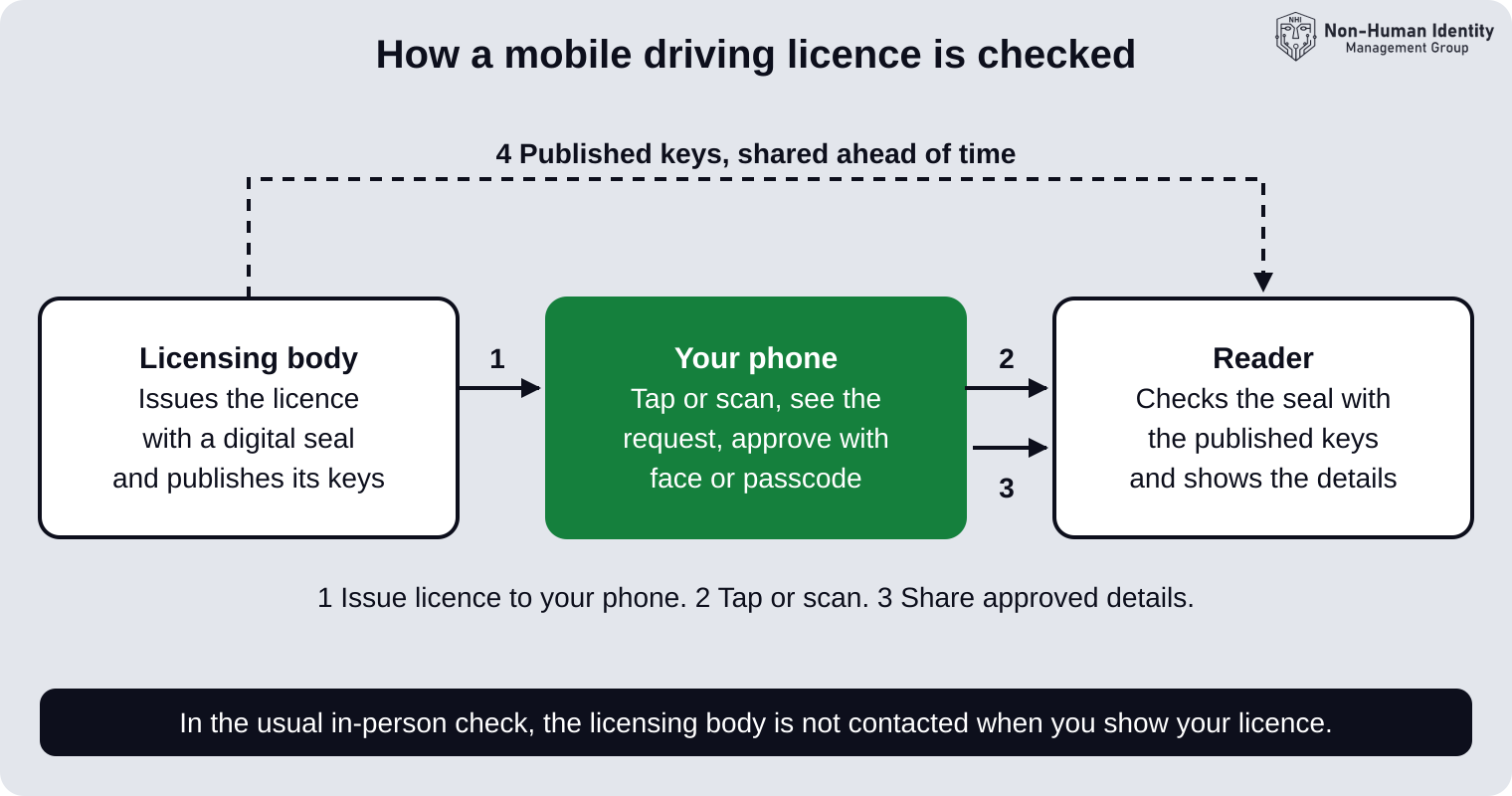
The check can work offline. The US guidance says licence data is sent from the phone even with poor or no mobile signal.[1] It also says the reader fetching details from the issuer's server is not recommended, because of the privacy risk.[1]
A worked example
Amara Erikson is moving flat in a US state that issues mobile licences. She has added her licence to her phone's wallet app. She still keeps her plastic card in her purse.
First, she hires a van from Thistle Removals, a fictional removals firm. The desk worker, Ivo Yilmaz, asks to see her licence. Amara starts to hold up her phone, but Ivo points to a small reader on the desk.
Amara taps her phone. Her screen shows that Thistle Removals is asking for her name, photo, licence class and expiry date. It says the firm will keep them. That seems fair for a van hire, so she approves with her face.
Ivo's reader shows a green tick, which means the seal checked out. He compares the photo with Amara and hands over the keys.
That evening, Amara buys a bottle of wine at a small shop. The shop's app asks only whether she is over 21. Her date of birth and address stay on her phone.
The next week, she flies to visit family. Her airport accepts digital IDs at some lanes. She taps her phone at the checkpoint and approves the request. She still carries her plastic card, because the airport security agency says travellers must still carry a physical ID.[2]
None of this means a phone licence is perfect. If Amara loses her phone, she will need to contact her licensing body. But at each stop she shared only what was needed and kept hold of her phone.
Myths and mistakes
| What people think | What is true |
|---|---|
| A photo of my licence on my phone is a mobile licence. | It is not. A mobile licence is issued to your phone by the licensing body. US guidance warns that showing a picture carries significant fraud risk.[1] |
| The checker can see everything on my phone. | The reader receives only the details you approve. You do not need to unlock and hand over your phone. |
| The licensing office is told every time I show it. | In the usual in-person check, the reader uses keys it already holds. US guidance discourages asking the issuer's server.[1] |
| Every shop, police officer and airport accepts it. | Acceptance varies by place and by organisation. Keep your plastic card with you until you know it is accepted. |
| Looking closely at the screen is a good enough check. | Screens are easy to fake. A check needs a reader or app that tests the digital seal. |
What can I do this week?
- Check your licensing body's website to see if it offers a mobile licence, and add it only through its official route.
- Set a strong passcode on your phone, since it now guards your licence.
- If you check ID at work, ask your supplier whether your readers can check a mobile licence.
- Read each share request before you approve it.
Checklist
- I added my licence through the licensing body's official app or wallet route.
- My phone has a passcode and face or fingerprint unlock turned on.
- I read who is asking and what they want before I approve.
- I tap or scan, and do not hand over my unlocked phone.
- I still carry my plastic licence where it is required.
- Staff who check ID use a reader or app, not a look at the screen.
- Our business asks only for the details each task needs.
- I know how to report a lost phone to my licensing body.
Common questions
Do I still need my plastic licence?
Usually, yes, for now. Many places do not yet accept phone licences. The US airport security agency says travellers using a digital ID must still carry a physical ID.[2] In the UK, the government said in 2025 that physical documents would remain available.[5]
What happens if I lose my phone?
Your licence is still protected by your phone's lock. Report the loss to your licensing body or wallet provider, as their help pages describe. You can usually add the licence again to a new phone after checks. Keep your plastic card in the meantime.
Which phone wallets can hold one?
Several wallets can, depending on where you live. The US airport security agency lists Apple Wallet, Google Wallet, Samsung Wallet and some state apps for digital IDs at its checkpoints.[2] (Wallets listed alphabetically.) Check your licensing body's website for the options where you live.
Is a mobile licence safer than a plastic card?
It can be, when checked properly. Its details are sealed with public key cryptography, so changes can be spotted. It can also use your phone's face or fingerprint check, and let you share less.[6] A look at the screen gives none of these benefits.
Can a mobile licence prove my age without my birthday?
Yes, if the reader asks for it that way. The phone can share a yes or no answer, such as "over 18". US guidance says this lets you give only the data the transaction needs.[1]
Where next?
Ready for the detail? Read the practitioner guide: Mobile Driving Licence (mDL) Guide. It goes further into the data format, how sessions are secured, trust lists for issuer keys, and how a business builds a reader.
Also useful:
- Digital Identity Wallets for Beginners
- National Digital ID for Beginners
- Citizen Digital Wallet Safety Guide
Related NHI Mgmt Group resources: Verifiable Credentials Guide · Digital Identity Wallet Fraud Risks Guide · Identity Proofing vs Identity Verification
Key terms
- mdoc
- The data format the international standard uses for a mobile licence and other ID on a phone.
- Digital identity wallet
- An app that stores official credentials, such as a licence, and shares them when you approve.
- Verifiable digital credential
- Identity details that a reader can check with maths, not by looking at them.
- Digital signature
- A seal made with the issuer's private key and checked with its public key.
- Selective disclosure
- Sharing only the details a task needs, such as an age band.
- Relying party
- The shop, venue or service that checks your licence and acts on the result.
- Age verification
- Checking whether a person is over or under a set age.
- NFC
- Short-range wireless used when you tap a phone on a reader.
Sources and further reading
- Mobile Driver License (mDL) Frequently Asked Questions for Law Enforcement. American Association of Motor Vehicle Administrators (AAMVA), January 2024. https://www.aamva.org/getmedia/6c37bda5-e43d-493e-8294-bba0d18aa2f9/mDL-FAQ-for-LE-01242024.pdf, accessed 28 Nov 2026.
- Digital ID. Transportation Security Administration (TSA). https://www.tsa.gov/digital-id, accessed 28 Nov 2026.
- ISO/IEC 18013-5:2021 Personal identification, ISO-compliant driving licence, Part 5: Mobile driving licence (mDL) application. International Organization for Standardization, September 2021. https://www.iso.org/standard/69084.html, accessed 28 Nov 2026.
- Identity: mDL Digital Trust Service. AAMVA. https://www.aamva.org/identity, accessed 28 Nov 2026.
- Digital driving licence coming this year. GOV.UK press release, 21 January 2025. https://www.gov.uk/government/news/digital-driving-licence-coming-this-year, accessed 28 Nov 2026.
- Digital Identities: Mobile Driver's License (mDL). National Cybersecurity Center of Excellence (NCCoE), NIST. https://www.nccoe.nist.gov/projects/digital-identities-mdl, accessed 28 Nov 2026.