NHI monitoring means watching what software accounts do, so you notice when one is misused.
This guide is for anyone who wants to know how teams spot a stolen key or a misused software account. You do not need to run a security team to be affected: if your business uses cloud services or apps that connect to each other, software accounts act for you all day.
In short
- Software accounts, such as service accounts and API keys, work all day with nobody watching them.
- A stolen software key often works with no extra check, so its misuse can look like normal work.
- Records of what each account does (logs) let you spot activity that does not fit its usual pattern.
- Start with a list of accounts and owners, logs switched on and one or two simple alerts.
What you will learn
- Explain what NHI monitoring is in one sentence.
- Spot five warning signs that a software account is being misused.
- Check that the right records are switched on.
- Ask who answers when an alert goes off.
- Non-human identity (NHI)
- a digital identity, or the credential behind it, that represents a machine, application, automated process, service or AI agent, so it can authenticate, carry out tasks and connect to other systems without a person.
- Activity record (log)
- a time-stamped note of which account did what, when and from where.
- Usual pattern (baseline)
- what an account normally does, so you can spot what does not fit.
What is NHI monitoring?
Think of checking your bank statement for payments you did not make. Most lines are the usual bills. One odd payment stands out, and you ring the bank.
A non-human identity, or NHI, is an account used by software. Examples are a service account that copies files at night, an API key (a secret code one program shows another) or an AI agent. Each one proves who it is with a secret, such as a key or token.
Monitoring means keeping records of what these accounts do. Detection means picking out the records that suggest something is wrong. Software accounts are handy to watch, because most do the same jobs, from the same places, every day. So a change in pattern is a useful warning.
Where the comparison stops working: you read a bank statement once a month. A software account can act thousands of times a minute, in many places at once. Nobody can read that by eye, so teams use automatic alerts.
NHI Mgmt Group treats this as detection and response, the sixth of the seven stages in looking after a software identity. Spotting a problem is only half of it; the other half is acting on it quickly. The NHI Lifecycle Management Guide covers all seven stages.[7]
Why does it matter?
Software accounts are harder to protect than staff logins. Microsoft notes that they cannot use a second login check. They often have no formal start and end process, and they must store their secrets somewhere.[1] So watching what they do is one of the few ways to catch misuse.
If you run a small business
What could happen: someone uses your cloud storage key to copy files, and you only find out from the bill.
Check this: turn on your cloud provider's basic security alerts and send them to someone who reads them.
If you are new to security work
What could happen: you are asked if a service account is behaving normally, and you do not know where to look.
Check this: find out which records show NHI sign-ins on your main platforms.
If you manage a team
What could happen: an alert fires on a Saturday and nobody knows who owns the account.
Check this: make sure every important software account has a named owner.
What does it look like?
Here is a made-up page of activity records for one software account. It copies orders into a warehouse system every few minutes.
Example only. All values are made up.
# activity log, cloud.example.invalid (FAKE)
time   account      action             from
09:00  orders-sync  read new orders    office cloud, UK
09:05  orders-sync  read new orders    office cloud, UK
09:10  orders-sync  read new orders    office cloud, UK
09:12  orders-sync  NEW KEY ADDED      laptop, unknown network   (1)
09:14  orders-sync  list all customers unknown server, abroad      (2)
09:15  orders-sync  read new orders    office cloud, UK          (3)
- Someone added a new key to the account. Nobody planned this.
- The account did something new, from a place it does not usually work from.
- The normal job carries on, so the system still looks healthy.
Why this is risky: without an alert, lines 1 and 2 sit among thousands of normal lines. The account keeps working, so nothing looks broken.
The safer way: an alert fires when a new key is added to a software account. A person checks with the account's owner straight away.
How does it work?
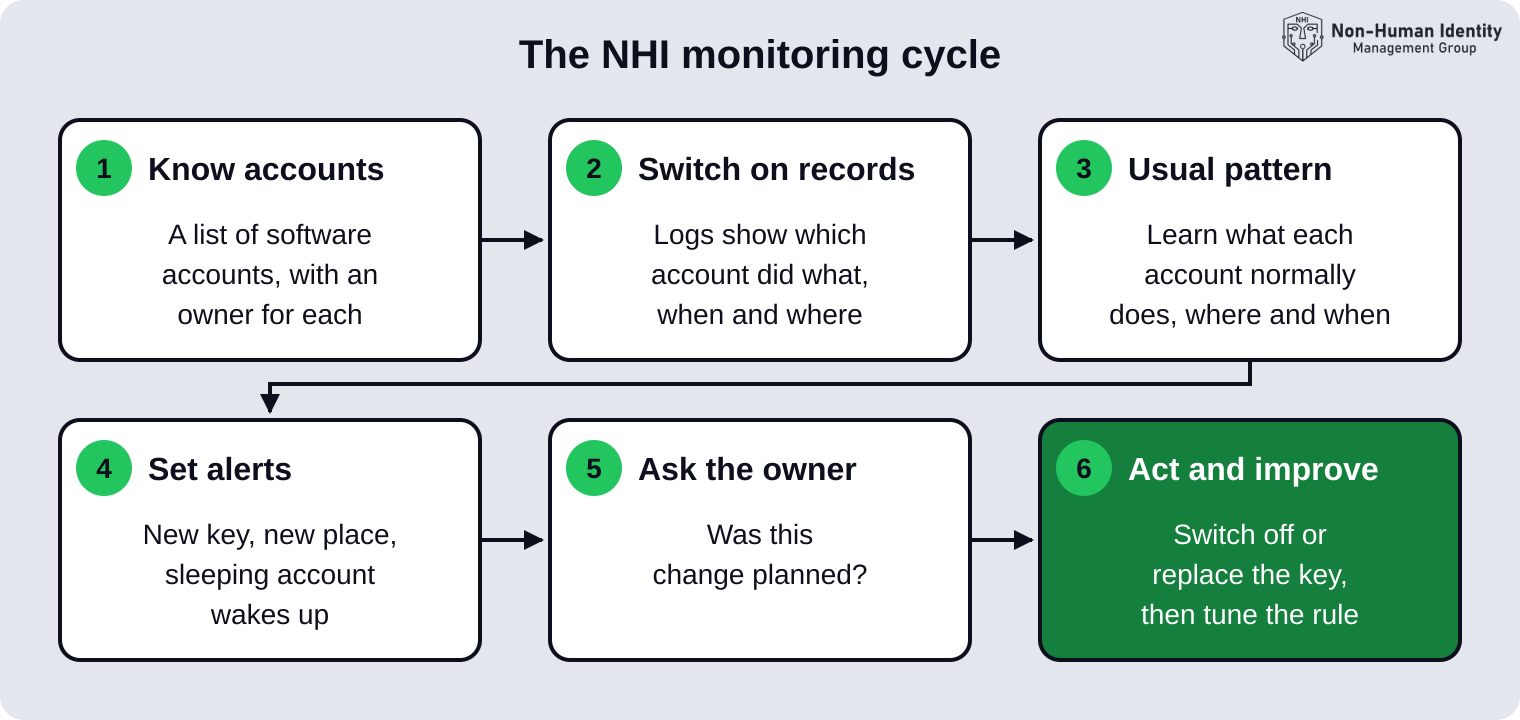
Most teams follow a cycle like this one.
- Know your accounts. Keep a list of software accounts, each with an owner and a purpose. You can only watch what you know about.
- Switch on the records. Turn on the logs that show what software accounts do. Some useful records are not on by default, so check.[4]
- Learn the usual pattern. Note what each important account normally does, from where and when. Some built-in tools learn this for you, which can take from 2 to 60 days.[1]
- Set alerts. Write simple rules for activity that breaks the pattern or is risky in itself, such as a new key being added.
- Check with the owner. When an alert fires, ask the owner if the change was planned.
- Act and improve. If it was not planned, switch off the account or replace its key through an approved and recorded step. Then adjust the rule so it stays useful.
Five warning signs make a good start:
- A new key or secret added to an existing account.
- An account used from a new country, network or device.[1]
- An account that has been asleep for months suddenly waking up.
- New powers given to an account outside a planned change.
- A person logging in with a software account, which makes it hard to tell who did what.[3]
Many teams send their logs to a SIEM (short for security information and event management). It is a tool that gathers records from many places and runs alert rules over them.
A worked example
Elif Fontaine is a junior security analyst at a fictional online shop. Its order system uses a software account called orders-sync. It copies new orders to the warehouse every five minutes.
Last month Elif set up two simple alerts. One fires when a new key is added to any software account. The other fires when an account that has slept for 60 days wakes up.
On Saturday morning the first alert fires. A new key has been added to orders-sync. Elif thinks of the bank statement. One odd line among the usual ones is worth a call.
She checks the list of accounts. The owner is the lead developer, so she sends him a message. He says nobody planned a change.
Elif follows the agreed plan. With approval from the manager on call, she switches off the new key and writes down why. Then she reads the records. The key was added from a developer's own login, which had signed in from an unknown network an hour before.
The team resets that developer login and checks what the new key was used for. The records available to them show two test requests before the key was switched off.
The shop still has work to do. It needs to find out how the developer login was taken, and check for anything the records missed. But because the alert fired and the owner was known, the team acted the same morning.
Real cases follow the same shape. Cloudflare said an attacker used a token and three service account credentials it had not changed, because it wrongly believed they were unused. An alert on a change to a service account helped the team find the attacker.[2] Read our Cloudflare Thanksgiving Breach 2023 page for the full story.
Myths and mistakes
| What people think | What is true |
|---|---|
| Our login alerts for staff cover software accounts too. | Not always. Many platforms keep NHI sign-ins in separate records, and rules written for people may not read them.[5] |
| If the account is still working, it is fine. | A misused account often keeps doing its normal job while someone else uses it on the side. |
| More alerts mean better monitoring. | Too many low-value alerts bury the important ones. A few well-chosen rules work better. |
| All the useful records are on by default. | Some must be switched on. In Google Cloud, for example, some service account records need extra audit logs turned on.[4] |
| Monitoring stops a stolen key from working. | Alerts help you notice sooner. You still have to switch off or replace the key. |
What can I do this week?
- List your ten most powerful software accounts, with an owner for each.
- Check that NHI sign-ins and key changes are recorded on your main cloud platform.
- Turn on one alert: "new key added to a software account".
- Agree who may switch off a key out of hours, and how that step is approved and recorded.
Checklist
- We have a list of important software accounts, each with a named owner.
- NHI sign-ins and key changes are recorded on our main platforms.
- The records show which account acted and, where possible, which key it used.
- We keep records long enough to look back over several weeks.
- We get an alert when a new key is added to an existing account.
- We get an alert when a sleeping account wakes up.
- Someone reads alerts every working day and knows how to reach owners.
- We review noisy rules each month and tune or remove them.
Common questions
Which records should I switch on first?
Start with the platform where your most powerful software accounts live, usually your main cloud provider or login service. Make sure the records show which account acted and, where the platform supports it, which key it used. Cloud providers such as AWS record this detail for each request.[6]
Do we need a SIEM to start?
No. Many cloud providers include basic alerts that you can turn on today. A SIEM helps later, when you need to bring together records from several places and run the same rules over all of them. Start small and grow when the need is clear.
How long should we keep the records?
Long enough to look into something found late. Your legal, regulatory and contract duties set the minimum, so check those first. We suggest keeping at least enough history to learn each account's usual pattern and to look back over several weeks.
How do we watch AI agents?
The same way as other software accounts. Give each agent its own account, record what it does with it, and alert on unusual actions. Agents can be less predictable than a nightly job, so their usual pattern needs more care. The practitioner guides go into this in more depth.
What should happen when an alert fires?
Ask the account's owner whether the activity was planned. If it was not, switch off or replace the key through an approved and recorded step, then look into what happened. See Leaked Secret Response for Beginners for the order of steps.
Where next?
Ready for the detail? Read the practitioner guide: Detection Engineering for Non-Human Identities Guide. It goes further into which logs each platform keeps, how to write and test alert rules, and how to cut down noisy alerts.
Also useful:
- NHI Dormancy Detection
- Service Account Behavioural Baselining Guide
- AI Agent Behaviour Baselining and Anomaly Detection Guide
- NHI Risks for Beginners
- NHI Foundation Level Training
Related NHI Mgmt Group resources: NHI Breach Detection Gaps Lessons Guide · NHI Discovery and Inventory for Beginners · Non-Human Identities for Beginners
Key terms
- Non-human identity (NHI)
- A digital identity, or the credential behind it, that represents a machine, application, automated process, service or AI agent, so it can authenticate, carry out tasks and connect to other systems without a person.
- Audit logs
- Time-stamped records of who or what did something, and when.
- Behavioural baseline
- The usual pattern of activity for an account under normal conditions.
- Detection rule
- A set condition that turns a known pattern into an automatic alert.
- SIEM
- A tool that gathers records from many places and runs alert rules over them.
- Dormant identity
- An account that is no longer used but still has working access.
- Alert fatigue
- When so many low-value alerts arrive that important ones get missed.
- Credential revocation
- Switching off a key, token or secret so it can no longer be used to log in.
Sources and further reading
- Securing workload identities with Microsoft Entra ID Protection. Microsoft Learn, Microsoft. https://learn.microsoft.com/en-us/entra/id-protection/concept-workload-identity-risk, accessed 28 Nov 2026.
- Thanksgiving 2023 security incident. The Cloudflare Blog, Cloudflare, 1 February 2024. https://blog.cloudflare.com/thanksgiving-2023-security-incident/, accessed 28 Nov 2026.
- OWASP Non-Human Identities Top 10, 2025. OWASP Foundation. https://owasp.org/www-project-non-human-identities-top-10/2025/top-10-2025/, accessed 28 Nov 2026.
- Examples of logs for service accounts. Google Cloud IAM documentation, Google. https://docs.cloud.google.com/iam/docs/audit-logging/examples-service-accounts, accessed 28 Nov 2026.
- What are Microsoft Entra sign-in logs? Microsoft Learn, Microsoft. https://learn.microsoft.com/en-us/entra/identity/monitoring-health/concept-sign-ins, accessed 28 Nov 2026.
- CloudTrail userIdentity element. AWS CloudTrail User Guide, Amazon Web Services. https://docs.aws.amazon.com/awscloudtrail/latest/userguide/cloudtrail-event-reference-user-identity.html, accessed 28 Nov 2026.
- NHI Lifecycle Management Guide. Lalit Choda, NHI Mgmt Group, updated 27 October 2026. https://nhimg.org/nhi-lifecycle-management-guide, accessed 28 Nov 2026.