Path traversal is a website flaw that lets someone open files outside the folder they should reach.
This guide is for students, new developers and anyone who looks after a website. You do not need to write code to be affected: if your site lets visitors download or view files, it is worth asking how it picks which file to open.
In short
- Many apps open a file based on a name the visitor sends, such as a document name in a web address.
- If the app trusts that name, tricks like
../(go up one folder) can lead it out of the allowed folder. - That can expose settings files, passwords and other private data.
- The safer way is a fixed list of allowed files, a check on the final path and an app with few permissions.
What you will learn
- Explain path traversal in one sentence.
- Spot a suspicious file request in a web address or a log.
- Explain why blocking
../alone is not enough. - Ask your developer or supplier how files are chosen.
- Address of a file (path)
- the list of folders that leads to a file, such as site/files/timetable.pdf.
- Go up one folder (../)
- a short code computers read as "step back to the folder above".
- Allowed list (allowlist)
- a list of the only values the app will accept. Everything else is refused.
What is path traversal?
Think of a library help desk. You fill in a slip asking for a book from the public shelves. A careless assistant follows the slip to the letter. That includes a slip saying "walk back out of this room and fetch the file from the staff safe".
A website can act like that assistant. Many sites let visitors ask for a file, such as a timetable or an invoice. The visitor's request includes the file's name. The app adds that name to a folder path (the list of folders that leads to a file).
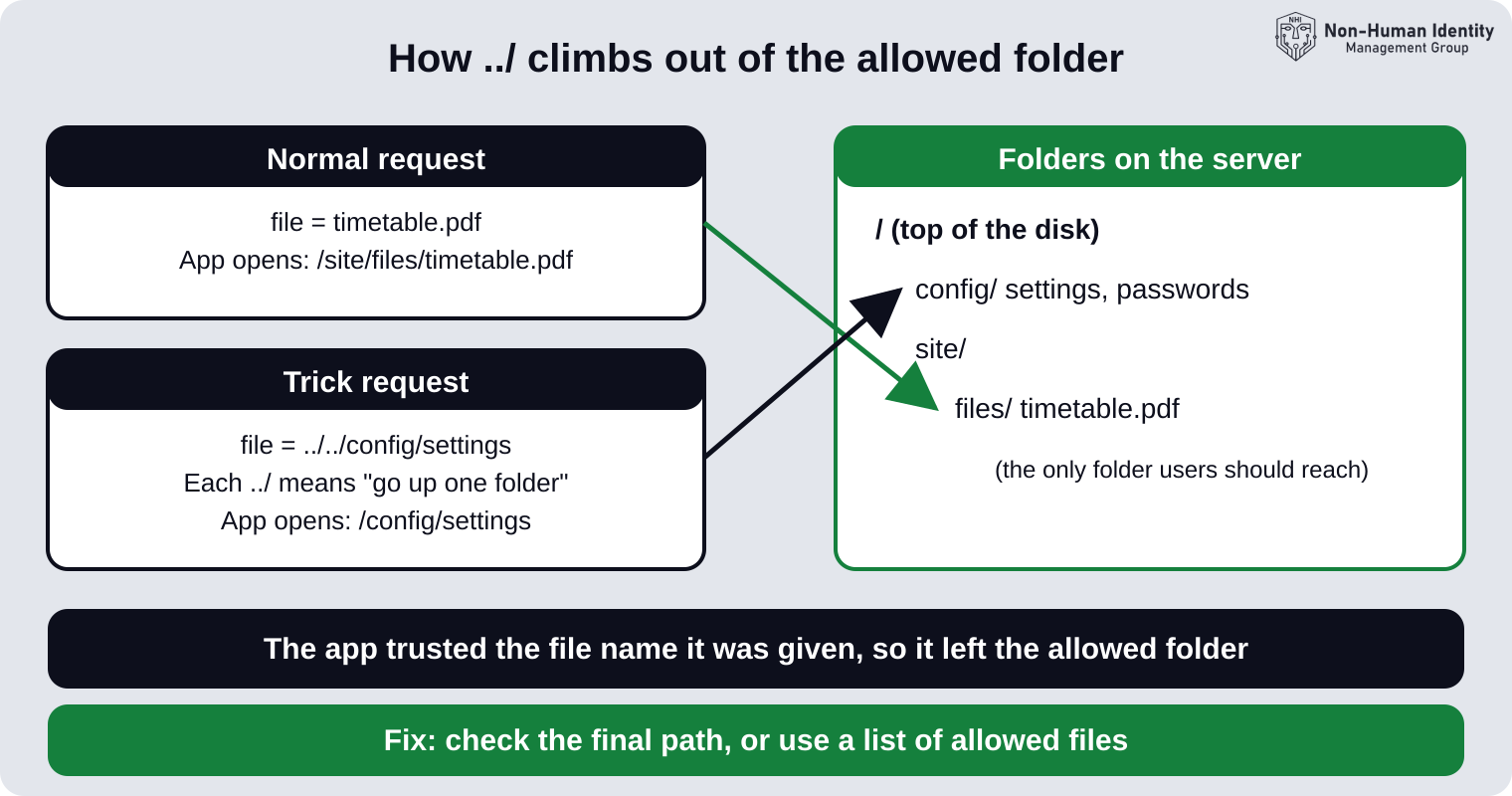
Computers read ../ as "go up one folder". If the app does not check the name, a request with several of these can climb out of the public folder. It can then reach files the site owner never meant to share.[1] The flaw is also called directory traversal or "dot-dot-slash".[1]
Where the comparison stops working: a library assistant might notice the odd request. An app follows the instructions it is given, and it can handle thousands of requests a minute.
Why does it matter?
Files outside the public folder are often the private ones. They include settings files, database passwords and the app's own code.[1] US agencies say flaws like this have been used against real organisations, including hospitals and schools.[3]
If you are learning to build websites
What could happen: your download page opens any file name a visitor types, including ones outside the folder.
Check this: do not build a file path straight from what a visitor sends.
If you run a small business website
What could happen: a stranger downloads your site's settings file, with your database password inside.
Check this: ask your supplier how the site decides which file to send, and how fast it applies updates.
If you look after servers
What could happen: a bought product has a known traversal flaw, and it is being used in attacks.
Check this: keep products patched, and watch logs for requests holding ../ or odd codes.
What does it look like?
Here are two made-up lines from a web server's log for a fictional tutoring site. The first is normal. The second is a warning sign.
Example only. All values are made up.
# web server log for tutors.example.com
GET /download?file=timetable.pdf                      (1)
GET /download?file=../../config/FAKE-settings.ini     (2)
GET /download?file=%2e%2e%2f%2e%2e%2fconfig/EXAMPLE   (3)
# status 200 = file sent                              (4)
- A normal request for a file in the public folder.
- A request that tries to go up two folders and open a settings file. The file name here is made up.
- The same trick written in a hidden form.
%2e%2e%2fis another way to write../. - If a request like (2) or (3) shows status 200, the server may have sent the file.
Why this is risky: the app used the visitor's text as part of the file path. So the visitor, not the site owner, decided which file was opened.
The safer way: the visitor picks from a fixed list, such as file number 1 or 2. The app looks up the real name itself and refuses anything not on the list.[1][2]
How does it work?
- The app takes a name. A page asks for a file using text the visitor can change, often in the web address.
- The app builds a path. It adds that text to the end of a folder path, such as site/files/.
- The trick climbs out. Each
../in the text steps up one folder, so the path can end up somewhere else.[2] - Hidden forms slip past. Simple filters that block
../can miss coded versions of it.[1] - The file is sent. If the app is allowed to read the file, it hands it over.
Some apps go a step further and run the file they open, not just send it. This is called local file inclusion. It can be more serious, because the app may act on what is inside the file. Our Local File Inclusion vs Path Traversal page explains the difference.
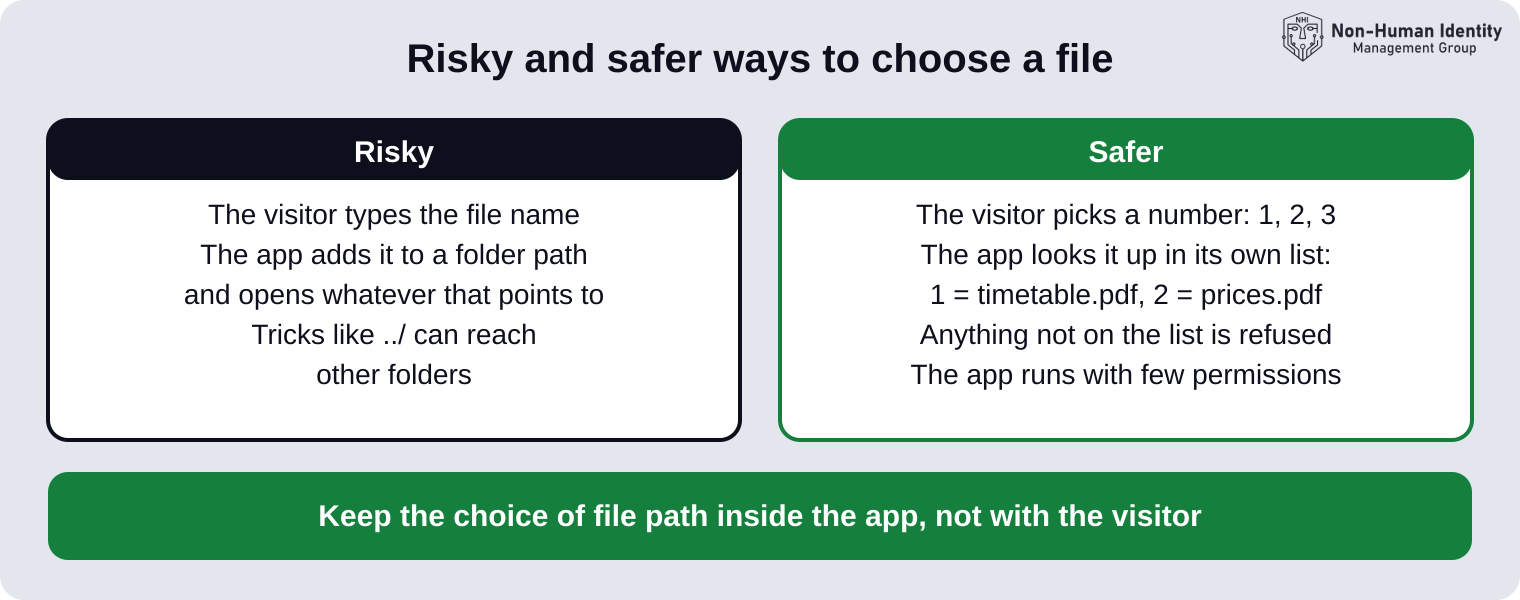
The main defences are well known. Where possible, do not pass visitor text to file actions at all. If you must, check it against an allowed list, work out the final full path and confirm it is still inside the allowed folder. Run the app with only the permissions it needs, so even a mistake reaches less.[1][2] For uploads, give each file a new random name and keep uploads away from the public web folder.[4]
A worked example
Farah Zeller is a computing student. She does part-time web work for Alder Tutors, a fictional tutoring business that shares lesson sheets through its website.
The download page was built years ago. It takes the sheet's name from the web address and opens that file from the sheets folder.
In a class on web flaws, Farah learns about path traversal. She remembers the library slip: the page does exactly what the request says. With the owner's permission, she checks the site's code, not the live site.
She sees the problem quickly. The code adds the name from the address straight onto the folder path, with no check. A request with ../ in it could leave the sheets folder.
Next, she looks through the web server's logs for the past month. She finds two odd requests holding ../. Both got an error, not a file, in the records available to her.
Farah rewrites the page. Each sheet now has a number, and the code looks the number up in its own list. Anything else gets a "not found" page. She also moves the settings file out of the website's folders and checks that the site runs with limited permissions.
Last, she asks the owner to change the database password anyway, just in case. She writes a short note on what she found and what she changed, so the next developer knows why the list matters.
Myths and mistakes
| What people think | What is true |
|---|---|
Blocking ../ fixes it. | Coded forms can slip past simple filters. Use an allowed list and check the final path.[1] |
| Only old websites have this flaw. | US agencies still warn about it in current products.[3] |
| Hidden files are safe because nobody links to them. | A traversal request does not need a link. It only needs the app to follow the path. |
| It only matters on Linux servers. | Windows paths use a backslash, and the same trick works with it.[1] |
| Checking the file name's ending (like .pdf) is enough. | Endings can be faked. Check the whole final path, or use a list of allowed files.[2] |
What can I do this week?
- List the pages on your site that let visitors view or download files.
- Ask your developer or supplier how each one decides which file to open.
- Search your web server logs for requests holding
../or%2e%2e. - Check that settings files and passwords are kept outside the public web folder.
- Apply security updates to bought web products and devices promptly.
Checklist
- Visitors choose files by number or fixed name, not by typing a path.
- Where a name is needed, it is checked against an allowed list.
- The final full path is checked to be inside the allowed folder.
- The app runs with only the permissions it needs.
- Settings files and uploads are kept outside the public web folder.
- Uploaded files get new names made by the app.
- Logs are kept and checked for odd file requests.
- Bought products are patched when a traversal fix is released.
Common questions
Is path traversal the same as directory traversal?
Yes. They are two names for the same flaw. You may also see "dot-dot-slash" or "directory climbing". All mean a request that leads an app out of the folder it should stay in, to reach other files on the computer.
Is it legal to test a website for path traversal?
Only with the owner's written permission. Testing someone else's site without permission may break computer misuse laws. Practise on your own projects or on training sites built for learning, and report any flaw you find through the owner's official contact route.
Does a web application firewall stop path traversal?
It can block many common forms, so it is a useful extra layer. But it cannot see how your app builds its paths, and coded forms can slip past rules. Fixing the app is still the main defence. See Web Application Firewalls for Beginners.
How is it different from local file inclusion?
Path traversal is about reaching a file the app should not open. Local file inclusion is when the app also runs or uses what is inside that file, which can be more serious. The two often appear together. See Local File Inclusion vs Path Traversal.
What should I do if I find a request like this in my logs?
Check whether the server sent a file in reply. If it did, treat any passwords in that file as leaked and change them. Then fix the page or apply the vendor's update, and keep the logs in case you need them later.
Where next?
Ready for the detail? Read the practitioner guide: Path Traversal Guide. It goes further into how the attack works across platforms, how to detect it and how to harden code and products against it.
Also useful:
Related NHI Mgmt Group resources: Web Application Firewalls for Beginners · How the Web Works for Beginners · Business Logic Flaws for Beginners
Key terms
- Path traversal
- A flaw where tricks such as ../ in a file name lead an app out of the folder it should stay in.
- Directory traversal
- Another name for path traversal.
- Local file inclusion
- A flaw where an app opens and uses a local file chosen by the attacker.
- Input validation
- Checking that what a visitor sends matches what the app expects before using it.
- Allowlist
- A list of approved values. Anything not on the list is refused.
- Web server
- The software that receives requests from browsers and sends back pages and files.
- Patch
- An update from a vendor that fixes a bug or security flaw.
Sources and further reading
- Path Traversal. OWASP Foundation, community attacks page. https://community.owasp.org/attacks/Path_Traversal, accessed 28 Nov 2026.
- CWE-22: Improper Limitation of a Pathname to a Restricted Directory ('Path Traversal'). MITRE. https://cwe.mitre.org/data/definitions/22.html, accessed 28 Nov 2026.
- Secure by Design Alert: Eliminating Directory Traversal Vulnerabilities in Software. CISA and FBI. https://www.cisa.gov/resources-tools/resources/secure-design-alert-eliminating-directory-traversal-vulnerabilities-software, accessed 28 Nov 2026.
- File Upload Cheat Sheet. OWASP Cheat Sheet Series. https://cheatsheetseries.owasp.org/cheatsheets/File_Upload_Cheat_Sheet.html, accessed 28 Nov 2026.