Physical access control is the set of badges, readers, controllers, locks and rules that decide who can go through which door, at what time, and that records each attempt.
This guide is for newcomers, facilities and office staff, students and managers who use a badge every day but have never looked at what happens behind the reader. It explains the parts of a system in plain English, how a door decides to open, a worked example, common myths and simple first steps. It stays at beginner level and links to our practitioner guides for the technical detail.
By the end of this guide you will be able to:
- Explain what a physical access control system is and what each part does.
- Describe what happens between tapping a badge and the door opening.
- Identify the common weak points, such as old cards and tailgating.
- Understand three practical steps to improve access control at a site.
Key takeaways
- A badge is an identity, not just a key. The system links each badge to a person and decides access from that person's rights, which can be changed or removed at any time.
- The decision happens behind the reader. A reader collects the badge data; a controller checks the rules and tells the lock what to do.
- Not all badges are equal. Older proximity cards are easier to copy than modern smart cards that prove themselves with cryptography.
- Higher-risk doors need more than a badge. Adding a PIN or a biometric check means a lost or copied badge alone is not enough.
- People and process matter as much as technology. Tailgating, unreturned badges and unreviewed access lists undo good hardware.
What it is, in plain English
A physical access control system (PACS) is the technology that controls who can enter a real-world space, such as a building, an office floor or a server room. The US government's identity management guidance describes the main parts as the credential (usually a badge), the reader (sometimes with a keypad), an optional biometric reader, the control panel (also called a controller), the access control server, a record of each person's access rights, and the access point: the door, turnstile or gate itself.[1]
A helpful comparison is a hotel. Your room card opens your room and the gym, but not other rooms, and it stops working after you check out. The hotel can see when the card was used. Physical access control in an office works the same way. Where the analogy breaks down: hotels rarely check that the person holding the card is the guest, while high-security doors at work can ask for a PIN or a fingerprint as well.
Physical and digital security are linked. Someone who walks into a building with a borrowed or copied badge may be able to reach unlocked laptops, network ports or a server room. That is why security standards treat physical access as part of information security. For example, the NIST SP 800-53 control catalogue includes PE-2 Physical Access Authorizations, PE-3 Physical Access Control, PE-6 Monitoring Physical Access and PE-8 Visitor Access Records.[2]
Why it matters to you
- If you run a small business: your office, stockroom and comms cupboard hold equipment and data. Knowing who can get in, and removing access when people leave, is a basic control.
- If you are new to a security job: badge systems often sit with facilities teams, but security teams are asked about them in audits, investigations and risk reviews.
- If you are a manager: access lists drift over time. Leavers, contractors and old visitor badges can keep working unless someone checks.
UK counter-terrorism guidance for venues names tailgating and holding doors open as bad practice, and says staff training should cover what to do if a pass is lost or stolen, so that staff feel able to challenge or report suspicious behaviour.[3] Most physical intrusions do not need clever hacking: they need a door held open or a badge that was never switched off.
How it works, step by step
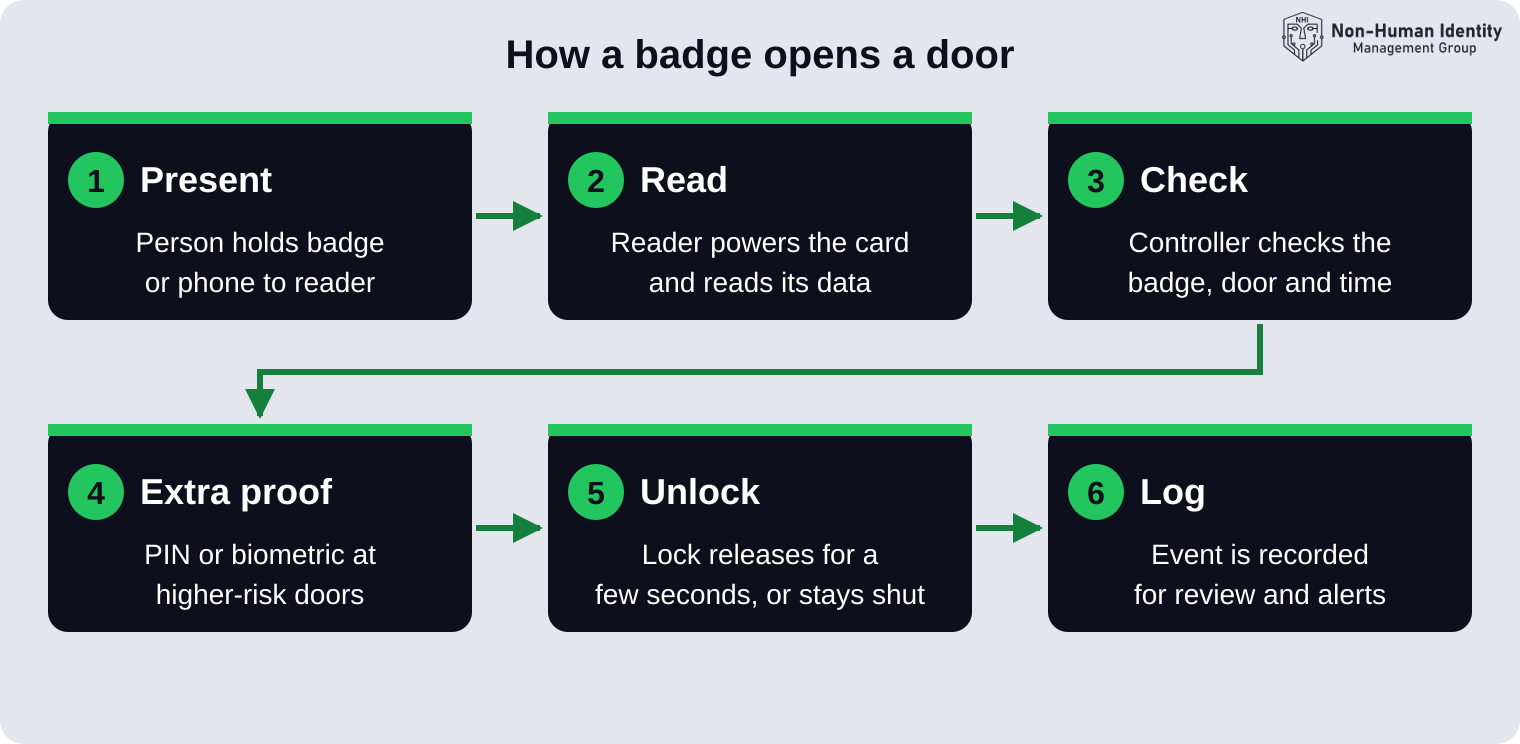
Products differ, but most badge systems follow the same flow.[1]
- Enrol the person. Before any of this, an administrator links a badge to a person in the access control server and assigns which doors and times they may use.
- Present the badge. The person holds their badge, or a phone carrying a mobile credential, near the reader.
- Read the credential. For a contactless card, the reader powers the chip by radio and reads its data, then sends it to the control panel.[1]
- Ask for extra proof where needed. At higher-risk doors the person may also enter a PIN or give a fingerprint, face or iris sample.[1]
- Decide. The control panel checks that the credential is valid and that this person may use this door at this time, then makes the access decision.[1]
- Unlock or refuse. If allowed, the lock releases for a few seconds; if not, it stays locked.
- Record. The system logs the event, whether granted or refused, for later review and alerts.[1]
The wire between reader and controller
The reader and controller talk over a cable. Many older systems use a simple one-way connection called Wiegand. A newer open standard, the Open Supervised Device Protocol (OSDP), is maintained by the Security Industry Association and was approved by the IEC as IEC 60839-11-5:2020. It supports two-way communication, monitors the wiring for tampering, and offers a Secure Channel that uses AES-128 encryption.[4] In plain terms, it makes it harder for someone to tap the cable behind a reader without being noticed.
How much proof at which door
US federal guidance groups areas by risk and asks for more factors as the risk rises.[1] You do not need to follow federal rules, but the idea is useful for any site.
| Area type (federal wording) | Example | Factors at the door |
|---|---|---|
| Controlled | Lobby or general office entrance | 1: something you have (the badge)[1] |
| Limited | Restricted floor or equipment room | 2: badge plus PIN[1] |
| Exclusion | The most sensitive rooms | 3: badge, PIN and a biometric[1] |
Types of badge, in brief
- Proximity cards: older contactless cards that typically send a fixed number. US federal guidance says agencies should not buy non-compliant technologies such as proximity cards, and should treat legacy credentials only as a temporary migration step.[1] See Access Card Cloning for Beginners for why.
- Smart cards: cards with a chip that can carry out cryptographic checks, so the reader can test that the card is genuine. The US government's PIV card is one example used for both building and computer access.[1][5]
- Mobile credentials: a badge held in a phone app or wallet instead of on a card. See the Mobile Access Credentials guide for how they work and what to check.
A worked example
Greenway Studios is a fictional design agency with 60 staff in a two-floor office. It has badge readers on the front door, the stairwell and a small server room. Nadia, the office manager, takes over the system and runs a quick review.
- Who has access: the system shows 94 active badges. Nadia matches them against the staff list and finds 21 badges belonging to leavers and old contractors. She switches them off and agrees with HR that badges are disabled on each leaver's last day.
- Server room: 40 people can open it, though only three need to. She cuts the list to three named people plus the building engineer, and asks the installer about adding a PIN at that door.
- Card type: the installer confirms the office still uses older proximity cards. Nadia plans a move to smart cards over the next budget year, starting with the server room.
- Tailgating: the front door is often held open for people. A short briefing reminds staff they may politely ask anyone without a visible badge to sign in at reception.
- Logs: she sets a monthly reminder to look at refused attempts and out-of-hours entries.
A month later, a refused attempt appears at the server room at 2 am using a badge that had belonged to a former contractor. Because the badge had been switched off, the door stayed locked and the log gave the team something to investigate. The review did not make the office immune to intrusion, but it closed the easiest gaps and made odd activity visible.
Myths and misunderstandings
| What people think | What is true |
|---|---|
| The reader decides whether to open the door. | In most systems the reader collects the data and the control panel makes the decision.[1] |
| All contactless badges are equally secure. | Older proximity cards are much easier to copy than smart cards with cryptographic checks. US federal guidance says agencies should not buy proximity cards.[1] |
| A good badge system stops people following others in. | Tailgating depends on behaviour as much as technology; guidance stresses training and a culture where staff challenge or report.[3] |
| Doors should always stay locked in an emergency. | Safety comes first. Guidance notes that doors may unlock automatically when a fire alarm sounds, and security should never compromise safety.[3] |
| Badge systems are a facilities matter, not security. | Security frameworks include physical access controls such as PE-3 and PE-6 in NIST SP 800-53.[2] |
Key terms
- Physical access control system (PACS)
- The credentials, readers, locks, policies and logs that control who can enter or use a real-world space.
- Credential
- Any proof used to verify identity and grant access; in a building, usually a badge, a PIN or a mobile credential.
- RFID
- Radio frequency identification: a wireless technology that reads data from a tag or card using radio waves.
- Smart card
- A card with a chip that stores identity data and carries out cryptographic checks, often used with a PIN.
- PIV card
- A high-assurance US government smart card used to verify a person for building and computer access.
- Mobile credential
- An access credential held in a smartphone app or wallet instead of on a physical card.
- OSDP
- Open Supervised Device Protocol: a modern standard for communication between readers and controllers, with supervision and optional encryption.
- Tailgating
- Getting into a restricted area by following an authorised person through a door.
- Anti-passback
- A rule that stops the same badge being used to enter twice in a row without a matching exit, which discourages badge sharing.
- Fail secure
- A design where a device stays in a secure state, such as locked, when power or control is lost; it must still meet fire and safety rules.
- Least privilege
- Giving each person only the access they need, for only as long as they need it.
Common questions
What is the difference between a reader and a controller?
The reader collects the badge data, and any PIN, and passes it on. The controller checks it against the access rules and decides whether the door opens.[1]
Can a badge be copied?
Some can. Older cards that just send a fixed number are much easier to copy than smart cards that prove themselves with cryptography. See Access Card Cloning for Beginners.
Are phone-based badges safer than cards?
They can be, because phones have their own screen lock and can be updated, but they bring new questions about lost phones, enrolment and battery life. The Mobile Access Credentials guide covers this.
What should happen when someone loses a badge?
Staff should know how to report it straight away, and the badge should be switched off in the system. UK guidance says staff training should cover what to do if a pass is lost or stolen.[3]
How long should we keep access logs?
There is no single answer. NIST SP 800-53 PE-3 asks organisations to keep physical access audit logs for a period they define.[2] Check any legal, contract or privacy rules that apply to you.
What do I do about visitors?
Give visitors a temporary badge or escort, record their visit and take the badge back when they leave. NIST SP 800-53 covers visitor access records in PE-8.[2]
First steps
Three things you can do this week:
- Compare badges with people. Export the list of active badges and match it against current staff and contractors. Switch off any badge with no matching person.
- Review your most sensitive door. Check who can open the server room or equivalent, cut the list to those who need it, and ask whether a PIN can be added.
- Find out your card type. Ask your installer or supplier whether you use older proximity cards or smart cards, and whether readers use OSDP. If an emergency override or temporary access is ever needed, make sure it is approved, recorded and time-limited.
Checklist
- Every active badge belongs to a current, named person.
- Badges are switched off on a leaver's last day.
- Access to sensitive rooms is limited to the people who need it.
- Higher-risk doors ask for a PIN or biometric as well as a badge.
- We know our card type and have a plan if it is an older proximity card.
- Staff know how to report a lost badge and feel able to challenge tailgating.
- Visitors are recorded, badged or escorted, and their badges collected.
- Someone reviews refused and out-of-hours entries regularly.
- Door behaviour in a fire alarm has been checked with safety advisers.
Check your understanding
1. Which part of the system usually makes the decision to open the door?
Answer: the control panel, or controller. The reader only collects and passes on the badge data.
2. Why is a PIN added at higher-risk doors?
Answer: so that a lost, stolen or copied badge is not enough on its own to get in.
3. Why are older proximity cards a concern?
Answer: they typically send a fixed number with no cryptographic proof, so they are easier to copy.
4. What does OSDP add compared with older reader wiring?
Answer: two-way communication, supervision of the wiring and optional encryption between reader and controller.
Suggested learning pathway
- Start with IoT Security for Beginners for the wider picture of connected devices and buildings.
- Then read Access Card Cloning for Beginners to see why card type matters.
- For the people side, read Social Engineering for Beginners.
- For tailgating in practitioner depth, see the Tailgating and Piggybacking Guide.
- For securing the system itself, see the Physical Access Control Systems Security Guide.
- For phone-based badges, see Mobile Access Credentials.
- For the control framework, see NIST SP 800-53 PE Physical and Environmental Protection.
- For regular access reviews, use the Physical Access Review Checklist.
Standards and references
- Physical Access Control Systems (PACS). IDManagement.gov, US General Services Administration (FICAM). https://www.idmanagement.gov/university/pacs/, accessed 27 Nov 2026.
- SP 800-53 Rev. 5, Security and Privacy Controls for Information Systems and Organizations (PE family). National Institute of Standards and Technology (NIST). https://csrc.nist.gov/pubs/sp/800/53/r5/upd1/final.
- Access control (Venues and Public Spaces guidance). ProtectUK, Counter Terrorism Policing and Home Office, 1 March 2022. https://protectuk.police.uk/access-control, accessed 27 Nov 2026.
- Open Supervised Device Protocol (OSDP). Security Industry Association. https://www.securityindustry.org/industry-standards/open-supervised-device-protocol/, accessed 27 Nov 2026.
- SP 800-116 Rev. 1, Guidelines for the Use of PIV Credentials in Facility Access. National Institute of Standards and Technology (NIST), June 2018. https://csrc.nist.gov/pubs/sp/800/116/r1/final.
Related NHI Mgmt Group resources: Physical Access Control Systems Buyer's Guide · PIV Cards in Physical Access Control · PCI DSS Requirement 9 Guide