Social engineering is the use of deception, pressure and trust to persuade a person to reveal information, hand over access or take a risky action that helps an attacker.
It targets people rather than software, and it comes in many forms: emails, text messages, phone calls, chat messages, fake job offers and even someone following you through a door. This guide is for newcomers, students, career changers and managers. It covers the big picture: the tricks that all these attacks share and the habits and checks that make them harder. Phishing and business email compromise are covered in more detail in their own beginner guides, linked at the end.
By the end of this guide you will be able to:
- Explain what social engineering is and why it works.
- Describe the main forms it takes, beyond email phishing.
- Identify the warning signs that a request may be manipulative.
- Understand the simple checks and processes that make these attacks harder.
Key takeaways
- It attacks people, not code. The attacker's goal is to get someone to do something: share a code, reset a password, pay an invoice or run a file.
- Phishing is only one channel. Phone calls, text messages, chat apps, help desk requests and physical visits use the same tricks.
- Pressure is the warning sign. Urgency, authority, fear and rewards are used to stop you thinking carefully.
- Verify by a route you already trust. Call back on a known number or check through an official channel, never through the details in the message.
- Processes protect people. Rules such as call-back checks for payment changes and identity checks for password resets work better than asking staff to be perfect.
What it is, in plain English
Social engineering means manipulating people. Instead of breaking into a computer, the attacker persuades someone who already has access to open the door for them. MITRE ATT&CK, a public catalogue of attacker behaviour, describes it as adversaries getting users to act in ways that enable unauthorised access, approve changes, disclose sensitive information or run instructions the attacker supplied, while leaving few technical clues.[1] It lists it as technique T1684, with sub-techniques for impersonation and email spoofing.[1]
The common forms include:
- Phishing: deceptive emails or messages with links or attachments. Smishing is the same by text message.
- Vishing: voice phishing by phone call, for example a fake "IT support" call asking for a sign-in code.
- Pretexting: inventing a believable story, such as a new supplier or a busy executive, to get information or action.
- Business email compromise: impersonating a trusted person or supplier to change bank details or approve payments.
- Baiting and quid pro quo: offering something attractive, such as a free download, a prize or "help", in exchange for access.
- Tailgating: following an authorised person through a secure door.
A helpful comparison is a confidence trickster at a market. They do not pick the lock on your bag; they tell you a good story and you hand them your wallet. Where the analogy breaks down: online attackers can send thousands of tailored messages at once and can research their targets in advance from public websites and social media.
Why it matters to you
- If you run a small business: one convincing call or email can lead to a fraudulent payment or a stolen account. Small firms often have fewer checks, so a simple call-back rule for payment changes is one of the most valuable controls you can add.
- If you are new to a security job: many incidents you will investigate start with someone being tricked. Knowing the patterns helps you ask the right questions and design better processes.
- If you are a manager: your name and authority are often what attackers borrow. Make it clear that staff will never be in trouble for checking a request that looks like it came from you.
The UK National Cyber Security Centre (NCSC) warns that training and phishing simulations alone are not enough, and that blaming people who click discourages reporting.[2] It recommends layers: make it harder for attackers to reach users, help users spot and report suspicious messages, limit the harm when a message gets through, and detect and respond quickly.[2]
How it works, step by step
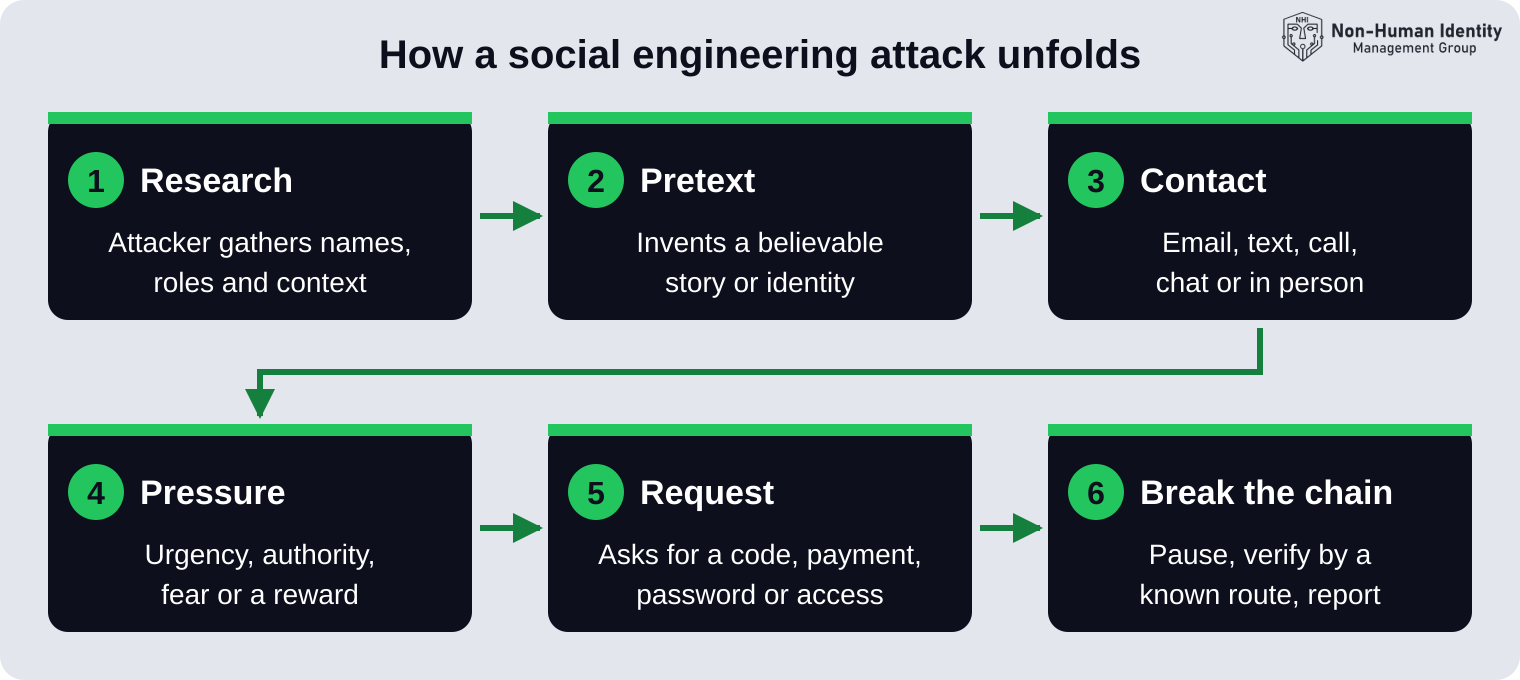
Most social engineering attacks follow a similar path, whatever the channel.
- Research. The attacker gathers names, job titles, suppliers and recent events, often from company websites, social media and earlier data leaks.
- Pretext. They build a believable story or identity: a manager, a supplier, the IT help desk, a delivery company or a recruiter.
- Contact. They reach out by email, text, phone, chat app, video call or in person, choosing the channel the target is most likely to trust.
- Pressure. They add urgency ("today or the account is closed"), authority ("the director needs this"), fear or a reward to cut short careful thinking. CISA, the US cyber security agency, lists urgent or emotional wording as a key warning sign.[3]
- Request. They ask for the action they need: a sign-in code, a password reset, a payment, a file download, a change of bank details or access to a building.
- Break the chain. This is where the defender comes in. Pausing, checking the request through a route you already trust and reporting it can stop the attack at the last step.
The table below links common warning signs to a safer response.
| Warning sign | Safer response |
|---|---|
| Urgent or emotional wording, or a threat of serious consequences | Slow down. Real organisations can wait while you check. |
| A request for passwords, sign-in codes or personal or financial details | Never share sign-in codes. Check the request through a known channel. |
| A new or changed payment instruction | Call the supplier on a number you already hold, not one in the message. |
| Slightly wrong email addresses, links or shortened URLs | Type the official website address yourself instead of clicking. |
| Someone you do not recognise asking to be let through a door | Politely direct them to reception or security. |
| A perfectly written, professional message | Good spelling and grammar do not prove a message is genuine. |
CISA notes that polished grammar does not rule out phishing, because AI tools can produce flawless messages, and advises contacting the organisation through a method you already trust, such as a website you type in yourself or a phone number you know is genuine.[3]
A worked example
Lakeside Dental is a fictional practice group with 45 staff. On a Friday afternoon, Ben on the front desk gets a call from someone who says he is "Chris from the IT support company". Chris knows the name of the practice manager and the IT company, both listed on public websites.
Chris says there is a problem with Ben's email account and that it will be locked within the hour unless he can "verify" it. He asks Ben to read out the six-digit code that has just arrived on his phone.
Ben remembers the practice rule: nobody ever needs your sign-in code, and IT requests are checked by calling the support number printed on the poster in the staff room. He tells Chris he will call back. When he rings the real support number, the IT company confirms they did not call. Ben reports the call to the practice manager, who asks the IT company to check Ben's account for unusual sign-ins and reminds all staff about the rule.
The rule did not make Lakeside Dental immune. Someone in a hurry might still have read out the code. But a simple, well-known check gave Ben a confident way to say no, and the report meant the IT company could check the account and warn others.
Myths and misunderstandings
| What people think | What is true |
|---|---|
| Only careless people fall for social engineering. | Well-crafted attacks fool experienced staff, especially when they are busy or under pressure. Processes and support matter more than blame. |
| Social engineering just means phishing emails. | Calls, texts, chat apps, fake job offers and physical visits use the same tricks. |
| Spelling mistakes always give it away. | AI tools can produce flawless messages, so good grammar proves nothing.[3] |
| Training alone solves the problem. | The NCSC says training and simulations alone are not enough; technical controls and easy reporting are needed too.[2] |
| Multi-factor authentication makes us safe from these attacks. | It helps a lot, but attackers may try to trick people into reading out codes or approving prompts. Phishing-resistant methods reduce this risk. |
Key terms
- The use of deception, urgency and authority to persuade a person to reveal information or take a risky action.
- Phishing
- Deceptive messages or websites that trick people into revealing credentials, running malware, approving access or sending money.
- Spear phishing
- Phishing aimed at a specific person or group, using details about them to seem convincing.
- Smishing
- Phishing delivered by text message instead of email.
- Vishing
- Voice phishing: using phone calls or voice channels to persuade someone to reveal information or approve access.
- Pretexting
- Inventing a believable story, often posing as support staff, a supplier or an executive, to get information or trigger an action.
- Business email compromise
- Impersonating a trusted person or domain to change payment details, approve payments or extract sensitive information.
- Baiting
- Tempting a target with something attractive, such as a free download, a USB device or a prize, to trigger a harmful action.
- Quid pro quo
- Offering help, a service or a benefit in exchange for information or access.
- Tailgating
- Gaining physical entry by following an authorised person into a restricted area.
- MFA fatigue
- Pressure from repeated sign-in prompts that makes a person more likely to approve access without checking.
Common questions
Is social engineering the same as phishing?
No. Phishing is one type of social engineering. Social engineering is the wider idea of manipulating people, through any channel, including phone calls and in person.
Why does social engineering work so well?
Because it uses normal human instincts: wanting to help, respecting authority, reacting to urgency and avoiding trouble. Attackers create situations where those instincts lead to a risky action.
What should I do if I think I have been tricked?
Report it straight away through your organisation's normal route. The NCSC advises organisations to reassure staff that they will not be punished for reporting, even after clicking a link.[2] Quick reporting lets the security team reset passwords and check for misuse.
How can I check a request is genuine?
Contact the person or organisation through a route you already trust, such as a phone number you already hold or a website address you type yourself. Do not use the links or numbers in the message.[3]
Can AI make social engineering worse?
Yes. AI tools can write convincing messages without mistakes,[3] and deepfakes (AI-generated fake audio or video) can imitate voices. This makes verification steps even more important.
What controls help besides training?
Email filtering and anti-spoofing, multi-factor authentication, limited admin rights, clear verification rules for payments and password resets, and an easy way to report.[2] NIST's SP 800-53 catalogue also includes a control enhancement, AT-2(3), for awareness training on recognising and reporting social engineering.[4]
First steps
Three things you can do this week:
- Set one verification rule for payment detail changes: always call back on a number already on file, and require a second person to approve.
- Make reporting easy: make sure everyone knows how to report a suspicious message or call, and say clearly that reporting is welcome even after a mistake.
- Agree what IT will never ask for, such as passwords or sign-in codes, and tell everyone.
Checklist
- Staff know that nobody legitimate will ask for their password or sign-in code.
- Payment detail changes are always confirmed by calling a known number.
- Large or unusual payments need a second approver.
- The help desk checks identity before resetting passwords or MFA.
- There is one simple, well-known way to report suspicious messages and calls.
- People who report, including after a mistake, are thanked, not blamed.
- Multi-factor authentication is switched on for email and key systems.
- Visitors are signed in and escorted, and staff feel able to challenge tailgaters.
Check your understanding
1. What does social engineering target?
Answer: people and their decisions, rather than weaknesses in software.
2. Name three channels social engineering can use besides email.
Answer: for example phone calls (vishing), text messages (smishing), chat apps, fake job offers and in-person visits.
3. Why do attackers create urgency?
Answer: to stop the target from slowing down and checking whether the request is genuine.
4. What is the safest way to check an unexpected request?
Answer: contact the person or organisation through a route you already trust, not the details in the message.
Suggested learning pathway
- For the most common channel, read Phishing for Beginners.
- For payment fraud by email, read Business Email Compromise for Beginners.
- For phone-based tricks that hand over control of a computer, read Remote Access Scams for Beginners.
- For building good habits across a team, read Security Awareness for Beginners.
- For the full practitioner view, see the Social Engineering Guide.
- For story-based attacks in detail, see the Pretexting Guide.
- For calls to the help desk, see the Vishing and Help Desk Social Engineering Awareness Guide.
Standards and references
- T1684 Social Engineering. MITRE ATT&CK Enterprise, version 20, created 14 April 2026, last modified 12 May 2026. https://attack.mitre.org/techniques/T1684/, accessed 27 Nov 2026.
- Phishing attacks: defending your organisation. National Cyber Security Centre (NCSC), last reviewed 13 February 2024. https://www.ncsc.gov.uk/guidance/phishing, accessed 27 Nov 2026.
- Recognize and Report Phishing. Secure Our World, Cybersecurity and Infrastructure Security Agency (CISA). https://www.cisa.gov/secure-our-world/recognize-and-report-phishing, accessed 27 Nov 2026.
- SP 800-53 Rev. 5, Security and Privacy Controls for Information Systems and Organizations, control enhancement AT-2(3) Social Engineering and Mining. National Institute of Standards and Technology (NIST). https://csrc.nist.gov/pubs/sp/800/53/r5/upd1/final.
Related NHI Mgmt Group resources: MITRE ATT&CK T1684 Social Engineering · Social Engineering Testing vs Phishing Simulation · Phishing-Resistant MFA Guide