Physical security is the fences, locks, lights, cameras, people and habits that protect a place and what is inside it.
This guide is for small business owners, office managers and anyone new to security. You do not need a technical background. If someone can walk into your office, they may reach laptops, paperwork and network sockets, so physical security protects your data as well as your stock.
In short
- Good physical security works in layers, from the edge of the site to the most important room.
- Each layer aims to put people off, spot trouble, slow an intruder down and get help on the way.
- The layout of a place matters too: clear views, good lighting and signs that show where visitors may go.
- People and habits matter as much as hardware. A door held open can undo an expensive lock.
What you will learn
- Explain the layered idea in one sentence.
- Describe the four jobs each layer does: put off, spot, slow down and respond.
- Spot weak points in your own site, such as dark corners and propped doors.
- Check how visitors are let in and looked after.
- Layers of protection (defence in depth)
- several barriers in a row, so one failing does not leave the site open.
- Designing out crime (CPTED)
- using the layout, lighting and look of a place to make crime harder and less tempting.
- Following someone in (tailgating)
- walking through a door behind someone who opened it, without your own pass.
What is physical security?
Think of an old castle. It had a moat, then a wall, then a gate with guards, then a strong inner tower for the treasure. An attacker had to beat every layer, and each one bought the defenders time.
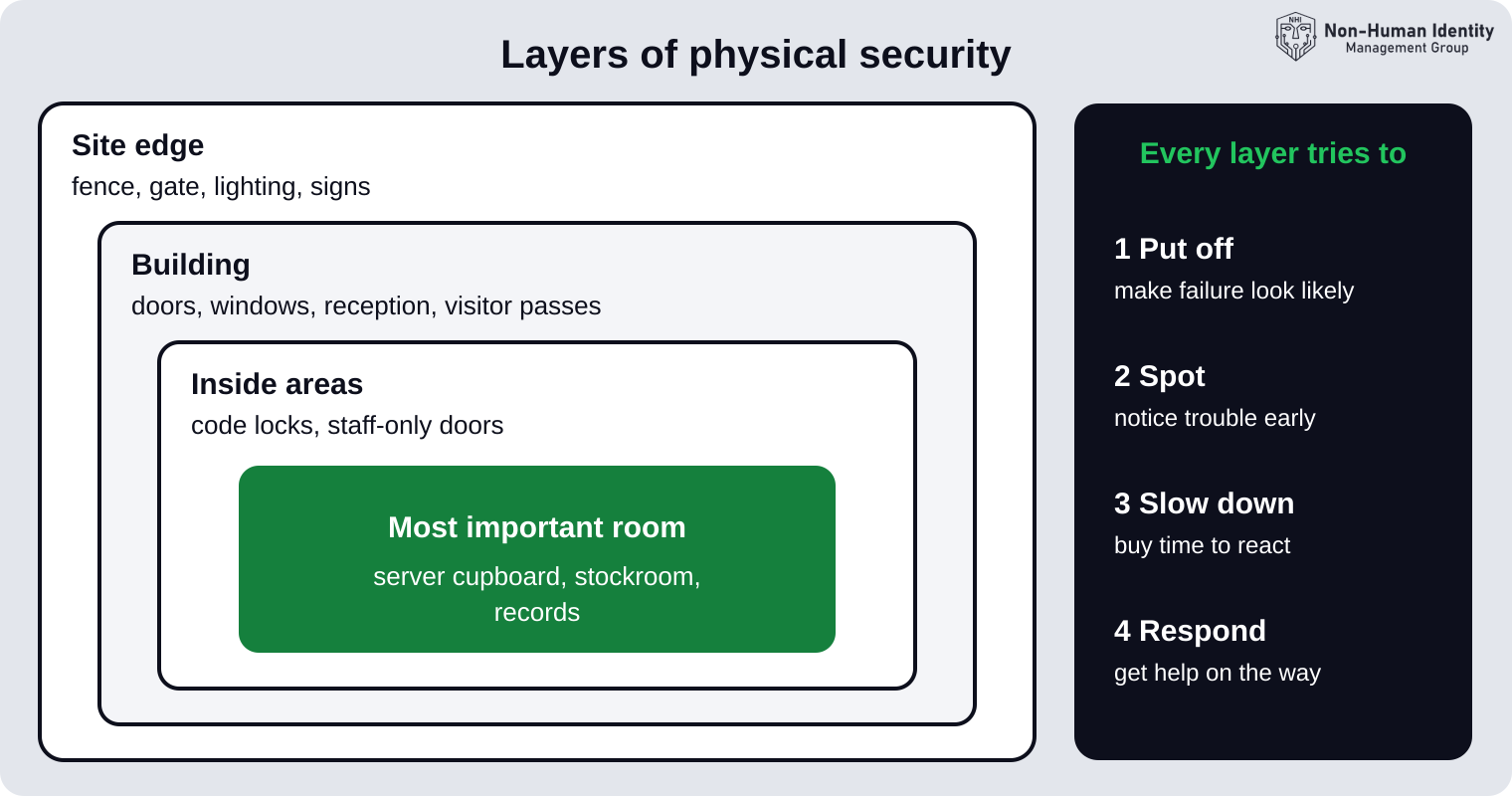
A modern site works the same way. The outer layer might be a fence or the edge of a car park. Next comes the building, with its doors, windows and reception. Inside, some rooms need more care, such as a stockroom, a records office or a server cupboard. Each layer adds a barrier and a chance to notice trouble. Security people call this defence in depth (using several layers of protection, so one failure is not the end).
Physical security also covers people and routines. Who may visit, who checks them in, who locks up at night and what staff do when something looks wrong are all part of it.
Where the comparison stops working: a castle kept everyone out. An office, a shop or a clinic needs to welcome customers, visitors and delivery drivers. The job is to let the right people in easily while making it harder for the wrong ones.
Why does it matter?
Many problems start with simple gaps: a back door left open, a dark yard or a visitor nobody looked after.
If you run a small business
What could happen: a thief walks in through an unlocked side door and leaves with two laptops full of customer records.
Check this: walk round the outside after closing time and try every door and ground floor window.
If you manage an office
What could happen: a stranger follows staff in at the morning rush and wanders the floor unchallenged.
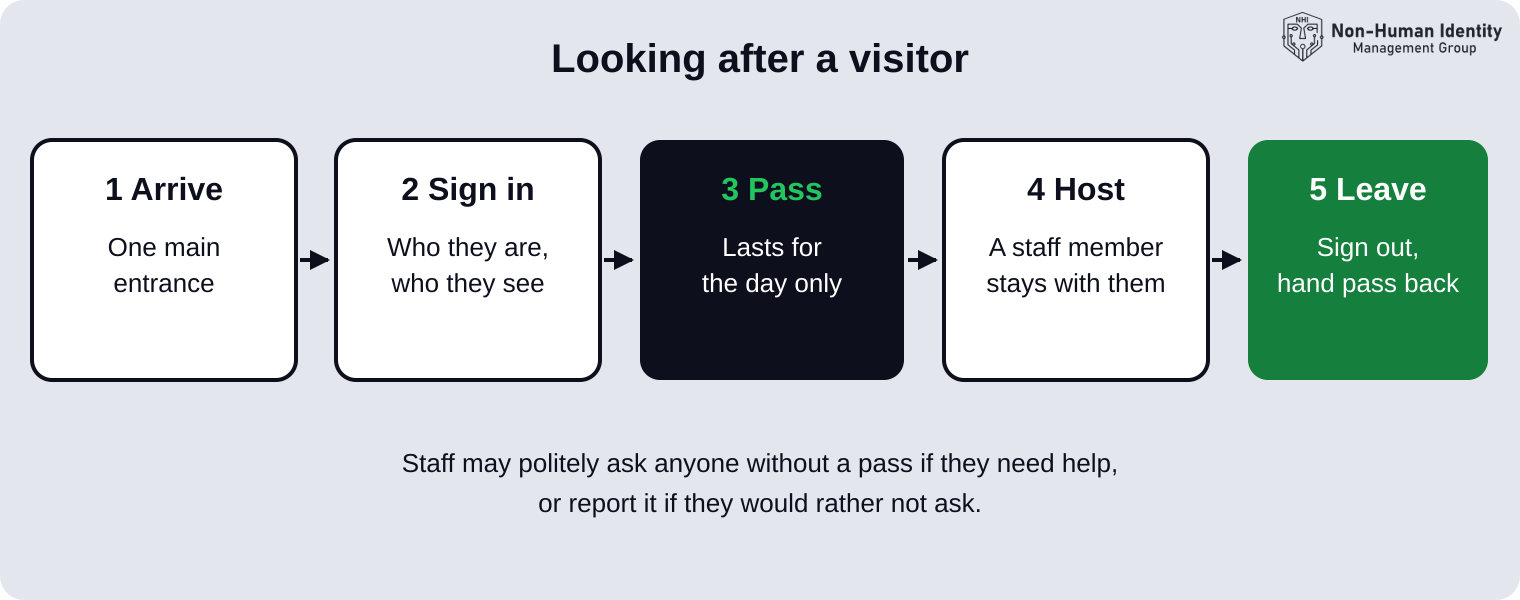
Check this: make sure every visitor signs in, wears a pass and has a host.
If you are new to security work
What could happen: you focus on firewalls and miss that the server cupboard has no lock.
Check this: list where your network kit and paper records sit, and who can reach them.
What does it look like?
Here is a made-up walk-round card, the kind of quick note someone might fill in after checking a small site.
Example only. All values are made up.
Site walk-round: Example Unit 0, example.invalid business park
Date: 00/00/0000   Checked by: A. Sample
Outer edge   Yard gate unlocked after 18:00          (1)
Outer edge   Light by bins not working               (2)
Building     Fire exit propped open with a box       (3)
Building     Reception empty at lunch, no sign-in    (4)
Inside       Server cupboard key on a hook above it  (5)
Inside       Office door has a code lock, works OK
- The outer layer is open, so anyone can reach the building unseen.
- A dark corner makes it easier for someone to hide or work unnoticed.
- A propped door skips the building layer completely.
- Nobody is there to greet visitors, so the visitor process has a gap.
- The inner lock is only as good as the place its key is kept.
Why this is risky: each gap on its own looks small. Together they open a path from the street to the server cupboard.
The safer way: fix the gaps layer by layer. Lock the gate at night, mend the light, keep fire exits shut and alarmed, cover reception and move the key somewhere controlled.
How does it work?
UK protective security guidance describes good physical security as layers that work together, so if one layer fails, others are still in place.[1] Each layer tries to do four jobs.[2]
- Put people off (deter). Fences, lights, signs and visible staff make a would-be intruder think they are likely to fail or be caught.[2]
- Spot trouble (detect). Alarms, cameras (CCTV) and alert staff notice when something is wrong. UK guidance notes that CCTV only helps if someone watches it and keeps it working.[1]
- Slow them down (delay). Strong doors, good locks and tough glass buy time between being spotted and reaching what matters.[2]
- Get help moving (respond). A plan says who is called, by whom, and what happens next. The guidance stresses the other layers need a response plan behind them.[1]
The look and layout of a place help as well. This idea is called crime prevention through environmental design, or CPTED for short. Police crime prevention guidance groups it into a few simple ideas.[3]
- Clear sightlines. People can be seen by others, through layout, lighting, cameras or staff.
- Guided movement. Paths, barriers and staffed points steer people where they should go.
- Clear ownership. Signs, borders and tidy spaces show that someone cares for the area.
- Spaces in use. Places that are used and looked after are less likely to be misused.
The people layer ties it together. UK guidance says staff should feel able to challenge, or report, anyone without the right pass. It also says training should tackle habits such as tailgating and holding doors open.[4]
A worked example
Lina Whitlock runs the office at Birch Removals, a fictional removals firm with 30 staff, a yard of vans and a small office. After a van was broken into, the owner asks her to look at security.
Lina starts at the edge. She walks the yard one evening and finds the gate is left unlocked until the last driver returns. The light by the bins has been broken for weeks. She agrees a lock-up time with the drivers and gets the light fixed.
Next, the building. The fire exit by the kitchen is often propped open for fresh air. She asks the landlord about a door alarm and puts up a sign explaining why it must stay shut. Reception is empty at lunch, so visitors wander straight in. She sets up a sign-in book, day passes and a rule that every visitor has a host.
Then the inside. The comms cupboard, which holds the internet router and the file server, has a lock, but the key hangs on a hook beside it. Lina moves the key to the manager's locked drawer and keeps a short list of who may use it.
Last, the people. At the team meeting she explains that it is fine to ask anyone without a pass if they need help. Anyone who would rather not ask can simply tell her.
Three weeks later, a driver spots a man in the yard after hours. The lights are on, the gate is locked and the driver calls the number on Lina's sheet. No layer was perfect, but together they gave the team a much better chance.
Myths and mistakes
| What people think | What is true |
|---|---|
| A good lock on the front door is enough. | Intruders look for the weakest way in. Layers mean one weak point does not leave everything open.[1] |
| Cameras keep a site safe on their own. | CCTV helps when someone watches it and keeps it working. It also needs a plan for what happens when it shows trouble.[1] |
| Physical security is just for big companies. | Small sites face break-ins and theft too, and simple steps such as lighting and locking up often cost little. |
| Physical security has nothing to do with IT. | A person inside the building may reach laptops, paperwork, network sockets and servers. |
| Challenging a stranger is rude. | UK guidance says staff should feel able to challenge or report anyone without the right pass.[4] A friendly "Can I help you?" usually works. |
What can I do this week?
- Walk round your site after dark and note doors, gates, windows and lights.
- Find where your most important things are kept, such as laptops, records and network kit.
- Check that fire exits are shut and not propped open.
- Set up a simple visitor routine: sign in, day pass, host, sign out.
- Tell staff who to call if something looks wrong.
Checklist
- We know our layers, from the site edge to our most important room.
- Outside lighting works and covers doors, gates and parking.
- Doors and ground floor windows lock, and someone checks them at closing.
- Fire exits stay shut and are checked regularly.
- Visitors sign in, wear a pass, have a host and sign out.
- Keys and codes for sensitive rooms are kept by a short, named list of people.
- Any cameras are working, pointed at the right places and checked.
- Staff know it is fine to challenge or report someone, and who to call.
Common questions
What is the difference between physical security and physical access control?
Physical access control is one part of physical security. It covers the badges, readers and locks that decide who opens which door. Physical security is the wider picture, including fences, lighting, cameras, visitors, guards and staff habits. See Physical Access Control for Beginners.
Do I need security guards?
Not always. Many small sites manage with good locks, lighting, an alarm and a clear visitor routine. Guards make more sense for larger sites, valuable stock or busy public spaces. A short risk check helps you decide. The practitioner guide on guarding goes into choosing and running a guard service.
Are CCTV cameras allowed in my workplace?
Usually, yes, but in the UK and EU cameras that record people bring data protection duties. You may need to tell people, keep footage secure and not keep it longer than needed. Check your regulator's guidance. See the CCTV and Video Surveillance Privacy Guide.
What should I protect first?
Start with what would hurt most to lose: people's safety first, then things like laptops, customer records and the room holding your network kit. Then work outwards, checking each layer between that room and the street. Fix cheap, easy gaps such as broken lights and propped doors first.
Is physical security part of cyber security?
They overlap. Someone who gets into a building may plug a device into the network, take a laptop or read papers on a desk. Many organisations now look at both together, so a gap in one is not ignored by the other.
Where next?
Ready for the detail? Read the practitioner guide: Guarding and Perimeter Protection. It goes further into setting requirements for a guard service, fences, gates and intrusion detection, and applying crime prevention design at a real site.
Also useful:
- Physical Security Guide for Security Teams
- Physical Access Control for Beginners
- Physical Security Site Assessment Checklist
- Tailgating and Piggybacking Guide
Related NHI Mgmt Group resources: Physical Security Risk Assessment Guide · Physical and Environmental Security Policy Template · Social Engineering for Beginners
Key terms
- Physical security
- Measures that protect places, equipment and people from being reached, damaged or taken.
- Defence in depth
- Using several layers of protection, so that if one fails, others are still in place.
- Physical access control
- Controls that decide who can enter buildings, rooms and other physical spaces, and record each attempt.
- CPTED
- Crime prevention through environmental design: using layout, lighting and upkeep to make crime harder.
- Visitor management
- The routine for signing visitors in, giving them a pass, hosting them and signing them out.
- Tailgating
- Following an authorised person through a secured door without using your own pass.
Sources and further reading
- Venues and Public Spaces (VaPS) guidance: Physical security. ProtectUK, Counter Terrorism Policing and Home Office, 1 March 2022. https://www.protectuk.police.uk/physical-security, accessed 28 Nov 2026.
- Beyond the Perimeter. National Protective Security Authority (NPSA), last updated 15 March 2021. https://www.npsa.gov.uk/beyond-perimeter-0, accessed 28 Nov 2026.
- Safer by Design: Crime Prevention Through Environmental Design (CPTED). NSW Police Force. https://www.police.nsw.gov.au/safety_and_prevention/policing_in_the_community/safer_by_design, accessed 28 Nov 2026.
- Access control (Venues and Public Spaces guidance). ProtectUK, Counter Terrorism Policing and Home Office, 1 March 2022. https://protectuk.police.uk/access-control, accessed 28 Nov 2026.