A reasoning model is an AI chatbot model that works through a problem step by step before it answers.
This guide is for anyone who has seen "thinking" appear in an AI chat and wondered what it means. You do not need any technical background. If you pay for AI tools at work, reasoning also affects how fast answers come and what they cost.
In short
- A reasoning model writes hidden working notes first, then gives its answer. This often helps with maths, coding and multi-step tasks.
- Thinking takes time and is billed, so reasoning answers can be slower and cost more, even when you do not see the notes.
- The notes you see are often a summary, and research shows they do not always reflect how the model really reached its answer.
- Reasoning models can still be wrong. Check important answers, and use reasoning where the task needs it.
What you will learn
- Explain what a reasoning model does differently from a normal chatbot model.
- Spot when a task is likely to benefit from reasoning, and when it is not.
- Check why a reasoning answer may cost more or take longer.
- Ask the right questions before trusting the "thinking" an AI shows you.
- Working notes (reasoning tokens)
- the hidden text a reasoning model writes to itself before its answer.
- Thinking setting (effort)
- a control that sets how much a model thinks before it answers.
- Word pieces (tokens)
- the small chunks of text AI models read and write, and the unit most AI services bill by.
What is a reasoning model?
Think of a maths exam where you must show your working. You jot the steps on scrap paper, check them, then write the final answer in the box. The working helps you avoid silly mistakes.
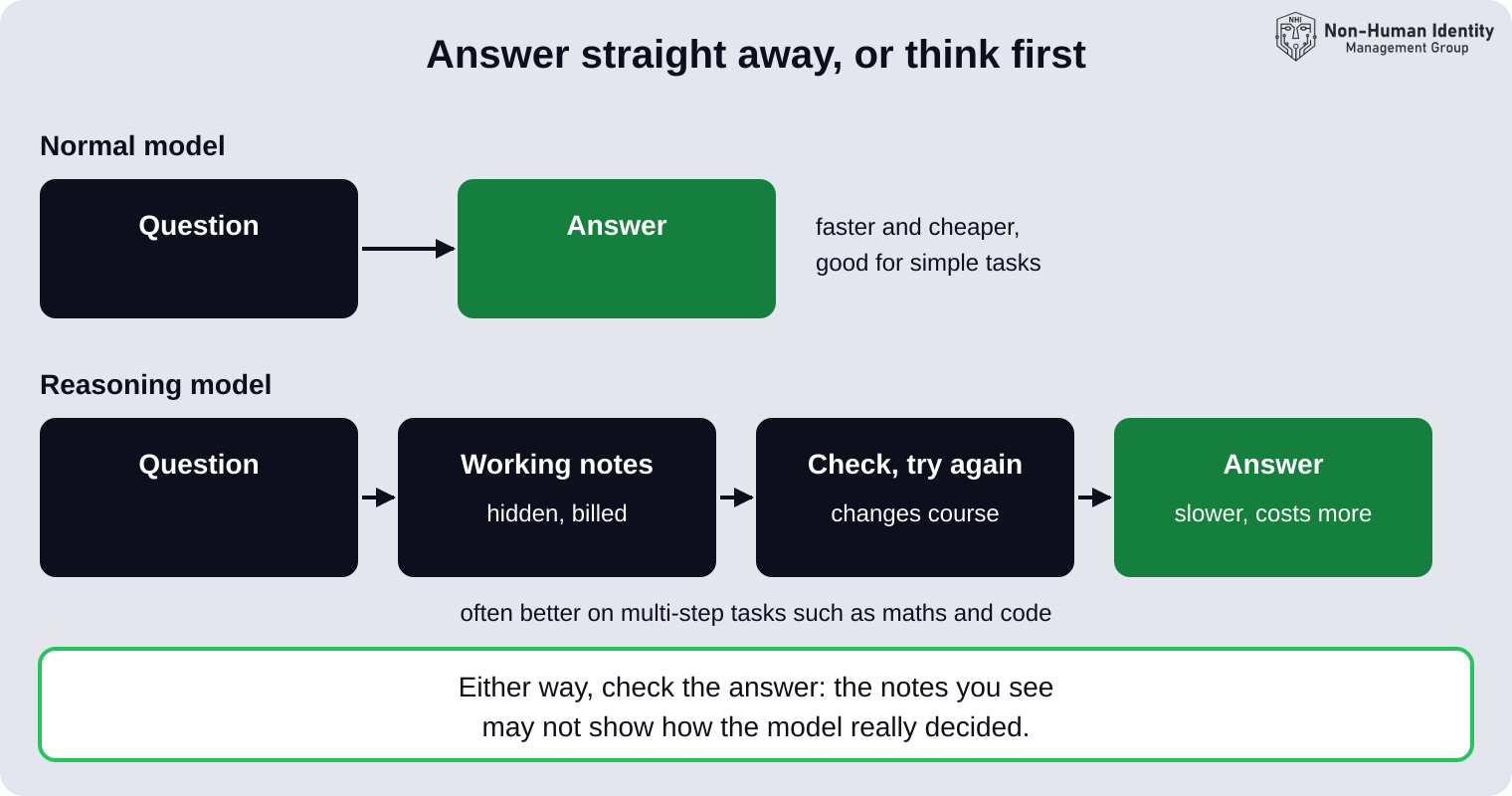
A reasoning model does something similar. A normal chatbot model starts writing its answer straight away, one word piece at a time. A reasoning model first writes its own working notes. It breaks the problem down, tries an approach and checks it. Only then does it write the answer you see.[1]
Most reasoning models are large language models, the kind of AI behind chatbots, trained to predict text. They have extra training that teaches them to use those working notes well.[2]
Where the comparison stops working: your exam working shows how you really solved the problem. A model's notes are more text it predicts. Research shows they do not always reflect what really drove the answer.[6]
Why does it matter?
Many AI tools now switch reasoning on by default or offer a "think harder" option. Knowing what it does helps you choose well, control costs and trust answers the right amount.
If you use AI chat for everyday questions
What could happen: you trust an answer because the visible "thinking" looks careful, but the answer is still wrong.
Check this: check facts that matter against a trusted source, however careful the thinking looks.
If you manage an AI budget
What could happen: costs rise because every simple task uses a high thinking setting, and the hidden notes are billed.
Check this: ask which tasks really need reasoning, and set lower effort for the rest.
If you are starting to use AI agents
What could happen: an agent plans many steps with tools, and a mistake early in its thinking leads to the wrong action.
Check this: keep a person approving actions that change data or spend money.
Next: AI Agents for Beginners
What does it look like?
In a chat app, you may see a "Thinking" line that you can open. Here is a made-up screen with the parts worth noticing.
Example only. All values are made up.
ExampleChat (FAKE app)      Model: example-reasoner-0000
You: Our van does 9 miles per litre. Fuel is 1.50 a litre.
     What does a 270 mile week cost?
Thinking (summary) . . . . 12 seconds                (1)
  Work out litres, then multiply by price.            (2)
Answer: 270 / 9 = 30 litres. 30 x 1.50 = 45.00        (3)
Usage: 40 words shown, 900 thinking tokens billed     (4)
- The model spent time thinking before it answered. Higher thinking settings usually take longer.
- A short summary of the notes. The full notes are often hidden or shortened.
- The answer shows its working, which makes it easier for you to check.
- The hidden notes are counted and billed, even though you only see a short answer.
Why this is risky: the tidy summary makes the answer feel checked. It may not show how the model really decided, and the bill includes notes you never saw.
The safer way: check the answer itself, not the thinking. Use reasoning for tasks with several steps, and a faster setting for simple ones.
How does it work?
Here is what happens when you send a question to a reasoning model.
- You ask a question. The app may let you pick a thinking setting, often called effort, such as low, medium or high.[1]
- The model writes working notes. These are called reasoning tokens. They can run from a few hundred to tens of thousands of word pieces.[1]
- It tries, checks and changes course. Training teaches it to spot its own mistakes and try another approach when one does not work.[2]
- It writes the answer. This is the part you see. Some apps show a summary of the notes. OpenAI, for example, chose to show a summary, not the raw notes.[2]
- You are billed for both. The hidden notes count as output and are billed, and they take up space in the model's short-term memory.[1][5]
The idea grew from research. In 2022, a team of researchers showed that giving a model worked examples with steps improved its results on maths and logic problems. They called it chain-of-thought prompting.[3]
In September 2024, OpenAI released o1, a model trained to think before it answers. OpenAI reported that its results improved with more time spent thinking.[2] In January 2025, DeepSeek described training reasoning through reinforcement learning, where a model is rewarded for answers that can be checked as right.[4]
Some newer models decide for themselves whether to think. Anthropic says that with its adaptive setting, Claude may skip thinking on easy questions at lower effort.[5]
A worked example
Talia Osei runs the accounts for a small design studio. She uses an AI chat tool for two jobs. One is tidying the wording of client emails. The other is checking a tricky quote with discounts, VAT and a deposit.
Her manager, Sana Thorne, notices the AI bill has nearly doubled. When Talia opens the usage page, she sees that every request, even the short email edits, ran on the highest thinking setting.
They look at the provider's help pages together. The pages say reasoning notes are billed as output, even though most are hidden, which explains the bill. A one-line email edit was producing many hidden notes that nobody needed.
Talia changes her habits. For email wording she picks the fast setting. For the quote she keeps reasoning on, because it has several steps that depend on each other.
The reasoning answer looks careful. Its thinking summary walks through the discount, then VAT, then the deposit. Talia still checks the total with a calculator. The sums match, but she spots that the model used the old VAT rate she had typed in by mistake. The thinking looked right because it followed her wrong number.
Sana and Talia agree two simple rules. Reasoning is used for tasks with several steps. Any figure going to a client is checked by a person first.
Myths and mistakes
| What people think | What is true |
|---|---|
| A reasoning model thinks like a person. | It writes extra text before answering, learned through training. It does not think or understand like a person. |
| The thinking I see is exactly how it decided. | It is often a summary. Research found that models do not always mention what really drove their answer. |
| Reasoning models do not make mistakes. | They can do better on multi-step tasks, but they can still be wrong, and a careful-looking chain can hide a wrong start. |
| Hidden thinking is free. | Providers bill the reasoning notes as output, even when you do not see them. |
| Always use the highest thinking setting. | Higher settings are slower and cost more. Simple tasks often do just as well on a lower one. |
What can I do this week?
- Find the thinking setting in the AI tool you use most, and note what it is set to.
- Sort your tasks into simple ones and multi-step ones, and try a lower setting for the simple ones.
- Check one reasoning answer yourself, step by step, against a trusted source or a calculator.
- Look at your usage page if you pay for AI, and see how much is reasoning.
Checklist
- I can explain what a reasoning model does differently.
- I know where the thinking setting is in the tools I use.
- Simple tasks use a lower thinking setting.
- I check important answers myself, not only the visible thinking.
- I know that hidden reasoning notes are billed.
- Actions an AI agent takes on real data are approved by a person.
- I do not paste secrets or private data into prompts, whatever the setting.
Common questions
Is a reasoning model smarter than a normal model?
It is often better at problems with several steps, such as maths, coding and planning. For quick tasks like rewording a sentence, a normal model is usually just as good, and faster and cheaper. Which one is better depends on the task, not on the label.
Why can't I see all of the thinking?
Many providers show a summary or hide the notes. OpenAI said it chose to show a model-written summary for its o1 models, not the raw notes. Other providers make their own choices, so what you see differs from tool to tool.
Can I trust the reasoning it shows me?
Treat it as a helpful view, not proof. Anthropic researchers tested two reasoning models and found that the models often did not mention a hint that had shaped their answer. Check the answer itself, especially when it matters.
Does reasoning cost more?
Usually yes. Providers bill the reasoning notes as output, even when they are hidden. Higher thinking settings tend to produce more notes, so they tend to cost more and take longer. Your usage page should show how much went on reasoning.
Do reasoning models make AI agents riskier?
They make agents better at planning many steps, which is why agents often use them. More steps also mean more chances for one early mistake to carry through. Keep agents' access narrow, and have a person approve actions that change data or spend money.
Where next?
Ready for the detail? Read the practitioner guide: Reasoning Models Explained. It goes further into how each provider names and bills reasoning, the effort settings they offer and how reasoning is passed between steps.
Also useful:
- How Large Language Models Work
- AI Pricing and Tokens for Beginners
- Neural Networks for Beginners
- Context Windows Explained
Related NHI Mgmt Group resources: Generative AI for Beginners · AI Benchmarks for Beginners · Agentic AI for Beginners
Key terms
- Reasoning Model
- A language model that works through a task in extra internal steps before it gives its answer.
- Reasoning Tokens
- The working text a model writes while it thinks, before its final answer. They are usually billed.
- Chain of Thought
- The step-by-step reasoning text a model produces before its final answer.
- Chain-of-Thought Prompting
- Asking a model to work through steps before it answers, often with worked examples.
- Large Language Model
- An AI model trained on large amounts of text to predict and generate language.
- Context Window
- The text a model can take in at one time, including your prompt, the conversation and its own notes.
Sources and further reading
- Reasoning models. OpenAI API documentation, OpenAI. https://developers.openai.com/api/docs/guides/reasoning, accessed 28 Nov 2026.
- Learning to reason with LLMs. OpenAI, 12 September 2024. https://openai.com/index/learning-to-reason-with-llms/, accessed 28 Nov 2026.
- Wei, J. et al. Chain-of-Thought Prompting Elicits Reasoning in Large Language Models. arXiv:2201.11903, first submitted 28 January 2022. https://arxiv.org/abs/2201.11903, accessed 28 Nov 2026.
- DeepSeek-AI. DeepSeek-R1: Incentivizing Reasoning Capability in LLMs via Reinforcement Learning. arXiv:2501.12948, first submitted 22 January 2025; published in Nature, volume 645 (2025). https://arxiv.org/abs/2501.12948, accessed 28 Nov 2026.
- Building with extended thinking. Claude API documentation, Anthropic. https://platform.claude.com/docs/en/build-with-claude/extended-thinking, accessed 28 Nov 2026.
- Reasoning models don't always say what they think. Anthropic Alignment Science, 3 April 2025. https://www.anthropic.com/research/reasoning-models-dont-say-think, accessed 28 Nov 2026.