The CIS Controls are a ranked list of security actions that tell an organisation what to do first.
This guide is for small business owners, managers and newcomers who keep hearing "CIS Controls" or "IG1" and want to know what they mean. You do not need a technical background. If your business has laptops, email and customer data, the Controls offer a ready-made order for getting the basics right.
In short
- The CIS Controls are 18 groups of security actions from a US non-profit, the Center for Internet Security (CIS).
- Each group is split into specific tasks called Safeguards. There are 153 in total.
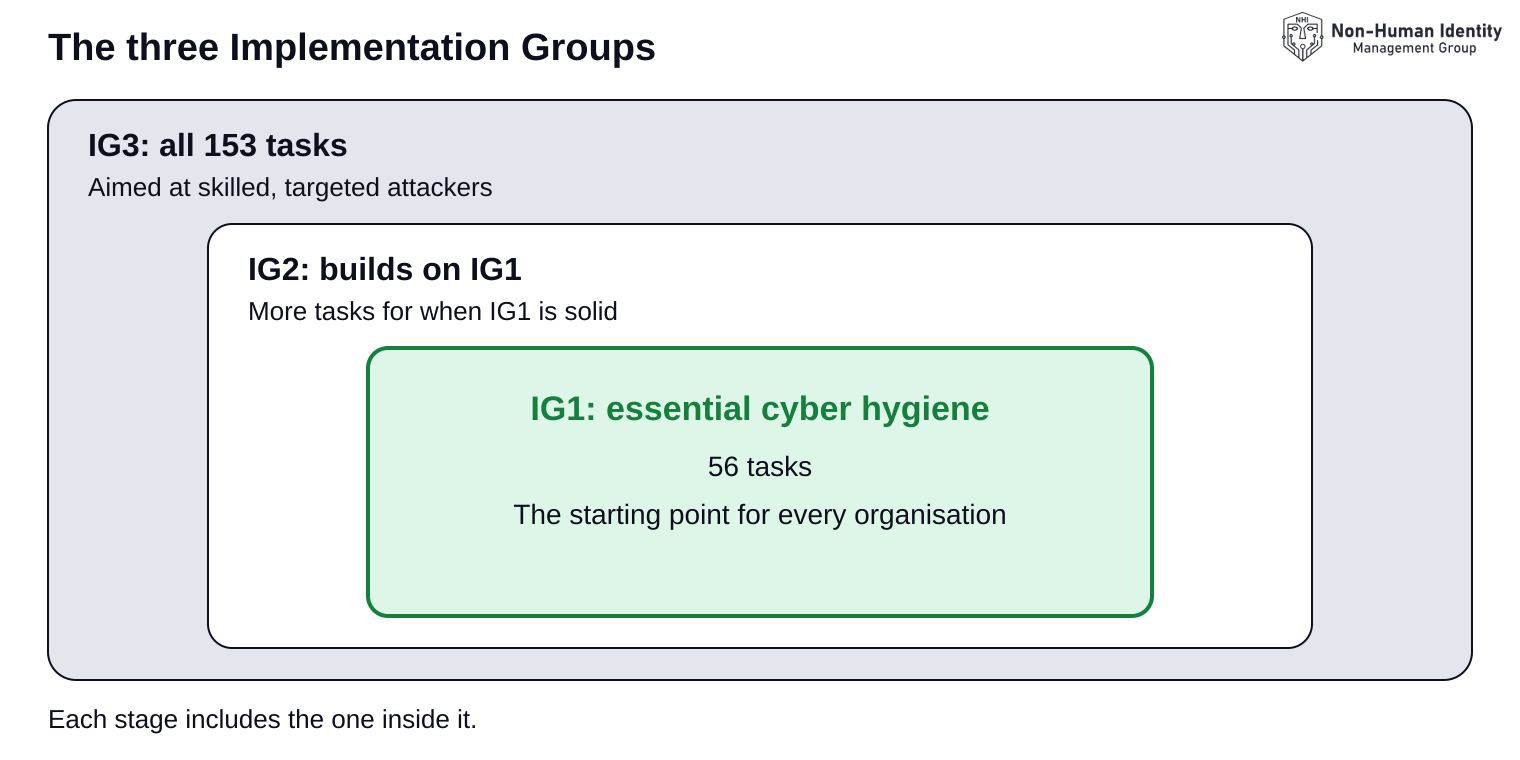
- The tasks are sorted into three stages. Every organisation is advised to start with the first, called IG1, which has 56 tasks.
- The Controls are free guidance, not a law. They help you build good habits in a sensible order.
What you will learn
- Explain what the CIS Controls are and who publishes them.
- Tell a Control, a Safeguard and an Implementation Group apart.
- Spot why the list starts with knowing what you own.
- Check where a small team could begin this week.
Status: correct as at 28 November 2026, based on the Center for Internet Security's published CIS Controls v8.1 pages. Standards are updated; check the official text.
This guide explains the topic in general terms and is not legal advice.
- Topic area (Control)
- one of the 18 broad areas, such as backups or staff training.
- Single task (Safeguard)
- one specific action inside a Control, such as "keep a list of all devices".
- Starting stage (Implementation Group 1, or IG1)
- the first set of tasks every organisation is advised to do.
What are the CIS Controls?
Think of a big recipe book with a chapter called "Learn these first". You do not cook every dish from page one. You start with the basics every cook needs, then move on.
The CIS Controls work the same way for security. There are many possible security tasks, and the list can feel endless. The Controls answer a simpler question: what should we do first?
The list has three layers. A Control is a broad topic, such as looking after accounts or keeping backups. A Safeguard is one task inside a Control. An Implementation Group is a stage that tells you which tasks to do now and which can wait.
The first stage, IG1, is what the publisher calls "essential cyber hygiene": the everyday basics, like washing your hands, that stop many common problems.
Where the comparison stops working: recipes rarely depend on each other. Many Safeguards do. You cannot update or protect a laptop you do not know you have, so the list starts with knowing what you own.
Why does it matter?
Most small firms are not chosen as targets. They are hit by broad attacks that try the same tricks on everyone. CIS says the IG1 tasks are aimed at these general, non-targeted attacks, and at organisations with limited IT and security expertise.[3]
If you run a small business
What could happen: you buy tools at random and still miss basics such as backups or removing old accounts.
Check this: ask your IT supplier which IG1 tasks are already done.
If you are new to IT or security work
What could happen: you meet "CIS 5" or "IG1" in a ticket or audit and do not know what it means.
Check this: learn the 18 topic names. They act as a map of the whole field.
If you manage a team or budget
What could happen: you are asked "how secure are we?" and have no clear way to answer.
Check this: track progress as a count, such as "40 of the 56 IG1 tasks done".
What does it look like?
Here is a made-up progress card that a small firm might keep for its first stage. The task wording is simplified.
Example only. All values are made up.
IG1 progress card: Slate Brewery (example.com)
Topic: Know your devices       Task: list every laptop     DONE   (1)
Topic: Know your software      Task: list what is installed  DONE
Topic: Accounts                Task: remove leavers' logins  IN PROGRESS  (2)
Topic: Fix weak spots          Task: updates turned on     DONE
Topic: Backups                 Task: test a restore        NOT STARTED  (3)
Owner: EXAMPLE-NAME   Next review: 00 Month 0000          (4)
- Each line is one task, filed under its topic.
- Work in progress is shown honestly, not ticked early.
- A gap is easy to see, so someone can be asked to fix it.
- Someone owns the card and a review date is set.
Why this is risky: without a list like this, firms tend to do the tasks they enjoy and skip dull ones, such as testing backups.
The safer way: follow the order, write down what is done, and review it on a set date.
How does it work?
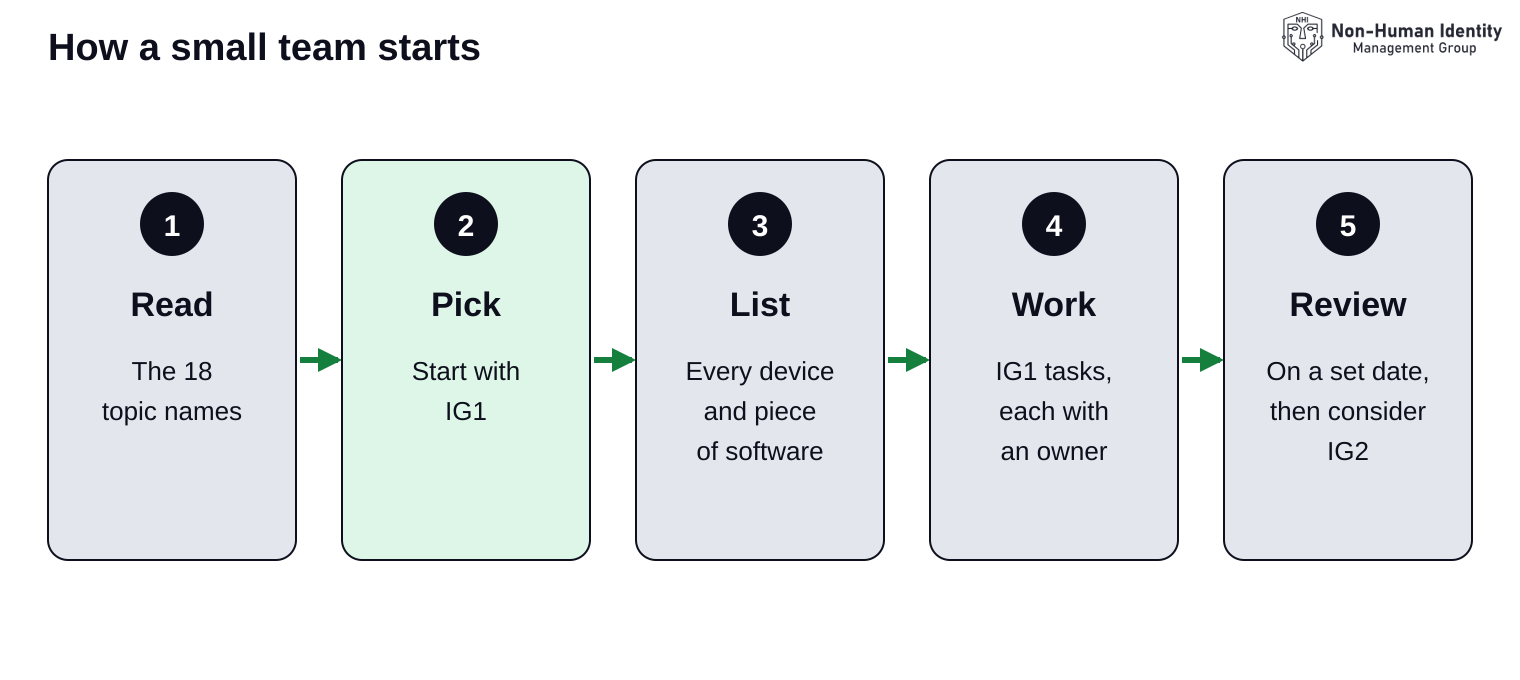
The current version is v8.1, released by CIS on 25 June 2024. It added a governance theme, about policies and processes, and updated the types of assets each task covers.[4] A small team usually works through it like this.
- Read the 18 topics. They run from knowing your devices and software, through accounts, updates, backups and training, to incident response and testing.[1]
- Pick your stage. CIS says every organisation should start with IG1.[2] IG2 builds on it, and IG3 includes every task.
- List what you own. The first two Controls cover devices and software, because the later tasks depend on them.
- Work through the IG1 tasks. Mark each one done, in progress or not started, with an owner.
- Review and move up. Check progress on a set date. When IG1 is solid, look at whether IG2 fits your size and risk.
The Controls are voluntary. CIS also publishes maps that link each task to other well-known frameworks, such as a US government framework for managing cyber risk.[5] Following the Controls does not on its own make you compliant with any law, but it builds the habits many rules expect.
A worked example
Vera Sesay is the office manager at a small accountancy practice with 12 staff. A new client asks on a supplier form whether the practice follows a recognised security framework. Vera has heard of the CIS Controls but does not know where to begin.
She asks Emil Blom, the practice's part-time IT contractor, to help. They read the 18 topic names together and agree to aim for IG1 only.
Emil starts with the first two topics. He lists every laptop, phone and printer, and the software on each. He finds two old laptops that nobody uses, still signed in to email. He wipes them and removes their access.
Next they look at accounts. A member of staff who left in the spring still has a login. Emil removes it and writes a short leaver checklist for Vera to use in future.
Backups come next. The practice has them, but nobody has ever tried to restore a file. Emil tests a restore on a quiet Friday. It works, though it takes longer than expected, so they write the steps down.
After six weeks, the card shows most IG1 tasks done and a few in progress, each with an owner and a date. Vera can answer the client's form honestly. She describes it as work in progress, not a finished job.
Myths and mistakes
| What people think | What is true |
|---|---|
| The CIS Controls are a law we must follow. | They are voluntary guidance. Some contracts or insurers may ask about them, so check what yours say. |
| We must do all 153 tasks at once. | CIS says every organisation should start with IG1, which has 56 tasks.[2][3] |
| Buying a security tool ticks off a Control. | Tools help, but most tasks need a process and an owner too. |
| We can skip the inventory and start with the fun parts. | Later tasks depend on knowing what you own. Start with devices and software. |
| Once IG1 is done, we are finished. | Things change. Review the list on a set date and keep it up to date. |
What can I do this week?
- Read the 18 topic names on the official CIS list, and note any your business has never thought about.
- Start a device list. Write down every laptop, phone and printer the business uses, and the person who looks after each one.
- Find old accounts. Ask who has left in the past year and check that their logins are gone.
- Test one backup. Try to restore a single file from last week, and note how long the whole process takes.
Checklist
- I can explain the difference between a Control, a Safeguard and an Implementation Group.
- We have chosen IG1 as our starting stage.
- We have a list of our devices and the software on them.
- Logins for people who have left are removed.
- Software updates are turned on for our devices.
- We have tested restoring a file from backup.
- Each IG1 task has an owner and a status.
- We have set a date to review our progress.
Common questions
Are the CIS Controls free?
The list itself is public. CIS shows all 18 Control names on its website, and the IG1 page explains the starting tasks.[1][3] Check the CIS website for the terms that apply to the full documents and any extra tools.
What is the difference between the CIS Controls and Cyber Essentials?
Both cover the security basics, but they work differently. The CIS Controls are a ranked list of tasks you follow at your own pace. Cyber Essentials is a UK government-backed scheme with a set of checks and a certificate you can show others.
Which version should I use?
Use the latest one CIS publishes. As at November 2026, that is v8.1, released in June 2024.[4] Check the CIS website before you start, because new versions do appear.
Do I need IG2 or IG3?
Probably not at first. IG1 is the starting point for everyone. IG2 builds on it with more tasks. IG3 includes every task and is aimed at organisations with security experts that may face skilled, targeted attackers.[6] Move up when IG1 is solid.
Where next?
Ready for the detail? Read the practitioner guide: CIS Controls Guide. It goes further into each of the 18 Controls, how the Implementation Groups are built and how the Controls map to other frameworks.
Also useful:
- CIS Controls IG1 Rollout Plan
- Asset Inventory for Beginners
- Patch Management for Beginners
- Cyber Essentials for Beginners
Related NHI Mgmt Group resources: Cyber Essentials Guide · CIS Control 5 Account Management Guide · CIS Control 17 Incident Response Management Guide
Key terms
- CIS Controls
- A ranked list of security actions from the Center for Internet Security.
- Implementation Group
- One of three stages that sort the tasks by what to do first.
- Asset Inventory
- A list of the devices, software and services an organisation owns or uses.
- Secure Configuration
- Setting up devices and software safely, such as changing default passwords.
- Patch Management
- Finding and installing software updates that fix weak spots.
- Data Recovery
- Getting data back from backups after it is lost or damaged.
- Security Awareness Training
- Teaching staff to work safely and spot scams.
Sources and further reading
- CIS Critical Security Controls List (v8.1). Center for Internet Security. https://www.cisecurity.org/controls/cis-controls-list, accessed 28 Nov 2026.
- CIS Critical Security Controls Implementation Groups. Center for Internet Security. https://www.cisecurity.org/controls/implementation-groups, accessed 28 Nov 2026.
- CIS Controls Implementation Group 1 (IG1). Center for Internet Security. https://www.cisecurity.org/controls/implementation-groups/ig1, accessed 28 Nov 2026.
- Center for Internet Security (CIS) Releases CIS Controls v8.1 with New Governance Recommendations. Center for Internet Security press release, 25 Jun 2024. https://www.cisecurity.org/about-us/media/press-release/center-for-internet-security-releases-cis-controls-v8-1-with-new-governance-recommendations, accessed 28 Nov 2026.
- CIS Controls v8.1 Mapping to NIST CSF 2.0. Center for Internet Security white paper, 25 Jun 2024. https://www.cisecurity.org/insights/white-papers/cis-controls-v8-1-mapping-to-nist-csf-2-0, accessed 28 Nov 2026.
- CIS Controls Implementation Group 3 (IG3). Center for Internet Security. https://www.cisecurity.org/controls/implementation-groups/ig3, accessed 28 Nov 2026.