Relationship-based access control decides who can open something by how they are linked to it.
This guide is for anyone who shares files, builds apps or wonders why a colleague can see a document they were never sent. You do not need to write code to be affected: every time you share a folder, you are creating the links this model uses.
In short
- Relationship-based access control (ReBAC) gives access because of a link, such as "owner of", "member of" or "inside this folder".
- It is the idea behind sharing in tools like Google Drive, where sharing a folder also shares the files inside it.
- It sits beside two older models: access by job title (roles) and access by facts (attributes).
- Links pile up over time, so check what you have shared, with whom and through which folders.
What you will learn
- Explain relationship-based access control in one sentence.
- Spot how a person can reach a file through a folder or a group.
- Tell it apart from role-based and attribute-based access control.
- Check your own shared folders for links you no longer need.
- Link (relationship)
- a stated connection between a person and a thing, such as "Yara owns this folder".
- Permission check (authorisation)
- the moment a system decides whether someone may open or change something.
- Inherited access
- access that comes from a parent, such as a file getting the sharing of its folder.
What is relationship-based access control?
Think of a guest list at a private party. You get in because of who you are linked to: you live there, you came with someone who does, or the host invited your group.
Relationship-based access control, or ReBAC, works the same way for software. The system keeps a list of links. Each link joins a person or group to a thing, with a name for the link, such as "owner", "editor" or "member". When someone asks to open a file, the system looks for a chain of links that leads from them to the file.[1]
Links can also join things to things. A document sits inside a folder, and a folder sits inside a shared drive. So access can flow down from the folder to the files inside it.[2]
It is the third of three common models. In role-based access control, your job title decides. In attribute-based access control, facts about you and the file decide. In ReBAC, your links to the file decide.
Where the comparison stops working: at a party, the host can see who walked in. In a big sharing system, chains of links can grow long, so the owner of a file may not know everyone who can reach it.
Why does it matter?
Many everyday apps share this way, so the links decide who sees your work. Google has said its own permission system, called Zanzibar, handles sharing for services including Drive, Calendar, Photos and YouTube.[3]
If you share files at work
What could happen: you add a file to a shared folder, and everyone who can see the folder can now see the file.
Check this: before you drop a sensitive file into a folder, look at who the folder is shared with.
If you are learning to build apps
What could happen: your app checks that a user is signed in, but not that they are linked to the record they ask for.
Check this: for each page or action, write down which link a user needs to have.
If you run a team or a small business
What could happen: a former supplier is still in a group that can open your shared drive.
Check this: review the members of each group that has access to important folders.
What does it look like?
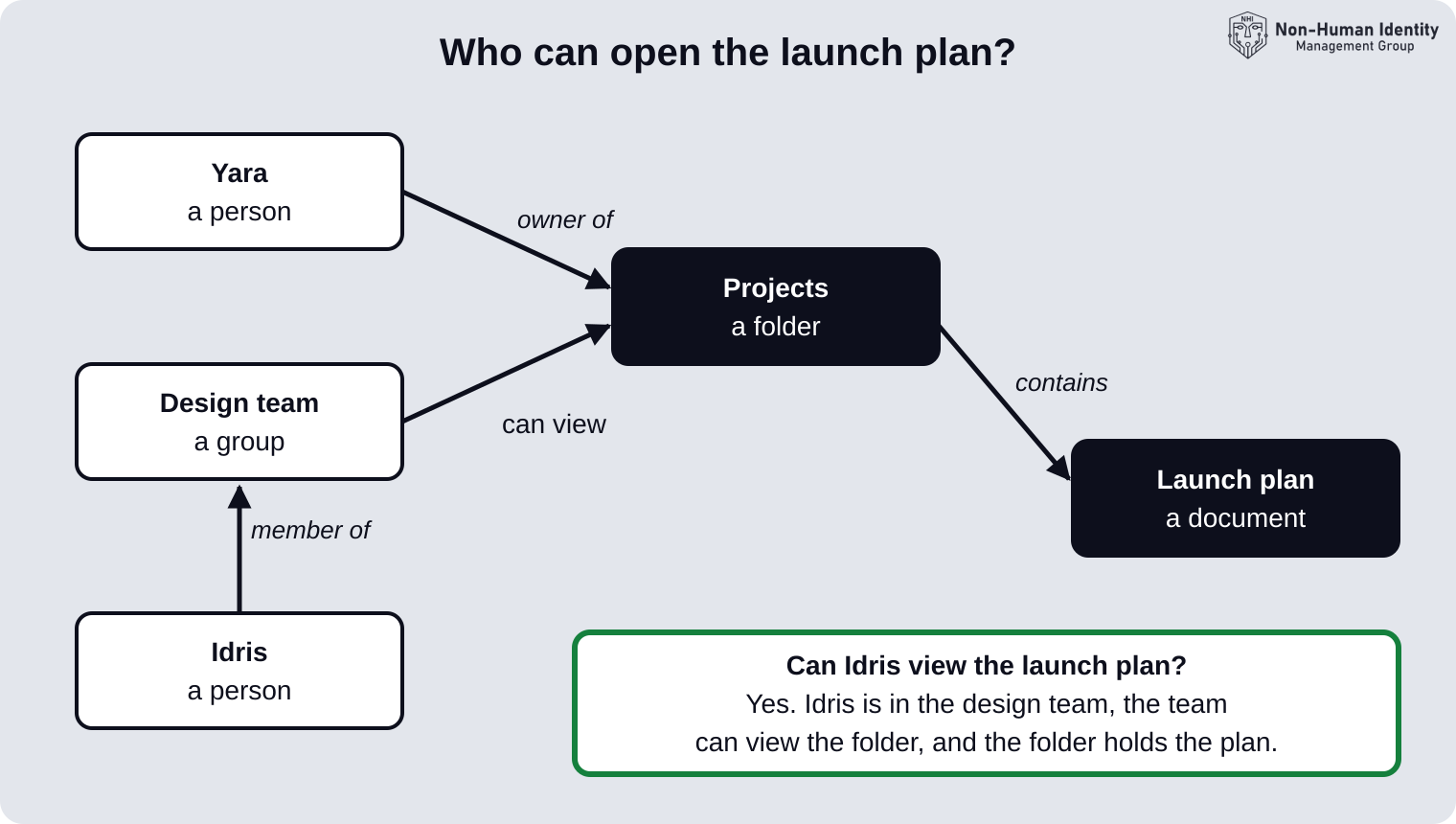
A ReBAC system stores simple lines that each say "this person or group has this link to this thing". Here is a made-up set for a small design studio.
Example only. All values are made up.
person:yara-EXAMPLE      is owner of    folder:projects-EXAMPLE  (1)
group:design-team        can view       folder:projects-EXAMPLE  (2)
person:idris-EXAMPLE     is member of   group:design-team        (3)
folder:projects-EXAMPLE  contains       doc:launch-plan-0000     (4)
person:ex-supplier-FAKE  is member of   group:design-team        (5)
- Yara owns the folder, so she can open and share everything in it.
- The whole design team can view the folder.
- Idris is in the team, so he gets what the team gets.
- The launch plan sits in the folder, so it gets the folder's sharing.
- In a real system, a line like this would be an old link that nobody removed.
Why this is risky: nobody shared the launch plan with the former supplier directly. Yet line 5, plus lines 2 and 4, still give them a path to it.
The safer way: remove people from groups when they leave, and review who can reach important folders, not only who was sent each file.
How does it work?
Here is what happens when someone tries to open a shared document.
- Links are written down. Each time you share, add someone to a group or move a file into a folder, the system stores a new link.[1]
- Rules say what links mean. The app's builders decide, for example, that a folder viewer can also view every file in that folder.[2]
- Someone asks. A person clicks the file. The app asks the permission system: "Can this person view this file?"
- The system follows the links. It looks for a path from the person to the file, through groups and folders.
- It answers yes or no. The app opens the file only if the answer is yes.[1]
Google Drive shows the same idea in its help pages. When you share a folder, the files and folders inside it get the same sharing. You cannot give someone less access to a file than they have to the folder it sits in.[4]
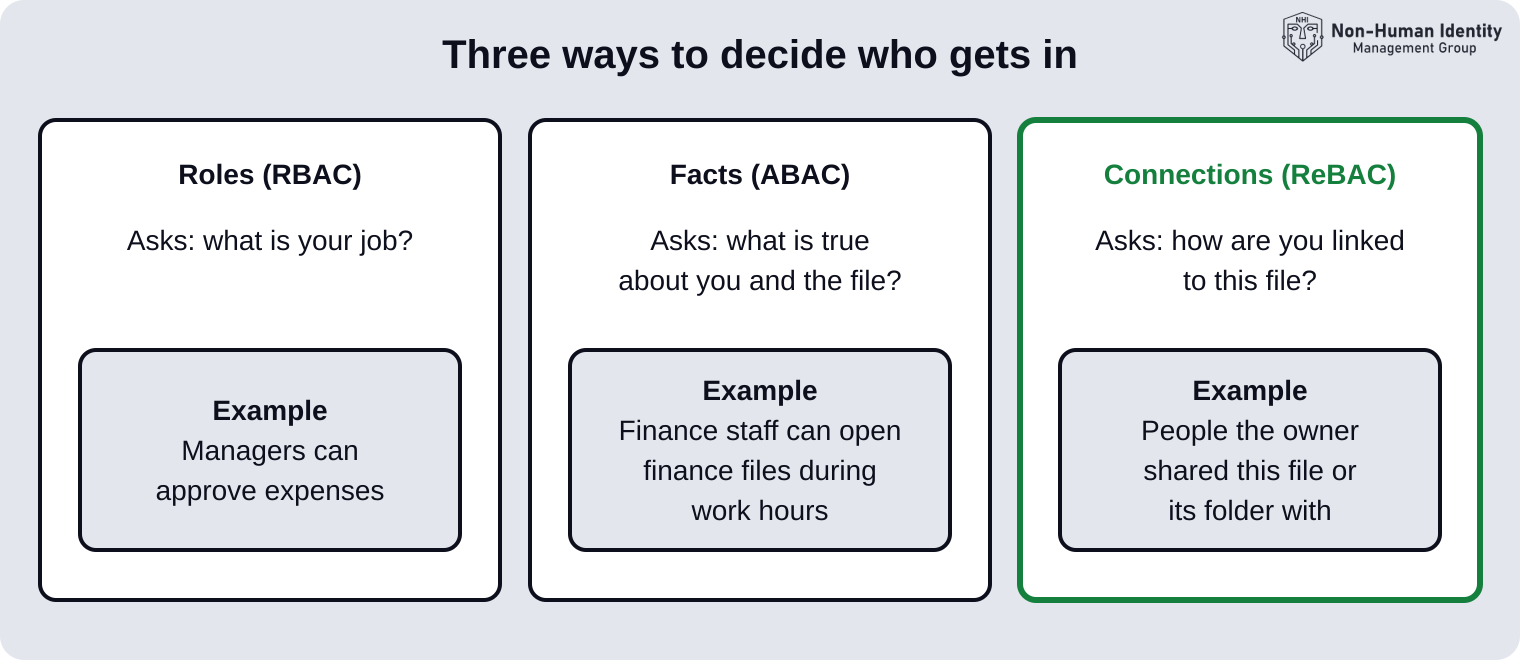
A security guidance group for web developers, OWASP, suggests that apps often fit attribute-based or relationship-based models better than roles alone. Roles struggle when each user should see only their own records.[5]
A worked example
Yara Corrigan runs a small, fictional design studio with six staff. The team keeps client work in one shared drive.
A client asks Yara for a private price list. She saves it into the "Projects" folder, because that is where everything goes.
The next day, Idris Strand, a junior designer, mentions the new prices in a team chat. Yara is surprised. She never sent him the file.
She remembers the party guest list. Idris did not need an invite to the file. He came in with his group. The design team can view the Projects folder, and the folder holds the price list.
Yara opens the folder's sharing settings. She sees the design team group, and inside the group she finds a freelancer whose contract ended in the spring.
She makes three changes. First, she removes the freelancer from the group. Next, she makes a new folder called "Owner only" and moves the price list there. The help pages say a file in a shared folder takes that folder's sharing. Last, she sets a reminder to review group members every three months.
No harm came from it this time. Yara now asks "who can reach this folder?" before she saves anything private.
Myths and mistakes
| What people think | What is true |
|---|---|
| Only the people I sent a file to can open it. | Anyone linked through a shared folder, a group or a public link may also open it.[4] |
| I can lock one file inside a shared folder. | In Google Drive, a file cannot have less access than its folder. Move it to a folder with tighter sharing.[4] |
| ReBAC replaces roles. | Many systems use roles, facts and links together. A role like "editor" can itself be a kind of link. |
| Checking that a user is signed in is enough. | Signing in proves who someone is. The app still has to check their link to each record, on every request.[5] |
| Removing someone from a file removes all their access. | They may still reach it through a group or a parent folder. Check every path. |
What can I do this week?
- Open your three most important shared folders and read who they are shared with.
- Look inside each group on that list and remove anyone who has left.
- Find any file set to "anyone with the link" and ask if it still needs to be.
- Move private files into folders shared only with the people who need them.
Checklist
- Every important folder has a named owner.
- Folders are shared with groups, and group members are reviewed regularly.
- Leavers and former suppliers are removed from groups, not only from single files.
- Private files sit in folders with tight sharing.
- Public links are used only when needed, and are reviewed.
- Apps you build check the user's link to each record on every request.
- Software accounts, such as service accounts and AI agents, get links only to what their job needs.
Common questions
What does ReBAC stand for?
ReBAC stands for relationship-based access control. It is a way of deciding access by looking at the links between people, groups and things. For example, "Idris is in the team" plus "the team can view this folder" can let Idris open a file in it.
How is ReBAC different from RBAC?
RBAC gives access by role, such as "manager", across many things at once. ReBAC gives access by your link to one particular thing, such as "owner of this document". ReBAC suits apps where each person should see their own items and the items shared with them.
What is Google Zanzibar?
Zanzibar is the permission system Google described in a 2019 research paper. Google said it stores trillions of access rules and answers millions of permission checks per second for services such as Drive and YouTube. Several open-source tools, such as OpenFGA, follow its ideas.[3][1]
Does ReBAC apply to software as well as people?
Yes. A service account, an app or an AI agent can be linked to things in the same way as a person. These are non-human identities (NHIs). Give each one links only to the folders, records or tools its job needs, and remove them when the job ends.
Do I need ReBAC for my small app?
Not always. If your app has a few simple roles, role-based access may be enough. ReBAC helps when users share items with each other, own their own records or work in nested folders and teams. Many teams start with roles and add links later.
Where next?
Ready for the detail? Read the practitioner guide: Fine-Grained Authorisation Guide. It goes further into Zanzibar-style systems, how to design the rules for links and how to keep permission checks fast and consistent.
Also useful:
- Authorisation Models Guide
- Role-Based Access Control for Beginners
- Attribute-Based Access Control for Beginners
- Authorisation and Policy Engines for Beginners
Related NHI Mgmt Group resources: Coarse-Grained vs Fine-Grained Authorisation · How to Audit Google Drive External Sharing and Public Links · AI Agent Authorisation Guide
Key terms
- ReBAC
- An access model that decides access from the links between people, groups and things.
- Role-based access control
- An access model where your job role decides what you can use.
- Attribute-based access control
- An access model where facts about the person, the thing and the situation decide.
- Zanzibar
- Google's permission system, described in a 2019 paper, that inspired many ReBAC tools.
- Access control list
- A list attached to a thing that says who may use it and how.
- Access decided for each single item, not just for whole groups of items.
- Least privilege
- Giving each person or program only the access its job needs.
Sources and further reading
- Concepts. OpenFGA documentation, OpenFGA. https://openfga.dev/docs/concepts, accessed 28 Nov 2026.
- Getting started with modeling. OpenFGA documentation, OpenFGA. https://openfga.dev/docs/modeling/getting-started, accessed 28 Nov 2026.
- Pang, R. et al. Zanzibar: Google's Consistent, Global Authorization System. 2019 USENIX Annual Technical Conference (USENIX ATC '19), July 2019. https://www.usenix.org/conference/atc19/presentation/pang, accessed 28 Nov 2026.
- Share folders in Google Drive. Google Drive Help, Google. https://support.google.com/drive/answer/2494822, accessed 28 Nov 2026.
- Authorization Cheat Sheet. OWASP Cheat Sheet Series, OWASP Foundation. https://cheatsheetseries.owasp.org/cheatsheets/Authorization_Cheat_Sheet.html, accessed 28 Nov 2026.