The same origin policy is a browser rule that stops one website reading another website's data.
This guide is for anyone who uses the web, builds websites or looks after a site for a business. You do not need to write code to be affected: this rule quietly protects your email and bank tabs from every other site you have open.
In short
- An origin is the first part of a web address: the scheme, the site name and the port.
- Your browser lets a page read data only from its own origin, unless the other site agrees.
- The rule mainly blocks reading. Pages can still link to other sites and send forms to them.
- A site can open a door on purpose with a setting called CORS, but it should name exactly who may come in.
What you will learn
- Explain what an origin is in one sentence.
- Spot whether two web addresses share the same origin.
- Explain what the rule blocks and what it does not.
- Ask your developer which other sites your site lets in.
- Website home address (origin)
- the scheme, site name and port at the start of a web address.
- Agreed sharing (CORS)
- a setting a website uses to say which other sites may read its data.
What is the same origin policy?
Think of a block of flats. Each flat has its own locked post box. You can push a leaflet through a neighbour's door, but you cannot open their post box and read their letters.
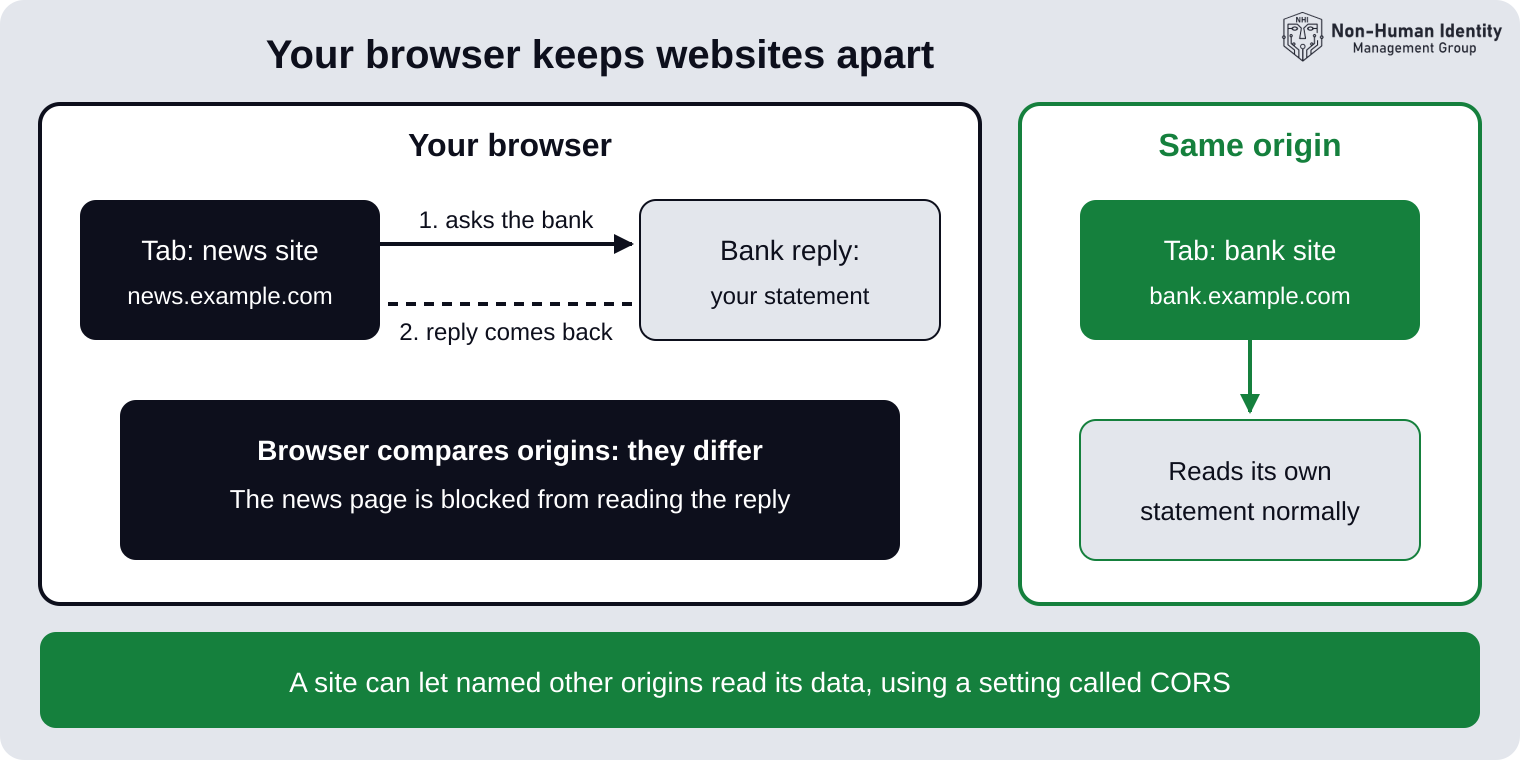
Your browser treats websites the same way. You might have your bank, your email and a news site open at once, and be logged in to some of them. Without a rule, code on the news site could ask your bank for your statement and read the reply. The same origin policy is there to stop that kind of reading.[1]
Each website's "flat" is its origin. An origin is made of three parts of a web address. The scheme is the first word, such as https. The host is the site name, such as shop.example.com. The port is a door number on the server, which is usually hidden because a standard one is used. Two addresses share an origin only when all three match.[1]
Where the comparison stops working: a neighbour can choose to hand you their key. Websites can do something similar on purpose, with a setting called CORS. And a cookie, the small file that keeps you logged in, follows a looser rule than the post box suggests.
Why does it matter?
The rule protects your logged-in accounts from other sites you visit. For website owners, a careless setting can switch part of that protection off.
If you browse the web at home
What could happen: without this rule, any site you open could read your email in another tab.
Check this: keep your browser up to date, so its safety rules stay current.
If you own a business website
What could happen: a developer lets every site read your app's data to fix an error quickly.
Check this: ask which other sites your site allows to read its data, and why.
If you are learning web development
What could happen: you see a CORS error and copy a fix that opens the door to everyone.
Check this: read the error, then allow only the exact site that needs access.
What does it look like?
Here is a made-up page address, compared with four others. Mozilla, which makes the Firefox browser, uses a similar table.[1]
Example only. All values are made up.
Page:  http://store.example.com/dir/page.html

http://store.example.com/dir2/other.html   same   (1)
https://store.example.com/page.html        not    (2)
http://store.example.com:81/dir/page.html  not    (3)
http://news.example.com/dir/page.html      not    (4)
- Same origin. Only the part after the site name differs.
- Different origin. The scheme is https, not http.
- Different origin. The port is 81, not the usual 80.
- Different origin. The site name is news, not store.
Why this is risky: people often assume that sites under one company name are one origin. They are not. So a developer may open a door between them in a hurry, and open it too wide.
The safer way: when two of your own sites need to share data, list the exact origin that may read it. Do not allow every site.[2]
How does it work?
Here is what the browser does each time a page asks for data.
- A page loads. The browser notes the page's origin, such as https://shop.example.com.
- The page asks for data. Code on the page requests something from an address, such as a stock list.
- The browser compares origins. If the scheme, site name and port all match, the page may read the reply.[1]
- Other sites get limited access. Links, form sends and embedded pictures are usually allowed. Reading the reply is usually blocked.[1]
- The other site can agree. With CORS, the other site's reply names which origins may read it. For some requests, the browser first sends a short check, called a preflight, to ask whether the real request is allowed.[2]
The rule has limits. It does not stop other sites sending requests, such as a form. So sites also need their own protection against forged requests, often a secret token in each form.[3] And if an attacker gets their own code to run inside your site, the browser treats that code as yours. This is called cross-site scripting.[3]
A worked example
Sienna Tanaka is learning web development. She runs a small online pottery shop as a side business, and builds the site herself.
The shop lives at one web address. Her stock list lives at a second address with a different site name. She adds a "pieces left" counter to the shop page, but it shows nothing. The browser reports a CORS error.
She remembers the post boxes. The shop page is trying to read a neighbour's letters, and the neighbour has not agreed.
A forum post suggests a quick fix: tell the stock service to allow every site. Sienna pauses. That would let any website on the internet try to read her stock data.
She checks Mozilla's guide first. It says that when a request carries login cookies, the server has to name one exact origin, not "everyone".[2] So she sets the stock service to allow only her shop's exact address.
She writes that address in one settings list, so it is easy to review later. Then she tests the counter from the shop, where it works. She also tests from a test page on another address, where the browser blocks it.
The fix takes ten minutes longer than the forum shortcut. In return, only her own shop can read her stock data.
Myths and mistakes
| What people think | What is true |
|---|---|
| The rule stops other sites sending requests to mine. | It mainly stops reading. Form sends from other sites are usually allowed, so protect actions with anti-forgery tokens.[1][3] |
| CORS is a security feature that protects my data. | CORS loosens the browser's rule. It does not log people in or check what they may do, so the server still has to check. |
| Allowing every site is fine for a quick fix. | It lets any website try to read your data. Name only the exact sites that need access. |
| Two sites under my company name are one origin. | Any change in scheme, site name or port makes a different origin.[1] |
| Cookies follow exactly the same rule. | A page can set a cookie for a parent domain, so cookies can be shared more widely.[1] |
What can I do this week?
- Keep your web browser up to date on every device you use.
- Ask your developer which other sites your site allows to read its data.
- Check that the list names exact addresses, not "every site".
- Ask whether forms that change data use anti-forgery protection.
Checklist
- The team can explain what an origin is.
- Any CORS setting names a short, fixed list of exact origins.
- No setting allows every origin for data that needs a login.
- The server checks logins and permissions on every request, whatever CORS allows.
- Forms that change data use anti-forgery tokens.
- Changes to the allowed list are reviewed like any other access change.
Common questions
What is an origin, in simple terms?
An origin is the start of a web address: the scheme (such as https), the site name and the port number. Two addresses share an origin only when all three match. The part after the site name, such as a page or folder, does not count.
Is CORS the same as the same origin policy?
No, they work together. The same origin policy is the browser's default rule that blocks reading across sites. CORS is the way a website says "these other named sites may read my replies". So CORS is a controlled exception to the rule.
Why do I see CORS errors in my browser?
Usually because a page tried to read data from another origin that has not agreed to share it. The browser is doing its job. The fix is on the other site's settings, by naming your exact origin, not by allowing every site.
Does this rule protect me from every web attack?
No. It blocks one kind of reading between sites. It does not stop forged form sends, and it cannot help if an attacker's code runs inside a site itself. Websites still need their own protections, such as anti-forgery tokens and careful handling of what users type.
Where next?
Ready for the detail? Read the practitioner guide: Same-Origin Policy and Browser Security Model Guide. It goes further into how browsers compare origins, the exact CORS headers and how this rule fits with other browser protections.
Also useful:
- CORS Misconfiguration Guide
- Cross-Site Scripting for Beginners
- Cross-Site Request Forgery for Beginners
- Browser Security for Beginners
Related NHI Mgmt Group resources: CORS vs CSRF Protection · CSP vs CORS · Application Security for Beginners
Key terms
- Same origin policy
- A browser rule that stops one website's code reading data from another website unless it is allowed.
- Origin
- The scheme, host name and port at the start of a web address.
- Cross-Origin Resource Sharing (CORS)
- A way for a server to say which other origins may read its replies. It does not log users in by itself.
- A small piece of data a website stores in your browser to remember you.
- Cross-site request forgery (CSRF)
- An attack where another site tricks your browser into sending a request you did not mean to send.
- Cross-site scripting (XSS)
- An attack where harmful code is made to run inside a trusted website.
Sources and further reading
- Same-origin policy. MDN Web Docs, Mozilla. https://developer.mozilla.org/en-US/docs/Web/Security/Same-origin_policy, accessed 28 Nov 2026.
- Cross-Origin Resource Sharing (CORS). MDN Web Docs, Mozilla. https://developer.mozilla.org/en-US/docs/Web/HTTP/Guides/CORS, accessed 28 Nov 2026.
- Cross-Site Request Forgery Prevention Cheat Sheet. OWASP Cheat Sheet Series, OWASP Foundation. https://cheatsheetseries.owasp.org/cheatsheets/Cross-Site_Request_Forgery_Prevention_Cheat_Sheet.html, accessed 28 Nov 2026.