Cross-site request forgery is when a trick web page makes your browser act on a site you are logged into.
This guide is for anyone who uses, builds or runs a website with sign-ins. You do not need to write code to be affected: if your business runs a site where people log in, it needs this protection.
In short
- When you sign in, a website gives your browser a small file called a cookie that says "this is you".
- Your browser can send that cookie with requests that another web page sets off, so a trick page may act in your name.
- Websites defend with a secret form code (a CSRF token) that the trick page does not know.
- Cookie settings, origin checks and asking for your password again add more layers.
What you will learn
- Explain what cross-site request forgery is in one sentence.
- Explain why being signed in is part of the risk.
- Check that your website uses the protections built into its tools.
- Ask your developers or suppliers the right questions.
- Sign-in note (session cookie)
- a small file a website stores in your browser so it remembers you are signed in.
- Secret form code (CSRF token)
- a hard-to-guess value a website puts in its own forms and checks when they come back.
What is cross-site request forgery?
Think of a bank clerk who knows you well. A stranger hands you a sealed envelope and asks you to pass it to the clerk. Because it comes from your hand, the clerk acts on it without question.
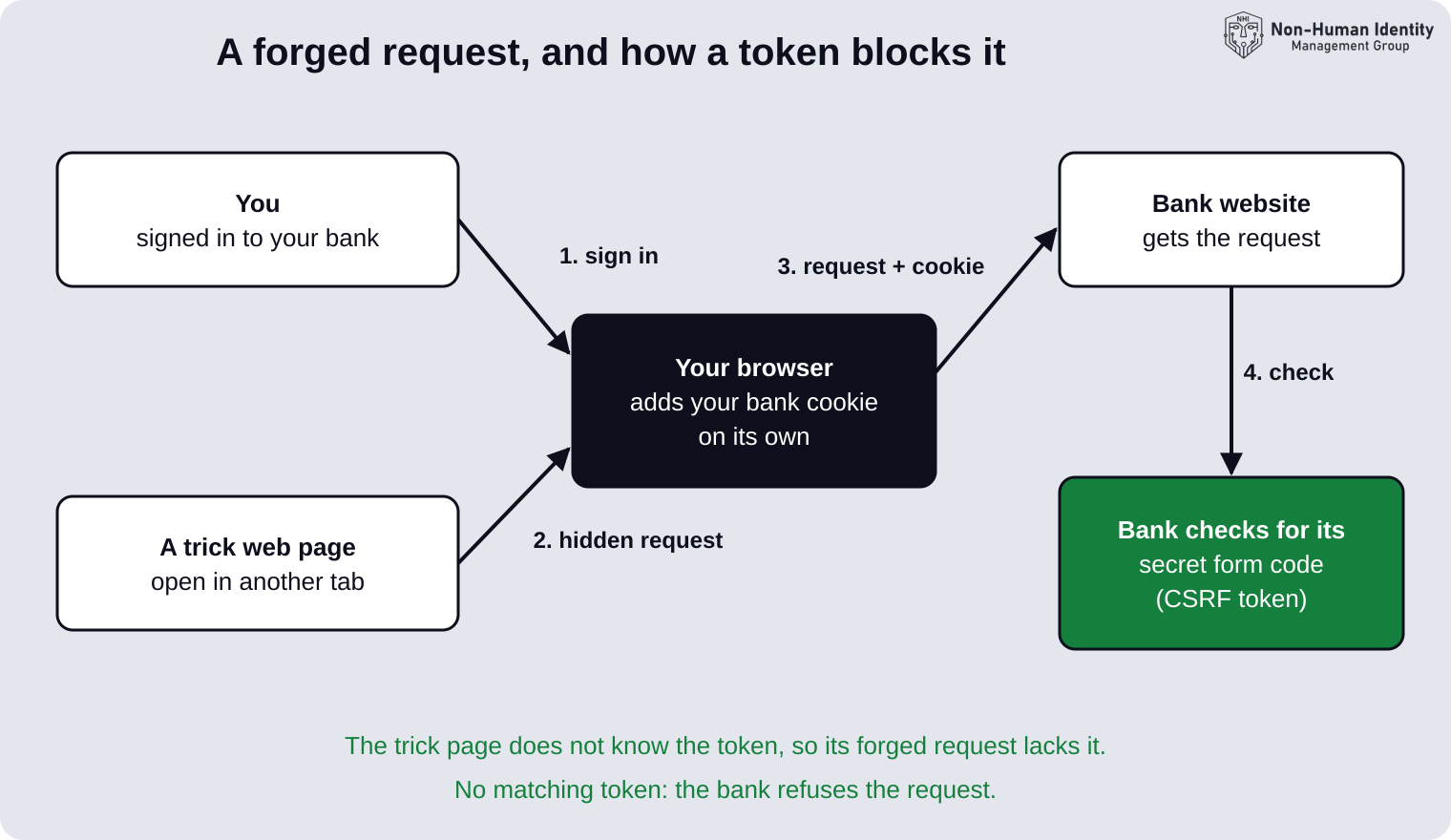
Cross-site request forgery, often shortened to CSRF, works the same way. You sign in to a site, and it gives your browser a session cookie. Later, while you are still signed in, you open a trick page in another tab. That page quietly asks your browser to send a request to the first site. Your browser adds your cookie, so the site may think you asked for it.[2]
The trick page never sees your password. It borrows your signed-in browser instead.[1]
Where the comparison stops working: you might feel an envelope in your hand. A forged request can happen in the background, with nothing on screen to show it.
Why does it matter?
A forged request can do whatever you could do on that site. It might change your email address, post a message or move money, if the site does not check.
If you run a website with member sign-ins
What could happen: a member's account settings are changed by a page they never meant to use.
Check this: ask your developer whether the site's built-in forged request protection is turned on.
If you are learning web development
What could happen: a page that changes data on a simple link click can be set off by another site.
Check this: use your framework's token feature and do not change data with a plain link.
If you use websites every day
What could happen: a trick page acts on a site you left signed in.
Check this: sign out of banking and admin sites when you finish, and keep your browser updated.
What does it look like?
Here is a made-up, simplified version of a protected form on a bank's website. It shows the defence, not an attack.
Example only. All values are made up.
<!-- change of address form on bank.example.com -->
<form action="/change-address" method="post">          (1)
  <input name="new_address" value="FAKE Street 0000">
  <input type="hidden" name="csrf_token"
         value="EXAMPLE-TOKEN-0000-FAKE">               (2)
</form>
Set-Cookie: session=FAKE-0000; Secure; SameSite=Lax   (3)
- The form changes data, so it uses a "post" request, not a plain link.
- In a real file, this line would hold a hard-to-guess code made for this visit. The bank checks it when the form comes back.
- The cookie setting "SameSite" tells the browser to hold the cookie back from most requests started by other sites.
Why this is risky: without line 2, the bank has only the cookie to go on. A trick page can make your browser send that cookie, so the bank may not tell a forged request from a real one.[2]
The safer way: the bank rejects any change that arrives without the right code. A trick page does not know the code, so it cannot add it.[2]
How does it work?
Here is how a forged request travels, and where the defence steps in.
- You sign in. A site gives your browser a session cookie.
- You browse elsewhere. You open a trick page in another tab, perhaps from a link in a message.
- The hidden request. The trick page tells your browser to send a request to the first site.
- The cookie goes along. Browser requests can include the site's cookies, including the session cookie.[1]
- The check. A protected site looks for its secret form code. The forged request lacks it, so the site refuses.[2]
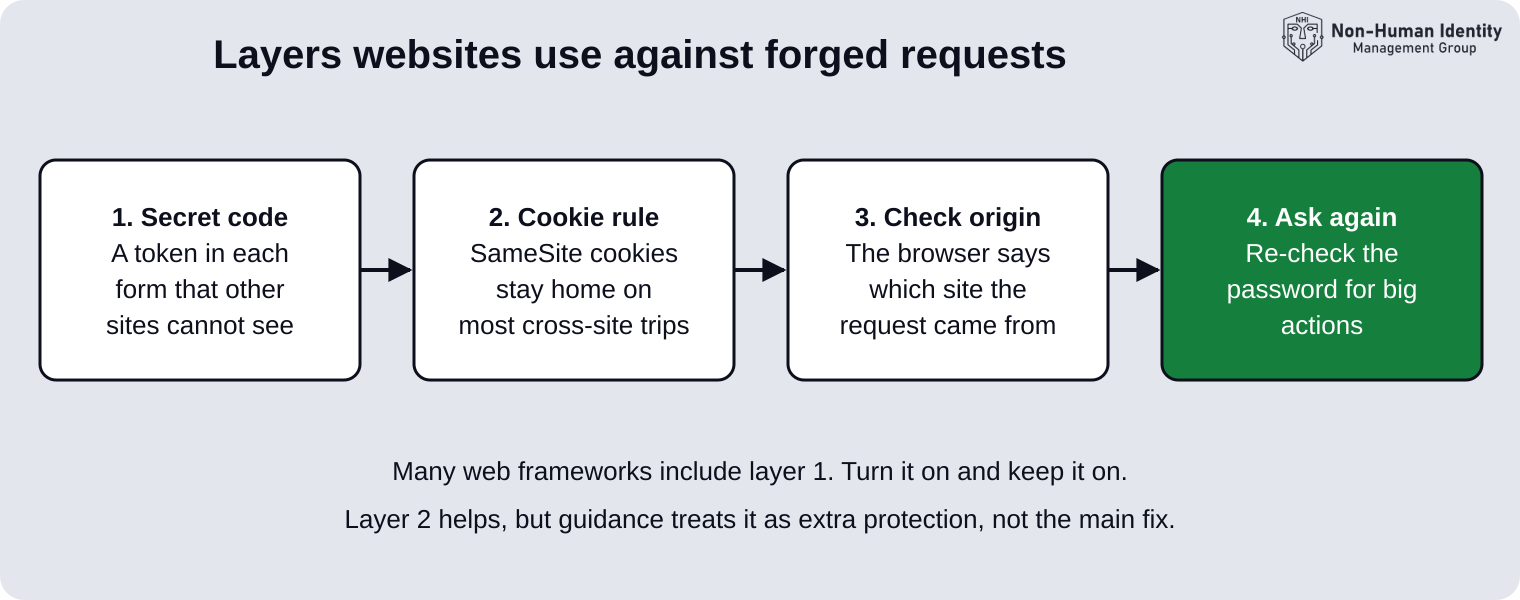
OWASP is a non-profit that publishes free web security advice. Its guidance says to check whether your web framework (the toolkit a site is built with) has built-in protection, and to use it.[1] It also says not to change data with simple link requests.[1]
Other layers help too. A cookie setting called SameSite tells the browser to hold back cookies from many cross-site requests. Guidance calls it extra protection, not a full defence on its own.[2] Modern browsers can also tell a site which site a request came from, and the site can refuse unexpected ones.[2] For big actions, like a money transfer, sites may ask for your password again.[1]
A worked example
Carmen Ortiz runs a fictional online club for amateur bakers, with about 800 members. Members sign in to post recipes and update their details.
Henrik Ibrahim, a volunteer developer, is moving the site to a new version of its web framework. While testing, he notices something. The "change email" page updates a member's email after a simple request, and it does not check for a secret form code.
He explains it to Carmen. "If a member is signed in and opens the wrong page, that page could change their email. Then someone could reset their password."
Carmen thinks of the sealed envelope. The site is the clerk, acting on whatever arrives in a member's hand. So she asks Henrik what it would take to fix.
Henrik turns on the framework's built-in token feature for every form that changes data. He makes sure data changes only through "post" requests. He sets the sign-in cookie to SameSite, as an extra layer. For email and password changes, the site now asks for the current password too.
Then he checks the site's records for email changes that members did not expect. He sees no unexpected changes in the records available to him, and no member has reported a problem.
Carmen adds a short note to the club's newsletter, reminding members to sign out on shared computers. She also asks Henrik to keep the framework updated.
Myths and mistakes
| What people think | What is true |
|---|---|
| HTTPS stops forged requests. | HTTPS protects data on the way. A forged request can still travel over HTTPS. |
| SameSite cookies are enough on their own. | They help, but guidance treats them as an extra layer, not a full defence.[2] |
| A strong password protects me. | The trick page does not need your password. It uses your signed-in browser. |
| Hidden form tokens fix every web flaw. | A flaw that lets attackers run script on the site, called cross-site scripting, can get around these defences.[1] |
| Simple links are fine for changing settings. | Data changes should not use simple link requests.[1] |
What can I do this week?
- Ask your developer or supplier whether the site's built-in forged request protection is on for every form.
- Check that settings changes use forms, not simple links.
- Ask whether the sign-in cookie uses the SameSite setting.
- Make sure big actions, like changing an email or password, ask for the password again.
- Sign out of banking and admin sites when you finish.
Checklist
- The framework's built-in forged request protection is turned on.
- Every form that changes data carries a secret form code.
- Data changes do not happen through simple link requests.
- Sign-in cookies use the SameSite setting as an extra layer.
- Big actions ask the user to confirm with a password or second check.
- The site is also tested for cross-site scripting.
- The framework and plug-ins receive updates promptly.
Common questions
Is CSRF the same as cross-site scripting?
No. Cross-site scripting puts harmful script inside a site. Forged requests come from a different site and borrow your signed-in browser. They are linked, because cross-site scripting can get around the defences against forged requests. See Cross-Site Scripting for Beginners.
Does signing out help?
Yes, it can. A forged request relies on you being signed in. If you sign out of a site when you finish, your browser has no live session cookie for that site to send. It is a sensible habit for banking, admin and email sites.
Do modern browsers stop this already?
They help, but you should not rely on them alone. Browsers support cookie settings and origin signals that sites can use. The site still has to turn these on and check them. Guidance treats browser features as extra layers, alongside the secret form code.
How is CSRF different from SSRF?
CSRF tricks your browser into sending a request to a website. Server-side request forgery tricks a website's own server into sending requests on its behalf, often to places inside a company network. See Server-Side Request Forgery for Beginners.
Do APIs need CSRF protection?
Often, yes, if they rely on cookies to know who you are. An API is a way for programs to talk to a site. One that sends a separate token with each request, not a cookie, is usually less exposed. Ask your developer which approach your site uses.
Where next?
Ready for the detail? Read the practitioner guide: CSRF Prevention Guide. It goes further into token patterns, cookie settings, origin checks and testing.
Also useful:
- CORS vs CSRF Protection
- Cookie Security Guide
- Session Tokens and Cookies for Beginners
- Same Origin Policy for Beginners
- Cross-Site Scripting for Beginners
Related NHI Mgmt Group resources: SSRF vs CSRF · The OWASP Top 10 for Beginners · Secure Coding Guide
Key terms
- Cross-site request forgery (CSRF)
- A trick where another web page makes your browser send a request to a site you are signed in to.
- A small file a site stores in your browser so it remembers you are signed in.
- CSRF token
- A hard-to-guess code a site puts in its own forms and checks when they come back.
- A small piece of data a website stores in your browser.
- Session hijacking
- Taking over someone's signed-in session, a related but different attack.
Sources and further reading
- Cross-Site Request Forgery Prevention Cheat Sheet. OWASP Cheat Sheet Series, OWASP Foundation. https://cheatsheetseries.owasp.org/cheatsheets/Cross-Site_Request_Forgery_Prevention_Cheat_Sheet.html, accessed 28 Nov 2026.
- Cross-site request forgery (CSRF). MDN Web Docs, Mozilla. https://developer.mozilla.org/en-US/docs/Web/Security/Attacks/CSRF, accessed 28 Nov 2026.