Security awareness is an organised programme that helps people recognise common security risks, such as phishing and scam calls, and respond in the right way, mainly by pausing, checking and reporting.
This guide is for newcomers, career changers, students and managers who are not security specialists. It explains what an awareness programme is, why it matters to a business of any size, how a simple programme runs from start to finish, a worked example, common myths and practical first steps. It looks at awareness from the organisation's side: how you build good habits across a team, not how to spot one particular scam.
By the end of this guide you will be able to:
- Explain what a security awareness programme is and what it is not.
- Understand why reporting matters more than never making a mistake.
- Describe the main stages of a simple awareness programme.
- Identify three first steps a small team can take this week.
Key takeaways
- Awareness is about habits, not a yearly video. The aim is behaviour change: people who pause, check and report, as part of normal work.
- Reporting is the most useful habit. A quick report lets the security team warn others and block a message, even if someone has already clicked.
- People are one layer, not the only one. Good guidance pairs training with technical controls such as email filtering and multi-factor authentication, so one mistake does less harm.
- Blame makes things worse. Staff who fear trouble report late or not at all, so a supportive culture is part of the defence.
- Small teams can start small. A clear reporting route, a rule for checking payment or password requests, and short regular reminders cover a lot of ground.
What it is, in plain English
Most attacks on organisations need a person to do something: open a link, type a password, approve a sign-in or change a bank account number. Attackers use social engineering, which means using deception, urgency and authority to persuade someone to reveal information or take a risky action. The best-known form is phishing: deceptive messages or websites that trick people into revealing credentials, running malware, approving access or sending money.
Security awareness is the organisation's answer. It is a programme that teaches people how to recognise and respond to common security risks. Security awareness training is the teaching part: short lessons on phishing, passwords, handling data and how to report problems. A full programme also includes reminders, practice exercises, an easy way to report, and a way to measure whether behaviour is improving.
NIST, the US standards body, describes this as a learning programme that covers awareness, training and education, with the goal of encouraging behaviour change and building a security and privacy culture. Its guidance is written for small organisations as well as large ones.[1]
A helpful comparison is road safety. Drivers learn the rules once, but safe driving comes from habits: checking mirrors, slowing down near schools, not using a phone. Roads also have barriers, speed cameras and seatbelts, so one mistake is less likely to be fatal. Security awareness builds the habits; technical controls are the barriers. Where the analogy breaks down: road hazards do not change their tactics, while attackers copy whatever works, so awareness content has to be refreshed regularly.
Why it matters to you
- If you run a small business: one convincing email asking to change a supplier's bank details can cost real money. A simple rule, "always check payment changes by phone using a number you already have", reduces that risk.
- If you are new to a security job: you will often be the person staff ask "is this email real?". How you respond shapes whether they ask again next time.
- If you are a manager: your team copies what you do. Leaders who report suspicious messages and follow the checking rules make those habits normal. The NCSC's culture principles include leading by example and fostering openness, so people feel safe raising concerns.[4]
The numbers show how common people-focused attacks are. The UK government's Cyber Security Breaches Survey 2025 found that 43% of UK businesses identified a breach or attack in the previous 12 months, and phishing was the most common type, reported by 85% of those businesses.[7] In the United States, the FBI's Internet Crime Complaint Center recorded 21,442 complaints of business email compromise in 2024, with reported losses of about 2.77 billion US dollars.[6] Business email compromise is a form of social engineering where an attacker impersonates a trusted person or domain to change payments or extract information, often without any malware.
The UK National Cyber Security Centre (NCSC) makes an important point: phishing defences often place too much weight on users spotting every bad email. It recommends layers instead: make it hard for attacks to reach people, help people spot and report them, limit the damage when one gets through, and respond quickly.[2] Awareness is the second layer, and it supports the other three.
How it works, step by step
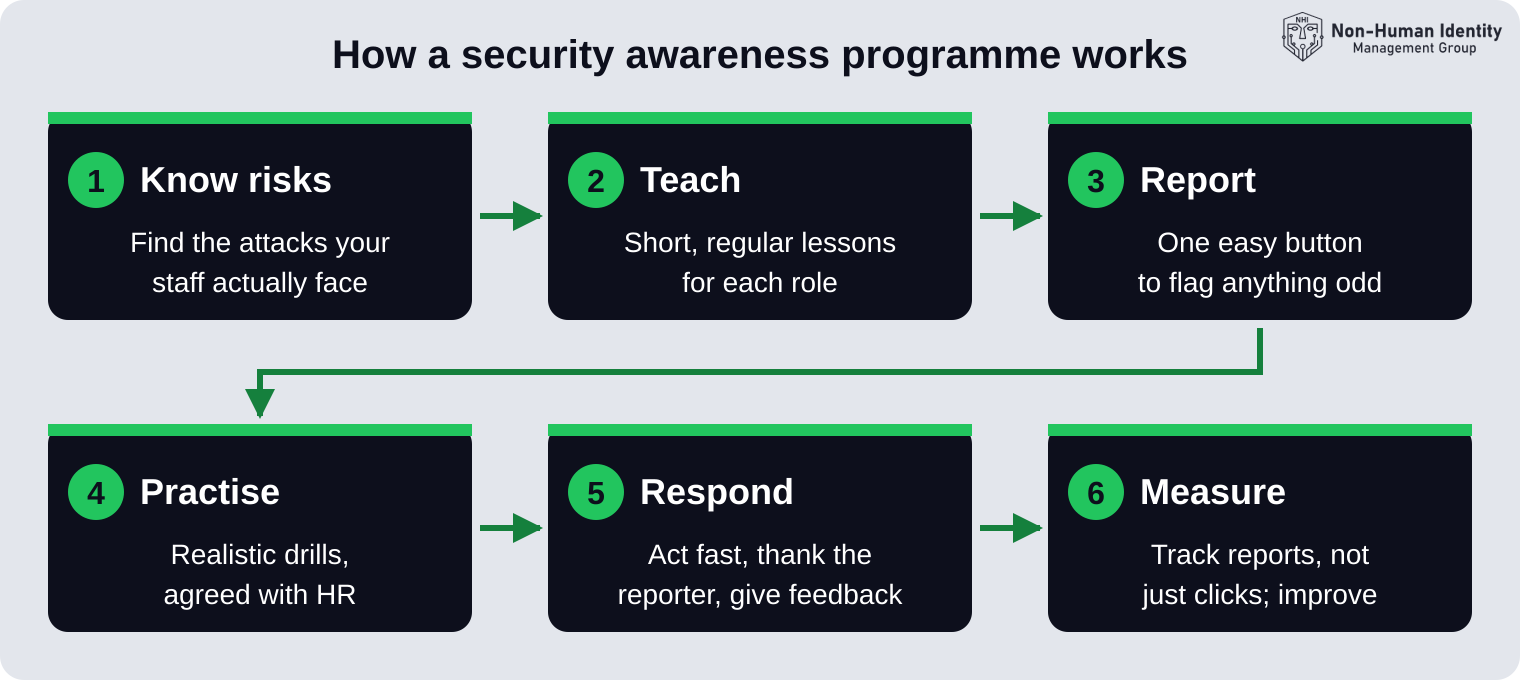
Programmes differ in size, but most follow the same cycle.
- Know your risks. Find out which attacks your organisation actually sees. Finance staff may get fake invoices; the IT service desk may get calls from people pretending to be staff who are locked out.
- Teach in short pieces. Give everyone a short introduction, then regular, brief lessons. Add extra content for roles that attackers target most, such as finance, the service desk and executives. CIS Control 14 describes this as a programme to influence behaviour across the workforce so staff are security conscious and properly skilled.[3]
- Make reporting easy. Give people one simple way to report a suspicious message or call, such as a report button in the email client. CISA, the US cyber security agency, advises people to report suspected phishing rather than click, and to delete the message without replying or using an "unsubscribe" link.[5]
- Practise. Some organisations run phishing simulations: harmless test emails that look like real attacks. The NCSC warns that simulations can be unrealistic and can create legal and morale risks, so agree them with HR first and treat them as learning, not a trap.[2]
- Respond and give feedback. When someone reports, the security team checks the message, removes copies from other inboxes if needed and thanks the reporter. The NCSC advises making reporting clear, simple and quick, with feedback to the person who reported.[2]
- Measure and improve. Track how many people report, how fast the first report arrives and whether incidents caused by people are falling. Use what you learn to choose the next lessons. NIST's guidance includes metrics and evaluation methods for this.[1]
The table below shows which habits matter most against everyday attacks. These are suggestions, not a standard.
| Everyday attack | Habit to build | Technical layer that helps |
|---|---|---|
| Phishing email with a link to a fake sign-in page | Pause on urgent messages; report instead of clicking | Email filtering; multi-factor authentication |
| Request to change a supplier's bank details | Check by phone using a number you already have | A finance process that needs two people to approve changes |
| Phone call from "IT support" asking for a code | Never share sign-in codes; call back through the official number | Service desk identity checks before resets |
| Text message about a parcel or bank problem | Treat texts like emails; go to the official app or website instead | Mobile device management on work phones |
| Unexpected sign-in approval prompt | Deny prompts you did not start, and report them | Sign-in methods that resist phishing, such as passkeys |
Useful distinctions
- Awareness, training and education are different levels. Awareness keeps a risk in mind (posters, reminders); training builds a skill (how to check a payment request); education builds deeper understanding for specialists. NIST's programme guidance covers all three.[1]
- Awareness is not the same as human risk management. Human risk management is a wider practice that also looks at how controls and processes affect behaviour, for example making the secure way the easy way. See the Security Awareness and Human Risk Management Guide for that wider view.
- Training does not replace controls. If a task is risky because of a weak process, such as bank detail changes by email alone, fix the process. Training is for risks that controls cannot fully cover.
A worked example
Harbour Print is a fictional printing company with 35 staff. Its only security training was a one-hour video once a year, and nobody knew how to report a suspicious email. Jo, the office manager, is asked to improve things.
- One reporting route: Jo's IT provider switches on the report button in the email system. Reports go to the provider, who promises a reply within one working day.
- Two clear rules: any change to bank details is checked by phone using the number on file, and nobody ever shares a sign-in code, even with "IT".
- Short monthly reminders: a five-minute item at the team meeting on one real example, often a message a colleague reported that month.
- A thank-you habit: the managing director thanks reporters in the team chat, including someone who admitted clicking a link and reported it straight away.
Three months later, Amir in accounts receives an email that seems to come from a regular paper supplier, saying their bank has changed. He calls the supplier on the number already on file. The supplier has not changed banks. Amir reports the email, the IT provider finds two more copies in other inboxes and removes them, and the supplier is warned that its email account may be compromised.
This does not make Harbour Print safe from every attack. A more convincing message could still fool someone, which is why the company also keeps multi-factor authentication switched on and its two-person approval for payments. What changed is that staff now know what to do, and the team hears about problems sooner.
Myths and misunderstandings
| What people think | What is true |
|---|---|
| Only careless people fall for phishing. | Well-made messages fool careful, experienced people too, especially when they are busy. That is why layered controls and fast reporting matter. |
| Poor spelling is the giveaway. | CISA notes that poor grammar is no longer a reliable sign, because AI tools can produce polished messages.[5] Urgency, unusual requests and odd links or addresses are better clues. |
| Punishing people who click makes them more careful. | The NCSC warns that users who fear reprisals will not report mistakes promptly, if at all.[2] Support and feedback work better. |
| A low click rate in a test proves the programme works. | Click rates change with how hard the test is. The NCSC suggests measuring reporting as well as clicks.[2] |
| Awareness is a once-a-year compliance task. | Habits fade and attacks change. Short, regular content tied to real examples is more useful than one long session. |
Key terms
- Security awareness
- A programme that teaches people how to recognise and respond to common security risks, judged by whether it changes behaviour.
- Security awareness training
- Teaching people to recognise and respond to security risks in daily work, such as phishing, passwords, data handling and reporting.
- Using deception, urgency and authority to persuade a person to reveal information or take a risky action.
- Phishing
- Deceptive messages or websites that trick people into revealing credentials, running malware, approving access or sending money.
- Smishing
- Phishing delivered by text message instead of email.
- Vishing
- Voice phishing: using phone calls to persuade someone to reveal information or approve access.
- Pretexting
- Inventing a believable story, such as posing as support staff or a supplier, to get information or trigger an action.
- Business email compromise
- Impersonating a trusted person or domain to change payments, bank details or extract sensitive information.
- Phishing simulation
- A controlled exercise that sends realistic but harmless test messages to see how people respond.
- Security culture
- The shared behaviours and expectations that shape how people report issues, handle pressure and use controls.
- Multi-factor authentication
- Signing in with two or more independent proofs, so a stolen password alone is not enough.
Common questions
What is security awareness training?
It is teaching people to recognise and respond to security risks at work, such as phishing, scam calls and unsafe data handling. It works best as short, regular lessons with a clear way to report problems.
How often should staff have awareness training?
No single standard sets one interval for everyone. We suggest a short introduction for new starters, then brief regular reminders, for example monthly, rather than one long yearly session. Check any rules your sector or customers set.
Are phishing simulations a good idea?
They can help if they are realistic, agreed with HR and used for learning. The NCSC cautions that badly run simulations can damage trust and create legal risk.[2] Some teams start with reporting drills or discussions of real examples instead.
What should someone do if they clicked a bad link?
Report it straight away through the agreed route, and say what happened, such as whether a password was typed in. Speed matters more than embarrassment. The security team can then reset passwords and check the account.
Which frameworks mention security awareness?
Several do. NIST SP 800-53 has control AT-2 Literacy Training and Awareness, including an enhancement on social engineering, AT-2(3).[8] The NIST Cybersecurity Framework 2.0 has an Awareness and Training category, PR.AT.[9] CIS Control 14 covers security awareness and skills training.[3] ISO/IEC 27001:2022 also has an Annex A control on awareness, education and training (A.6.3).
Is security awareness only about email?
No. Attacks also come by text message, phone call, chat apps, video calls and fake sign-in prompts. A good programme covers the channels your staff actually use.
First steps
Three things you can do this week:
- Set up one reporting route. Choose a single way to report suspicious messages or calls, tell everyone what it is, and make sure someone checks reports every working day.
- Agree two checking rules. For example: payment or bank detail changes are always confirmed by phone on a known number, and sign-in codes are never shared with anyone.
- Share one real example. At your next team meeting, spend five minutes on a real suspicious message your organisation received, what gave it away and how to report one. Thank anyone who has reported something.
Checklist
- Everyone knows the one way to report a suspicious message or call.
- Reports get a reply, and reporters are thanked, not blamed.
- New starters get a short security introduction in their first week.
- Staff receive short, regular reminders based on real examples.
- Finance, the service desk and executives get extra role-specific guidance.
- Payment and bank detail changes are always checked through a second channel.
- Multi-factor authentication is switched on for email and other key accounts.
- Any phishing simulations are agreed with HR and used for learning only.
- We track report numbers and time to first report, not only click rates.
Simple measures that show progress: the percentage of staff who have reported at least one message, the time from a phishing email arriving to the first report, the number of incidents that started with a person being tricked, and the share of high-risk roles that have had role-specific guidance.
Check your understanding
1. What is the main goal of a security awareness programme?
Answer: to change behaviour, so people pause, check and report, rather than simply to complete training.
2. Why is a quick report useful even after someone has clicked?
Answer: it lets the security team reset passwords, remove copies of the message from other inboxes and warn others before more harm is done.
3. Why does the NCSC advise against blaming people who fall for phishing?
Answer: people who fear reprisals report mistakes late or not at all, which gives attackers more time.
4. Name one technical control that should run alongside awareness.
Answer: for example email filtering, multi-factor authentication or a two-person approval process for payments.
Suggested learning pathway
- Start with Phishing for Beginners to learn how the most common attack works.
- Then read Social Engineering for Beginners for calls, texts and other manipulation tricks.
- For the sign-in habits that support awareness, see Password Security for Beginners.
- To learn what happens after a report, see Incident Response for Beginners.
- For the full practitioner view of programmes, metrics and culture, see the Security Awareness and Human Risk Management Guide.
- For running test emails safely, see the Phishing Simulation Programme Guide.
- For measuring your programme, see Security Awareness Metrics.
Standards and references
- SP 800-50 Rev. 1, Building a Cybersecurity and Privacy Learning Program. National Institute of Standards and Technology (NIST), September 2024. https://csrc.nist.gov/pubs/sp/800/50/r1/final.
- Phishing attacks: defending your organisation. National Cyber Security Centre (NCSC). https://www.ncsc.gov.uk/guidance/phishing, accessed 27 Nov 2026.
- CIS Critical Security Control 14: Security Awareness and Skills Training. Center for Internet Security (CIS). https://www.cisecurity.org/controls/security-awareness-and-skills-training, accessed 27 Nov 2026.
- Cyber security culture principles. National Cyber Security Centre (NCSC). https://www.ncsc.gov.uk/collection/cyber-security-culture-principles, accessed 27 Nov 2026.
- Recognize and Report Phishing. Cybersecurity and Infrastructure Security Agency (CISA). https://www.cisa.gov/secure-our-world/recognize-and-report-phishing, accessed 27 Nov 2026.
- Internet Crime Report 2024. Federal Bureau of Investigation, Internet Crime Complaint Center (IC3). https://www.ic3.gov/AnnualReport/Reports/2024_IC3Report.pdf.
- Cyber Security Breaches Survey 2025. Department for Science, Innovation and Technology, UK Government, published 10 April 2025. https://www.gov.uk/government/statistics/cyber-security-breaches-survey-2025/cyber-security-breaches-survey-2025.
- SP 800-53 Rev. 5, Security and Privacy Controls for Information Systems and Organizations. National Institute of Standards and Technology (NIST). https://csrc.nist.gov/pubs/sp/800/53/r5/upd1/final.
- The NIST Cybersecurity Framework (CSF) 2.0. National Institute of Standards and Technology (NIST), February 2024. https://www.nist.gov/cyberframework.
Related NHI Mgmt Group resources: CIS Control 14 Security Awareness and Skills Training Guide · Security Awareness and Training Policy Template · Business Email Compromise Response Playbook