A security policy is a written set of rules that says how an organisation protects its information.
This guide is for anyone who has been asked to read, sign or write a security policy and wants to know what it is for. You do not need to work in IT: if you use a work laptop, email or shared files, the policy is about you.
In short
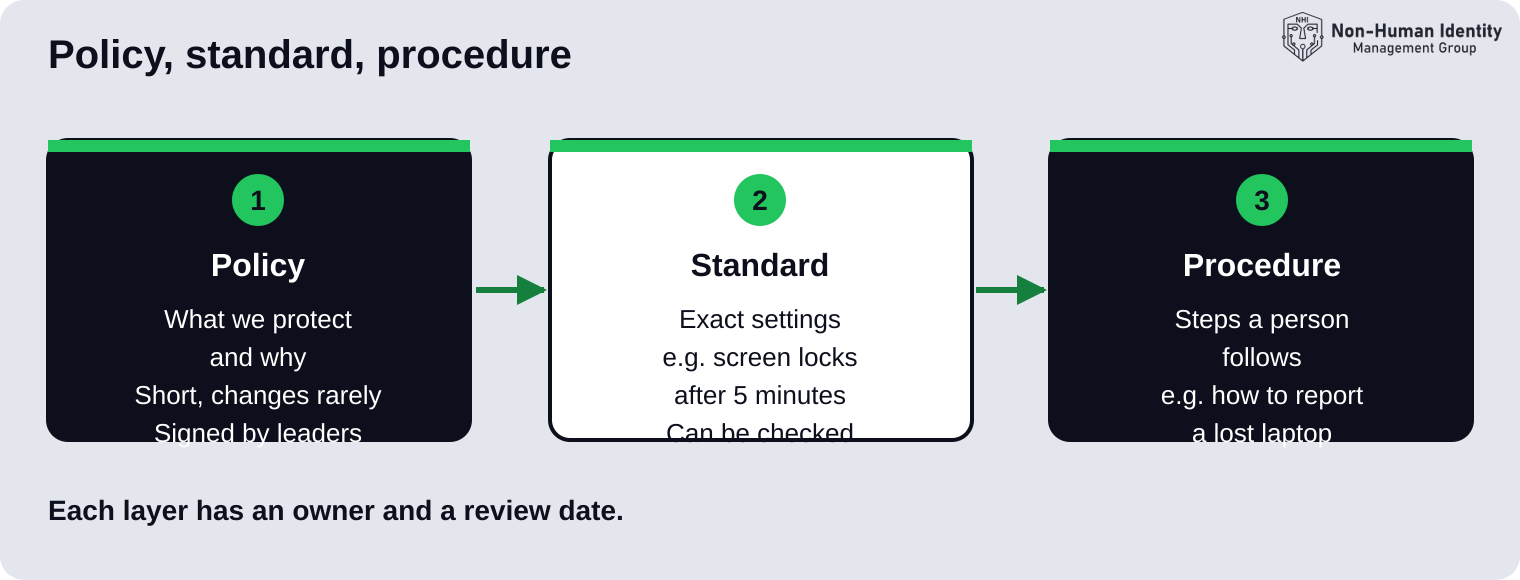
- A policy says what the organisation wants and why. It is short and changes rarely.
- Standards add the exact settings. Procedures give the steps to follow.
- Rules that are hard to follow tend to get worked around, so test them with the people who use them.
- Give every policy an owner, a review date and a way for staff to ask questions.
What you will learn
- Rule book (security policy)
- a short document that says what must be protected and why.
- Exact setting (standard)
- a rule that turns the policy into something you can measure, such as a password length.
- Step-by-step guide (procedure)
- the steps a person follows to do a task the right way.
What is a security policy?
Think of the food safety rules in a restaurant kitchen. The head chef says "we serve safe food". A chart on the wall says the fridge must stay at 5°C or below. A card by the sink shows how to wash your hands, step by step.
A security policy works the same way for information. It sets the goal and the limits. It says what must be protected and why, not exactly how.[1]
Most organisations use three layers. The policy is the "what and why". A standard is the exact setting, like the fridge temperature. A procedure is the step-by-step card by the sink.
Some organisations add guidelines too. These are helpful advice, not firm rules.
Where the comparison stops working: a fridge reading is easy to check with a thermometer. Many security rules are harder to see. Nobody notices when a file is shared with the wrong person until something goes wrong.
Why does it matter?
A policy tells everyone what "good" looks like. Without one, each person guesses, and the guesses differ.
If you are a member of staff
What could happen: you break a rule you never knew about, such as sending customer data to your personal email.
Check this: find out where your policies live and who to ask when a rule is unclear.
If you run a small business
What could happen: a customer or insurer asks for your security policy and you have nothing to show.
Check this: start with one short policy that covers passwords, devices, backups and reporting problems.
If you have been asked to write one
What could happen: you copy a long template, nobody reads it, and staff carry on as before.
Check this: ask a few people who do the work to try each rule before it is signed off.
What does it look like?
Here is one short part of a made-up policy, with the standard and procedure that sit under it.
Example only. All values are made up.
EXAMPLE LTD  Information Security Policy  v0.0
Owner: Head of Operations (FAKE NAME)       (1)
Next review: 00 Month 0000                  (2)
POLICY: Customer data stays on company      (3)
  systems, because we promised customers.
STANDARD: Laptops lock after 5 minutes and  (4)
  use full-disk encryption.
PROCEDURE: Lost a laptop? Tell the service  (5)
  desk at example.invalid within one hour.
- Every policy has a named owner who keeps it up to date.
- A review date, so the rules do not quietly go stale.
- The policy line: what and why, in plain words.
- The standard line: exact settings someone can check.
- The procedure line: what a person does, step by step. In a real file, this line would contain the service desk contact.
Why this is risky: a policy with no owner or review date tends to go stale. Without clear steps, people tend to ignore it.
The safer way: keep the policy short. Put the detail in standards and steps. Name who looks after each one.
How does it work?
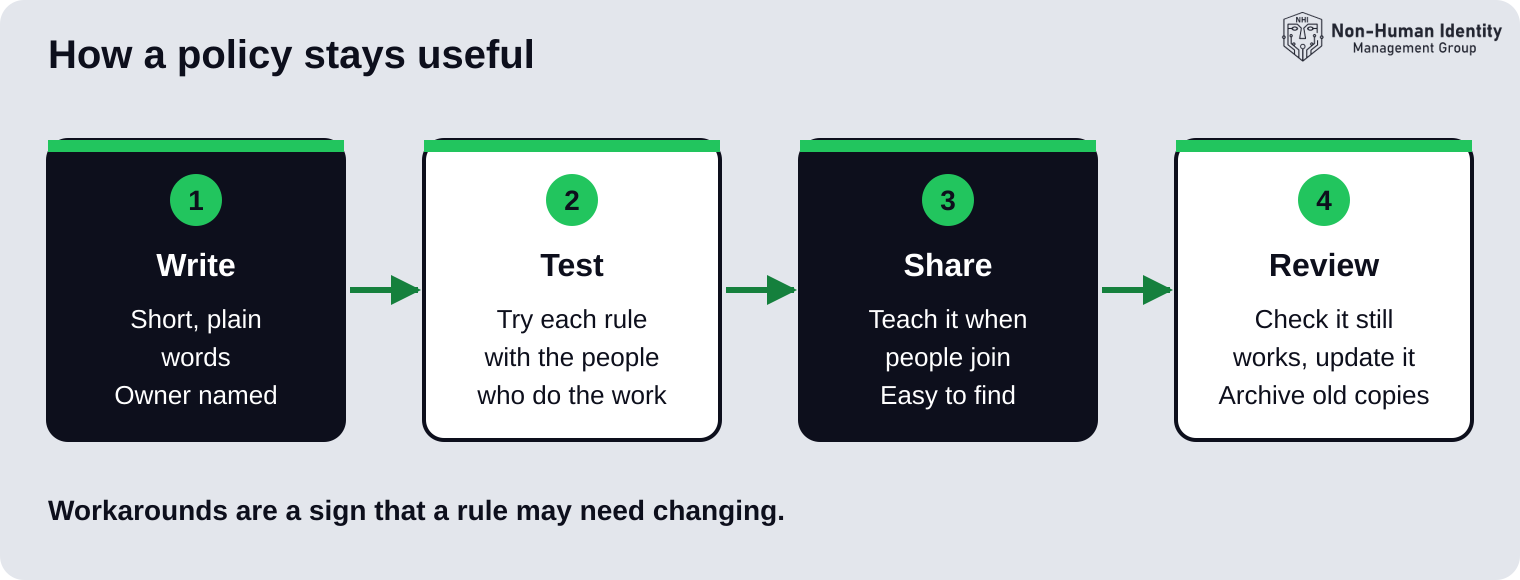
Here is a common way a policy goes from an idea to something people follow.
- Decide what matters. Leaders agree what information needs protecting and which risks worry them most.
- Write the policy. A short document sets the goals and the limits in plain words.
- Add standards and procedures. Technical and team leads add the exact settings and the steps.
- Test it with real users. The UK's National Cyber Security Centre (NCSC), the government's cyber security agency, advises involving people who know how local work is done.[2]
- Share and train. People learn the rules when they join and know where to find them.
- Review and improve. The owner checks the rules still work, updates them and removes old copies.[3]
A worked example
This story is made up to show how it can happen.
Yusuf Demir runs the office at Quayline Ferries, a small ferry company. A new insurer asks to see the company's security policy. Yusuf finds a 40-page document from six years ago. Nobody he asks has read it.
He starts again. First he writes a two-page policy. It says customer and booking data must stay on company systems, and why. It names him as the owner and sets a review date a year away.
Next he adds a short standard with the IT supplier. Laptops lock after five minutes. Staff use the company password manager. Backups run every night.
Then he writes three procedures on single pages. One covers a lost phone or laptop. One covers a strange email. One covers a new starter getting accounts.
Before signing anything off, Yusuf asks the booking team to try the rules for a week. They tell him one rule does not work. The old policy banned USB sticks. But the ticket printers at the port only take updates by USB. He changes the procedure so the IT supplier provides one approved stick and keeps a record of it.
At the next team meeting, Yusuf shows where the policy lives and who to ask. He sends the insurer the new policy and the date of the next review.
What made the difference: Yusuf kept the policy short and tested each rule with the people who had to follow it.
Myths and mistakes
| What people think | What is true |
|---|---|
| A longer policy is a better policy. | Long policies are rarely read. Keep the policy short and move detail into standards and procedures. |
| Once staff have signed it, the job is done. | Signing is not the same as following. The NCSC warns that awareness alone does not change behaviour if people cannot follow the rules.[2] |
| Workarounds mean staff are careless. | Often they mean the rule does not fit the work. Ask why, then fix the rule or offer a safer option.[2] |
| A free template will do as it is. | Templates are a good start, but they need your names, your tools and your risks before they make sense. |
| Policies are only for the IT team. | Most rules are about everyday work, like email, files and devices, so they apply to everyone. |
What can I do this week?
- Find your organisation's security policy and note who owns it.
- Check the date it was last reviewed. Ask the owner if it is more than a year old.
- Pick one rule you find hard to follow and tell the owner why.
- If you have no policy, write one page on passwords, devices, backups and reporting problems.
Checklist
- We have a short security policy that says what we protect and why.
- Each policy has a named owner and a review date.
- Exact settings live in standards, and steps live in procedures.
- People who do the work tried the rules before sign-off.
- New starters are shown where the policies live.
- Staff know who to ask when a rule is unclear or does not work.
- Old versions are archived so nobody follows the wrong copy.
Common questions
What is the difference between a policy and a procedure?
A policy says what the organisation wants and why. A procedure says how to do a task, step by step. For example, the policy says lost devices must be reported. The procedure says who to tell, how and by when.
How long should a security policy be?
As short as it can be while still being clear. Many small firms manage with a few pages. Put the long, technical detail into standards and steps. Then the policy stays easy to read and rarely needs to change.
How often should policies be reviewed?
Many firms review once a year, and also after a big change, such as a new system or an incident. The NCSC says to check that rules still work. It also says to archive old copies, so people do not follow the wrong one.[3]
Is a security policy the same as an acceptable use policy?
No. The security policy covers how the whole firm protects its information. An acceptable use policy is a smaller set of rules. It says how staff may use work devices, email and the web. Many firms have both, and the smaller one sits under the main one.
Where can I find a template to start from?
Free templates are a good place to look. One is a library from SANS, a security training body, and the Cybersecurity Risk Foundation.[4] Use one as a start. Cut what does not apply. Add your own names, tools and review dates.
Where next?
Ready for the detail? Read the practitioner guide: Information Security Policy Template. It goes further into a full policy structure, roles and approvals, and wording you can adapt.
Also useful:
- Security Policy Framework Guide
- Acceptable Use Policies for Beginners
- Security Awareness for Beginners
- Governance, Risk and Compliance for Beginners
Related NHI Mgmt Group resources: Security Policy Suite · Acceptable Use Policy vs Information Security Policy · Security Policy Writing Style Guide
Key terms
- Security policy
- A written statement of what an organisation must protect, why, and who is responsible.
- Information security policy
- The top-level policy that sets an organisation's overall approach to protecting information.
- Standard
- A rule that sets a measurable requirement, such as a minimum password length, to meet a policy.
- Procedure
- The step-by-step instructions a person follows to carry out a task the agreed way.
- Acceptable use policy
- Rules for how staff may use company devices, accounts, email and internet.
- Security awareness
- Helping people understand security risks and the rules, so they can act safely at work.
Sources and further reading
- Glossary: security policy (definition from NIST SP 800-82 Rev. 3: policies address the what and why, not the how). National Institute of Standards and Technology (NIST), Computer Security Resource Center. https://csrc.nist.gov/glossary/term/security_policy, accessed 28 Nov 2026.
- 10 Steps to Cyber Security: Engagement and training. National Cyber Security Centre (NCSC). https://www.ncsc.gov.uk/collection/10-steps-to-cyber-security/the-10-steps/user-education-and-awareness, accessed 28 Nov 2026.
- Cyber security culture principles: Principle 6. National Cyber Security Centre (NCSC). https://www.ncsc.gov.uk/collection/cyber-security-culture-principles/principle-6, accessed 28 Nov 2026.
- Security Policy Templates (free library with the Cybersecurity Risk Foundation). SANS Institute. https://www.sans.org/information-security-policy/, accessed 28 Nov 2026.