Cyber Essentials is a UK government-backed certificate showing a business has five basic cyber protections in place.
This guide is for owners and staff of small and medium-sized organisations, mainly in the UK, who have been asked about Cyber Essentials or are wondering if they need it. You do not need an IT team to get it: many small firms do it themselves or with help from a local supplier.
In short
- Cyber Essentials checks five basics: firewalls, secure settings, updates, who has access, and protection from harmful software.
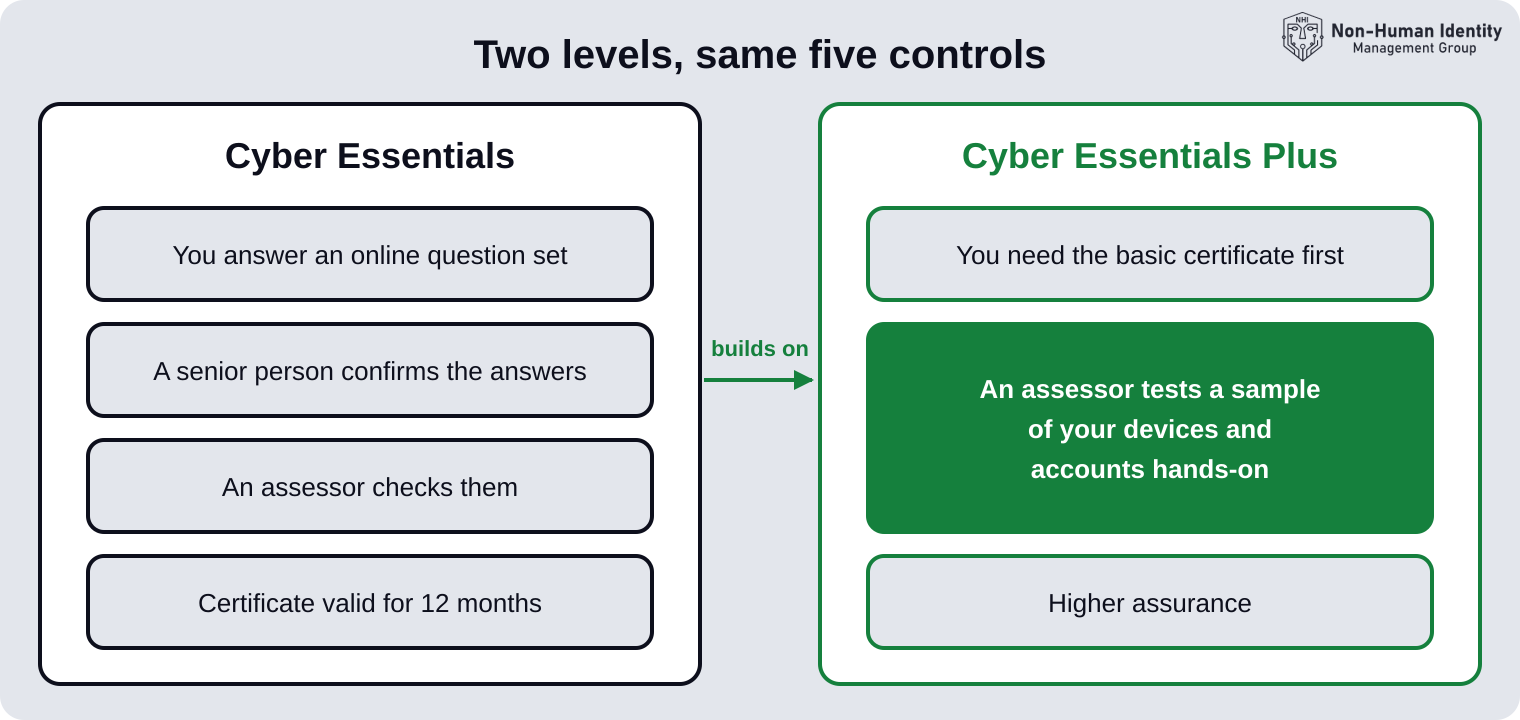
- There are two levels. Cyber Essentials is an online question set checked by an assessor. Cyber Essentials Plus adds a hands-on technical test.
- You may need it if a customer asks for it, especially for some UK government work. Many firms choose it anyway as a solid starting point.
- The certificate lasts 12 months, so you renew it every year.
What you will learn
- Explain what Cyber Essentials is and what it checks.
- Tell the difference between Cyber Essentials and Cyber Essentials Plus.
- Check whether your business is likely to need it.
- Spot the common reasons firms fail, before you apply.
Status: correct as at 28 November 2026, based on the NCSC and IASME websites. The scheme is updated from time to time; check the official pages before you apply.
This guide explains the topic in general terms and is not legal advice.
- Security filter (firewall)
- a barrier that controls what can pass between the internet and your computers.
- Software fixes (security updates)
- changes from the maker that close known weak spots in software.
- Second sign-in check (MFA)
- proving it is you with a second thing, such as a code from an app, as well as a password.
What is Cyber Essentials?
Think of an MOT for your car. It does not promise the car will not break down, but it checks the basics that keep it safe to drive. Cyber Essentials does the same for a business's computers.
Cyber Essentials was made by the UK government's cyber security agency. The agency calls it the basic level of cyber security it suggests for every organisation, big or small.[1] It is run by an official partner called IASME.
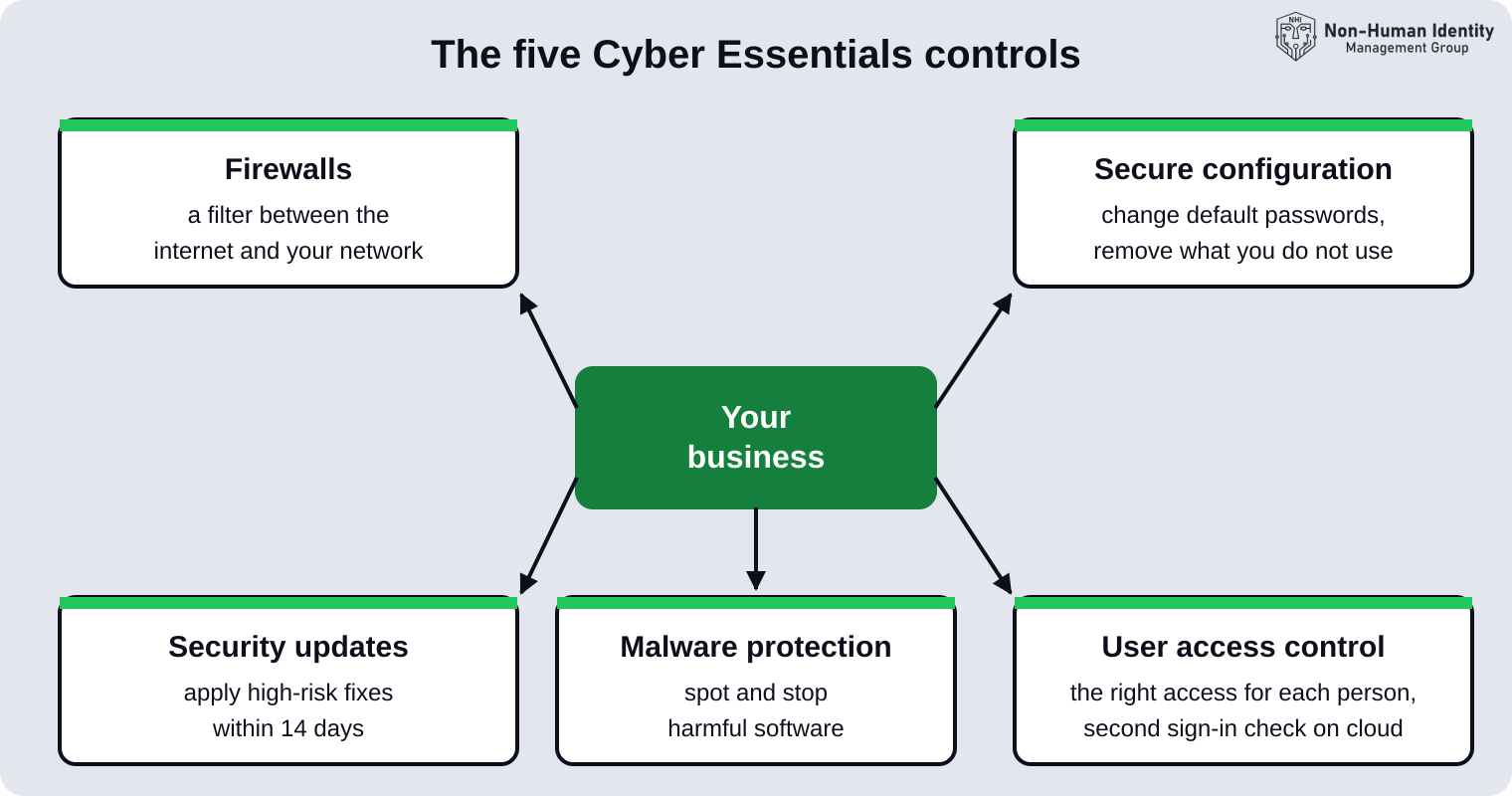
It checks five basic controls:[1]
- Firewalls: a filter between the internet and your computers.
- Secure configuration: setting up devices so there are fewer ways in. For example, you change the password a device came with.
- Security update management: keeping software up to date to fix weak spots.
- User access control: each person can reach only what they need.
- Malware protection: finding and blocking harmful software.
Where the comparison stops working: an MOT tester checks the car in person. At the basic level of Cyber Essentials, you answer questions about your own systems, and an assessor checks your answers. Only the Plus level adds a hands-on test.
Why does it matter?
The five controls deal with many common attacks. The UK cyber security agency says more and more buyers ask suppliers to be certified before they can bid for work.[1]
If you run a small business
What could happen: you miss out on a contract because a customer asks for the certificate and you do not have it.
Check this: look at recent tenders and contracts to see if they mention Cyber Essentials.
If you look after IT in a small office
What could happen: an old laptop that no longer gets updates, or a cloud app without a second sign-in check, could fail the assessment.
Check this: list every device and online service the business uses before you start.
If you are a director or manager
What could happen: you sign the declaration without knowing whether the answers are true.
Check this: a senior person must confirm the answers are accurate, so ask to see the evidence first.
What does it look like?
Here is a made-up "Am I ready?" card a small firm might fill in before applying.
Example only. All values are made up.
Firm: EXAMPLE Joinery Ltd (example.com)      Staff: 8
Firewall on router and every laptop              yes
Default passwords changed on all devices         yes
All software still getting security updates      no   (1)
Updates applied within 14 days                   no   (2)
Second sign-in check on all cloud services       no   (3)
Staff use normal accounts, not admin accounts    yes
Anti-malware on every laptop                     yes
- One office PC runs a version of Windows that no longer gets updates.
- Updates sit waiting for weeks because nobody restarts the laptops.
- The online accounts package has a second sign-in check, but it is switched off.
Why this is risky: under the current rules, any one of these three gaps could be enough to fail the assessment.[3] More importantly, they are the kind of gaps attackers look for.
The safer way: replace or remove the old PC and turn on automatic updates. Switch on the second sign-in check for every cloud service that offers it. Then apply.
How does it work?
For the basic level, the official route looks like this.[2]
- Prepare. Read the free official guidance and question set, and decide what is in scope. Scope means which parts of the business the certificate covers. Cloud services cannot be left out.[3]
- Buy the assessment. The price depends on the size of your organisation. You then have up to six months to complete it.
- Answer the questions online. You can save and come back. A senior person, such as a director, must confirm the answers are accurate.
- Get checked. A qualified assessor reviews your answers. If they need more, you can update and send it back.
- Get your certificate. Once you meet the requirements, the certificate is issued with a digital badge. It is valid for 12 months.
Cyber Essentials Plus uses the same five controls. It adds independent technical testing to check that they really work.[1] You need the basic certificate first.[2]
The rules were updated in April 2026. The current requirements are version 3.3, which took effect on 27 April 2026.[4] Under them, a second sign-in check is required on cloud services wherever it is available. High-risk or critical updates must be applied within 14 days of release.[3]
A worked example
Rhys Morgan runs a joinery firm in Cardiff with eight staff. A local council invites him to quote for fitting new doors in its offices. The tender form asks for a Cyber Essentials certificate.
Rhys has never heard of it. He asks Zoe Atkinson, who looks after the firm's computers two days a month.
Zoe explains it like an MOT. "It checks the basics. We answer questions about our set-up, and an assessor checks the answers."
They start by listing everything: six laptops, one old office PC, the router, staff phones used for email, and three online services. These are email, the accounts package and a shared drive.
Zoe downloads the free question set and works through it. Three gaps show up. The old office PC no longer gets security updates. Laptops are often weeks behind on updates. And the accounts package has its second sign-in check switched off.
Over two weeks they fix them. Rhys replaces the old PC. Zoe turns on automatic updates and asks staff to restart every Friday. She switches on the second sign-in check for all three online services and helps each person set it up.
Then they apply. Rhys reads every answer before he confirms it, because his name goes on the declaration. The assessor asks one question about the router, Zoe sends a screenshot, and the certificate arrives.
Rhys puts a reminder in his diary for eleven months' time, so the renewal does not catch him out.
Myths and mistakes
| What people think | What is true |
|---|---|
| Once certified, we are protected from attacks. | It covers the basics only. It lowers the risk from common attacks but does not remove all risk. |
| It is a one-off. | The certificate is valid for 12 months. Renew every year and keep the controls in place in between.[2] |
| Cloud services like email do not count. | Cloud services are in scope and cannot be left out. Turn on the second sign-in check wherever it is offered.[3] |
| It is only for big companies. | It is designed for organisations of all sizes, and the lowest price band is for firms with fewer than ten staff.[2] |
| Someone in IT can sign it off for us. | A senior person, such as a director, must confirm the answers are accurate.[2] |
What can I do this week?
- Look at recent tenders and contracts to see if they ask for Cyber Essentials.
- List every device and online service your business uses, and add staff phones that get work email.
- Find any device or program that no longer gets fixes from its maker.
- Turn on the second sign-in check on every cloud service that offers it.
- Download the free question set from the official website and read it through before you start.
Checklist
- You know which parts of the business the certificate will cover.
- Every device and online service is on a list.
- Firewalls are on for the router and every laptop.
- Default passwords are changed and unused accounts and software removed.
- All software still gets updates, and high-risk fixes go on within 14 days.
- Staff use normal accounts day to day, with admin accounts kept for admin tasks.
- A second sign-in check is on for every cloud service that offers one.
- Every laptop has malware protection switched on.
- A director has read the answers and knows they are signing the declaration.
Common questions
Does my business legally need Cyber Essentials?
No law requires it for most businesses. You may need it to win certain work. Since 2014, UK central government has required it for some contracts, such as those handling personal information.[5] Other customers may ask for it too, so check each contract.
How much does Cyber Essentials cost?
The basic level is priced by the size of your organisation. As at November 2026, IASME lists prices from £320 plus VAT for firms with up to nine staff.[2] Cyber Essentials Plus is quoted separately, based on the size and complexity of your network. Check the official site for current prices.
Should I get Cyber Essentials or Cyber Essentials Plus?
Start with Cyber Essentials, because you need it before Plus. Choose Plus if a customer asks for it or you want stronger proof that your controls work. Plus adds a hands-on test by an assessor.
How long does it take?
It varies with how ready you are. Once you buy the assessment you have up to six months to finish. IASME says the assessor reviews your answers within three working days.[2] Most of the time goes on fixing gaps before you apply.
Is Cyber Essentials the same as ISO 27001?
No. Cyber Essentials checks five technical basics. ISO 27001 is a world standard for running security across the whole business, and it is a much bigger project. Many firms start with Cyber Essentials. See Cyber Essentials vs ISO 27001.
Where next?
Ready for the detail? Read the practitioner guide: Cyber Essentials Guide. It goes further into scope rules, cloud shared responsibility, what the Plus audit tests and a phased approach to getting certified.
Also useful:
- Cyber Essentials Readiness Checklist
- Firewalls for Beginners
- Patch Management for Beginners
- Multi-Factor Authentication for Beginners
- Malware for Beginners
Related NHI Mgmt Group resources: Cyber Essentials vs ISO 27001 · ISO 27001 for Beginners · Password Security for Beginners
Key terms
- Cyber Essentials
- A UK government-backed scheme that certifies an organisation has five basic technical cyber security controls in place.
- Cyber Essentials Plus
- The higher level of Cyber Essentials, which adds hands-on technical testing of your systems.
- Firewall
- A filter that controls what traffic can pass between the internet and your devices.
- Secure configuration
- Setting up devices and software so there are as few ways in as possible.
- Security update
- A fix from a software maker that closes a known weak spot.
- User access control
- Making sure each person can reach only the data and systems they need.
- Malware protection
- Tools and settings that spot and stop harmful software.
- Multi-factor authentication
- Signing in with a second kind of proof, such as a code from an app, as well as a password.
Sources and further reading
- About Cyber Essentials. National Cyber Security Centre (NCSC). https://www.ncsc.gov.uk/cyberessentials/overview, accessed 28 Nov 2026.
- Cyber Essentials. IASME Consortium. https://iasme.co.uk/cyber-essentials/, accessed 28 Nov 2026.
- Important Update: Changes to Cyber Essentials for April 2026. IASME Consortium. https://iasme.co.uk/articles/important-update-changes-to-cyber-essentials-for-april-2026/, accessed 28 Nov 2026.
- Cyber Essentials resources (Requirements for IT infrastructure v3.3, effective 27 April 2026). National Cyber Security Centre (NCSC). https://www.ncsc.gov.uk/cyberessentials/resources, accessed 28 Nov 2026.
- Procurement Policy Note 09/14: Cyber Essentials scheme certification. Cabinet Office, GOV.UK, 26 September 2014 (updated 26 May 2016). https://www.gov.uk/government/publications/procurement-policy-note-0914-cyber-essentials-scheme-certification, accessed 28 Nov 2026.