An acceptable use policy is a short set of rules for how people may use an organisation's computers and data.
This guide is for anyone who has been asked to sign one at work, or who has to write one for a small team. You do not need to be technical: if you have a work laptop, email account or shared drive, a policy like this probably applies to you.
In short
- An acceptable use policy (AUP) says what you may and may not do with work devices, accounts and data.
- Most people are asked to read and accept it before they get access, and again when it changes.
- A good AUP is short, plain and fair, and it tells staff what the organisation monitors.
- Rules that get in the way of real work tend to be ignored, so ask staff how they work before you write.
What you will learn
- Explain what an acceptable use policy is in one sentence.
- Spot the main topics a good policy covers.
- Check whether your own policy is clear and up to date.
- Ask the right questions before you sign one.
- Rules for using work IT (acceptable use policy)
- a document that sets out what people may do with an organisation's systems and data.
- Sign to agree (acknowledgement)
- a record that you have read the rules and agree to follow them.
What is an acceptable use policy?
Think of the rules on the wall at a swimming pool. No running, no glass, shower first. Everyone sees them before they get in, and the staff can point to them if something goes wrong.
An acceptable use policy does the same job for work IT. It covers things like passwords, email, websites, personal use of work kit, and where files may be saved.
It is usually one part of a wider set of security rules. The top document, often called an information security policy, says what the firm wants to protect. The AUP turns that into plain rules for everyday users.
People are normally asked to accept it before they get access. A US government security catalogue describes the same idea as "rules of behaviour". It asks organisations to get each user's written agreement first, and to ask again when the rules change.[1]
Where the comparison stops working: pool rules rarely change. Work IT changes all the time, with new apps, devices and AI tools, so an AUP needs a regular review.
Why does it matter?
Many problems start with an everyday choice, such as sharing a password or saving files to a personal drive. Clear rules make the safe choice the obvious one.
If you are a new employee
What could happen: you break a rule you never knew about, such as forwarding work files to your personal email.
Check this: read the policy before you sign, and ask about anything that is unclear.
Next: Shadow IT for Beginners
If you run a small business
What could happen: without written rules, it is hard to say what someone did wrong, or to act fairly.
Check this: make sure every person with an account has accepted a current version.
If you manage a team
What could happen: rules that slow people down get quietly ignored, and leaders who skip them send the message that everyone can.
Check this: ask your team which rules get in their way, and pass that back to the policy owner.
If you work in HR
What could happen: checking on staff without telling them can break data rules and damage trust.
Check this: make sure the policy says plainly what is monitored and why.
Next: UK GDPR for Beginners
What does it look like?
Example only. All values are made up.
EXAMPLE Ltd - Acceptable Use Policy v0.0 (FAKE)
Applies to: all staff and contractors          (1)
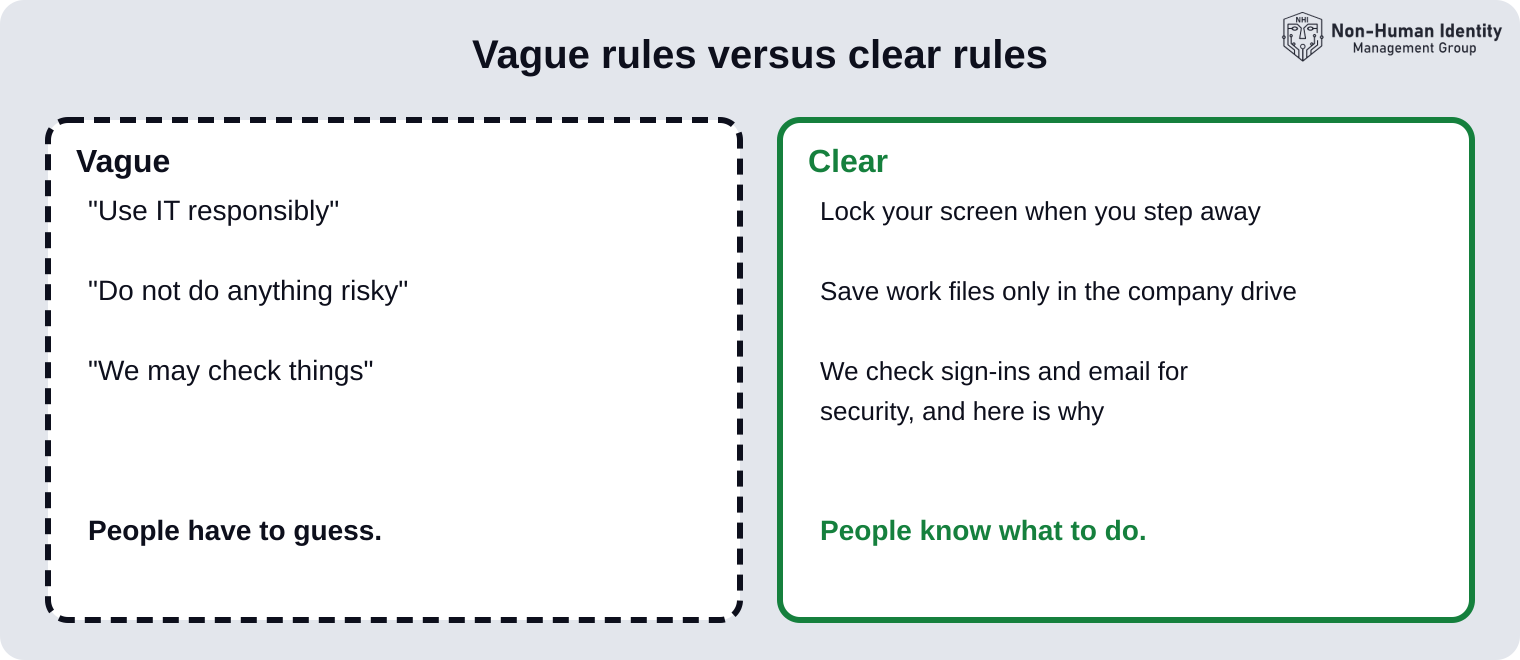
You must: lock your screen when you step away
You must not: share your password with anyone   (2)
Store work files only in: files.example.com     (3)
Personal use: allowed in moderation
We monitor: sign-ins and email for security     (4)
Report problems to: IT desk (EXAMPLE-0000)      (5)
Review date: every 12 months
I have read and agree: [ sign here ]            (6)
- Who the rules cover, including people who are not employees.
- A clear "must not", written so anyone can follow it.
- Where data should live. In a real file, this line would name the approved storage service.
- What the organisation watches, and the reason for it.
- Who to tell when something goes wrong.
- The acknowledgement: a record that this person accepted the rules.
Why this is risky: a policy missing lines like (3), (4) or (5) leaves people guessing where to save files, what is watched and who to call.
The safer way: keep it short, write each rule as a plain action, and put detailed technical settings in separate documents the policy points to.
How does it work?
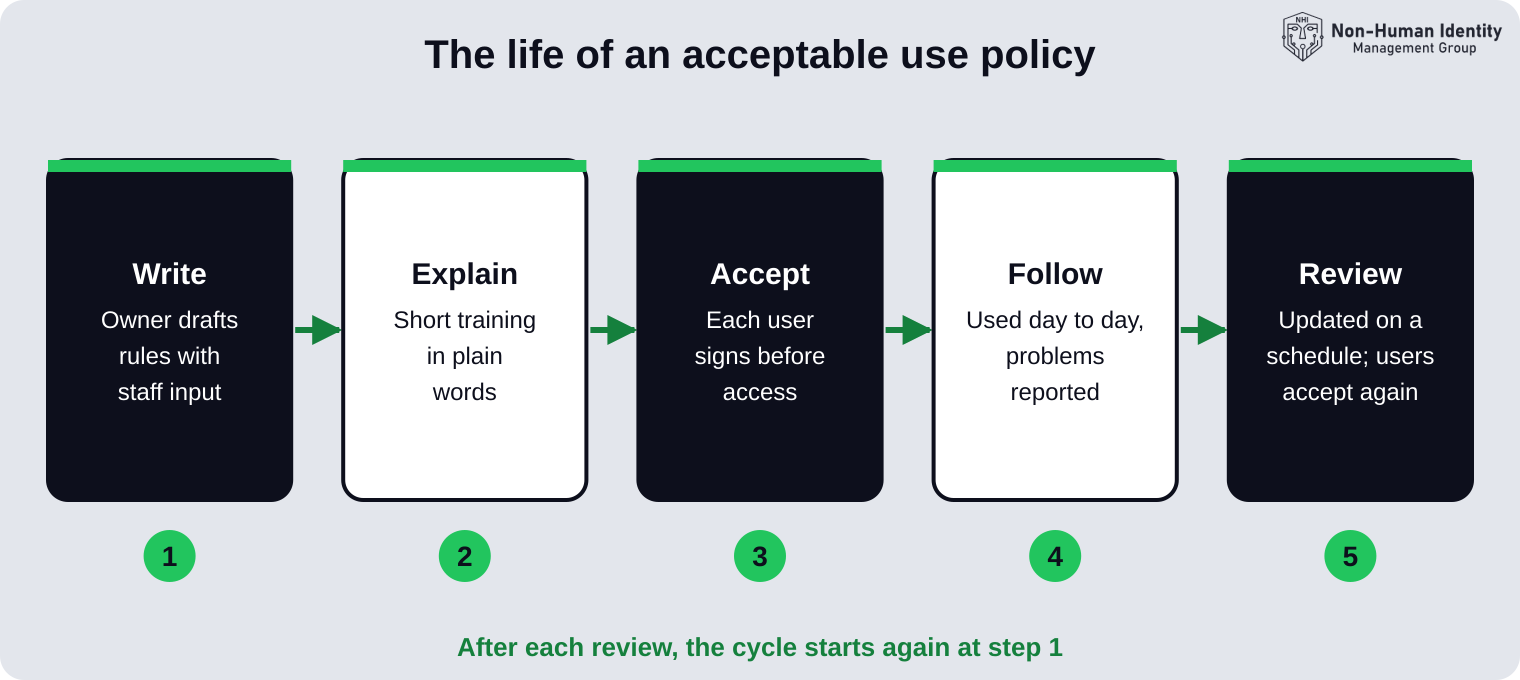
- Someone owns it. A named person, often the security lead, writes the policy and keeps it up to date.
- It is written with users. The UK cyber security agency advises involving people who know how work is really done, so the rules fit daily tasks.[2]
- People accept it. Each user reads it and gives a recorded agreement before getting access.[1]
- It is explained, not just filed. Short training and reminders help the rules stick.
- It is reviewed. The owner updates it on a set schedule or when things change, and asks users to accept the new version.[1]
Monitoring needs special care. The UK data protection regulator says employers must tell workers about monitoring in plain words. They should also pick the least intrusive way to meet their aim.[3]
A worked example
This story is made up to show how it can happen.
Seb Diallo is the office manager at Dune Recruitment, a recruitment firm with 30 staff. The firm has never had written IT rules. Everyone just "knows" what is fine.
One Monday a consultant's tablet goes missing. It had the shared login for the candidate database saved on it. Seb realises nobody can say who knew that password, or whether staff were allowed to save it.
Seb decides to write a simple acceptable use policy. He starts from a template, then cuts it down hard. He keeps rules on passwords, lost devices, where files are saved, personal use and who to call.
Before he finishes, he asks three consultants and two office staff what gets in their way. The consultants say they share one login because setting up their own takes too long. Seb asks the IT supplier to give each consultant an account. The policy can now say "never share your login" and mean it.
He adds a plain line on monitoring. It says the firm checks sign-ins to the candidate database for security, and nothing more.
Every person reads the two pages and signs. Seb puts a reminder in his calendar to review it in a year.
Three months later another tablet is left on a train. This time the consultant reports it within the hour, as the policy asks. The supplier signs the tablet out of every account, and no one else can use the saved login.
What made the difference: Seb fixed the reason people broke the rule before he wrote the rule.
Myths and mistakes
| What people think | What is true |
|---|---|
| A longer policy is a safer policy. | Long policies tend to go unread. Keep the AUP short and put the technical detail in separate documents. |
| Once everyone has signed, the job is done. | Rules need explaining and reviewing. Ask people to accept again when the policy changes.[1] |
| We can monitor anything on work devices without saying so. | UK guidance says workers should be told about monitoring, and secret monitoring is rarely justified.[3] |
| If people break the rules, they need more training. | Often the rule does not fit the job. Find out why people work around it and fix that first.[2] |
| The AUP only covers employees. | Most policies also cover contractors, temporary staff and anyone else given access. |
What can I do this week?
- Find your organisation's acceptable use policy and read it once from start to finish.
- Note any rule you do not understand, and ask the policy owner what it means.
- Check where you save work files, and compare it with what the policy says.
- If you own the policy, check when it was last reviewed and who has not yet accepted it.
Checklist
- Our policy has a named owner and a review date.
- It says who it applies to, including contractors.
- Each rule is written as a plain action.
- It covers passwords, devices, email, websites, data storage and personal use.
- It says what is monitored and why.
- It tells people how to report a problem or a lost device.
- Every user has accepted the current version.
- Staff were asked how they work before the rules were written.
Common questions
Do I have to sign an acceptable use policy?
Usually, yes, if you want to use work systems. Most firms ask you to agree before they give you an account. If a rule seems unfair or unclear, ask about it before you sign. Your manager or HR team should explain it.
What happens if I break the policy?
Usually your organisation's normal disciplinary steps apply. A small slip may lead to a reminder. A serious breach may lead to formal action. Owning up to a mistake quickly is usually treated far better than hiding it, so tell someone straight away.
Is an AUP the same as an information security policy?
No. The information security policy sets the big goals and says who is in charge. The AUP is the everyday rulebook for users, in plain words. Most firms have both. The AUP sits under the wider policy.
Can my employer read my work email?
Often it can, for set reasons such as security. In the UK, the data protection regulator says firms should tell staff about monitoring and keep it fair and in proportion. Your AUP or a privacy notice should say what is checked and why.[3]
Should the AUP cover AI tools?
It should at least point to the rules. AI chat tools raise their own questions, such as what data you may paste in. Many firms write a separate AI policy and link to it from the main AUP. That way each one stays short.
Where next?
Ready for the detail? Read the practitioner guide: Acceptable Use Policy Template. It gives ready-to-edit wording for each section, roles and responsibilities, and rules for privileged users and service accounts.
Also useful:
- Acceptable Use Policy vs Information Security Policy
- AI Acceptable Use Policies for Beginners
- Shadow IT for Beginners
- BYOD for Beginners
- Security Awareness for Beginners
Related NHI Mgmt Group resources: AI Acceptable Use Policy Template · BYOD Policy Template · Password Security for Beginners
Key terms
- Acceptable use policy
- A document that sets out how people may and may not use an organisation's systems, accounts and data.
- Information security policy
- The top-level document that says what an organisation protects and who is responsible.
- Shadow IT
- Apps, devices or services used for work without the organisation's approval.
- Policy exception
- An approved, recorded and time-limited permission to do something the policy would normally not allow.
- Security awareness
- Helping people understand security risks and the simple habits that reduce them.
Sources and further reading
- SP 800-53 Rev. 5, Security and Privacy Controls for Information Systems and Organizations, control PL-4 Rules of Behavior (establish rules, get documented acknowledgement before access, review and re-acknowledge). National Institute of Standards and Technology (NIST). https://csrc.nist.gov/pubs/sp/800/53/r5/upd1/final, accessed 28 Nov 2026.
- 10 Steps to Cyber Security: Engagement and training. National Cyber Security Centre (NCSC). https://www.ncsc.gov.uk/collection/10-steps/engagement-and-training, accessed 28 Nov 2026.
- Employment practices and data protection: monitoring workers, section "Data protection and monitoring workers". Information Commissioner's Office (ICO). https://ico.org.uk/for-organisations/uk-gdpr-guidance-and-resources/employment/monitoring-workers/data-protection-and-monitoring-workers/, accessed 28 Nov 2026.