A security rating is a score that estimates how well an organisation protects itself, judged from outside.
This guide is for people who buy from suppliers, run a small business or manage a team, and have been shown a supplier's security score. You do not need a technical background to use one well: you only need to know what the number can and cannot tell you.
In short
- Rating firms collect signals they can see from outside, then turn them into a score or grade.
- A score is a useful first look, but it cannot see inside a supplier's systems.
- Scores can be wrong. Rated firms should be able to see and challenge their own score.
- Use the score to start questions, then ask the supplier for evidence before you decide.
What you will learn
- Explain what a security rating measures in one sentence.
- Spot what a rating report can and cannot see.
- Ask a supplier useful questions about a low or falling score.
- Check your own organisation's score if a customer quotes it to you.
- Outside score (security rating)
- a number or grade a rating firm gives an organisation based on what it can observe.
- Supplier checks (third-party risk management)
- the work of judging and watching the risks that suppliers bring.
What is a security rating?
Think of a credit score. A lender looks at your payment records and gives you a number. It is quick and handy, but it does not know why you paid late once.
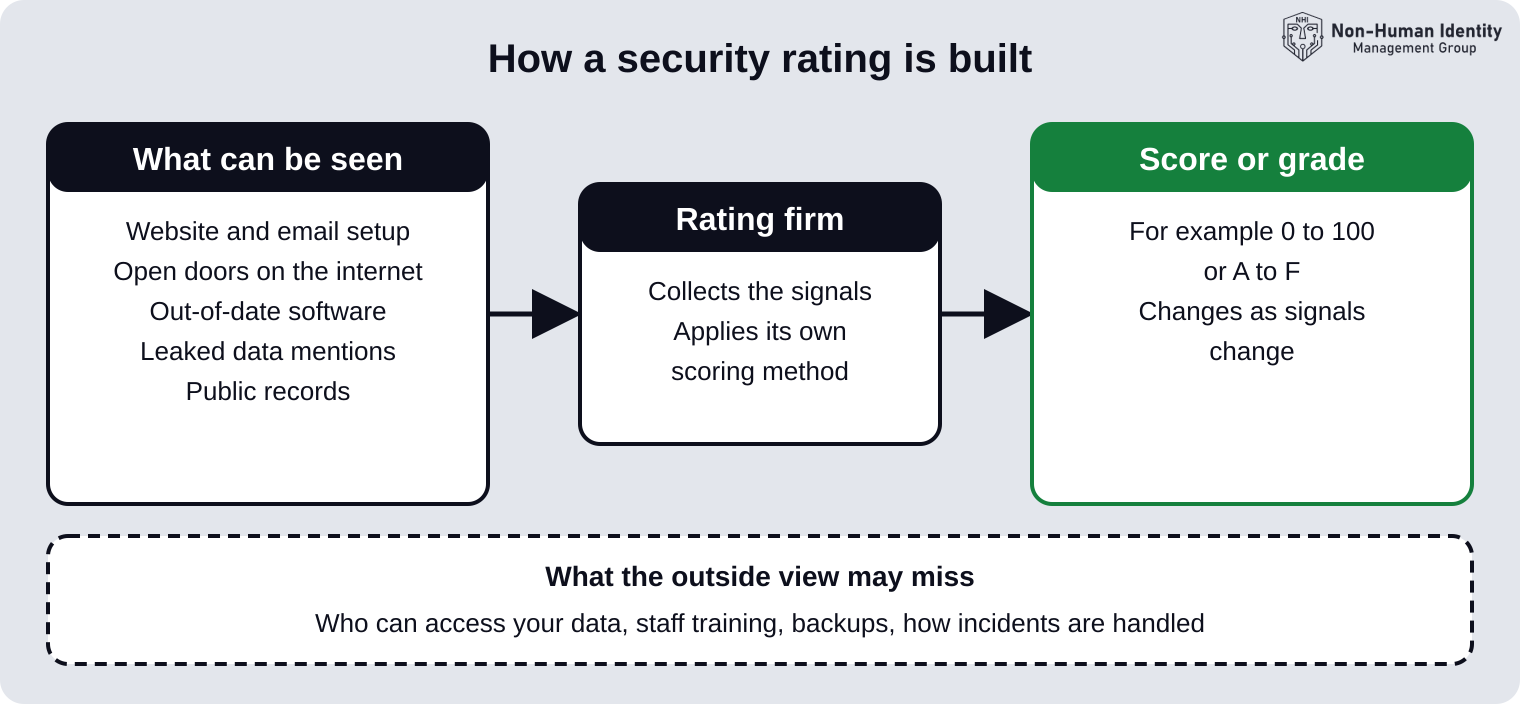
A security rating works in a similar way for an organisation's cyber security. A rating firm collects information from public and private sources. It then uses its own method to turn that information into a score.[1] Scores may look like a number out of 100 or a letter grade, depending on the firm.
Signals can include how a company's websites and email are set up. They can also include which services are open to the internet, and software that looks out of date. Each rating firm chooses its own signals and weights them in its own way.
Buyers use ratings to get a quick view of many suppliers at once. Suppliers sometimes see their own score for the first time when a customer asks about it.
Where the comparison stops working: you can usually ask to see your own credit file. Many firms only learn their security rating when a customer mentions it. Two rating firms can also give the same company quite different results.
Why does it matter?
Suppliers often hold your data or connect to your systems. A rating can help you spot which ones need a closer look, but it can also give false comfort or unfair alarm.
If you buy from suppliers
What could happen: you approve a supplier with a high score, but it gives too many staff access to your customer records.
Check this: ask how the supplier controls access to your data. A score from outside cannot answer that.
If you run a small business
What could happen: a customer quotes a low score for your firm, based on an old website you no longer use.
Check this: ask to see the findings behind the score, then correct or fix them.
If you manage a team
What could happen: the team chases a better number instead of fixing the risks that matter most.
Check this: treat the score as one input next to questions, contracts and evidence.
What does it look like?
Here is a made-up summary of the kind a rating service might show about a supplier.
Example only. All values are made up.
Supplier: Example Payroll Ltd (payroll.example.com)
Score: 61 / 100   (was 74 last quarter)          (1)
Findings:
- Website certificate expired                     (2)
- Remote login page open to the internet          (3)
- Email sender checks not set up
- Old server at test.payroll.example.com          (4)
Status: score disputed by supplier                (5)
- The trend matters as much as the number. A drop tells you something changed.
- Findings are the reasons behind the score. They are more useful than the number itself.
- In a real file, this line would name a login page anyone on the internet could reach.
- This may belong to the supplier, or may be a server it no longer owns. Ratings can mix these up.
- The supplier has challenged the score. Fair rating practice is to mark a score as disputed until the issue is settled.[1]
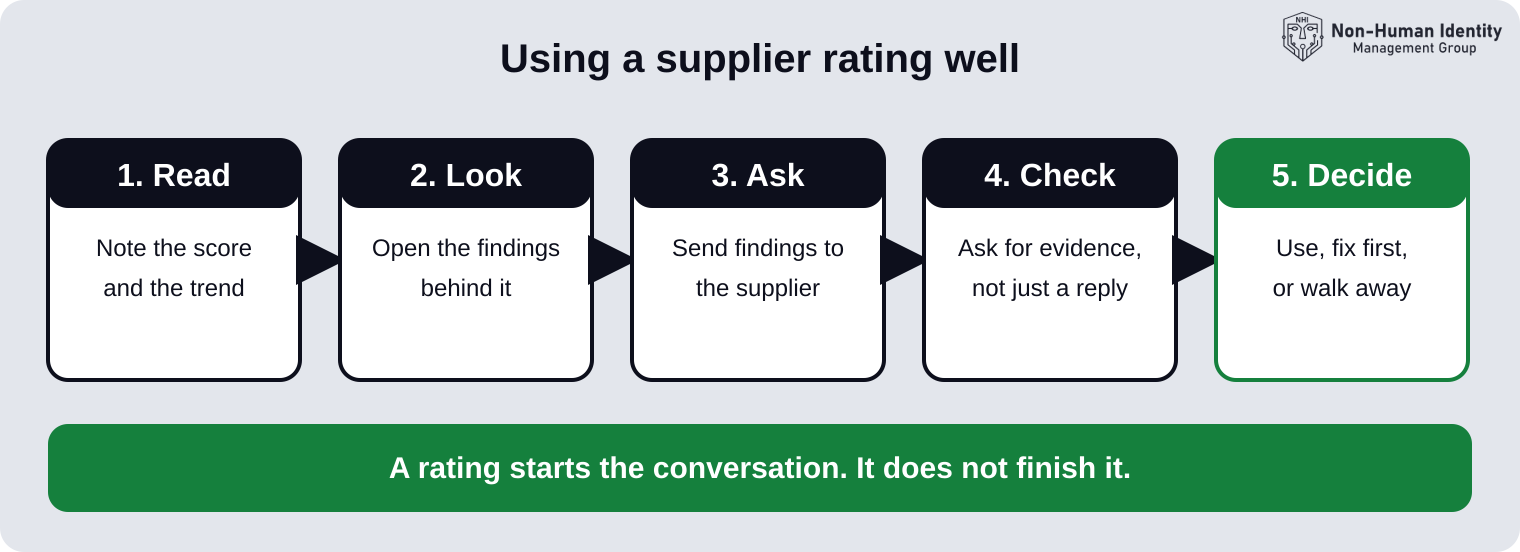
Why this is risky: it is tempting to read only "61" and say no, or read "disputed" and ignore it. Either way, you have not learned what is really going on.
The safer way: send the findings to the supplier. Ask which are theirs, what they have fixed and what evidence they can share.
How does a security rating work?
- Collect. The rating firm gathers data from public and private sources about the organisation.[1]
- Match. It works out which websites and systems belong to the organisation. This step can go wrong, for example with shared hosting or old domains.
- Score. It applies its own scoring method and produces a number or grade.[1]
- Update. The score changes as new signals arrive, so it can rise or fall between checks.
- Challenge. Rated organisations should be able to see their score, the data behind it, and dispute errors.[1]
The UK's national cyber security agency notes that tools can assess an organisation automatically. It adds that a skilled person needs to interpret the results, and that the tools cost money.[2] It also warns that questionnaires have limits, because suppliers may paint a better picture than the facts support.[2] That is why ratings and questions work best together.
A worked example
Wanda Zamora manages the office at Hazel Dental, a fictional practice with three dentists. She is choosing a new online booking supplier, and the shortlist comes down to two firms.
A friend shows her a rating service. One supplier scores 82. The other, run by Jonah Haddad, scores 58. Wanda remembers the credit score picture: a low number is a reason to ask, not a verdict.
She opens the findings behind the 58. Most of the points come from an old test server and an expired certificate on a page nobody uses. She sends the list to Jonah.
Jonah replies the next day. The test server belonged to a hosting firm they left two years ago, and he has asked the rating firm to correct it. The certificate is now renewed. He also sends a summary of how staff sign in with a second check, and who can see patient bookings.
Wanda asks the higher-scoring supplier the same access questions. Its answers are vague, and it cannot say who can see booking records.
She chooses Jonah's firm. She writes the access rules into the contract and sets a reminder to review the supplier each year. The score helped her ask better questions. The answers made the decision.
Myths and mistakes
| What people think | What is true |
|---|---|
| A high score means the supplier is safe. | A score reflects what can be seen from outside. Access controls, training and backups may not show up. |
| A low score means the supplier is unsafe. | Scores can include errors, such as systems the supplier no longer owns. Look at the findings first. |
| All rating firms agree. | Each firm uses its own data and method, so results can differ.[1] |
| A supplier cannot do anything about its score. | Fair practice lets rated firms see their data and challenge errors.[1] |
| A good score replaces questionnaires and contracts. | Ratings work best as one input, next to questions, evidence and contract terms. |
What can I do this week?
- List your five most important suppliers and what data or systems each can reach.
- For any supplier you rate, open the findings, not just the number.
- Send one supplier its findings and ask what has changed.
- Look up your own organisation's score if a customer has quoted one.
- Ask each key supplier one question a score cannot answer: who can access our data?
Checklist
- We know which suppliers hold our data or connect to our systems.
- We read the findings behind a rating, not only the score.
- We share findings with suppliers and give them a chance to respond.
- We ask for evidence on access, backups and incident handling.
- We use ratings alongside questions and contract terms, not instead of them.
- We check our own score and correct errors with the rating firm.
- We review key suppliers at least once a year.
Common questions
How do I find out my own company's security rating?
Ask the customer who quoted it which service they used. Many rating firms let a rated organisation view its own score and the data behind it. Fair rating principles say rated firms should be able to see this and challenge errors.[1]
Can I get a wrong security rating corrected?
Usually yes. Gather proof, such as a note that a domain or server is no longer yours, and send it to the rating firm. Fair practice is to mark a disputed score as disputed until it is resolved, and to update it once the correction is confirmed.[1]
Does paying a rating firm improve my score?
It should not. Fair rating principles say being a paying customer should not directly affect a firm's rating. Any rated firm should be able to view and challenge its score.[1]
Is a security rating the same as a certificate like Cyber Essentials?
No. A certificate shows a firm met a set of controls when it was assessed. A rating is a moving estimate from outside signals. Both are useful, and neither alone proves a supplier is secure.[2]
Where next?
Ready for the detail? Read the practitioner guide: TPRM and Security Ratings Buyer's Guide. It goes further into choosing a rating or supplier risk platform, evaluation criteria, questions to ask vendors and red flags.
Also useful:
- Third-Party Risk Management for Beginners
- Third-Party Access for Beginners
- Security Questionnaires Guide
- Attack Surface Management for Beginners
Related NHI Mgmt Group resources: Attack Surface Management Guide · IT Service-Level and Operational Supplier Assurance · Cyber Essentials for Beginners
Key terms
- Security rating
- An outside score that estimates how well an organisation protects itself, from signals a rating firm can observe.
- Third-party risk management
- Choosing, checking, contracting and watching suppliers according to the risk they bring.
- Vendor risk
- The chance that a supplier causes you security, legal or money problems.
- Attack surface
- All the places where an attacker could try to get into a system.
- Security questionnaire
- A set of questions a buyer sends a supplier about how it protects data and systems.
Sources and further reading
- Principles for Fair and Accurate Security Ratings. U.S. Chamber of Commerce, 19 January 2022. https://www.uschamber.com/security/cybersecurity/principles-for-fair-and-accurate-security-ratings, accessed 28 Nov 2026.
- How to assess and gain confidence in your supply chain cyber security, Stage 2b: Create key components for your approach. National Cyber Security Centre (NCSC), 12 October 2022. https://www.ncsc.gov.uk/collection/assess-supply-chain-cyber-security/stage-2-develop-an-approach/stage-2b-create-key-components-for-your-approach, accessed 28 Nov 2026.